LittleLama
Members
-
Joined
-
Last visited
-
Thanks. I made a test this night with power mode set to balanced and schedule the tips and tweaks modes. And it obsolutely does the job, switching Power Modes to the modes schedules in tips and tweaks. Wonderful
-
Hi Power efficiency mode has a good effect on my electrical demand. https://ibb.co/6RGc8qBC However my calculation tasks launched once time a day are 6x longer. Could we imagine change this mode programmatically or by a cron/schedule ? If yes, where to look at first ? Thanks
-
Hi @jayndoodle Do you have some tips or links to run an Android x86 VM ? I tried this post but get stuck on Android start page with a wierd resolution. Then I could try to make a share and answer to you as I need it too. Thanks
-
Just made a clear cmos on the motherboard and it looks fine.
-
Hi I'm currently experiencing server instability. This day everytime I start Docker engine, the server crashes and reboot. Here the diagnostic and the last log. Does somebody see something relevant ? PS : Last time I changed CPU and motherboard Many thanks little-unraid-diagnostics-20240221-2036.zip 2024-02-21-20-33.log
-
Here it is, mounting @ 11:25 little-unraid-diagnostics-20240216-1227.zip
-
Yes indeed. I dont' know where you want to go saying that but yes. If I set XFS it mounts as XFS. But if I format in XFS, manifestly this time there was an issue with formatting and it formatted to BTRFS (what I absolutely wanted anything but not that) We'll see next time, I have to change this drive again next week !
-
Hi, I created this cache pool last week because I had issues with btrfs. So, I am sure that this drive was formatted by using WebGUI in XFS. What unraid does for real, I don't know, but I know what I and what was displayed until yesterday on my cache pool line was XFS, not BTRFS. And if it was not formatted to XFS, then why at reboot Unraid tried to mount this drive in XFS ?
-
After seeing this btrfs word, I stopped array and set the cache drive to file system auto. Started the array, everything is there again but the cache drive is now in BTRFS. Files are there. Nothing looks corrupted. It's really strange. I'm sure at 1000% to have formatted this cache drive in XFS. Is this a bug ? Thank you @JorgeB for your help and especially this blkid command.
-
@JorgeB thank you for your help again blkid gives /dev/sda1: LABEL_FATBOOT="UNRAID" LABEL="UNRAID" UUID="EA60-3A52" BLOCK_SIZE="512" TYPE="vfat" PARTUUID="e82a9dc7-01" /dev/loop1: TYPE="squashfs" /dev/sdf1: UUID="7bd58c2e-679a-4d26-8105-134b4913c3f3" UUID_SUB="fe949ec9-a7ca-43df-9579-2bbcd0ea6c76" BLOCK_SIZE="4096" TYPE="btrfs" PARTUUID="f62cb481-f583-4b17-ac5b-3bad99459922" /dev/md9p1: UUID="04e885d1-8923-45b1-9600-23e59b088454" BLOCK_SIZE="512" TYPE="xfs" /dev/sdo1: UUID="de399b7f-94e2-4c28-aef2-cecec34fa03f" BLOCK_SIZE="512" TYPE="xfs" PARTUUID="e3921083-9bba-449f-b61a-5ae28fedff10" /dev/sdd1: UUID="d30513c8-f7eb-4364-8058-84ad1b69d9c6" BLOCK_SIZE="512" TYPE="xfs" PARTUUID="d8257a80-9ef7-4be2-bcf9-5ce456a6fce2" /dev/md2p1: UUID="de399b7f-94e2-4c28-aef2-cecec34fa03f" BLOCK_SIZE="512" TYPE="xfs" /dev/sdm1: UUID="f6aad683-8d29-47dd-b90e-b5e114c4656f" BLOCK_SIZE="512" TYPE="xfs" PARTUUID="54372ab6-5390-40ac-9dea-c5fccff282f3" /dev/sdb1: UUID="90af9fd6-c34d-4727-83a3-6253f9de753c" BLOCK_SIZE="512" TYPE="xfs" PARTUUID="5ed8acd0-61c3-4b90-b486-b793487fa78a" /dev/md5p1: UUID="dce92270-ddb2-4bbd-b56d-9d638169c866" BLOCK_SIZE="512" TYPE="xfs" /dev/sdk1: PARTUUID="fc05af88-0887-4c0f-ae35-a62c34c3f985" /dev/md11p1: UUID="0c0bba5e-83e6-4bb8-9f93-4bca9337b8e8" BLOCK_SIZE="512" TYPE="xfs" /dev/md8p1: UUID="6dfff2db-2e29-4f77-8c48-17d5532cfb09" BLOCK_SIZE="512" TYPE="xfs" /dev/sdi1: UUID="0c0bba5e-83e6-4bb8-9f93-4bca9337b8e8" BLOCK_SIZE="512" TYPE="xfs" PARTUUID="c6ccc7b0-fc2f-4c74-80aa-f28a7260cf4b" /dev/md1p1: UUID="f6aad683-8d29-47dd-b90e-b5e114c4656f" BLOCK_SIZE="512" TYPE="xfs" /dev/loop0: TYPE="squashfs" /dev/sde1: UUID="04e885d1-8923-45b1-9600-23e59b088454" BLOCK_SIZE="512" TYPE="xfs" PARTUUID="204d93ee-a1cd-45b6-896d-c345ba357542" /dev/sdn1: UUID="4263b110-177e-4252-a712-1d1b16981345" BLOCK_SIZE="512" TYPE="xfs" PARTUUID="6fe4b6f1-6a66-4aaa-9715-3f5e8f1e21f4" /dev/sdc1: UUID="e50b939e-ed79-4344-96d2-430125ceb605" BLOCK_SIZE="512" TYPE="xfs" PARTUUID="563dd5e0-aba9-4239-8e20-47684e258de5" /dev/sdl1: UUID="dce92270-ddb2-4bbd-b56d-9d638169c866" BLOCK_SIZE="512" TYPE="xfs" PARTUUID="f20e5ecf-ddd6-4d03-a963-ee7d8617dcfa" /dev/sdj1: UUID="6dfff2db-2e29-4f77-8c48-17d5532cfb09" BLOCK_SIZE="512" TYPE="xfs" PARTUUID="cd178a1f-d4cf-4974-b58d-3e284ce6cf9b" /dev/md3p1: UUID="4263b110-177e-4252-a712-1d1b16981345" BLOCK_SIZE="512" TYPE="xfs" It's strange to see btrfs in dev/sdf1 as it was formatted in xfs at install. fdisk -l /dev/sdf gives Disk /dev/sdf: 3.64 TiB, 4000787030016 bytes, 7814037168 sectors Disk model: Samsung SSD 870 Units: sectors of 1 * 512 = 512 bytes Sector size (logical/physical): 512 bytes / 512 bytes I/O size (minimum/optimal): 512 bytes / 512 bytes Disklabel type: gpt Disk identifier: 09BA3DB1-DA5B-4026-8EB3-E2D4ECC27E6A Device Start End Sectors Size Type /dev/sdf1 2048 7814037134 7814035087 3.6T Linux filesyste
-
Phase 1 - find and verify superblock... bad primary superblock - bad magic number !!! attempting to find secondary superblock... ...... Exiting now
-
It's been running for an hours and a half and only shows hundreds of dots continuously. Don't know if it is the normal stuff.
-
Phase 1 - find and verify superblock... bad primary superblock - bad magic number !!! attempting to find secondary superblock... .... and running I have to do this Array started right ?
-
Hi I had my unraid GUI unreachable and nothing on the server screen, console disabled and had to restart. A array start I got on my cache drive "Unmountable: Unsupported or no file system" Here is my diagnostic. Could someone tell me what can I do ? Many thanks little-unraid-diagnostics-20240215-2013.zip
-
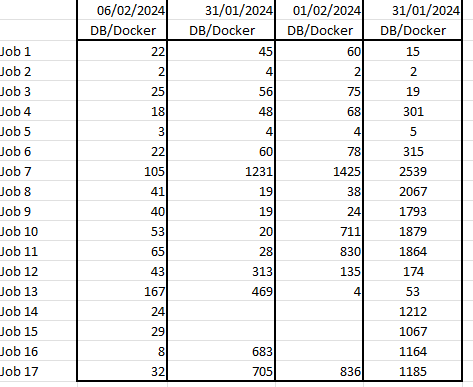
So, I finally changed my SSD and replaced my two Samsung QVO (with btrfs file system) by a single Samsung EVO (xfs) and everything returned fine. I first tested to change cache pool to RAID0, RAID1, Single with no real difference. I then moved the whole cache pool on the Array and observe a really light improvement. When replacing the drive, all the job times returned to normal value. As a conclusion, I don't know if it is a hardware issue or a file system issue and will run the SSD in Samsung Magician to know it. Thanks