Senect
Members
-
Joined
-
Last visited
-
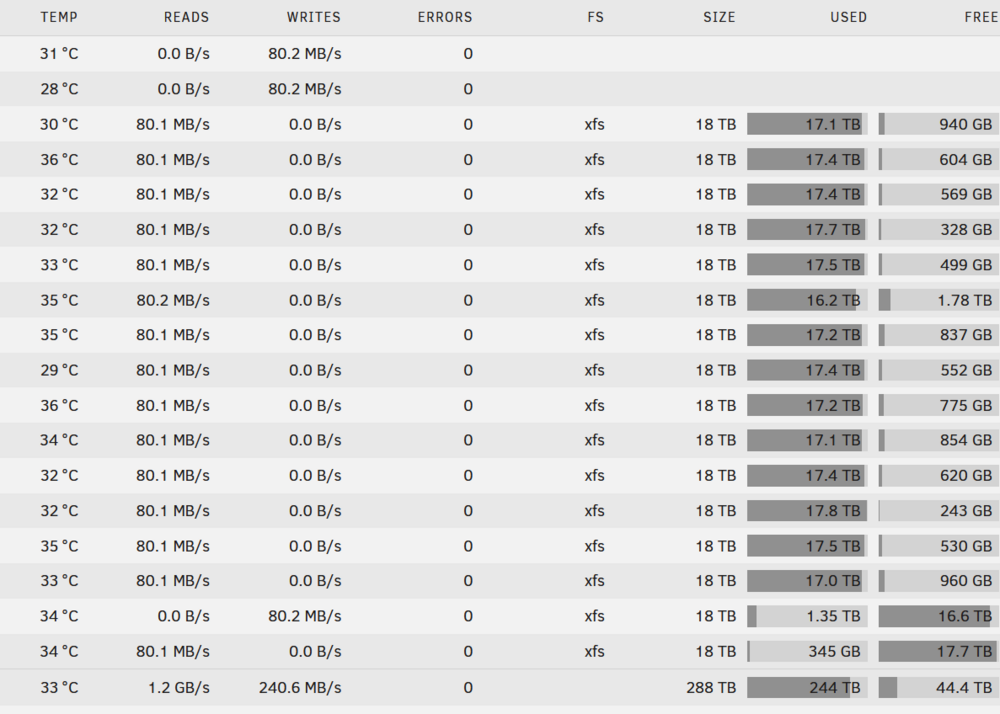
Thanks for the reply, but I don't think that is the issue, as you can see this server has 2 empty disks, it's full SAS3 setup (the one that reaches 215M/s average during parity check) And still this one is the same, the initial burst in speed is related to the RAM, because I can see the speed directly on Unraid and they are not going at 200MB/s+ initially, they have always a stable speed, windows transfer at that speed initially until the 32GB of RAM is full, so it lasts only 1m max.
-
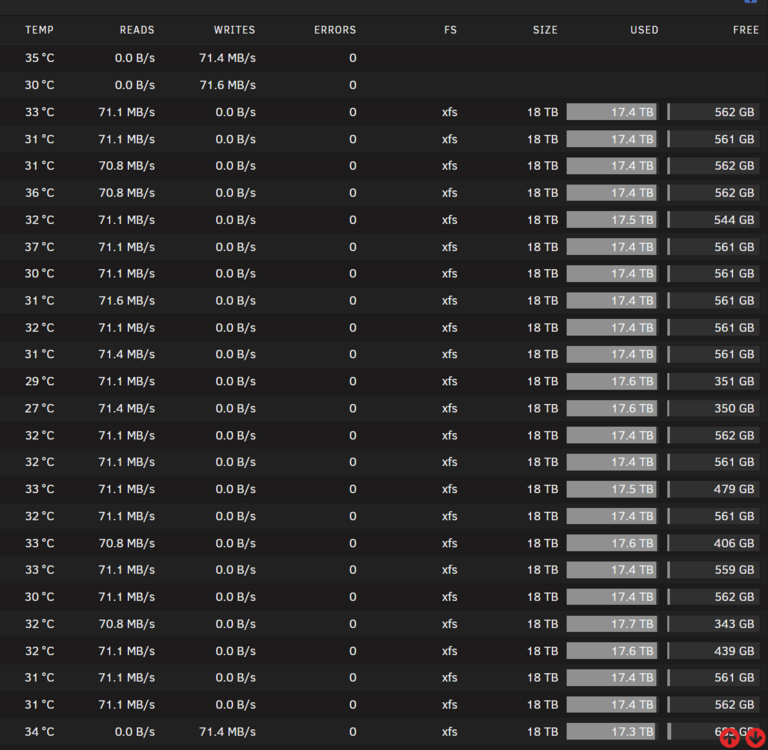
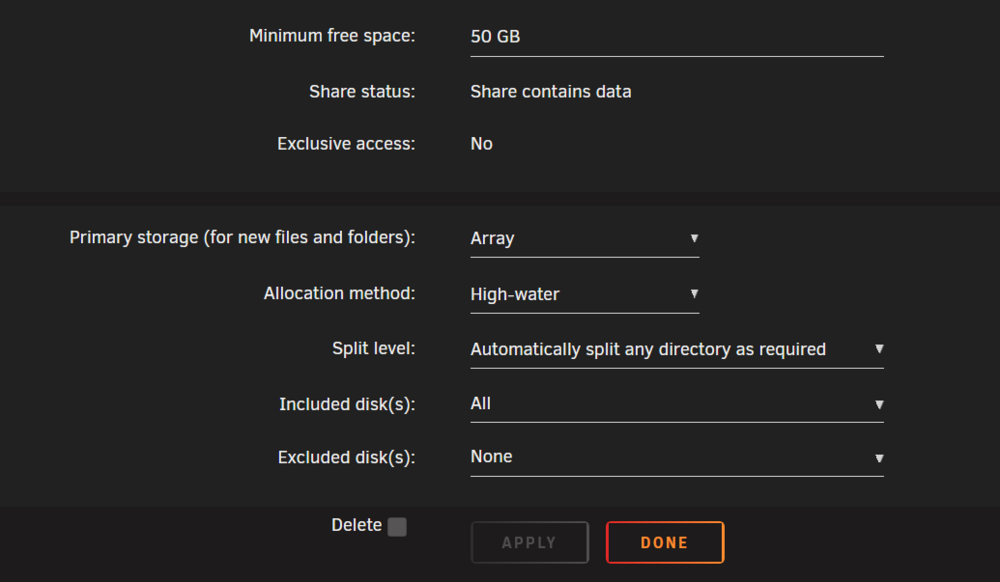
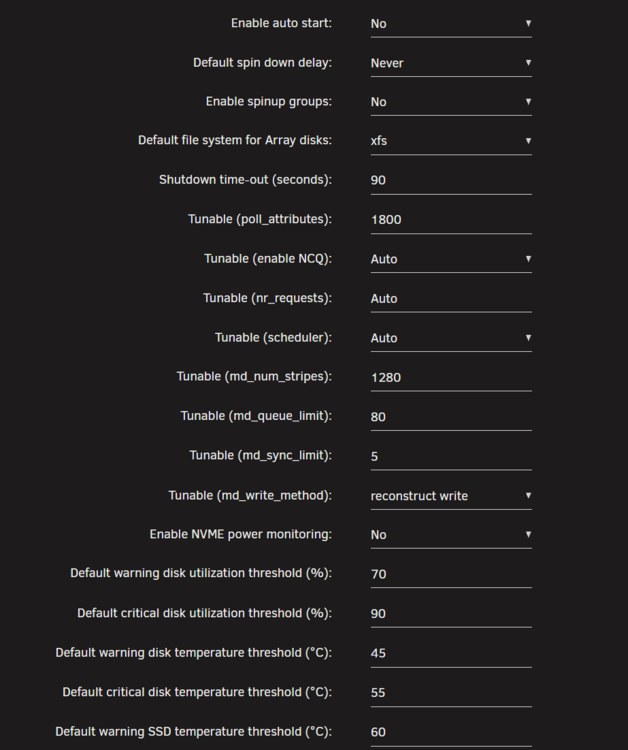
Hi all, I'm trying to diagnose persistently slow write speeds on my three Unraid servers. Despite a full 10GbE network and various hardware upgrades, my write speeds are stuck at a stable 70-80MB/s when writing directly to the array. I'd be grateful for any insights into what I might be missing. The issue is: when I transfer large files, the speed starts fast (approx. 215MB/s) until the server's RAM cache fills, then it drops to a consistent 70-80MB/s for the remainder of the transfer. Test Method: Transferring 1TB batches of large video files (5-10GB each). The 500GB cache drive is disabled for these tests (since my transfers are often 10TB+). The transfer is from a Windows 11 PC via a "Map Network Drive" (SMB) connection. Core Hardware: Motherboard: Supermicro X10SDV-4C+-TLN4F CPU: Intel Xeon D-1518 RAM: 32GB DDR4 ECC Disks: 18TB Toshiba Enterprise HBA: Supermicro AOC-S3008L-L8e (SAS3) OS: Unraid (no Docker or VMs running) Network Setup: Client: Windows 11 PC with a 10GbE network card. Servers: Using the integrated 10GbE ports. Infrastructure: All connected via a 10GbE switch and CAT8 cabling. I've tried multiple upgrades to fix this, with puzzling results: Mobo/CPU/RAM: Upgraded all servers from a DDR3 platform to the DDR4 setup above. (No change in write speed). HBA: Replaced original SAS2 HBAs with the current SAS3 models (AOC-S3008L-L8e) on two servers. Backplane: Replaced the SAS2 backplane with a SAS3 backplane on one of those servers. Cabling: Swapped HBA-to-backplane cables and connection methods. The upgrades had almost no effect on file transfer speeds (maybe a 10MB/s increase at most). However, on the one server with both the SAS3 HBA and SAS3 backplane, the parity check speed more than doubled. Before: ~90MB/s average (52-54 hours) After: ~210MB/s average (26 hours) This proves the new hardware is working and capable of high speeds, but it only affects parity checks, not my SMB file transfers. Note: The server with the new backplane has 19 disks (2 parity, 16 data). The other two servers have 30 disks (2 parity, 28 data). Unraid Settings: All servers have "write reconstruct enabled" (this is the md_write_method). Disk and share settings are identical across all servers (screenshots were attached in my original post). I suspect this might be a software limit or an inefficient transfer method, but I'm not sure what to check next. Why would the parity check speed improve so dramatically, but not the array write speed? Thanks for any help you can provide!
-
Thanks, I will try it, for now it seems that the temp reaches 46 C. during operation in idle they are around 40 C. but not all of them, they range from 33 to 40 idle and 37 to 46 during operation, and when they reach 45 they trigger the allert, I will try to raise it to 48 and see if the health test fails again.
-
Hi, I run a test of the array health daily, but this week 3/7 times the test failed (some time it fails some time does pass), there are 0 errors on the array overall, an there are no damaged sectors, from the notification archive I found out that some times the temp of the array are a bit higher, but it doesn't coicide when the test fails. I will attach my diagnostics here, if anyone can help me, or point out where should I look for, thanks. harem-diagnostics-20230523-1703.zip
-
How can I do this? I have few empty slot on the server so I could technically add the drives as unassigned (never done that so I don't know if it could be done and how to do it) but if that can be done should I use binhex-krusader to copy from disk to disk, from the online array and the unassigned disk, for all of them, and after it's done remove the 7 old drives and add the 7 new one with the copied files, and do a parity check? Does this method actually works? because if it does I think it's the best way without stressing too much the parity by doing the rebuilt 4 times..
-
Doing that will require building up parity 4 times, so it will take 8 days of constant activity + reading and writing constantly, it could cause other drive to die in the worst case scenario, but in the long run it will decrease the lifespan of all the other drives, there's another way to do this? for example cloning data using another machine on those 7 new drives, and then moving them all inside the UnRAID PC and doing only 1 parity check?
-
Thanks for the reply, I want to keep the data of actual 7x12TB disks inside the array. What can I use to do an extended S.M.A.R.T test on a w10 machine with the 7 new 18TB HDDs? I want to be sure they are working correctly and they are not defective, before moving data from the old disk to the new disk, and adding them to the array.
-
Hi, I searched around but I couldn't find a clear detailed procedure on how to do a massive swap, I have 30 drives on my UnRaid, I need to swap 7 of them with 7 newer larger disks, I need to know how to do a pre-clean of the disks on another PC (software to use and what to check) and how do I swap all of them togheter after the pre-clean is successful, I tried in the past to swap 2 disk, but I did it 1 at the time following the standard procedure, but it takes 2 days to do a parity check, and doing a parity check for each new drive will destroy all the others. So if anyone can please explain in details the steps, software, procedure to do a massive swap like this let me know. P.S. The 7 drive to swap out are 7x SAS 4kn 12TB, I need to swap them with 7x SATA 18TB, all the other drives in the array are SATA not 4kn, so I don't know if this should be taken into consideration or change the procedure. I have 2 parity of 18TB HDD. Thanks.
-
What's the correct steps in order: 1. stop the raid 2. disable the old parity 3. turn off the server 4. add the 3 new disk and turn on the server 5. assign the 2 new parity and add the old parity and new disk as data disk 6. start the raid and perform a parity check Is this correct or I'm missing or doing something wrong?
-
Hi, my current setup is 14 HDD of 12TB each + 1 HDD 12TB for parity. I wanted to add 3 HDD of 18TB. None of my actual drives failed, but to use 18TB HDD I will need to upgrade the parity disk, so what's the correct setup to replace the parity disk of 12TB with the one of 18TB and maybe add another 18TB HDD as a parity (so in total it will be 2x18TB parity). And another important thing is set the old 12TB parity disk as data drive, so the final setup will look like this: 2x18TB new parity disks 1x18TB new data disk 15x12TB data disk (with the old parity) I tried to check the documentation and videos but I still don't get it what are the exact step to accomplish that. Thanks.
-
On client connect it doesn't works (it never worked) on steam server browser it works only if you enable public server apparently..
-
This actually fixed the problem, thanks a lot!
-
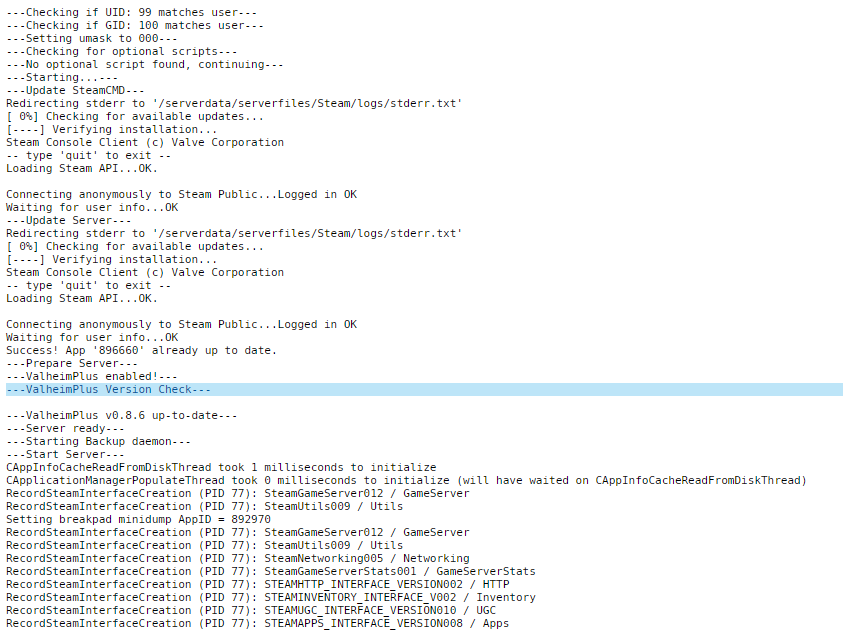
The last Valheim update broke the server, I tried both vanilla in a new container, and valheimplus the old server that was working untill the update, and I can't connect to both of them.. Anyone has the same issue? I unistalled Valheim (deleting all mod files) removed the old docker container with valheimplus but can't connect to a normal fresh setup vanilla server after this update..
-
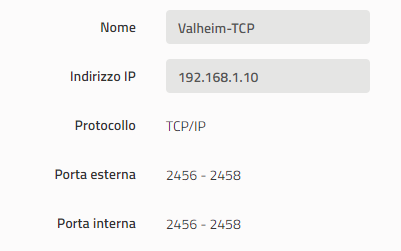
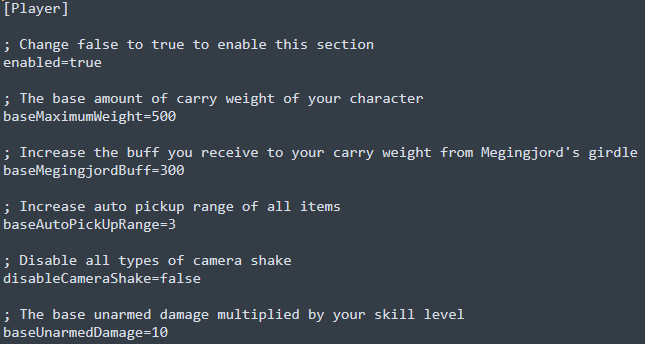
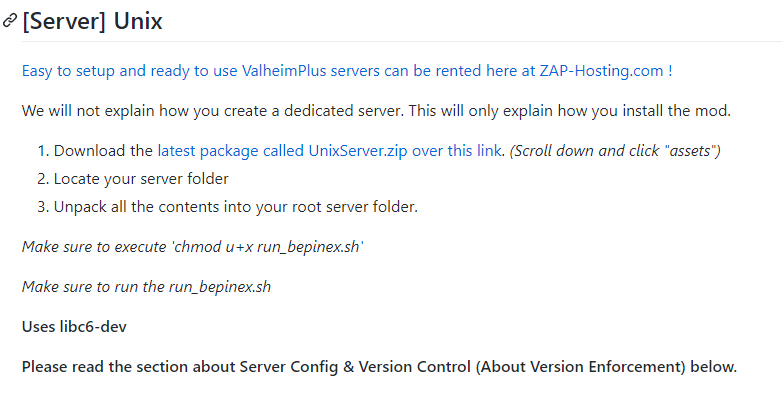
I had UDP ports too, but I removed TCP/IP, added all of them one by one for UDP, and it seems to work, thanks. For ValheimPlus when I enable it on docker configs should I do something else? I really don't understand why no settings apply not only the carry limit but everything else about valheimplus.. I don't know if these steps are required too with the docker installation..
-
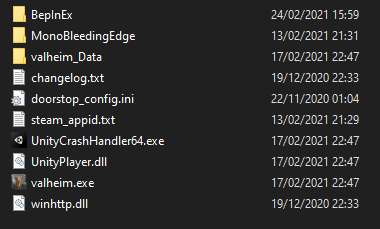
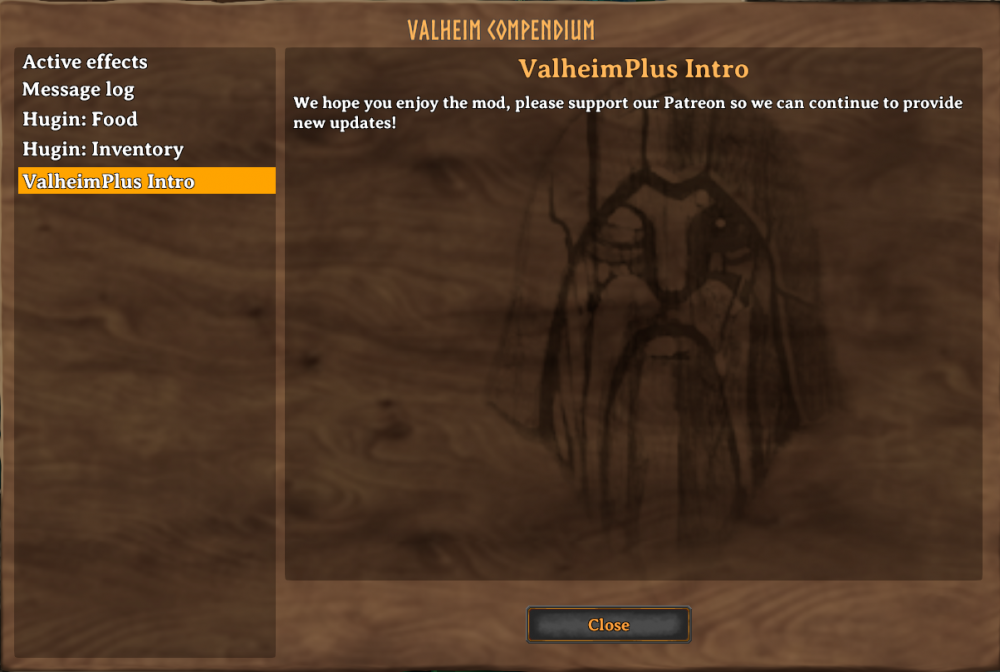
Hi @ich777, I was trying to setup Valheim Plus on my Unraid Server, I have 2 problems atm: 1. Me and my friends can't access the server using my IP Adress (the port are open on my modem settings), but I can access it via local Unraid address 192.168.1.10 2. Valheim Plus settings doesn't works, I installed it on the client, enable on docker config, changed the settings inside BepInEx\config\valheim_plus.cfg but they don't apply to the game, I tried restarting both client, server and array, but nothing ingame there's the valheim compendium regarding Valheim Plus but the actual settings (for example carry capacity didn't change) If you know how can I fix theese problems please let me know, and thanks for the work you've done so far to release the server for Valheim this early!