ech0chamber
Members
-
Joined
-
Last visited
Everything posted by ech0chamber
-
Can the pools be recreated with data intact? I have not formatted the drives yet
-
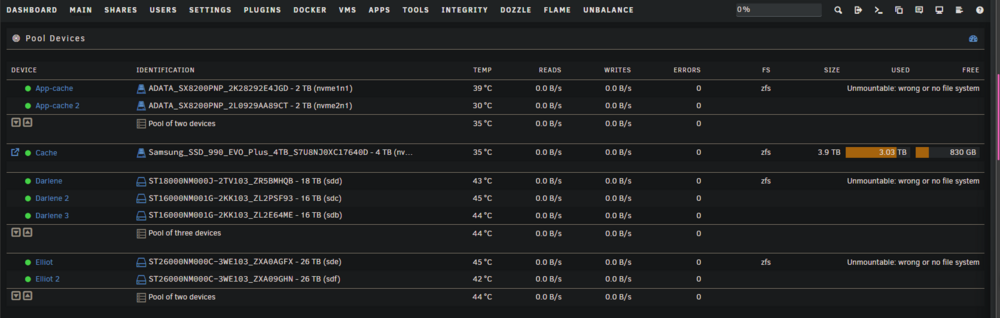
I am still pretty new to ZFS pools. Long story short I added a new drive to one of my ZFS pools. I had a Pool just for linux ISOs. It had only a single 26 TB drive in it with the intention of adding another 26TB drive at a later date. That day was today. I realized the ZFS pool was setup for Mirror with a single drive and for some reason I couldn't add a new drive to the pool. So, I took a screenshot of my pools like and stupidly went to Tool > New config like I have always done with the Array and cache drives when I needed to create it. I didn't understand once you destroy a ZFS pool, this essentially destroys it forever. I lost 3 pools. An Appdata mirror pool with 2 2TB NVMEs, as well as a ZFS pool with 3 16TB drives in RZ1 and a 3rd pool just for Linux ISOs that had a single 26TB drive I was adding another 26TB drive to today/ Luckily I think most of it is recoverable. It'll just take me months. Only thing I need to figure out is photos I had on Immich. I think most of that is backed up elsewhere also but I'll need to see. That is my main worry right now. Can the pools be recreated with data intact? I have not formatted the drives yet State of server right now:
-
Okay so swapping the drive to a 990 Pro solved my issues with the system crashing and shares disappearing. Still haven't fixed the drive ID issue but since my uptime has skyrocketed and the issue resolves itself after a reboot I can live with that for now.
-
Funny you mention this. This just occurred to me the drive was dropping offline as I have noticed for a couple months now whenever I reboot the server, the drive would not mount and only fix is to completely poweroff the server and power back on. Frustrating as this is a brand new drive I bought in November but I think the drive is known to have Firmware issues. It is a HP FX900 Pro 4TB and only reason I bought it is cause I got it for $215. I'll try this fix and see if it fixes it but if not I am replacing the drive. Already have a Samsung Evo Plus 4TB ordered for $249 and should arrive tomorrow. My Temp fix atm the moment is a user script I wrote that tries to write a text file to one of my shares and remove it every 15 minutes and it fails, reboot the server.
-
Shares dropped again. New log tower-diagnostics-20250308-0817.zip
-
Just fixed the container issue. It was Mellisearch that was continuously crashing. Will keep an eye on the system and see if I have any issues. For some reason my Disk IDs have not changed since I created this post despite editing my boot grub line days before making this post. But I'll take the win
-
Okay here's another log where shares dropped off middle of the night. I'll look for the container and I may disconnect the UPS tonight so I can give you cleaner logs tomorrow tower-diagnostics-20250306-0855.zip
-
The .230 is my Desktop PC I don't sorry. Here's another log with the shares dropping again. I just rebooted the server again. They seem to drop every 12 hours or so. It's 5p EST here I'll check again in the morning and if it's dropped off that'll give us a general idea tower-diagnostics-20250305-1621.zip
-
Haven't gotten the drive IDs to change yet which is weird cause it usually does it every 2-3 reboots. But here is diagnostics after the shares disappeared tower-diagnostics-20250304-1102.zip
-
Thanks I'll pull fresh logs here in little bit. Rebooting the server a couple times so I can get the issues to appear. It's pretty consistent
-
Also just noticed my Shares keep disappearing since the 7.0 update. They come back after a reboot. If I need to reboot and attach a new diagnotics let me know. I am also having an issue with one of my NVME drives dropping off after a reboot and only way to bring it back is a complete power off of the server and manual power on lsusb -vt /: Bus 001.Port 001: Dev 001, Class=root_hub, Driver=xhci_hcd/1p, 480M ID 1d6b:0002 Linux Foundation 2.0 root hub /: Bus 002.Port 001: Dev 001, Class=root_hub, Driver=xhci_hcd/3p, 20000M/x2 ID 1d6b:0003 Linux Foundation 3.0 root hub |__ Port 001: Dev 002, If 0, Class=Hub, Driver=hub/4p, 10000M ID 2109:0822 VIA Labs, Inc. |__ Port 002: Dev 003, If 0, Class=Mass Storage, Driver=usb-storage, 10000M ID 2109:0715 VIA Labs, Inc. VL817 SATA Adaptor |__ Port 003: Dev 004, If 0, Class=Hub, Driver=hub/4p, 10000M ID 2109:0822 VIA Labs, Inc. |__ Port 001: Dev 005, If 0, Class=Mass Storage, Driver=usb-storage, 10000M ID 2109:0715 VIA Labs, Inc. VL817 SATA Adaptor |__ Port 003: Dev 006, If 0, Class=Mass Storage, Driver=usb-storage, 10000M ID 2109:0715 VIA Labs, Inc. VL817 SATA Adaptor /: Bus 003.Port 001: Dev 001, Class=root_hub, Driver=xhci_hcd/12p, 480M ID 1d6b:0002 Linux Foundation 2.0 root hub |__ Port 002: Dev 002, If 0, Class=Human Interface Device, Driver=[none], 12M ID 0764:0601 Cyber Power System, Inc. PR1500LCDRT2U UPS |__ Port 003: Dev 003, If 0, Class=Vendor Specific Class, Driver=cp210x, 12M ID 10c4:8a2a Silicon Labs |__ Port 003: Dev 003, If 1, Class=Vendor Specific Class, Driver=cp210x, 12M ID 10c4:8a2a Silicon Labs |__ Port 004: Dev 004, If 0, Class=Hub, Driver=hub/4p, 480M ID 2109:2822 VIA Labs, Inc. |__ Port 003: Dev 006, If 0, Class=Hub, Driver=hub/4p, 480M ID 2109:2822 VIA Labs, Inc. |__ Port 010: Dev 005, If 0, Class=Wireless, Driver=btusb, 12M ID 8087:0032 Intel Corp. AX210 Bluetooth |__ Port 010: Dev 005, If 1, Class=Wireless, Driver=btusb, 12M ID 8087:0032 Intel Corp. AX210 Bluetooth /: Bus 004.Port 001: Dev 001, Class=root_hub, Driver=xhci_hcd/4p, 10000M ID 1d6b:0003 Linux Foundation 3.0 root hub |__ Port 001: Dev 002, If 0, Class=Mass Storage, Driver=usb-storage, 5000M ID 090c:1000 Silicon Motion, Inc. - Taiwan (formerly Feiya Technology Corp.) Flash Drive syslog-previous tower-diagnostics-20250301-1107.zip
-
Okay so I have actually read another post or 2 saying that this is a know bug in Unraid 7 due to a storage driver change. I have actually already tried the fix that was posted for this that is supposed to keep the hardware IDs from changing: Edit my boot line to this: kernel /bzimage append initrd=/bzroot usb_storage.quirks=2109:0715:u USB IDs: Bus 001 Device 001 Port 1-0ID 1d6b:0002 Linux Foundation 2.0 root hub Bus 002 Device 001 Port 2-0ID 1d6b:0003 Linux Foundation 3.0 root hub Bus 002 Device 002 Port 2-1ID 2109:0822 VIA Labs, Inc. USB3.1 Hub Bus 002 Device 003 Port 2-1.2ID 2109:0715 VIA Labs, Inc. VL817 SATA Adaptor Bus 002 Device 004 Port 2-1.3ID 2109:0822 VIA Labs, Inc. USB3.1 Hub Bus 002 Device 005 Port 2-1.3.1ID 2109:0715 VIA Labs, Inc. VL817 SATA Adaptor Bus 002 Device 006 Port 2-1.3.3ID 2109:0715 VIA Labs, Inc. VL817 SATA Adaptor Bus 003 Device 001 Port 3-0ID 1d6b:0002 Linux Foundation 2.0 root hub Bus 003 Device 002 Port 3-2ID 0764:0601 Cyber Power System, Inc. PR1500LCDRT2U UPS Bus 003 Device 003 Port 3-3ID 10c4:8a2a Silicon Labs HubZ Smart Home Controller Bus 003 Device 004 Port 3-4ID 2109:2822 VIA Labs, Inc. USB2.0 Hub Bus 003 Device 005 Port 3-10ID 8087:0032 Intel Corp. AX210 Bluetooth Bus 003 Device 006 Port 3-4.3ID 2109:2822 VIA Labs, Inc. USB2.0 Hub Bus 004 Device 001 Port 4-0ID 1d6b:0003 Linux Foundation 3.0 root hub Bus 004 Device 002 Port 4-1ID 090c:1000 Silicon Motion, Inc. - Taiwan (formerly Feiya Technology Corp.) Flash Drive JBOD: Bus 002 Device 005 Port 2-1.3.1ID 2109:0715 VIA Labs, Inc. VL817 SATA Adaptor Hardware: MINISFORUM MS-01 Yottamaster 5 Bay RAID Hard Drive Enclosure in JBOD mode
-
I guess I can try but I know from prior instances, server really hates Macvlan
-
I'm using directory. Not an image
-
Issue came back with a single container running. IDK what's going on!
-
Okay. I think I've narrowed it down. So now with a Fresh thumb Drive it seems to only occur once I've started the docker service. But it's pretty immediate. As soon as I start the service shit goes haywire. Is it a container freaking out? Edit: Okay I have the docker service running but with 0 containers running. I'm going to wait about 10 minutes and then start running each container one at a time till I notice an issue. I have 90 containers (probably only 60-70 I really need) so it'll take some time for me to narrow down the culprit probably
-
I let it run without the array started for about 30 minutes with a continueues ping and no packets were dropped. Usually it happens with 10-15 minutes. But as soon as I started the array I started having issues. Testing with a another drive with a trial license in a few minutes
-
It was about 10 seconds before I dumped the logs
-
That is what I did for the above logs. and I grabbed the logs before rebooting. The link seems to be constantly going up and down as it'll send 10 packets every couple of minutes or so Also isn'ty there a current syslog in the tower diagnostics? I'll grab fresh logs of you really need it Edit: Ok reboot server and then waited for the issue to occur and then immediately dumped logs tower-diagnostics-20241027-0838.zip
-
I have this weird issue where my Server starting beginning of this week, would just drop offline. It would send 10 packets and then drop for 40-60 packets. Then send another 10 and down again. I have 3 NICs in this machine, 2 onboard and 1 PCIE 10G NIC. I had them all bonded together so I decided to go into the BIOS and disable 1 of the onboard NICs (1 GBE NIC) and then changed my Unraid Settings to use the 5 GBE Obnboard NIC as eth0. This didn't solve the issue. So then I decided to use my 10GBE PCIE NIC as the main NIC and changed the Network Rules in Unraid to use that NIC as ETH0 instead. This helped some and the system does stay online contnuesly but only for about 10-15 minutes, then it drops completely offline again. I did have an issue earlier this week where I had a network loop in my house. This I know caused some of my intial issues but this was solved as of last night and I am still having issues. It's just not as bad. Edit: I now have both onboard NICs disabled in the BIOS tower-diagnostics-20241026-1154.zip syslog-previous
-
That's correct. I had switched back to MacVlan as IPVLAN didn't solve my issue. I decided to switch back to IPVLAN this morning however and I am gonna stay there to see if I crash again Is there anything else in the log that is telling?
-
Did some more researching. Aparrently switching docker networking to ipvlan can fix the call traces but I have already tried this unfortunately and it didn't seem to solve my crashing issues
-
Hello. I have an issue I have been dealing with for several weeks now if not longer. It wasn't this bad before but now it is crashing every single night around early morning. I checked all my scheduled tasks like appdata backup or plugin autoupdate and I can't tie anything to the crash. I have attached a syslog that was captured. You'll have to scroll up in the log a bit but you'll see the crash happened this morning around 5:15am Let me know if any other information is required. Thanks! Edit: I have gotify setup to send alerts to my phone and I just got a notification that "macvlan call traces were found". Could this be what is locking up the server? syslog
-
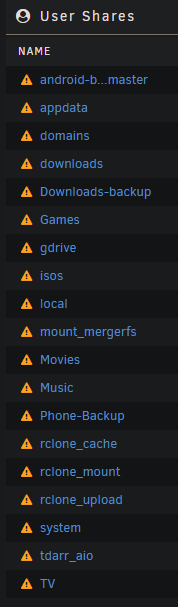
I am EXTREMELY Frustrated with trying to get this working. I have done it before on my Seedbox a year ago with MergerFS but the Unraid Shares is tripping me up. I have my shares setup like so: mnt/user/Backups mnt/user/Movies mnt/user/TV mnt/user/Music ..... I think I understand that I need to manually move all my existing files to my MergerFS mount so they get uploaded to GDrive and then point my containers like Radarr and Sonarr to the MergFS mount. Correct me if this is incorrect. What is throwing me off is everyone in their Rclone Mount Scipt has this path: `LocalFilesShare=/mnt/user/local` I guess this path is where everyone keeps there Unraid shares? I have my shares setup so that there is a Share for each folder (See my paths at the top of this post) so I can't just specify one Directory. I tried using multiple LocalFile Share Paths which kind of worked except it just mixed up all the files from my Shares (Backups, Music, SW, etc) all together in my mount_mergerfs/gdrive directory with no folder structure or organization. I need help!! lol. I have been working on this for 12 hours lol. I have added a screenshot of my Shares. If someone can edit my config and show me how I would want to do it with my setup I would be so grateful. I've lost sleep over this lol. #!/bin/bash ###################### #### Mount Script #### ###################### ## Version 0.96.9.2 ## ###################### ####### EDIT ONLY THESE SETTINGS ####### # INSTRUCTIONS # 1. Change the name of the rclone remote and shares to match your setup # 2. NOTE: enter RcloneRemoteName WITHOUT ':' # 3. Optional: include custom command and bind mount settings # 4. Optional: include extra folders in mergerfs mount # REQUIRED SETTINGS RcloneRemoteName="gdrive" # Name of rclone remote mount WITHOUT ':'. NOTE: Choose your encrypted remote for sensitive data RcloneMountShare="/mnt/user/rclone_mount" # where your rclone remote will be located without trailing slash e.g. /mnt/user/mount_rclone RcloneMountDirCacheTime="720h" # rclone dir cache time LocalFilesShare="/mnt/user/local" # location of the local files and MountFolders you want to upload without trailing slash to rclone e.g. /mnt/user/local. Enter 'ignore' to disable RcloneCacheShare="/mnt/user0/rclone_cache" # location of rclone cache files without trailing slash e.g. /mnt/user0/mount_rclone RcloneCacheMaxSize="200G" # Maximum size of rclone cache RcloneCacheMaxAge="48h" # Maximum age of cache files MergerfsMountShare="/mnt/user/mount_mergerfs" # location without trailing slash e.g. /mnt/user/mount_mergerfs. Enter 'ignore' to disable DockerStart="sonarr radarr Overseerr" # list of dockers, separated by space, to start once mergerfs mount verified. Remember to disable AUTOSTART for dockers added in docker settings page MountFolders=\{"Backup,SW,Movies,TV"\} # comma separated list of folders to create within the mount # Note: Again - remember to NOT use ':' in your remote name above # OPTIONAL SETTINGS # Add extra paths to mergerfs mount in addition to LocalFilesShare LocalFilesShare2="" # without trailing slash e.g. /mnt/user/other__remote_mount/or_other_local_folder. Enter 'ignore' to disable LocalFilesShare3="" LocalFilesShare4="" # Add extra commands or filters Command1="--rc" Command2="" Command3="" Command4="" Command5="" Command6="" Command7="" Command8="" CreateBindMount="N" # Y/N. Choose whether to bind traffic to a particular network adapter RCloneMountIP="192.168.1.252" # My unraid IP is 172.30.12.2 so I create another similar IP address NetworkAdapter="eth0" # choose your network adapter. eth0 recommended VirtualIPNumber="2" # creates eth0:x e.g. eth0:1. I create a unique virtual IP addresses for each mount & upload so I can monitor and traffic shape for each of them ####### END SETTINGS ####### # INSTRUCTIONS # 1. Edit the settings below to match your setup # 2. NOTE: enter RcloneRemoteName WITHOUT ':' # 3. Optional: Add additional commands or filters # 4. Optional: Use bind mount settings for potential traffic shaping/monitoring # 5. Optional: Use service accounts in your upload remote # 6. Optional: Use backup directory for rclone sync jobs # REQUIRED SETTINGS RcloneCommand="copy" # choose your rclone command e.g. move, copy, sync RcloneRemoteName="gdrive" # Name of rclone remote mount WITHOUT ':'. RcloneUploadRemoteName="gdrive" # If you have a second remote created for uploads put it here. Otherwise use the same remote as RcloneRemoteName. LocalFilesShare="/mnt/user/rclone_upload" # location of the local files without trailing slash you want to rclone to use RcloneMountShare="/mnt/user/rclone_mount" # where your rclone mount is located without trailing slash e.g. /mnt/user/mount_rclone MinimumAge="15m" # sync files suffix ms|s|m|h|d|w|M|y ModSort="ascending" # "ascending" oldest files first, "descending" newest files first # Note: Again - remember to NOT use ':' in your remote name above # Bandwidth limits: specify the desired bandwidth in kBytes/s, or use a suffix b|k|M|G. Or 'off' or '0' for unlimited. The script uses --drive-stop-on-upload-limit which stops the script if the 750GB/day limit is achieved, so you no longer have to slow 'trickle' your files all day if you don't want to e.g. could just do an unlimited job overnight. BWLimit1Time="01:00" BWLimit1="off" BWLimit2Time="08:00" BWLimit2="15M" BWLimit3Time="16:00" BWLimit3="12M" # OPTIONAL SETTINGS # Add name to upload job JobName="_daily_upload" # Adds custom string to end of checker file. Useful if you're running multiple jobs against the same remote. # Add extra commands or filters #Command1="--exclude downloads/**" Command1="--exclude downloads/**" Command2="--exclude gdrive/**" Command3="" Command4="" Command5="" Command6="" Command7="" Command8="" # Bind the mount to an IP address CreateBindMount="N" # Y/N. Choose whether or not to bind traffic to a network adapter. RCloneMountIP="192.168.1.253" # Choose IP to bind upload to. NetworkAdapter="eth0" # choose your network adapter. eth0 recommended. VirtualIPNumber="1" # creates eth0:x e.g. eth0:1. # Use Service Accounts. Instructions: https://github.com/xyou365/AutoRclone UseServiceAccountUpload="N" # Y/N. Choose whether to use Service Accounts. ServiceAccountDirectory="/mnt/user/appdata/other/rclone/service_accounts" # Path to your Service Account's .json files. ServiceAccountFile="sa_gdrive_upload" # Enter characters before counter in your json files e.g. for sa_gdrive_upload1.json -->sa_gdrive_upload100.json, enter "sa_gdrive_upload". CountServiceAccounts="15" # Integer number of service accounts to use. # Is this a backup job BackupJob="N" # Y/N. Syncs or Copies files from LocalFilesLocation to BackupRemoteLocation, rather than moving from LocalFilesLocation/RcloneRemoteName BackupRemoteLocation="backup" # choose location on mount for deleted sync files BackupRemoteDeletedLocation="backup_deleted" # choose location on mount for deleted sync files BackupRetention="90d" # How long to keep deleted sync files suffix ms|s|m|h|d|w|M|y ####### END SETTINGS #######