






Tristankin
Members
-
Joined
-
Last visited
Everything posted by Tristankin
-
Well, we got (un) lucky, went down again, I rebooted at 11:02 log is pretty bare? syslog
-
Yeah, I will be checking in tomorrow I guess when it goes down again.
-
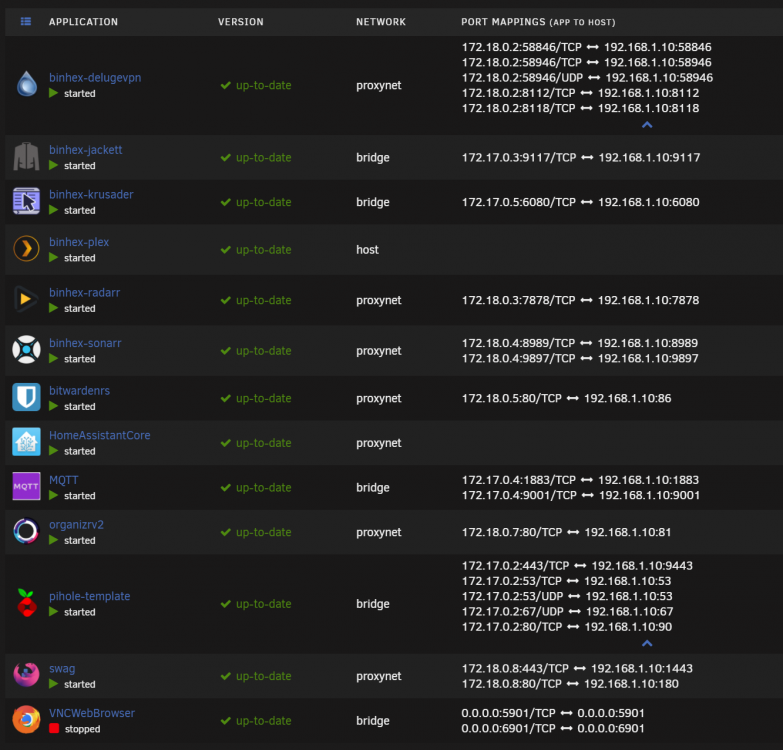
I removed the custom IP from pihole which was perfectly fine in 6.8.3 and tried removing in 6.9.1 to potentially fix the issue but the server still ended up hung. There is some potentially weird stuff happening with some of the bridges in the syslog but I really am not sure what I am meant to be looking for.. Mar 14 18:33:13 Firefly root: Starting NTP daemon: /usr/sbin/ntpd -g -u ntp:ntp Mar 14 18:38:52 Firefly ntpd[23095]: kernel reports TIME_ERROR: 0x2041: Clock Unsynchronized Mar 14 19:53:32 Firefly ool www[27271]: /usr/local/emhttp/plugins/dynamix/scripts/rsyslog_config Mar 14 19:53:34 Firefly rsyslogd: [origin software="rsyslogd" swVersion="8.2002.0" x-pid="28603" x-info="https://www.rsyslog.com"] start Mar 14 19:54:29 Firefly kernel: veth2d9cb7a: renamed from eth0 Mar 14 19:54:29 Firefly kernel: br-b33c13ba4d4e: port 4(veth4b15139) entered disabled state Mar 14 19:54:29 Firefly kernel: br-b33c13ba4d4e: port 4(veth4b15139) entered disabled state Mar 14 19:54:29 Firefly kernel: device veth4b15139 left promiscuous mode Mar 14 19:54:29 Firefly kernel: br-b33c13ba4d4e: port 4(veth4b15139) entered disabled state Mar 14 19:54:29 Firefly kernel: br-b33c13ba4d4e: port 4(vethe4c338c) entered blocking state Mar 14 19:54:29 Firefly kernel: br-b33c13ba4d4e: port 4(vethe4c338c) entered disabled state Mar 14 19:54:29 Firefly kernel: device vethe4c338c entered promiscuous mode Mar 14 19:54:29 Firefly kernel: br-b33c13ba4d4e: port 4(vethe4c338c) entered blocking state Mar 14 19:54:29 Firefly kernel: br-b33c13ba4d4e: port 4(vethe4c338c) entered forwarding state Mar 14 19:54:29 Firefly kernel: eth0: renamed from veth5b308b3 Mar 14 19:54:29 Firefly kernel: IPv6: ADDRCONF(NETDEV_CHANGE): vethe4c338c: link becomes ready Mar 14 19:55:44 Firefly ool www[28995]: /usr/local/emhttp/plugins/dynamix/scripts/rsyslog_config Mar 14 19:55:46 Firefly rsyslogd: [origin software="rsyslogd" swVersion="8.2002.0" x-pid="30204" x-info="https://www.rsyslog.com"] start Mar 14 19:57:57 Firefly kernel: docker0: port 4(veth33796e7) entered blocking state Mar 14 19:57:57 Firefly kernel: docker0: port 4(veth33796e7) entered disabled state Mar 14 19:57:57 Firefly kernel: device veth33796e7 entered promiscuous mode Mar 14 19:57:57 Firefly kernel: docker0: port 4(veth33796e7) entered blocking state Mar 14 19:57:57 Firefly kernel: docker0: port 4(veth33796e7) entered forwarding state Mar 14 19:57:57 Firefly kernel: docker0: port 4(veth33796e7) entered disabled state Mar 14 19:57:57 Firefly kernel: eth0: renamed from veth7755757 Mar 14 19:57:57 Firefly kernel: IPv6: ADDRCONF(NETDEV_CHANGE): veth33796e7: link becomes ready Mar 14 19:57:57 Firefly kernel: docker0: port 4(veth33796e7) entered blocking state Mar 14 19:57:57 Firefly kernel: docker0: port 4(veth33796e7) entered forwarding state my current docker loadout and config
-
OK, update, I have shifted some ports around and moved pihole from a secondary IP on my ethernet interface to everything sharing a single ip (pihole was 192.168.1.9, everything else 192.168.1.10). So far the system has been up 1 day and 3 hours. Networking could be the issue. Not sure hangs/restart states are actually that different, might be just how individual systems deal with the freeze. Does look like it might be tied to networking though? Was doing it on 6.9.0 and 6.9.1, still on 6.9.1 EDIT: Scratch that, just went down again, 28hr uptime. This is getting boring..... I have turned on USB save of syslog so hopefully something appears in there but from previous reports I don't have a lot of hope.
-
I just want to add to the chorus. I have an intel based system that was rock solid on 6.8.3 with a -30 voltage offset. Since upgrading to both 6.9.0 and 6.9.1 I the system seems to hang every 24 hours or so. I notice the web interface stops responding and also no response to keyboard inputs. I have attached the diagnostic report but the syslog seems to be replaced each boot making it quite difficult to see what the issue is. firefly-diagnostics-20210312-0036.zip

