





MikeGiann58
Members
-
Joined
-
Last visited
-
Is there no one that can provide some insight to this issue? Thank you.
-
Hello, I've been using this docker to connect my tunnel with Cloudflare and has been working well for a while. Yesterday, the tunnel went down and I have not been able to get it to connect. I have restarted the Unraid server but still won't start. I did upgrade to Unraid 7.0.1 on Monday, so don't know if that's what broke it. However, I don't know if the issue is with the docker (that needs to be updated) or something on my end that broke. If anyone else has experienced this in the last day or so, were you able to fix it? Here is the log of the docker, I even changed the DNS to the Cloudflare dns, but did not make a difference, received the same error. I'm not sure how to read and interpret the dig command. % Total % Received % Xferd Average Speed Time Time Time Current Dload Upload Total Spent Left Speed 0 0 0 0 0 0 0 0 --:--:-- --:--:-- --:--:-- 0 100 36.0M 100 36.0M 0 0 15.0M 0 0:00:02 0:00:02 --:--:-- 14.2M 2025-03-05T15:39:57Z INF Starting tunnel tunnelID=c7f2dc20-5eb2-41cf-9893-1c55639aa017 2025-03-05T15:39:57Z INF Version 2025.2.1 (Checksum afdfadd1ef552e66bffc35246fe30a9bd578356d2d386de95585ccfc432472b8) 2025-03-05T15:39:57Z INF GOOS: linux, GOVersion: go1.22.10, GoArch: amd64 2025-03-05T15:39:57Z INF Settings: map[token:*****] 2025-03-05T15:39:57Z INF Environmental variables map[TUNNEL_EDGE_BIND_ADDRESS: TUNNEL_EDGE_IP_VERSION:auto TUNNEL_GRACE_PERIOD:30s TUNNEL_LOGLEVEL:info TUNNEL_METRICS:0.0.0.0:46495 TUNNEL_ORIGIN_CERT: TUNNEL_REGION: TUNNEL_RETRIES:5 TUNNEL_TOKEN:***** TUNNEL_TRANSPORT_PROTOCOL:auto] 2025-03-05T15:39:57Z INF Generated Connector ID: 1dbf7920-688f-4f23-91ae-176d48b2458f 2025-03-05T15:39:58Z INF Initial protocol quic 2025-03-05T15:39:58Z INF ICMP proxy will use 172.19.0.2 as source for IPv4 2025-03-05T15:39:58Z INF ICMP proxy will use ::1 in zone lo as source for IPv6 2025-03-05T15:39:58Z ERR edge discovery: error looking up Cloudflare edge IPs: the DNS query failed error="lookup _v2-origintunneld._tcp.argotunnel.com on 127.0.0.11:53: server misbehaving" event=0 2025-03-05T15:39:58Z ERR Please try the following things to diagnose this issue: event=0 2025-03-05T15:39:58Z ERR 1. ensure that argotunnel.com is returning "origintunneld" service records. event=0 2025-03-05T15:39:58Z ERR Run your system's equivalent of: dig srv _origintunneld._tcp.argotunnel.com event=0 2025-03-05T15:39:58Z ERR 2. ensure that your DNS resolver is not returning compressed SRV records. event=0 2025-03-05T15:39:58Z ERR See GitHub issue https://github.com/golang/go/issues/27546 event=0 2025-03-05T15:39:58Z ERR For example, you could use Cloudflare's 1.1.1.1 as your resolver: event=0 2025-03-05T15:39:58Z ERR https://developers.cloudflare.com/1.1.1.1/setting-up-1.1.1.1/ event=0 2025-03-05T15:39:58Z INF ICMP proxy will use 172.19.0.2 as source for IPv4 2025-03-05T15:39:58Z INF ICMP proxy will use ::1 in zone lo as source for IPv6 2025-03-05T15:39:58Z INF Starting metrics server on [::]:46495/metrics 2025-03-05T15:39:58Z ERR edge discovery: error looking up Cloudflare edge IPs: the DNS query failed error="lookup _v2-origintunneld._tcp.argotunnel.com on 127.0.0.11:53: server misbehaving" event=0 2025-03-05T15:39:58Z ERR Please try the following things to diagnose this issue: event=0 2025-03-05T15:39:58Z ERR 1. ensure that argotunnel.com is returning "origintunneld" service records. event=0 2025-03-05T15:39:58Z ERR Run your system's equivalent of: dig srv _origintunneld._tcp.argotunnel.com event=0 2025-03-05T15:39:58Z ERR 2. ensure that your DNS resolver is not returning compressed SRV records. event=0 2025-03-05T15:39:58Z ERR See GitHub issue https://github.com/golang/go/issues/27546 event=0 2025-03-05T15:39:58Z ERR For example, you could use Cloudflare's 1.1.1.1 as your resolver: event=0 2025-03-05T15:39:58Z ERR https://developers.cloudflare.com/1.1.1.1/setting-up-1.1.1.1/ event=0 2025-03-05T15:39:58Z INF Tunnel server stopped 2025-03-05T15:39:58Z ERR Initiating shutdown error="Could not lookup srv records on _v2-origintunneld._tcp.argotunnel.com: lookup _v2-origintunneld._tcp.argotunnel.com on 127.0.0.11:53: server misbehaving" 2025-03-05T15:39:59Z INF Metrics server stopped Could not lookup srv records on _v2-origintunneld._tcp.argotunnel.com: lookup _v2-origintunneld._tcp.argotunnel.com on 127.0.0.11:53: server misbehaving ** Press ANY KEY to close this window **
-
Thanks for the quick reply and link, was able to delete and recreate fairly quickly, gave me a chance to do a cleanup of some dockers no longer being used.
-
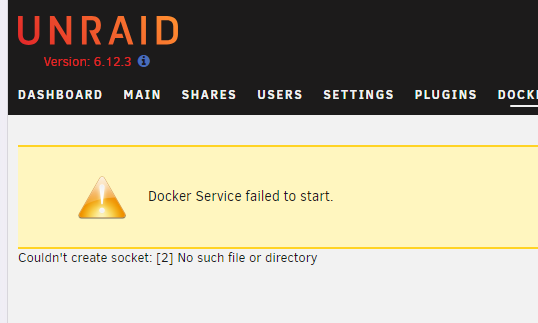
Hello all, I am getting this message in the Docker section after a power outage. I do have a battery to the NAS and I did not get an unclean shutdown detected, but I cannot get the docker service to start. I tried in "safe mode" and was getting the message that Docher Service failed to start. I also tried reverting back to the previous version 6.12.2 but getting same error. Anything else I can try? Here is the Diagnostics if it can help. Thanks nasserv01-diagnostics-20230803-1142.zip
-
With a minimum of extensions added, can this be used safely for online banking? Would it be safer than using the desktop version of firefox.

