zipt
Members
-
Joined
-
@CryPt00n, did you ever find a solution to this? Having the same issues with a 980 pro 1tb drive intermittently over the last year with no solution
-
Ran a second scrub - found zero errors, then rebooted. No more errors in logs. Looks to be solved!
-
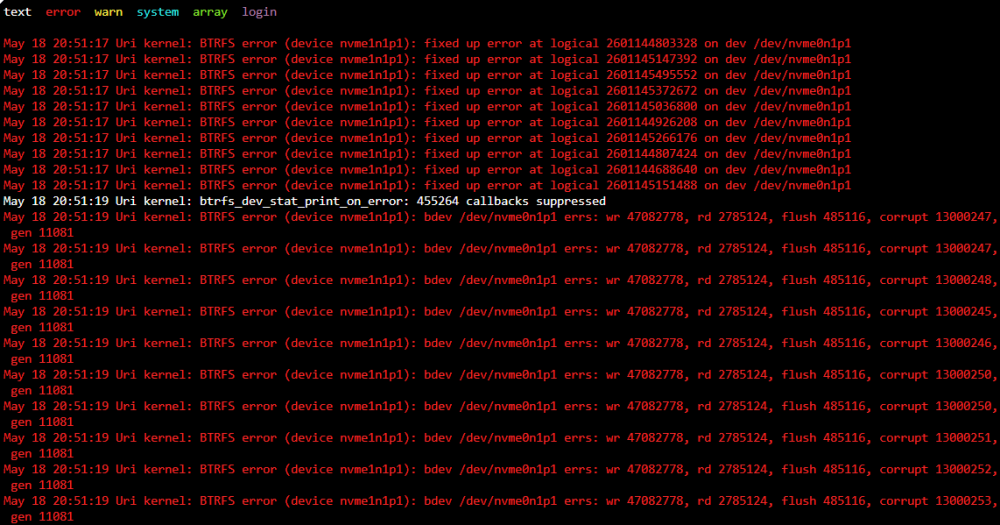
Return of the wall of errors, looks like there's still an issue
-
@JorgeB Thanks for the helpful advice, really appreciate it. I've added that in, but I'm not sure that would be the cause. It's been running fine for almost a year now so I'd be surprised if that was the issue, but I guess I'll see how it goes I've started the array and everything seems to be working correctly. Figured I'd run a scrub as well for good measure but looks okay
-
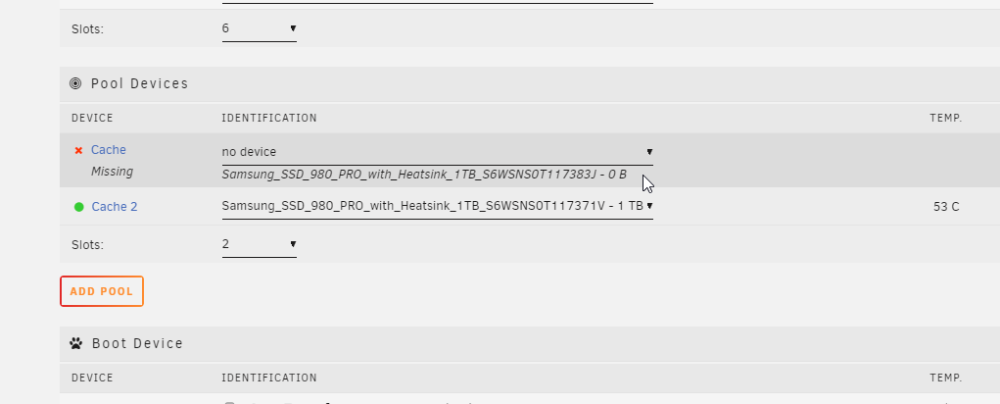
Saw a bunch of 'BTRFS error' today, mostly "BTRFS warning (device nvme1n1p1): direct IO failed ino 189208 rw 0,0 sector 0x443da678 len 4096 err no 10". Not sure why but seemed like the drive disconnected randomly. Tried rebooting the server and my 'nvme0n1' drive in my cache pool was shown as 'Missing', NOT the nvme1n1 I saw all the errors for. Rebooted into the BIOS, drive was detected okay, showed no errors, booted back into Unraid and it was showing again, and no smart errors. Started array in maintenance mode and ran a Check Filesystem Status and had pages and pages of "BTRFS ERROR (DEVICE LOOP2): PARENT TRANSID VERIFY FAILED ON X WANTED Y FOUND Z" At this point I don't know if I can trust either drive. Any advice would be appreciated for how to resolve this. Scared to start the array and make a backup of everything in case it screws up the data on there. **In theory** it should all be backed up already, but I'd rather not need to put that to the test... Should I even trust this device again? Or just RMA and get a new one, or both? Thanks in advance uri-diagnostics-20230518-1551.zip