





qw3r7yju4n
Members
-
Joined
-
Last visited
-
I dont know why. but the link is working now. Thanks so much for the help!
-
I can access it over HTTP. just not HTTPS. So boot up and install connect? Or, will the link still work? Sorry, Im a bit thick sometimes, Im not following...
-
So backup nothing? Full stock install with license files?
-
Turned tunnel off. Which removed the line for wireguard in connect. But it still doesnt work
-
Correct IP is 192.168.50.129 I dont know how to disable the wireguard tunnel?
-
Here it is. I got the API started qwertyplex-diagnostics-20260323-1337.zip
-
I had to wipe my router and now the custom https address is not working. I also logged into connect via http and noticed that the API is stopped. Is this a problem? If so, how can I correct it?
-
I have some uninvited guests. I need to wipe and restore as much as possible. I believe they have editted the UEFI boot to allow constant access to server and resources. Google AI says - Shut down server Backup config folder from boot drive wipe and restore latest UnRAID boot drive Restore config Boot Start array install plugins Is this correct? When i boot to the restore drive, does it carry over root password and all settings? Any advice is also appreciated...
-
I cannot spin up a new server cause I am unable to start a trial. fails with a notification in the bottom right but no place to view the error any help?
-
As the title states? Let me know if this doesnt belong here or could get better views elsewhere.
-
You're exactly right. It was errored plugin. I removed it and will reboot when i can. I do not use the driver currently. It is a backup for Intel QSV. Thanks for your help and concern. I will come back to this thread if your solution does not work. but it will be a few days
-
I found a way to remove it. Rebooting soon thanks for your help.
-
I cannot uninstall it. Its not there to uninstall in the UI. But, it is clearly there according to the error. is there a manual CLI option?
-
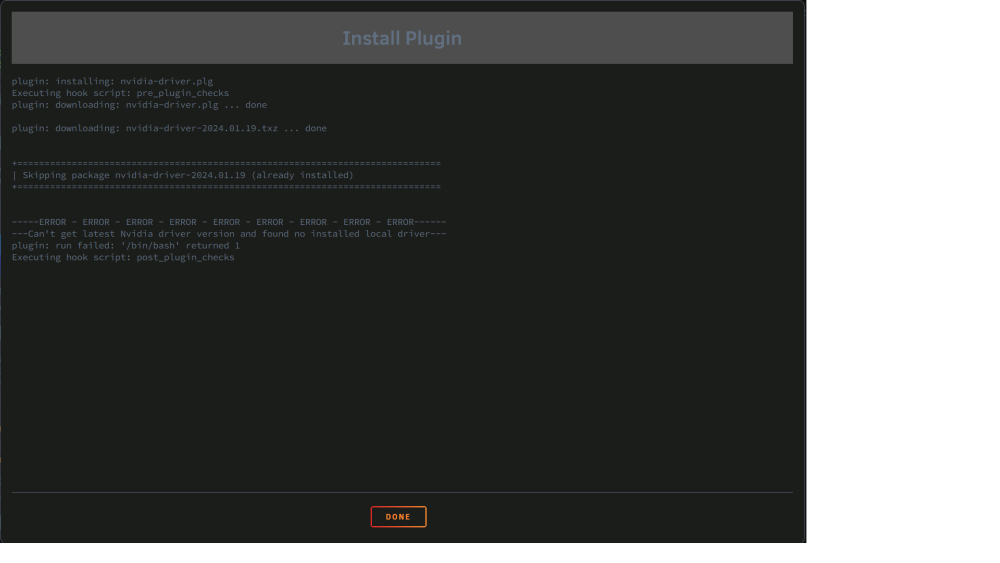
I just updated to 6.12.8 and the nvidia driver failed to install. I have tried to manually add and I get the attached install error. Any ideas? I expect this was a problem in the past.
-
FIxed it! I just used the read setting feature and read the settings from the test share. I also removed all the manual disk assignments and changed it to "All" disks. Wrote a file to the share and the mover is writing to the orphaned drive. Thanks to the mods and their wisdom! Thank you

