






DMP-UNRAID
Members
-
Joined
-
Last visited
-
Couple days in and things seem to be working like normal. Thank you one & all for the help, responses.
-
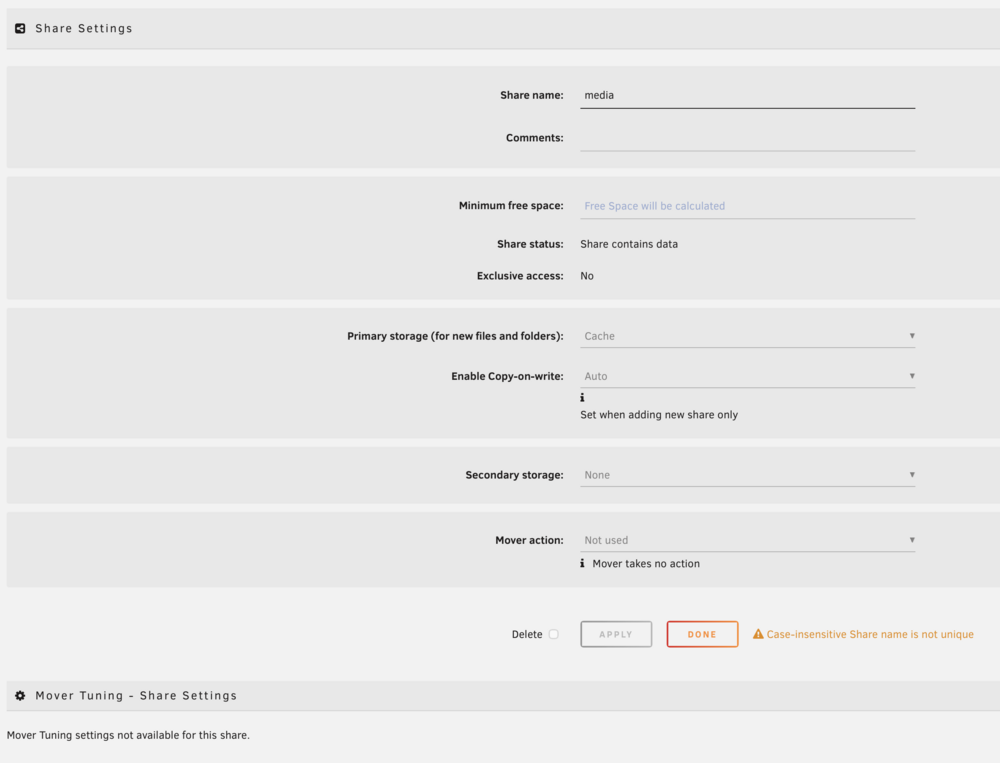
I tried this option from Gemini "Step 1: Force-Delete the Config We are going to delete the specific configuration file for the media share. Don't worry—this doesn't delete your movies; it just deletes the "rules" for that folder so Unraid is forced to recreate them from scratch. Open the Terminal (>_ icon). Type this exactly and press Enter: rm /boot/config/shares/media.cfg Now, immediately reboot your Unraid server. Step 2: Why Rebooting is Required When Unraid boots back up, it will see the media folder on your disks but notice the .cfg file is missing. It will then generate a brand-new, default configuration file. Because this file is "new," the previous "locks" that were greying out your Primary/Secondary storage settings will be gone. Step 3: Re-configure the Share Once the server is back online: Go to the Shares tab and click on media. The dropdowns should now be black and selectable! Set them to your preferred "Best Practice" setup: Primary storage: Cache Secondary storage: Array Mover action: Cache -> Array" It's giving me the option to change my primary/secondary storage.
-
I would add a movie and it would ask me where to download to, for some reason it started defaulting to the cache.
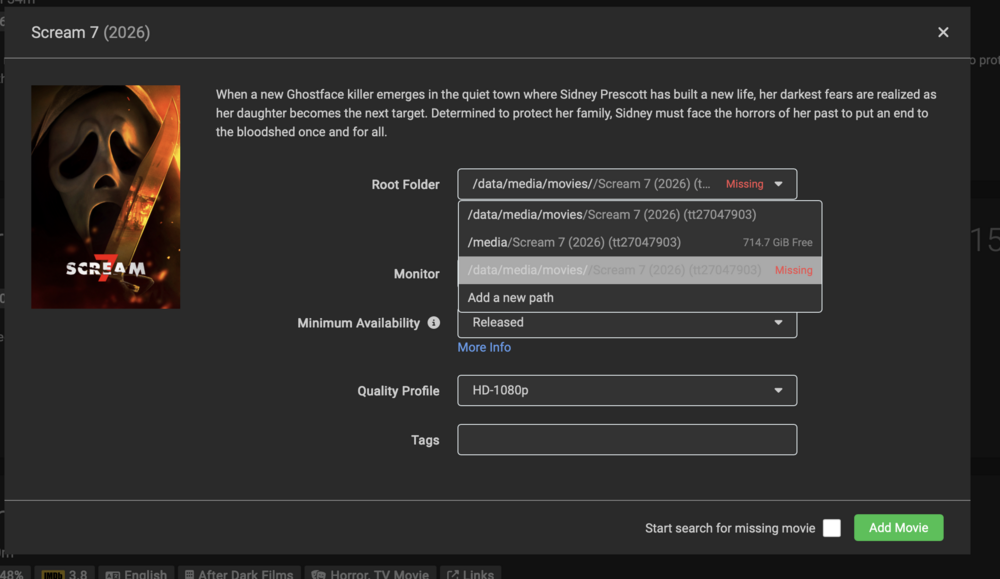
-
To the best of my knowledge I can't see anything directing to that path. I set this up years ago and other than a couple OS upgrades I've not changed anything. Can't even go into the share and change the primary/secondary storage as it's greyed out.
-
Appreciate the quick response, zip file attached. dmp-unraid-diagnostics-20260316-1904.zip
-
Hi, Quick question that's been bugging me for the last while, all of a sudden the media folder that I originally created when setting up my Unraid server had all movies/tv etc going to the array but for some reason the last while it now has anything I create being added to my cache folder. Noticed when I went to add a movie folder in Radarr that it was showing as only 774gb free when my array has 4.18tb free. Any new items added through Radarr/Sonarr are now defaulting to my cache drive and I can't figure out how to change it back. All help greatly appreciated.
-
Got that little bit at the end sorted also. Thank you folks for your help, really was greatly appreciated.
-
Looks to be all back up and running now. Thanks for all the information/help it was greatly appreciated. I think seeing the "All existing data on this device will be OVERWRITTEN when array is Started" really freaked me out. Here's a link to the screenshot of the array - https://ibb.co/yQvfRcg I've attached the new diagnostics if you want to check it out. dmp-unraid-diagnostics-20240121-1751.zip
-
Apologies about the delay in getting back to y'all was out of the house for the day. I've assigned all the drives correctly according to what I had previously from the screenshot above. Here's a link to the new diagnostics. I've just assigned the drives and haven't done anything else yet. dmp-unraid-diagnostics-20240121-1053.zip
-
In the second link above it's referencing the parity drive.
-
This is how it was originally when I screenshot it before everything - https://ibb.co/yWvFsKZ Here it is now when I've reassigned the disks like above - https://ibb.co/9gjhJNr Is this a good sign now that I've added all the drives back like above? https://ibb.co/cxZ8TTT
-
I'd taken a screenshot of the disk array earlier in the day. This is the message that popped up "All existing data on this device will be OVERWRITTEN when array is Started" I've a back up from August (I hit backup after the setup earlier and it then had today's date/time for the backup).
-
Is it possible to get previous logs? I seen the disks and was matching them up the way they were previously. There was a message saying that if it was started that all information would be erased so I unassigned them.
-
Hi, I'm at a bit of a loss at the moment. I'm running Unraid on a HP Microserver Gen 8 and have wanted for awhile to upgrade the CPU and the RAM & SSD cache drive, got it all up & running bar having the wrong ram, popped back in the old ram and it booted up. I then got an error message "Too Many Wrong And/or Missing Disks!" looked on the forums and they mentioned about "New Config" I did that and now none of my disks are showing in the array. Is it completely wrecked and will I just have to start over again? Some links to screenshots to show my issue and I'll attach my log at the bottom. Any help greatly appreciated, thanks. https://ibb.co/0r3fbbk https://ibb.co/NVVkHk4 https://ibb.co/WvZHHvq dmp-unraid-diagnostics-20240119-1822.zip
-
Hey folks quick question. I have been receiving this error message the last while and it seems to be persistent. If i manually test the indexers it disappears but then pops up again a little while later. Any help greatly appreciated. "2021-12-17 13:06:13.0|Warn|HttpClient|HTTP Error - Res: [GET] https://torrentapi.org/pubapi_v2.php?mode=list&ranked=0&category=18%3B41%3B49&limit=100&token=(removed)&format=json_extended&app_id=Sonarr: 429.TooManyRequests 2021-12-17 13:06:13.0|Warn|Rarbg|API Request Limit reached for Rarbg"


