





sebbi
Members
-
Joined
-
Last visited
-
But i have a new question, can i connect a domain to my server?
-
thank you for the help! Worked now!
-
should i change the runtime?
-
ok
-
the log now: ---Checking for Minecraft Server executable --- ---Downloading Minecraft Server 1.16.5--- ---Successfully downloaded Minecraft 1.16.5 Server!--- ---Preparing Server--- ---Checking for 'server.properties'--- ---No 'server.properties' found, downloading...--- ---Successfully downloaded 'server.properties'!--- ---Checking for old logs--- ---Starting Server--- ---EULA not found please stand by...--- grep: /serverdata/serverfiles/eula.txt: No such file or directory ---Waiting for logs, please stand by...--- Cannot exec '/serverdata/serverfiles/runtime/jre1.8.0_261/bin/java': No such file or directory Terminated ---Checking if UID: 99 matches user--- usermod: no changes ---Checking if GID: 100 matches user--- usermod: no changes ---Setting umask to 000--- ---Checking for optional scripts--- ---No optional script found, continuing--- ---Starting...--- ---Checking for 'runtime' folder--- ---'runtime' folder found--- ---Checking if Runtime is installed--- ---Runtime found--- ---Checking for Minecraft Server executable --- ---Minecraft v1.16.5 is Up-To-Date!--- ---Preparing Server--- ---Checking for 'server.properties'--- ---'server.properties' found... ---Checking for old logs--- ---Starting Server--- ---EULA not found please stand by...--- grep: /serverdata/serverfiles/eula.txt: No such file or directory ---Waiting for logs, please stand by...---
-
the log is: ---Checking if UID: 99 matches user--- ---Checking if GID: 100 matches user--- ---Setting umask to 000--- ---Checking for optional scripts--- ---No optional script found, continuing--- ---Starting...--- ---Checking for 'runtime' folder--- ---'runtime' folder not found, creating...--- ---Checking if Runtime is installed--- ---Downloading and installing Basic Runtime--- ---Something went wrong, can't download Runtime, putting server in sleep mode---
-
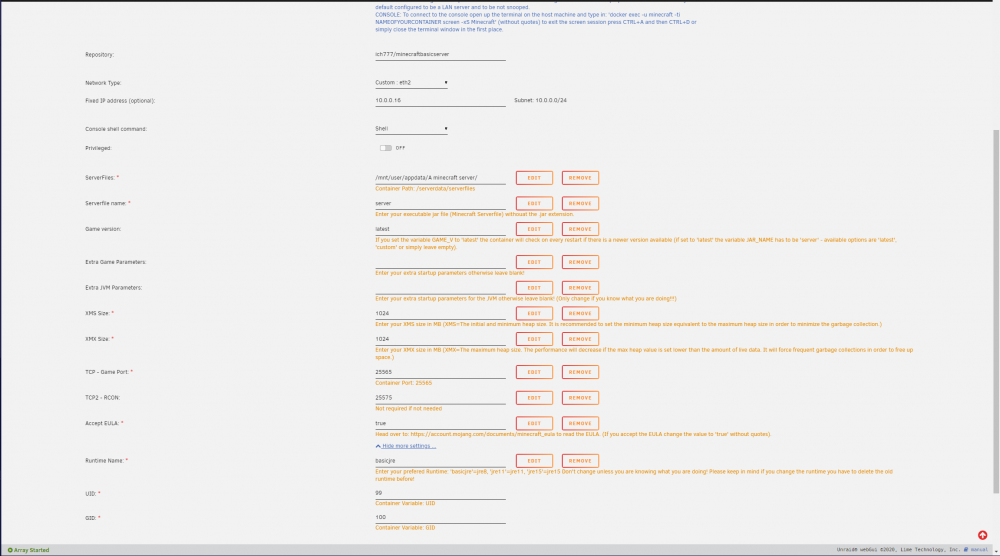
soo, now i dont have any server, when i try install the docker nothing happening. I dont know why... The docker dont install any files for the minecraft server. My settings are like this:
-
sebbi joined the community
-
when i set the server file to spigot-1.16.5 (i have it in my server folder) the server wont run, but if i set it back to server it will run, please help!

