tommykmusic
Members
-
Joined
-
Last visited
Everything posted by tommykmusic
-
I recently ran into an error which you can follow in the 🗄・unraid-os thread on DIscord. @OmgImAlexis from Discord helped me narrow it down to the "Pre Clear Disks" Plugin. The run down of the issue I had was that I ran into an "undefined system" I could not see my disks as well as trying to do anything but access and use terminal was not really working as it should. Example I tried to removed the "Pre Clear Disks" Plugin from the webgui and that did not work. I have now reboot and stopped the array and have removed the "Pre Clear Disks" Plugin. Will keep it removed and see if the error happens again. When I had the issue my plugins tab was showing this above all the already installed plugins. Warning: file_put_contents(): Only -1 of 59096 bytes written, possibly out of free disk space in /usr/local/emhttp/plugins/dynamix.plugin.manager/include/ShowPlugins.php on line 139 Warning: file_put_contents(): Only -1 of 729 bytes written, possibly out of free disk space in /usr/local/emhttp/plugins/dynamix.plugin.manager/include/ShowPlugins.php on line 139 Warning: file_put_contents(): Only -1 of 15365 bytes written, possibly out of free disk space in /usr/local/emhttp/plugins/dynamix.plugin.manager/include/ShowPlugins.php on line 139 Warning: file_put_contents(): Only -1 of 1069 bytes written, possibly out of free disk space in /usr/local/emhttp/plugins/dynamix.plugin.manager/include/ShowPlugins.php on line 139 Warning: file_put_contents(): Only -1 of 81264 bytes written, possibly out of free disk space in /usr/local/emhttp/plugins/dynamix.plugin.manager/include/ShowPlugins.php on line 139 Warning: file_put_contents(): Only -1 of 1037 bytes written, possibly out of free disk space in /usr/local/emhttp/plugins/dynamix.plugin.manager/include/ShowPlugins.php on line 139 Warning: file_put_contents(): Only -1 of 1540 bytes written, possibly out of free disk space in /usr/local/emhttp/plugins/dynamix.plugin.manager/include/ShowPlugins.php on line 139 cat /var/log/syslog however showed PHP Warning: file_put_contents(): Only -1 of 2050 bytes written, possibly out of free disk space in /etc/rc.d/rc.diskinfo on line 499 PHP Warning: file_put_contents(): Only -1 of 2050 bytes written, possibly out of free disk space in /etc/rc.d/rc.diskinfo on line 266 it showed a lot more but could not fit all the code in discord, those are the only two "errors" that stood out.
-
I restarted the server and waited for the error to happen again. When I restarted my Plex container was stopped. I turned it on and started to watch a few media and now the error is back. I think it has to do with Plex but I'm not sure. Anyways here's what I get from df -h Filesystem Size Used Avail Use% Mounted on rootfs 12G 12G 0 100% / devtmpfs 12G 0 12G 0% /dev tmpfs 12G 0 12G 0% /dev/shm cgroup_root 8.0M 0 8.0M 0% /sys/fs/cgroup tmpfs 128M 1.5M 127M 2% /var/log /dev/sde1 30G 255M 30G 1% /boot overlay 12G 12G 0 100% /lib/modules overlay 12G 12G 0 100% /lib/firmware tmpfs 1.0M 0 1.0M 0% /mnt/disks tmpfs 1.0M 0 1.0M 0% /mnt/remotes /dev/md1 1.9T 513G 1.4T 28% /mnt/disk1 /dev/md2 1.9T 91G 1.8T 5% /mnt/disk2 /dev/md3 13T 2.0T 11T 15% /mnt/disk3 /dev/md5 13T 2.7T 11T 21% /mnt/disk5 /dev/md6 3.7T 1.8T 1.9T 50% /mnt/disk6 /dev/md7 3.7T 1.7T 2.0T 46% /mnt/disk7 /dev/sdl1 239G 12G 227G 5% /mnt/cache_appdata /dev/sdm1 932G 142G 791G 16% /mnt/downloads shfs 37T 8.6T 28T 24% /mnt/user0 shfs 37T 8.6T 28T 24% /mnt/user /dev/loop2 256G 9.9G 245G 4% /var/lib/docker /dev/loop3 1.0G 3.8M 905M 1% /etc/libvirt How I can I figure out what is filling up my Ram?
-
I shut down the server and pulled the usb stick so I can grab the .zip attched here. Going to chdsk the usb on windows. tower-diagnostics-20220117-2331.zip
-
Starting diagnostics collection... Warning: file_put_contents(): Only -1 of 5 bytes written, possibly out of free disk space in /usr/local/emhttp/plugins/dynamix/scripts/diagnostics on line 109 Warning: file_put_contents(): Only -1 of 15 bytes written, possibly out of free disk space in /usr/local/emhttp/plugins/dynamix/scripts/diagnostics on line 114 Warning: file_put_contents(): Only -1 of 12 bytes written, possibly out of free disk space in /usr/local/emhttp/plugins/dynamix/scripts/diagnostics on line 114 Warning: file_put_contents(): Only -1 of 16 bytes written, possibly out of free disk space in /usr/local/emhttp/plugins/dynamix/scripts/diagnostics on line 114 Warning: file_put_contents(): Only -1 of 13 bytes written, possibly out of free disk space in /usr/local/emhttp/plugins/dynamix/scripts/diagnostics on line 114 Warning: file_put_contents(): Only -1 of 1018 bytes written, possibly out of free disk space in /usr/local/emhttp/plugins/dynamix/scripts/diagnostics on line 114 Warning: file_put_contents(): Only -1 of 11 bytes written, possibly out of free disk space in /usr/local/emhttp/plugins/dynamix/scripts/diagnostics on line 114 Warning: file_put_contents(): Only -1 of 15 bytes written, possibly out of free disk space in /usr/local/emhttp/plugins/dynamix/scripts/diagnostics on line 114 Warning: file_put_contents(): Only -1 of 14 bytes written, possibly out of free disk space in /usr/local/emhttp/plugins/dynamix/scripts/diagnostics on line 114 Warning: file_put_contents(): Only -1 of 11 bytes written, possibly out of free disk space in /usr/local/emhttp/plugins/dynamix/scripts/diagnostics on line 114 Warning: file_put_contents(): Only -1 of 83 bytes written, possibly out of free disk space in /usr/local/emhttp/plugins/dynamix/scripts/diagnostics on line 130 Warning: file_put_contents(): Only -1 of 2 bytes written, possibly out of free disk space in /usr/local/emhttp/plugins/dynamix/scripts/diagnostics on line 149 Warning: file_put_contents(): Only -1 of 34 bytes written, possibly out of free disk space in /usr/local/emhttp/plugins/dynamix/scripts/diagnostics on line 151 Warning: file_put_contents(): Only -1 of 2 bytes written, possibly out of free disk space in /usr/local/emhttp/plugins/dynamix/scripts/diagnostics on line 149 Warning: file_put_contents(): Only -1 of 34 bytes written, possibly out of free disk space in /usr/local/emhttp/plugins/dynamix/scripts/diagnostics on line 151 echo: write error: No space left on device echo: write error: No space left on device echo: write error: No space left on device echo: write error: No space left on device echo: write error: No space left on device echo: write error: No space left on device echo: write error: No space left on device echo: write error: No space left on device echo: write error: No space left on device Warning: file_put_contents(): Only -1 of 33 bytes written, possibly out of free disk space in /usr/local/emhttp/plugins/dynamix/scripts/diagnostics on line 190 Warning: file_put_contents(): Only -1 of 25 bytes written, possibly out of free disk space in /usr/local/emhttp/plugins/dynamix/scripts/diagnostics on line 190 Warning: file_put_contents(): Only -1 of 53 bytes written, possibly out of free disk space in /usr/local/emhttp/plugins/dynamix/scripts/diagnostics on line 190 Warning: file_put_contents(): Only -1 of 25 bytes written, possibly out of free disk space in /usr/local/emhttp/plugins/dynamix/scripts/diagnostics on line 190 Warning: file_put_contents(): Only -1 of 41 bytes written, possibly out of free disk space in /usr/local/emhttp/plugins/dynamix/scripts/diagnostics on line 190 Warning: file_put_contents(): Only -1 of 25 bytes written, possibly out of free disk space in /usr/local/emhttp/plugins/dynamix/scripts/diagnostics on line 190 Warning: file_put_contents(): Only -1 of 29 bytes written, possibly out of free disk space in /usr/local/emhttp/plugins/dynamix/scripts/diagnostics on line 190 Warning: file_put_contents(): Only -1 of 29 bytes written, possibly out of free disk space in /usr/local/emhttp/plugins/dynamix/scripts/diagnostics on line 190 Warning: file_put_contents(): Only -1 of 25 bytes written, possibly out of free disk space in /usr/local/emhttp/plugins/dynamix/scripts/diagnostics on line 190 Warning: file_put_contents(): Only -1 of 25 bytes written, possibly out of free disk space in /usr/local/emhttp/plugins/dynamix/scripts/diagnostics on line 190 Warning: file_put_contents(): Only -1 of 283 bytes written, possibly out of free disk space in /usr/local/emhttp/plugins/dynamix/scripts/diagnostics on line 259 done. ZIP file '/boot/logs/tower-diagnostics-20220117-2331.zip' created.
-
And we're back at the same issue, will run diagnostics tomorrow and post here.
-
I'm back in the webgui thanks to discord. Running a Parity Check and will troubleshoot from there.
-
I'm getting the same thing, all I did was enable the app data share for cache on a 256gb drive and then installed a few containers. Should I just upgrade the cache drive? Warning: session_write_close0: write failed: No space left on device (28) in /usrlocal/emhttp/login.php on line 96 Warning: session _write_close): Failed to write session data (files). Please verify that the current setting of session.save_path is correct (var/lib/php) in /usrlocal/emhttp/ogin.php on line 96 Warning: Cannot modify header information: headers already sent by (output started at (usrlocal/emhttp/login.php:96) in /usr/local/emhttp/login.php on line 98
-
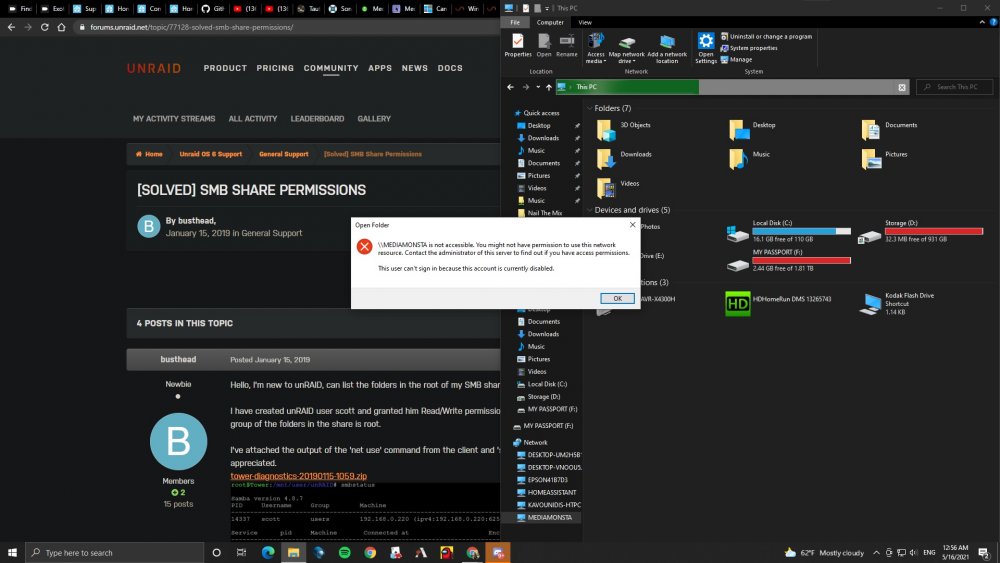
Trying to figure out how to share my windows drive via samba to access in krusader, I feel like there's something I'm missing. If someone could point me in the right direction that'd be much help. It appears that my windows HTPC cannot be accessed at all. I cannot access my unraid server from the HTPC windows explore but I can do so from my other computers. It also appears that I can't access my HTPC from any of the other windows PC's on my local network. I have tried everything I have been searching for a solution to this for hours but still can't figure it out. My unraid server shows in the list of network accessible drives but when I attempt to connect to it get a windows 10 error saying that it is not accessible and that I need permissions to access the unraid server. (you might not have permissions to use this network resource.) If I manually type in the IP address, it will open in the chrome browser but not in Windows Explorer. SMB has been re-enabled I have added the options to the group policy to enable insecure guest logins