





tommykmusic
Members
-
Joined
-
Last visited
Everything posted by tommykmusic
-
I instead opted to buy and install a 2tb m.2 ssd into the server and create a cache pool for my system share and move the whole system share onto the cache pool. Now I am monitoring for any changes. So far I noticed that docker loads up super fast! I don't know why I didn’t do this earlier.
-
mediamonsta-diagnostics-20240623-1930.zip Here is the latest diags.
-
I still seem to be having the same issue. My webgui is slow because something in the docker is filling up memory. I can better access everything through the CLI. Is there a command to stop all the docker containers or just turn docker off? That will help me post the new diags as I will be ale to download them from the web gui.
-
My docker service still says "docker service failed to start" and fix common problems still has the same errors. Should I reboot the server?
-
root@MediaMonsta:~# btrfs dev stats -z /mnt/downloads [/dev/sdg1].write_io_errs 0 [/dev/sdg1].read_io_errs 0 [/dev/sdg1].flush_io_errs 0 [/dev/sdg1].corruption_errs 18 [/dev/sdg1].generation_errs 0 root@MediaMonsta:~# btrfs dev stats /mnt/downloads [/dev/sdg1].write_io_errs 0 [/dev/sdg1].read_io_errs 0 [/dev/sdg1].flush_io_errs 0 [/dev/sdg1].corruption_errs 0 [/dev/sdg1].generation_errs 0 root@MediaMonsta:~# This is the output for the downloads.
-
Just to make sure, I reset the stats using the command "btrfs dev stats -z /mnt/cache" and then check for corruption again?
-
Are you sure, I just scrubbed all the pools and found no errors.
-
Which pool am I scrubbing?
-
How does one do that?
-
I’m posting here for further help investigating an issue I’m having with my server. I don’t know what exactly happened, but it seems like my docker image grew full. When I woke up this morning my server was unresponsive. I force restarted it and checked common problems, updated my docker image size, and everything worked for a bit. When I got home, I logged into the server via CLI and tried to troubleshoot. the command "df -h" output this: Last login: Thu Jun 20 17:09:00 2024 Linux 6.1.79-Unraid. root@MediaMonsta:~# df -h Filesystem Size Used Avail Use% Mounted on rootfs 16G 350M 16G 3% / tmpfs 128M 9.6M 119M 8% /run /dev/sda1 30G 1017M 29G 4% /boot overlay 16G 350M 16G 3% /lib overlay 16G 350M 16G 3% /usr devtmpfs 8.0M 0 8.0M 0% /dev tmpfs 16G 0 16G 0% /dev/shm tmpfs 128M 760K 128M 1% /var/log tmpfs 1.0M 0 1.0M 0% /mnt/disks tmpfs 1.0M 0 1.0M 0% /mnt/remotes tmpfs 1.0M 0 1.0M 0% /mnt/addons tmpfs 1.0M 0 1.0M 0% /mnt/rootshare /dev/md1p1 17T 9.0T 7.5T 55% /mnt/disk1 /dev/md2p1 17T 312G 17T 2% /mnt/disk2 /dev/md3p1 13T 13T 165G 99% /mnt/disk3 /dev/md4p1 13T 13T 18G 100% /mnt/disk4 /dev/md5p1 13T 4.7T 8.1T 37% /mnt/disk5 /dev/md6p1 13T 3.0T 9.9T 23% /mnt/disk6 /dev/md7p1 11T 78G 11T 1% /mnt/disk7 /dev/md8p1 11T 78G 11T 1% /mnt/disk8 /dev/nvme0n1p1 932G 184G 744G 20% /mnt/cache_appdata_m_ii /dev/sdg1 932G 104G 824G 12% /mnt/downloads shfs 106T 43T 64T 41% /mnt/user0 shfs 106T 43T 64T 41% /mnt/user /dev/loop2 256G 127G 129G 50% /var/lib/docker /dev/loop3 1.0G 4.1M 905M 1% /etc/libvirt tmpfs 3.2G 0 3.2G 0% /run/user/0 root@MediaMonsta:~# After that, I tried to stop all my docker containers in an attempt to speed up the webGUI using the command "docker stop $(docker ps -a -q)". That worked, so I dug further and tried to run the space invaders "check docker image" script, which didn’t output anything at all because docker failed to start. I checked common problems again and got the error “Out Of Memory errors detected on your server.” Any help would be greatly appreciated! mediamonsta-diagnostics-20240620-2343.zip
-
I ran memtest for 48hrs and there was no errors and it gave me a big PASS
-
Just post the diagnostics.
-
I just replaced 4 data drives with bigger capacity drives. Also replaced my 2 14tb parity drives with two brand new 18tb drives. I got everything setup with a new configuration. Parity synced and everything in the hard drive side of things shows green. Now I went to go start docker after I waited a few day for data to rebuild and for parity to sync. It all worked at first and then once I went to hit update all my docker stopped working. So I rebuilt my docker image and now docker fails to start. I ran a memtest for 48hrs and everything shows up fine with a giant PASS. I'm at a loss and don't know what to test next. Here's a link to my syslogs before I ran the memtest. https://pastebin.com/BqKAdvvr I'm super confused as the only thing I did was replace that hard drives and nothing else. I did have to use some sata power extension cables which was annoying but it did the job. mediamonsta-diagnostics-20240401-1421.zip
-
I stopped the array Unassigned disk6 and the second parity drive started the array waited a good 5 minutes tried to stop the array, got root: umount: /mnt/disk3: target is busy. Oct 8 10:09:56 MediaMonsta emhttpd: shcmd (76549): exit status: 32 Oct 8 10:09:56 MediaMonsta emhttpd: Retry unmounting disk share(s)... So I did umount -l /mnt/disk3 The array then stopped and now it's not letting me reassign disk6 or the second parity drive. mediamonsta-diagnostics-20231008-1330.zip
-
mediamonsta-diagnostics-20231007-1104.zip Let me know if you need anything else.
-
Just put in the new HBA card and here's the diagnostics. My second parity drive as well as one of my 4tb Seagate drives are still showing disabled and contents emulated the rest of the other drives are okay. Please let me know if you need anything else. mediamonsta-diagnostics-20231006-1547.zip
-
When I get the new HBA card I'll replace all the cables, do you reckon I shutdown the server for now?
-
mediamonsta-diagnostics-20230925-1718.zip Here you go, let me know if you need anything else. Also I ended up ordering an HBA LSI 9300-16i anyway just incase.
-
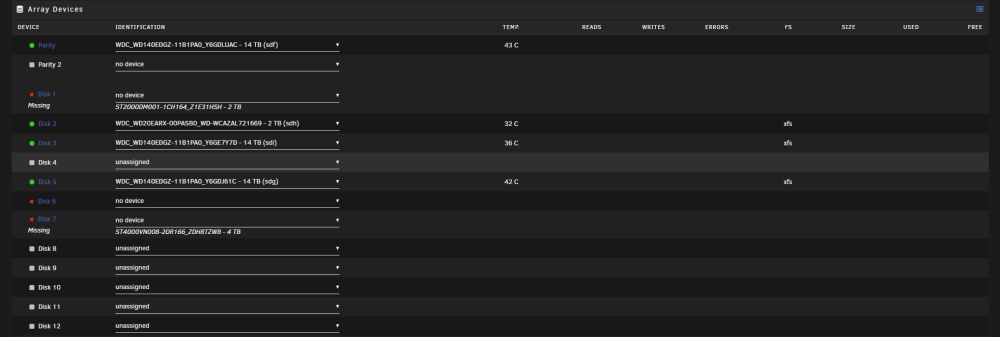
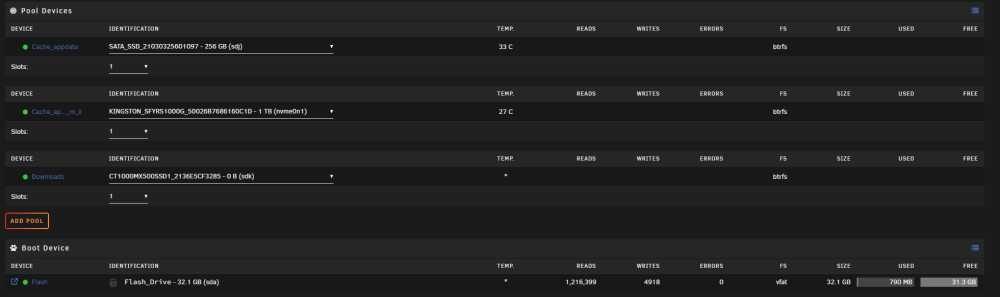
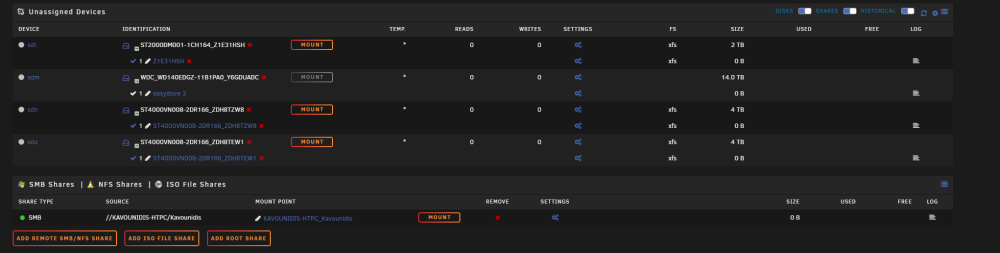
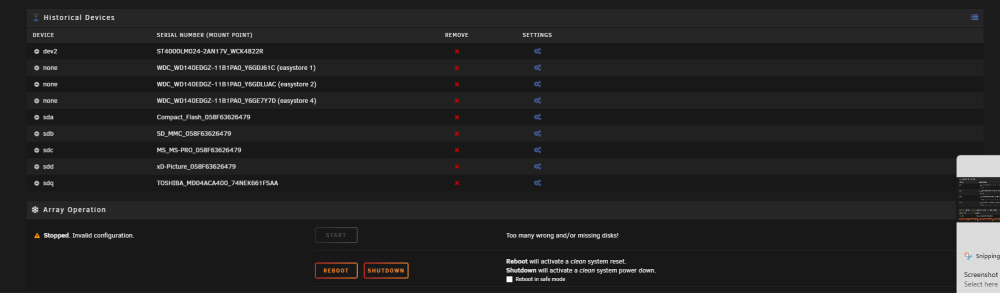
I had a red x on one of my drives and it stated unavailable. Basically said that there was an io error or something. Can't remember the exact words stated as now a few of my drives after stopping the array won't mount. Here is the syslogs, I don't understand if the drives have failed or not. https://pastebin.com/M4E2waUM One of the parity drives showed a red x, so I looked into it and then stopped the array to check things. Once I did that I noticed that a few drives somehow went missing. The parity drive however states that the drive is not present and unassigned devices shows the mount button grayed out. As for the other drives, I can mount them either. It's been a few days and I've been too lazy to look into the issue and fix it. I haven't done a restart or anything just yet. However I do plan on upgrading whatever needs to get fixed to make it more "reliable". I do have a (https://www.amazon.com/gp/product/B085NQVHLQ/ref=ppx_yo_dt_b_search_asin_title?ie=UTF8&psc=1) pcie SATA expander card on my mobo that some of the drives are plugged into. The rest of the drives are plugged into the mobo itself. I can't remember how many drives I plugged into the SATA card but I think it could also be that that card went bad? I'm looking at HBA cards and will probably replace that SATA card with a nice HBA card.
-
I am trying to setup nextcloud with a cloudflare tunnel using nginx and I got everything setup following ibras video. My only issue is that I get a 502 error when trying to access nextcloud outside of my network. Upon checking my nginx log I see this error [app ] Duplicate relation "access_list" in a relation expression. You should use "a.[b, c]" instead of "[a.b, a.c]". This will cause an error in objection 2.0 as well as this in blue [app ] [4/15/2023] [4:09:24 AM] [Migrate ] › ℹ info Current database version: none I can't seem to figure out what could be causing the issue as I don't have any access lists. Any help would be appreciated, Thank you.
-
It is set to "prefer" sorry. Correct, what i meant was that I want my containers to have access to the full 256gb Also all spelling mistakes are fixed.
-
Fixed the path, hopefully everything works again as normal.
-
SMH I am going to delete and reinstall plex! Thank you!
-
My appdata share is set to cache YES to use the "Chache_appdata" so all the appdata gets written to the "Chache_appdata" drive. Nothing else to my knowledge is being mapped to "Chache_appdata" other than the appdata share. Originally the "Chache_appdata" drive was named "Plex_appdata" as I was planning on only using it for plex and then changed my mind and I decided to use it for all the appdata thus the rename. I have it set to 256gb cause I want the appdata share to have access to all that storage in case it is needed. This is how I have Plex configured /config → /mnt/plex_appdata/ /transcode → /mnt/user/appdata/Plex-Media-Server/transcode /data → /mnt/user/data/ if any screenshots would help please let me know what you'd like to see and I can supply.
-
I thought my appdata was on my SSD cache drive which is in the unRAID cache pool. Where can I go to check and make sure this is set correctly?


