XCrownedClownsX
Members
-
Joined
-
Last visited
Everything posted by XCrownedClownsX
-
Can you include your support bundle at "Settings -> FolderView Plus -> Advanced -> Diagnostics" and your folder config export?
-
Can you export your support bundle under Settings -> FolderView Plus -> Advanced -> Diagnostics so I can see if this is a sort bug?
-
FolderView Plus 2026.04.05.13ChangesFeatures Added a compact Bulk move workflow directly to the Folder Editor Members tab for both Docker and VM folders, so users can move shown or included members into another folder without leaving the editor. Bulk move supports the scopes Shown, Included shown, Excluded shown, and All included. Bulk move reuses the guarded server-side bulk assignment path instead of duplicating a second editor-only mover. Each bulk move creates a backup first and exposes an editor-local undo path. FixesFixed multi-row Docker preview Console and Logs actions so they keep their real runtime wiring instead of falling back to a top-of-page anchor jump. @Beta Fixed Folder Editor startup crashes introduced by the new Members-tab bulk move flow when hydration reached the bulk move helpers before those functions finished initializing. @Revan335 Fixed the Folder Editor post-bulk-move lockup so the page no longer gets trapped behind a blocking success or undo modal after the move completes. Fixed Members-tab bulk move live refresh so moved Docker containers and VMs disappear from the current folder immediately instead of remaining visible until the folder is submitted or reloaded. Fixed the leave-page warning after a successful Members-tab bulk move by syncing the member baseline correctly, while keeping the normal unsaved-changes prompt for regular manual member edits. UI and UXThe Members-tab bulk move flow now keeps the editor live after completion and shows a non-blocking inline undo action inside the bulk move summary area. Folder Editor bulk move status messaging now updates in place instead of interrupting the editor with follow-up confirmation dialogs. Platform and RuntimeAdded versioned asset URLs for shipped FolderView Plus JavaScript, CSS, vendor includes, and locale assets so plugin updates no longer depend on users manually clearing browser cache to see new changes. Release and QualityHardened the main release process so stable cuts now require explicit curated release notes instead of falling back to generic seeded CHANGES text. Added a local simulate_main_release.sh path so the full stable-release flow can be rehearsed before merging and pushing main. Unified stable packaging through the shared release_prepare.sh entrypoint so the local and GitHub release flows use the same preparation path. Hardened back-merge handling so release-only artifacts and stable-only metadata do not keep breaking the main to dev sync path. Tightened workflow self-checks, release-note consistency validation, include-order coverage, and related release/package guards around the new release path. Release runs no longer hard-require browser smoke or theme matrix URLs, so stable merges can proceed even when smoke targets are unavailable. Remote publish validation now retries until raw GitHub artifacts reflect the pushed release, preventing false failures from raw cache lag.

-
FolderView Plus 2026.04.05.01 is now live on main.This release puts a lot of focus on stability, maintainability, support tooling, and making it easier to troubleshoot real-world issues without needing multiple rounds of back-and-forth. Features- Added Copy Folder Settings and Paste Folder Settings to the Docker and VM folder menus. @btTeddy - Added Apply to folders... In the folder editor, you can take the current folder configuration, including unsaved changes, and apply it to other existing folders. - Added a safe server-side merge path for folder settings transfer so target folder names, parents, members, regex rules, and IDs are preserved. - Added automatic backup snapshot creation before folder settings batch-apply operations. - Completed the transition to the modern folder editor only and removed the legacy editor path. - Overhauled the support system with a new v2 support bundle built specifically for troubleshooting real plugin issues more effectively. Support System Overhaul- Rebuilt support exports into a structured v2 support bundle. - Added better environment, plugin-state, runtime-state, UI-telemetry, and health-history coverage. - Added sanitized redaction manifests so support bundles are more useful without collecting unnecessary personal information. - Added export preview so users can see what is included before exporting. - Added build identity, loaded asset versions, recent plugin actions, browser-side error snapshots, and plugin-scoped server log context. - Improved issue report generation so support exports and diagnostics are much more useful for debugging. Fixes- Fixed Docker update detection so container rows, folder rows, root folders, and folder-editor update summaries stay aligned with native Unraid update state. @john_smith - Fixed multi-row Docker previews so clicking previewed containers opens the normal Docker menu again. @btTeddy - Fixed Docker preview quick actions so WebUI, Console, and Logs behave correctly without interfering with the menu. - Hardened Docker order sync so it only runs when it actually needs to, coalesces repeated requests, and avoids unnecessary rewrites. @Gursh - Fixed theme-token issues across dialogs, menus, debug panels, status colors, and diagnostics surfaces. - Fixed diagnostics theme reporting and self-heal behavior so false theme warnings no longer appear. - Fixed diagnostics layout issues in the Suggested fixes area. - Fixed multiple white-theme UI issues across the folder editor, icon picker, parent picker, and related controls. - Fixed editor/runtime loading and support-bundle edge cases found during the refactor and diagnostics work. UI / UX- Continued polishing the modern folder editor layout and control styling. - Improved dark and light theme consistency across diagnostics, settings, dashboard views, folder editor surfaces, and picker dialogs. - Cleaned up dashboard chevron/dropdown chrome across all dashboard layout modes. - Improved diagnostics presentation and support export flow. - Improved parent folder selector and icon picker readability in white theme. - Refined action button consistency in the folder editor. Refactor / Under the Hood- Continued breaking up the larger monolith files into smaller, focused modules across settings, folder editor, Docker runtime, and server helpers. - Finished the planned extraction phases for the main settings, editor, Docker, and diagnostics code paths. - Removed dead runtime code and tightened architecture, include-order, performance-budget, install-smoke, and release guards. - Improved release tooling with better subsystem-aware release note generation and stronger validation coverage. What To Test- Copy Folder Settings and Paste Folder Settings on both Docker and VM folders. - Apply to folders... from the folder editor, especially with unsaved changes. - Docker container menus from folder previews, including multi-row previews. - Docker update detection on container rows, folder rows, root folders, and inside the folder editor. - Folder editor behavior in both black and white Unraid themes. - Diagnostics, support-bundle preview, issue report generation, and support bundle export. - Dashboard layouts and chevron/dropdown behavior across the different view modes. - General folder editing, saving, parent selection, icon picking, and preview behavior. If you report an issue, please include:- Unraid version - theme used black or white) - page where it happened Dashboard, Docker, VMs, Folder Editor, Settings, Diagnostics) - screenshot if it is visual - exact steps to reproduce if possible
-
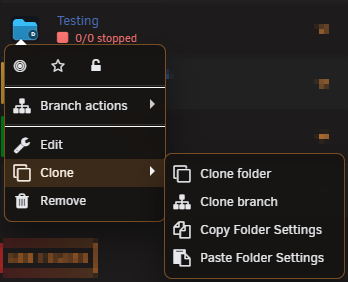
Yes, I can look at those; however, with #2, it should already be implemented. Can you provide a screenshot showing that there is no clone option on previous folders? Also, an export of your config as well would help.
-
When you get the chance, once you have more updates, can you export your config and support bundle (Settings > Advanced > Diagnostics at the bottom)? That way, I can troubleshoot further. Please also see if it's a caching issue, if you clear your cache, if all of them still show they have an update instead of just one. I'm still working on a better cache solution to fix those issues.
-
@Sacred Good find, I'll look into this as well.
-
Yes, will definitely look into getting this implemented.
-
I’ll definitely check the other issues. Just to confirm did you clear your cache on the folder editor page or try incognito? During testing the buttons were visible again before release.
-
Heads up for the next FolderView Plus release:We’re retiring the legacy folder editor and moving forward with the modern editor only. The legacy editor was useful during the transition, but maintaining two separate editor runtimes has started to slow down development, testing, and bug fixing. Consolidating on the modern editor will let us move faster, reduce duplicate maintenance, improve reliability, and make future features and UI improvements much easier to deliver. The modern editor is now the path forward, and upcoming work will be focused there exclusively. I know this may be inconvenient for anyone who preferred the older editor flow, and I do apologize for that. The goal here is to make the plugin better long-term, not remove options without reason. Supporting two different editors at once has become more costly than beneficial, and retiring the legacy path gives us a cleaner, more stable foundation to build on. What this means: The next release will no longer include the legacy folder editor Folder editing will use the modern editor only Future fixes, improvements, and new features will target the modern editor If you’ve been relying on the legacy editor, now is a good time to test the current modern editor behavior on dev and report anything that still feels off. That feedback will help make the transition as smooth as possible. Thanks for sticking with the project and helping improve it.
-
FolderView Plus 2026.04.01.09 is now live on main.Please perform a "Ctrl+Shift+F5" on all pages necessary to clear the cache before reporting an issue. This release is mainly focused on folder editor improvements, theme cleanup, icon picker polish, and a full fix for Docker update-state accuracy. Features- Added folder-scoped advanced auto-rules directly to the modern folder editor for saved folders. - Added regex member-search dropdown controls in the folder editor Rules workflow. - Added a searchable, path-aware parent folder picker for larger folder trees. - Added new Pixel icon packs to the built-in third-party icon picker: - Folders/Pixel - Icons/Pixel Folder editor and UI improvements- Reworked the modern folder editor General section into a tighter grouped layout. - Added a dedicated left rail so Name and Folder WebUI stack cleanly without being pushed around by the icon picker. - Improved parent folder picker spacing, layout, and overall presentation. - Improved advanced Rules card alignment so the Regex and advanced auto-rule controls sit more naturally on larger screens. - Improved folder editor reorder button visibility in dark mode. - Polished white-theme editor controls: - aligned Submit with the rest of the action buttons - aligned Basic/Advanced toggle styling with the rest of the editor - improved Submit readability in light mode - fixed icon picker light-mode surfaces - made favorite stars visible without hover - removed the extra star border chrome - fixed the parent picker gray light-mode background Fixes- Fixed Docker update detection so container rows, folder rows, root folders, and folder-editor update counts consistently reflect native Unraid update availability. - Fixed Docker update state handling across lightweight refreshes, collapsed folders, runtime hydration, and late page refreshes. - Fixed cases where Docker folders could stay stuck on up-to-date even when child containers had updates available. - Fixed the modern folder editor bootstrap warning banner so stale runtime warnings clear once the editor actually finishes loading. Under the hood- Split the newer folder editor rules and parent-picker logic into dedicated modules to keep the editor runtime maintainable and within perf budgets. - Added stronger dead-code and unused-symbol guards. - Expanded Docker update regression coverage and theme/layout regression coverage. - Added the one-step dev finalize workflow used to validate, package, and push dev builds more safely. - Improved release-note parsing, validation, and guard coverage so release summaries stay accurate. Testing requestedIf you update to 2026.04.01.09, please test the areas below and report back anything that still looks off: Docker update detection: - container rows - folder rows - root folder rows - folder editor update counts Folder editor in both dark and white themes: - General section layout - Parent folder selector - Icon picker - Submit / Basic / Advanced buttons - Advanced auto-rules in the modern folder editor - Regex member-search dropdown behavior - New Pixel icon packs in the third-party icon picker - Folder editor bootstrap/loading flow, especially if you previously saw runtime warning banners If you report an issue, please include:- Unraid version - theme used black or white) - Docker / VM / Dashboard / Folder Editor page - a screenshot if the issue is visual - exact steps to reproduce if possible
-
Thanks for pointing that out. I'll see why the style tokens didn't apply properly to that.
-
@shiftylilbastrd Please update to the latest version of 2026.04.01.24. I've implemented the default purge in days (by default, it's set to 0, which is disabled). Also added a custom purge for specific items, as well as other polishing and fixes.
-
@shiftylilbastrd It's not a default purge time. It only lets you set a purge time for quarantine items if you want to. I can implement a default purge timer that can be enabled for all items moved to quarantine.
-
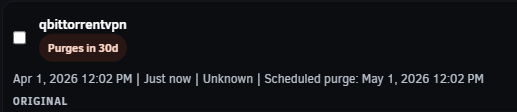
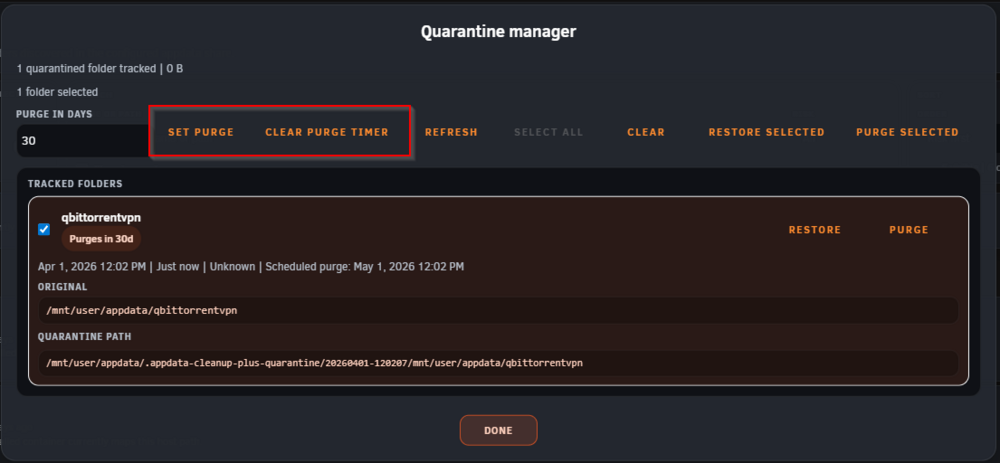
@shiftylilbastrd It shows you the time added in a badge and the scheduled purge below. Also, you have to have an item selected for those buttons to be enabled.
-
This should be addressed in the latest stable release: 2026.04.01.09. Two changes went in for this:- The bottom Done button was removed from the action bar entirely, so it should no longer kick you back to the Settings page by mistake while working through a cleanup. - The quarantine manager now supports purge scheduling for quarantined items: - select one or more quarantined entries - set Purge in days - clear the timer later if needed - each scheduled item shows a visible purge badge and the scheduled purge time Important detail:- The current implementation is per selected quarantine entry, not a single global default retention setting. - Due scheduled purges are cleaned up automatically the next time the quarantine state is loaded. Can you update to 2026.04.01.09 and test again to confirm: - the bottom action bar no longer has the old Done button - quarantine items can be scheduled for purge successfully - the scheduled purge badge/timestamp show correctly in the quarantine manager Release: https://github.com/alexphillips-dev/Appdata-Cleanup-Plus/releases/tag/v2026.04.01.09
-
Appriciate all the provided information. I will troubleshoot why this is happening and provide a fix for you.
-
All good suggestions, I'll work on those as well. I should have a release for this tomorrow.
-
This should be fixed in the latest stable release: 2026.04.01.02. Two changes were made for this case: - The plugin now allows the configured appdata share root itself to be symlinked without hard-locking every folder under it. - .Recycle.Bin is now excluded from direct-child appdata discovery, so it should no longer show up as an orphaned appdata folder. Important detail: - This only relaxes the lock for the configured appdata root symlink itself. - Direct folder symlinks and deeper nested symlink segments are still locked for safety. Can you update to 2026.04.01.02 and test again to confirm: - normal appdata folders under your symlinked appdata root are no longer all stuck as Locked - .Recycle.Bin no longer appears in the scan Release: https://github.com/alexphillips-dev/Appdata-Cleanup-Plus/releases/tag/v2026.04.01.02
-
@shiftylilbastrd I didn't see the updated edit when I commented. I will review this issue and provide a fix.
-
Please test the latest version 2026.03.31.18 to see if your issue is resolved.
-
Appdata Cleanup Plus - Version: 2026.03.31.12- Feature / Fix / UI / UX ReleaseSince the last main release (2026.03.30.48), this stable build promotes the full 2026.03.31.01 through 2026.03.31.11 development cycle to main. Scan and Detection- Added direct filesystem discovery for orphaned child folders inside the configured appdata share, even when no saved Docker template still references them. - Locked symlink candidates now show the exact offending symlink path segment instead of a generic safety warning. @shiftylilbastrd - Host path matching is now canonicalized before comparing saved templates against live container mounts, so trailing slash differences no longer create false orphan rows. - Added regression coverage for saved-template vs live-mount trailing slash mismatches. Results UI / UX- A single scan is now split into grouped sections for Saved template references, Appdata share discovery, and Ignored paths. - Filtering, sorting, and selection remain global across the page while sorting is applied within each visible section. Bulk Actions- Added Select all to the main bottom action bar so every deletable result can be selected in one click. - Added quarantine entry checkboxes with bulk Restore selected and Purge selected actions. - Added Select all to the quarantine manager toolbar for bulk restore and purge workflows. Quarantine Workflow Fixes- Fixed the restore/purge flow so the quarantine manager no longer gets stuck until a full page refresh. - Changed the success flow so the quarantine manager no longer reopens again after a successful restore or purge. - Restored normal page scrolling after quarantine restore/purge modal flows close. - Cleared modal-specific SweetAlert classes more reliably when moving between quarantine, history, and other dialogs. Quarantine Manager UI / Modal Improvements- Increased the quarantine manager review height so more tracked items stay visible. - Tuned the quarantine manager width to use more horizontal viewport space without keeping the oversized early layout. - Reduced side padding so quarantined path cards have more usable room for long paths. - Corrected alignment so quarantine entry names line up properly with their checkboxes and actions. - Replaced fragile modal sizing with explicit width and max-width handling so wider layouts actually apply consistently. - Restored proper centered positioning for wide and tall dialogs. - Reset modal margin handling and used full centering transforms so confirmation dialogs no longer open cut off near the bottom of the screen. Safety / Settings- Permanent delete and outside-share cleanup safety toggles can now be saved even when the current scan is empty.
-
Currently working on a fix for this as it's a known issue.
-
What version of the plugin and Unraid are you running?
-
Appdata Cleanup Plus 2026.03.30.48This main release rolls up everything that landed after the previous stable main release, 2026.03.27.24. The focus for this cycle was scan reliability, quarantine workflow depth, live result updates, and a long pass on compacting and cleaning up the Unraid Settings UI. New Workflow Additions- Added a dedicated Quarantine manager with tracked quarantine records, restore actions, and purge actions. - Added popup audit history so cleanup, restore, and purge events can be reviewed without leaving the dashboard. - Added an Action bar that surfaces quarantine and history access in one place. - Added Show ignored handling so hidden paths can be surfaced and restored from the UI. - Added live restore behavior so restored candidates can return to the detected list without waiting for a full manual rescan. Scan And Backend Fixes- Hardened scan execution against Docker client includes failures, Docker warnings, object-shaped volume metadata, malformed templates, missing Docker config text, invalid UTF-8 path data, reverse-proxied hosts, and per-candidate exceptions. - Moved Docker template parsing local so the plugin no longer depends on Community Applications helper runtime code. - Kept exec responses valid JSON even when backend noise or warnings are emitted. - Added fatal backend error surfacing so real scan failures are diagnosable instead of collapsing into generic HTTP 500 responses. - Fixed the helper-name collision with globally declared my_parse_ini_* functions in the Unraid PHP runtime. - Added read-only fallback behavior when snapshot persistence fails so dashboard results can still render. Quarantine, Restore, And Live Update Behavior- Changed ignore, quarantine, delete, and restore actions so they update the current results live instead of forcing a full scan refresh after every action. - Kept restore actions actionable by returning refreshed secure snapshot tokens with restored rows. - Persisted quarantine size data so the action bar can report tracked size correctly instead of sticking at 0 B. - Restored detected-folder size measurement and cache write-back so rows stop defaulting to Unknown. Modal And Popup Stability- Moved the quarantine manager out of the page body and into a dedicated pop-up workflow. - Reworked the pop-up host so the quarantine manager stays inside a single SweetAlert instance during refreshes. - Replaced the invalid modal host paragraph wrapper with a block container to stop duplicate content stacking. - Hid SweetAlert's stale base body and icon chrome so custom quarantine and audit modal content no longer artifacts behind the real UI. - Removed duplicate in-body titles and other refresh echo paths that caused repeated modal content. Dashboard And UX Improvements- Split the old banner and utility area into safer mode/status presentation plus direct quarantine access. - Rebuilt the top controls into compact Search, Sort, and Controls panels. - Moved visible/detected counts and controls into cleaner dedicated panel positions during the top-row redesign. - Tightened panel, utility card, audit card, and result-row spacing throughout the dashboard. - Flattened panel backgrounds so the interface uses solid surfaces instead of gradient fades. - Refined detected-row layout so badges, path chips, metadata, descriptions, and action placement align more cleanly. - Added color-matched summary stat glow behavior and then limited the glow to nonzero values so empty stats stay quiet. - Tightened and centered summary tile, row copy, and badge/path alignment across the compact layout. Safety, Security, And Compatibility- Kept quarantine as the default real action while preserving typed confirmation for every permanent delete path. - Enforced same-host POST execution and kept canonical path and target validation around risky operations. - Scoped action snapshots to the active session and kept cached path stats for safer repeat actions. - Removed the unused XML helper and dropped the old CA helper dependency from the runtime path. - Split the backend into dedicated dashboard, API, HTTP, quarantine, and path utility modules for easier maintenance. - Added local behavior smoke coverage around scan regressions, including Docker client load-failure handling.