





Nummy
Members
-
Joined
-
Last visited
Everything posted by Nummy
-
OK so I caved and setup glutun and of course it's saying the VPN is unhealthy and theres an issue. Sigh.
-
Was looking for a simple solution, thanks for your suggestion though
-
So I'm trying to run, j downloader and nicotine+, through WireGuard. So I set up by simply adding the config file from surf shark to wg in the VPN manager as per instructions named the tunnel, then set the network type to wg and run the docker, And they don't connect. Change the network type to my usual one and it connects. numserver-diagnostics-20241023-0917.zip
-
Thanks for your help buddy
-
Not sure
-
<?xml version='1.0' encoding='UTF-8'?> <domain type='kvm'> <name>Windows 10</name> <uuid>5b031726-9d4c-6e3c-3fe8-be4417356276</uuid> <metadata> <vmtemplate xmlns="unraid" name="Windows 10" icon="windows.png" os="windows10" webui=""/> </metadata> <memory unit='KiB'>33554432</memory> <currentMemory unit='KiB'>33554432</currentMemory> <memoryBacking> <nosharepages/> </memoryBacking> <vcpu placement='static'>12</vcpu> <cputune> <vcpupin vcpu='0' cpuset='0'/> <vcpupin vcpu='1' cpuset='1'/> <vcpupin vcpu='2' cpuset='2'/> <vcpupin vcpu='3' cpuset='3'/> <vcpupin vcpu='4' cpuset='4'/> <vcpupin vcpu='5' cpuset='5'/> <vcpupin vcpu='6' cpuset='8'/> <vcpupin vcpu='7' cpuset='9'/> <vcpupin vcpu='8' cpuset='12'/> <vcpupin vcpu='9' cpuset='13'/> <vcpupin vcpu='10' cpuset='16'/> <vcpupin vcpu='11' cpuset='17'/> </cputune> <os> <type arch='x86_64' machine='pc-i440fx-7.2'>hvm</type> <loader readonly='yes' type='pflash'>/usr/share/qemu/ovmf-x64/OVMF_CODE-pure-efi-tpm.fd</loader> <nvram>/etc/libvirt/qemu/nvram/5b031726-9d4c-6e3c-3fe8-be4417356276_VARS-pure-efi-tpm.fd</nvram> </os> <features> <acpi/> <apic/> <hyperv mode='custom'> <relaxed state='on'/> <vapic state='on'/> <spinlocks state='on' retries='8191'/> <vpindex state='on'/> <synic state='on'/> <stimer state='on'/> <vendor_id state='on' value='none'/> </hyperv> </features> <cpu mode='host-passthrough' check='none' migratable='off'> <topology sockets='1' dies='1' clusters='1' cores='6' threads='2'/> <cache mode='passthrough'/> </cpu> <clock offset='localtime'> <timer name='hpet' present='no'/> <timer name='hypervclock' present='yes'/> </clock> <on_poweroff>destroy</on_poweroff> <on_reboot>restart</on_reboot> <on_crash>restart</on_crash> <devices> <emulator>/usr/local/sbin/qemu</emulator> <disk type='block' device='disk'> <driver name='qemu' type='raw' cache='writeback'/> <source dev='/dev/sdj'/> <target dev='hdc' bus='virtio'/> <serial>vdisk2</serial> <address type='pci' domain='0x0000' bus='0x00' slot='0x05' function='0x0'/> </disk> <disk type='block' device='disk'> <driver name='qemu' type='raw' cache='writeback'/> <source dev='/dev/sdk'/> <target dev='hdd' bus='virtio'/> <serial>vdisk3</serial> <address type='pci' domain='0x0000' bus='0x00' slot='0x06' function='0x0'/> </disk> <disk type='block' device='disk'> <driver name='qemu' type='raw' cache='writeback'/> <source dev='/dev/sdb'/> <target dev='hde' bus='virtio'/> <serial>vdisk4</serial> <address type='pci' domain='0x0000' bus='0x00' slot='0x08' function='0x0'/> </disk> <disk type='block' device='disk'> <driver name='qemu' type='raw' cache='writeback'/> <source dev='/dev/sdc'/> <target dev='hdf' bus='virtio'/> <serial>vdisk5</serial> <address type='pci' domain='0x0000' bus='0x00' slot='0x09' function='0x0'/> </disk> <disk type='file' device='cdrom'> <driver name='qemu' type='raw'/> <source file='/mnt/user/isos/Windows - Copy.iso'/> <target dev='hda' bus='sata'/> <readonly/> <boot order='2'/> <address type='drive' controller='0' bus='0' target='0' unit='0'/> </disk> <disk type='file' device='cdrom'> <driver name='qemu' type='raw'/> <source file='/mnt/user/isos/virtio-win-0.1.248-1.iso'/> <target dev='hdb' bus='sata'/> <readonly/> <address type='drive' controller='0' bus='0' target='0' unit='1'/> </disk> <controller type='pci' index='0' model='pci-root'/> <controller type='sata' index='0'> <address type='pci' domain='0x0000' bus='0x00' slot='0x03' function='0x0'/> </controller> <controller type='virtio-serial' index='0'> <address type='pci' domain='0x0000' bus='0x00' slot='0x04' function='0x0'/> </controller> <controller type='usb' index='0' model='ich9-ehci1'> <address type='pci' domain='0x0000' bus='0x00' slot='0x07' function='0x7'/> </controller> <controller type='usb' index='0' model='ich9-uhci1'> <master startport='0'/> <address type='pci' domain='0x0000' bus='0x00' slot='0x07' function='0x0' multifunction='on'/> </controller> <controller type='usb' index='0' model='ich9-uhci2'> <master startport='2'/> <address type='pci' domain='0x0000' bus='0x00' slot='0x07' function='0x1'/> </controller> <controller type='usb' index='0' model='ich9-uhci3'> <master startport='4'/> <address type='pci' domain='0x0000' bus='0x00' slot='0x07' function='0x2'/> </controller> <interface type='bridge'> <mac address='52:54:00:e3:15:cd'/> <source bridge='br0'/> <model type='virtio'/> <address type='pci' domain='0x0000' bus='0x00' slot='0x02' function='0x0'/> </interface> <serial type='pty'> <target type='isa-serial' port='0'> <model name='isa-serial'/> </target> </serial> <console type='pty'> <target type='serial' port='0'/> </console> <channel type='unix'> <target type='virtio' name='org.qemu.guest_agent.0'/> <address type='virtio-serial' controller='0' bus='0' port='1'/> </channel> <channel type='qemu-vdagent'> <source> <clipboard copypaste='yes'/> <mouse mode='client'/> </source> <target type='virtio' name='com.redhat.spice.0'/> <address type='virtio-serial' controller='0' bus='0' port='2'/> </channel> <input type='tablet' bus='usb'> <address type='usb' bus='0' port='1.2'/> </input> <input type='mouse' bus='ps2'/> <input type='keyboard' bus='ps2'/> <tpm model='tpm-tis'> <backend type='emulator' version='2.0' persistent_state='yes'/> </tpm> <graphics type='vnc' port='-1' autoport='yes' websocket='-1' listen='0.0.0.0' keymap='en-gb' sharePolicy='ignore'> <listen type='address' address='0.0.0.0'/> </graphics> <audio id='1' type='none'/> <video> <model type='qxl' ram='65536' vram='65536' vgamem='16384' heads='1' primary='yes'/> <address type='pci' domain='0x0000' bus='0x00' slot='0x1e' function='0x0'/> </video> <hostdev mode='subsystem' type='pci' managed='yes'> <driver name='vfio'/> <source> <address domain='0x0000' bus='0x01' slot='0x00' function='0x0'/> </source> <rom file='/mnt/disk4/isos/EVGA.GTX1080Ti.11264.170406.rom'/> <address type='pci' domain='0x0000' bus='0x00' slot='0x0a' function='0x0'/> </hostdev> <hostdev mode='subsystem' type='pci' managed='yes'> <driver name='vfio'/> <source> <address domain='0x0000' bus='0x01' slot='0x00' function='0x1'/> </source> <address type='pci' domain='0x0000' bus='0x00' slot='0x0b' function='0x0'/> </hostdev> <hostdev mode='subsystem' type='pci' managed='yes'> <driver name='vfio'/> <source> <address domain='0x0000' bus='0x05' slot='0x00' function='0x0'/> </source> <address type='pci' domain='0x0000' bus='0x00' slot='0x0c' function='0x0'/> </hostdev> <hostdev mode='subsystem' type='pci' managed='yes'> <driver name='vfio'/> <source> <address domain='0x0000' bus='0x02' slot='0x00' function='0x0'/> </source> <boot order='1'/> <address type='pci' domain='0x0000' bus='0x00' slot='0x0d' function='0x0'/> </hostdev> <hostdev mode='subsystem' type='usb' managed='no'> <source> <vendor id='0x045e'/> <product id='0x0291'/> </source> <address type='usb' bus='0' port='2'/> </hostdev> <hostdev mode='subsystem' type='usb' managed='no'> <source> <vendor id='0x046d'/> <product id='0xc332'/> </source> <address type='usb' bus='0' port='3'/> </hostdev> <hostdev mode='subsystem' type='usb' managed='no'> <source> <vendor id='0x0a67'/> <product id='0x0e01'/> </source> <address type='usb' bus='0' port='4'/> </hostdev> <hostdev mode='subsystem' type='usb' managed='no'> <source> <vendor id='0x1462'/> <product id='0x7e06'/> </source> <address type='usb' bus='0' port='5'/> </hostdev> <hostdev mode='subsystem' type='usb' managed='no'> <source> <vendor id='0x1a2c'/> <product id='0x0e24'/> </source> <address type='usb' bus='0' port='6'/> </hostdev> <hostdev mode='subsystem' type='usb' managed='no'> <source> <vendor id='0x8087'/> <product id='0x0033'/> </source> <address type='usb' bus='0' port='1.1'/> </hostdev> <hub type='usb'> <address type='usb' bus='0' port='1'/> </hub> <memballoon model='none'/> </devices> </domain>
-
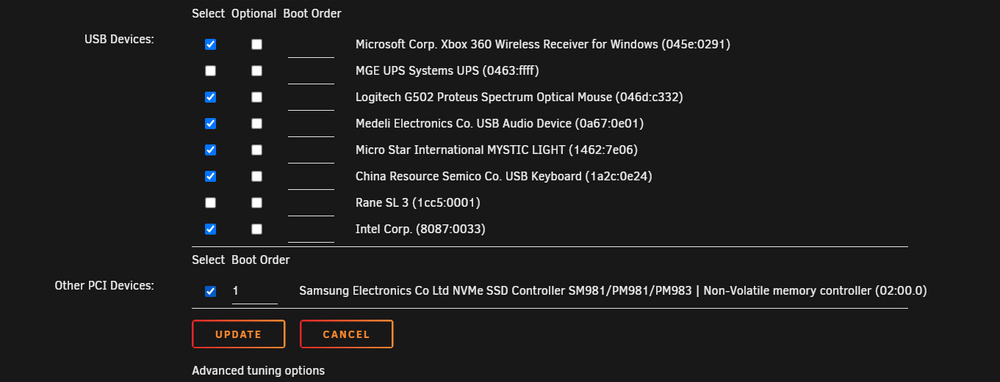
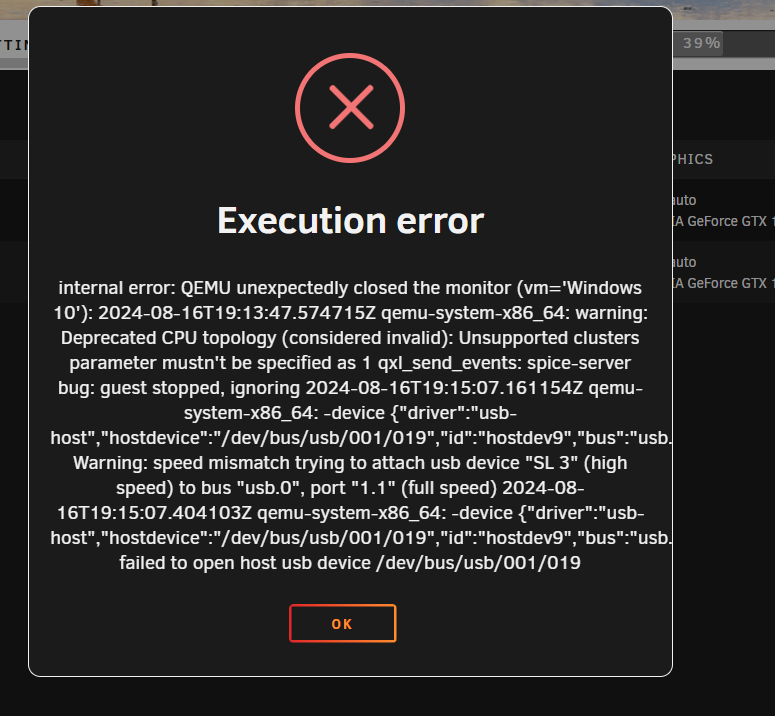
So this device is wont pass thru and cant get my VM to run with it and comes up with the following error message, how to fix please?
-
So Ive ran this now since then an seems fairly stable without xmp, thanks for the help please close this ticket.
-
Yeah it was, found out that issue is down to the ram and XMP profile causing issues which i now tested with xmp off and memtest is fine. So I am now just letting the system run and see if it randomly crashes again. Thanks again for your help so far!
-
Ok ,here you go. syslog.rar numserver-diagnostics-20240703-2004.zip
-
Here you go, all I did was start my win vm and unraid crashed again Unconfirmed 674128.crdownload Unconfirmed 405002.crdownload
-
So crashed about 35 mins ago, i had stopped the windows vm then clicked on an other tab and it crashed on me. numserver-diagnostics-20240702-0822.zip
-
So Ive replaced the SAS card, and those drive issues have gone away now,somenumserver-diagnostics-20240628-2325.zip so thanks for that. I am still getting VM crashes though, so I updated to the latest Unraid as there are meant to have VM improvements, but I can't have VM running, have Plex running and the dockers doing their late evening tasks.
-
So just failed parity again, all the drives came back fine when it took them out and checked them all in crystal disk These are the two assholes that are fighting me. Added new diags again just incase there's a change that you might notice. numserver-diagnostics-20240619-2217.zip

-
UUID: 27b890d1-1335-421c-afc6-7131a6ff851f Scrub started: Wed Jun 19 19:38:58 2024 Status: finished Duration: 0:12:23 Total to scrub: 2.61TiB Rate: 3.59GiB/s Error summary: csum=372 Corrected: 0 Uncorrectable: 372 Unverified: 0
-
Going take out my HDDs and and check the power connectors and sata connectors , also going to run them on crystal disk to see if there's any major issues. When I start my array Parity keeps failing at 0.1 with a read error then starts to run a read check on the drives, and when I cancel that it freezes. So ill do that and then run correcting scrub and let you know, thanks for the help so far. :)
-
3 Passes and no issues
-
Running Memtest now, 6 hours soak enough?
-
I've upgraded my system now. Ticket can be closed thanks.
-
Can someone please have a look over my diagnostics and see what I need to fix etc, thanks :) numserver-diagnostics-20240618-1619.zip
-
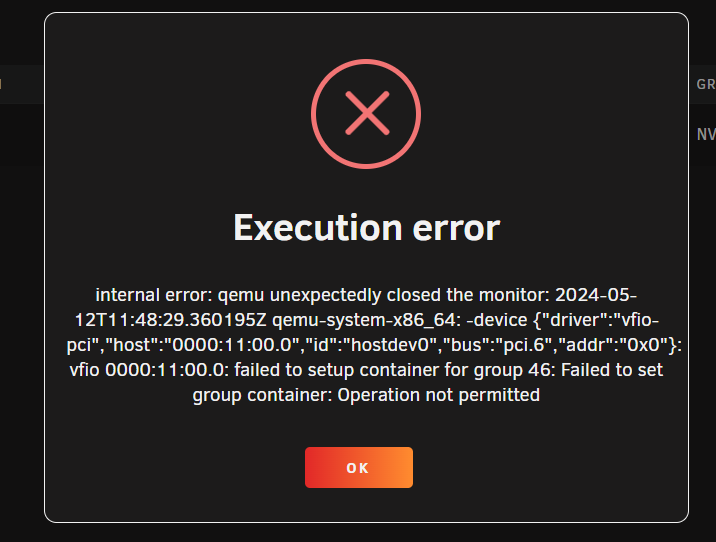
I have just managed to get the vm to boot without the error message, I left the soundcard part of the gpu disabled. This seem to be an issue related to HP servers, which of course I have. diagnostics-20240513-2058.zip
-
Help anyone
-
Help! Pulling my hair out, I don't have much left to begin with! <?xml version='1.0' encoding='UTF-8'?> <domain type='kvm'> <name>Fedora</name> <uuid>33325cf6-9657-df8f-e945-4f62f19efae8</uuid> <metadata> <vmtemplate xmlns="unraid" name="Fedora" icon="fedora.png" os="fedora"/> </metadata> <memory unit='KiB'>16777216</memory> <currentMemory unit='KiB'>16777216</currentMemory> <memoryBacking> <nosharepages/> </memoryBacking> <vcpu placement='static'>20</vcpu> <cputune> <vcpupin vcpu='0' cpuset='1'/> <vcpupin vcpu='1' cpuset='21'/> <vcpupin vcpu='2' cpuset='3'/> <vcpupin vcpu='3' cpuset='23'/> <vcpupin vcpu='4' cpuset='5'/> <vcpupin vcpu='5' cpuset='25'/> <vcpupin vcpu='6' cpuset='7'/> <vcpupin vcpu='7' cpuset='27'/> <vcpupin vcpu='8' cpuset='9'/> <vcpupin vcpu='9' cpuset='29'/> <vcpupin vcpu='10' cpuset='11'/> <vcpupin vcpu='11' cpuset='31'/> <vcpupin vcpu='12' cpuset='13'/> <vcpupin vcpu='13' cpuset='33'/> <vcpupin vcpu='14' cpuset='15'/> <vcpupin vcpu='15' cpuset='35'/> <vcpupin vcpu='16' cpuset='17'/> <vcpupin vcpu='17' cpuset='37'/> <vcpupin vcpu='18' cpuset='19'/> <vcpupin vcpu='19' cpuset='39'/> </cputune> <os> <type arch='x86_64' machine='pc-q35-7.2'>hvm</type> <loader readonly='yes' type='pflash'>/usr/share/qemu/ovmf-x64/OVMF_CODE-pure-efi.fd</loader> <nvram>/etc/libvirt/qemu/nvram/33325cf6-9657-df8f-e945-4f62f19efae8_VARS-pure-efi.fd</nvram> </os> <features> <acpi/> <apic/> </features> <cpu mode='host-passthrough' check='none' migratable='on'> <topology sockets='1' dies='1' cores='10' threads='2'/> <cache mode='passthrough'/> </cpu> <clock offset='utc'> <timer name='rtc' tickpolicy='catchup'/> <timer name='pit' tickpolicy='delay'/> <timer name='hpet' present='no'/> </clock> <on_poweroff>destroy</on_poweroff> <on_reboot>restart</on_reboot> <on_crash>restart</on_crash> <devices> <emulator>/usr/local/sbin/qemu</emulator> <disk type='file' device='disk'> <driver name='qemu' type='raw' cache='writeback'/> <source file='/mnt/cache/domains/Fedora/vdisk1.img'/> <target dev='hdc' bus='virtio'/> <serial>vdisk1</serial> <boot order='1'/> <address type='pci' domain='0x0000' bus='0x03' slot='0x00' function='0x0'/> </disk> <disk type='block' device='disk'> <driver name='qemu' type='raw' cache='writeback'/> <source dev='/dev/disk/by-id/ata-TCSUNBOW_X3_1TB_2019081300462'/> <target dev='hdd' bus='virtio'/> <serial>vdisk2</serial> <address type='pci' domain='0x0000' bus='0x04' slot='0x00' function='0x0'/> </disk> <disk type='block' device='disk'> <driver name='qemu' type='raw' cache='writeback'/> <source dev='/dev/disk/by-id/ata-X12_SSD_1TB_2022111700118'/> <target dev='hde' bus='virtio'/> <serial>vdisk3</serial> <address type='pci' domain='0x0000' bus='0x05' slot='0x00' function='0x0'/> </disk> <disk type='file' device='cdrom'> <driver name='qemu' type='raw'/> <source file='/mnt/user/isos/bazzite-nvidia-stable.iso'/> <target dev='hda' bus='sata'/> <readonly/> <boot order='2'/> <address type='drive' controller='0' bus='0' target='0' unit='0'/> </disk> <controller type='usb' index='0' model='ich9-ehci1'> <address type='pci' domain='0x0000' bus='0x00' slot='0x07' function='0x7'/> </controller> <controller type='usb' index='0' model='ich9-uhci1'> <master startport='0'/> <address type='pci' domain='0x0000' bus='0x00' slot='0x07' function='0x0' multifunction='on'/> </controller> <controller type='usb' index='0' model='ich9-uhci2'> <master startport='2'/> <address type='pci' domain='0x0000' bus='0x00' slot='0x07' function='0x1' multifunction='on'/> </controller> <controller type='usb' index='0' model='ich9-uhci3'> <master startport='4'/> <address type='pci' domain='0x0000' bus='0x00' slot='0x07' function='0x2'/> </controller> <controller type='pci' index='0' model='pcie-root'/> <controller type='pci' index='1' model='pcie-root-port'> <model name='pcie-root-port'/> <target chassis='1' port='0x8'/> <address type='pci' domain='0x0000' bus='0x00' slot='0x01' function='0x0' multifunction='on'/> </controller> <controller type='pci' index='2' model='pcie-root-port'> <model name='pcie-root-port'/> <target chassis='2' port='0x9'/> <address type='pci' domain='0x0000' bus='0x00' slot='0x01' function='0x1'/> </controller> <controller type='pci' index='3' model='pcie-root-port'> <model name='pcie-root-port'/> <target chassis='3' port='0x12'/> <address type='pci' domain='0x0000' bus='0x00' slot='0x02' function='0x2'/> </controller> <controller type='pci' index='4' model='pcie-root-port'> <model name='pcie-root-port'/> <target chassis='4' port='0x13'/> <address type='pci' domain='0x0000' bus='0x00' slot='0x02' function='0x3'/> </controller> <controller type='pci' index='5' model='pcie-root-port'> <model name='pcie-root-port'/> <target chassis='5' port='0x14'/> <address type='pci' domain='0x0000' bus='0x00' slot='0x02' function='0x4'/> </controller> <controller type='pci' index='6' model='pcie-root-port'> <model name='pcie-root-port'/> <target chassis='6' port='0x15'/> <address type='pci' domain='0x0000' bus='0x00' slot='0x02' function='0x5'/> </controller> <controller type='pci' index='7' model='pcie-root-port'> <model name='pcie-root-port'/> <target chassis='7' port='0x16'/> <address type='pci' domain='0x0000' bus='0x00' slot='0x02' function='0x6'/> </controller> <controller type='virtio-serial' index='0'> <address type='pci' domain='0x0000' bus='0x02' slot='0x00' function='0x0'/> </controller> <controller type='sata' index='0'> <address type='pci' domain='0x0000' bus='0x00' slot='0x1f' function='0x2'/> </controller> <interface type='bridge'> <mac address='52:54:00:8e:da:47'/> <source bridge='br0'/> <model type='virtio-net'/> <address type='pci' domain='0x0000' bus='0x01' slot='0x00' function='0x0'/> </interface> <serial type='pty'> <target type='isa-serial' port='0'> <model name='isa-serial'/> </target> </serial> <console type='pty'> <target type='serial' port='0'/> </console> <channel type='unix'> <target type='virtio' name='org.qemu.guest_agent.0'/> <address type='virtio-serial' controller='0' bus='0' port='1'/> </channel> <input type='tablet' bus='usb'> <address type='usb' bus='0' port='1'/> </input> <input type='mouse' bus='ps2'/> <input type='keyboard' bus='ps2'/> <audio id='1' type='none'/> <hostdev mode='subsystem' type='pci' managed='yes'> <driver name='vfio'/> <source> <address domain='0x0000' bus='0x11' slot='0x00' function='0x0'/> </source> <address type='pci' domain='0x0000' bus='0x06' slot='0x00' function='0x0' multifunction='on'/> </hostdev> <hostdev mode='subsystem' type='pci' managed='yes'> <driver name='vfio'/> <source> <address domain='0x0000' bus='0x11' slot='0x00' function='0x1'/> </source> <address type='pci' domain='0x0000' bus='0x07' slot='0x00' function='0x1'/> </hostdev> <memballoon model='none'/> </devices> </domain>
-
02:28:22 PM PostgreSQL Database directory appears to contain a database; Skipping initialization 12/18/2023 02:28:22 PM 12/18/2023 02:28:22 PM 2023-12-18 14:28:22.408 GMT [1] LOG: starting PostgreSQL 15.5 (Debian 15.5-1.pgdg120+1) on x86_64-pc-linux-gnu, compiled by gcc (Debian 12.2.0-14) 12.2.0, 64-bit 12/18/2023 02:28:22 PM 2023-12-18 14:28:22.408 GMT [1] LOG: listening on IPv4 address "0.0.0.0", port 5432 12/18/2023 02:28:22 PM 2023-12-18 14:28:22.408 GMT [1] LOG: listening on IPv6 address "::", port 5432 12/18/2023 02:28:22 PM 2023-12-18 14:28:22.422 GMT [1] LOG: listening on Unix socket "/var/run/postgresql/.s.PGSQL.5432" 12/18/2023 02:28:22 PM 2023-12-18 14:28:22.438 GMT [30] LOG: database system was shut down at 2023-12-18 14:28:19 GMT 12/18/2023 02:28:22 PM 2023-12-18 14:28:22.459 GMT [1] LOG: database system is ready to accept connections 12/18/2023 02:33:22 PM 2023-12-18 14:33:22.535 GMT [28] LOG: checkpoint starting: time 12/18/2023 02:33:27 PM 2023-12-18 14:33:27.023 GMT [28] LOG: checkpoint complete: wrote 48 buffers (0.3%); 0 WAL file(s) added, 0 removed, 0 recycled; write=4.416 s, sync=0.053 s, total=4.488 s; sync files=13, longest=0.005 s, average=0.005 s; distance=209 kB, estimate=209 kB 12/18/2023 02:38:22 PM 2023-12-18 14:38:22.053 GMT [28] LOG: checkpoint starting: time 12/18/2023 02:38:26 PM 2023-12-18 14:38:26.834 GMT [28] LOG: checkpoint complete: wrote 48 buffers (0.3%); 0 WAL file(s) added, 0 removed, 1 recycled; write=4.713 s, sync=0.049 s, total=4.782 s; sync files=15, longest=0.004 s, average=0.004 s; distance=245 kB, estimate=245 kB 12/18/2023 02:43:22 PM 2023-12-18 14:43:22.935 GMT [28] LOG: checkpoint starting: time 12/18/2023 02:43:27 PM 2023-12-18 14:43:27.413 GMT [28] LOG: checkpoint complete: wrote 45 buffers (0.3%); 0 WAL file(s) added, 0 removed, 0 recycled; write=4.414 s, sync=0.039 s, total=4.479 s; sync files=12, longest=0.004 s, average=0.004 s; distance=218 kB, estimate=243 kB 12/18/2023 02:48:22 PM 2023-12-18 14:48:22.489 GMT [28] LOG: checkpoint starting: time 12/18/2023 02:48:26 PM 2023-12-18 14:48:26.971 GMT [28] LOG: checkpoint complete: wrote 45 buffers (0.3%); 0 WAL file(s) added, 0 removed, 0 recycled; write=4.414 s, sync=0.050 s, total=4.483 s; sync files=12, longest=0.016 s, average=0.005 s; distance=229 kB, estimate=241 kB 12/18/2023 02:53:23 PM 2023-12-18 14:53:23.067 GMT [28] LOG: checkpoint starting: time 12/18/2023 02:53:27 PM 2023-12-18 14:53:27.847 GMT [28] LOG: checkpoint complete: wrote 48 buffers (0.3%); 0 WAL file(s) added, 0 removed, 0 recycled; write=4.714 s, sync=0.049 s, total=4.781 s; sync files=15, longest=0.004 s, average=0.004 s; distance=227 kB, estimate=240 kB 12/18/2023 02:58:23 PM 2023-12-18 14:58:23.900 GMT [28] LOG: checkpoint starting: time 12/18/2023 02:58:28 PM 2023-12-18 14:58:28.369 GMT [28] LOG: checkpoint complete: wrote 45 buffers (0.3%); 0 WAL file(s) added, 0 removed, 0 recycled; write=4.413 s, sync=0.039 s, total=4.470 s; sync files=12, longest=0.004 s, average=0.004 s; distance=232 kB, estimate=239 kB 12/18/2023 03:03:23 PM 2023-12-18 15:03:23.430 GMT [28] LOG: checkpoint starting: time 12/18/2023 03:03:27 PM 2023-12-18 15:03:27.896 GMT [28] LOG: checkpoint complete: wrote 45 buffers (0.3%); 0 WAL file(s) added, 0 removed, 0 recycled; write=4.412 s, sync=0.037 s, total=4.467 s; sync files=12, longest=0.005 s, average=0.004 s; distance=224 kB, estimate=238 kB 12/18/2023 03:08:23 PM 2023-12-18 15:08:23.996 GMT [28] LOG: checkpoint starting: time 12/18/2023 03:08:28 PM 2023-12-18 15:08:28.966 GMT [28] LOG: checkpoint complete: wrote 49 buffers (0.3%); 0 WAL file(s) added, 0 removed, 0 recycled; write=4.715 s, sync=0.188 s, total=4.970 s; sync files=15, longest=0.019 s, average=0.013 s; distance=241 kB, estimate=241 kB 12/18/2023 03:13:24 PM 2023-12-18 15:13:24.012 GMT [28] LOG: checkpoint starting: time 12/18/2023 03:13:28 PM 2023-12-18 15:13:28.480 GMT [28] LOG: checkpoint complete: wrote 45 buffers (0.3%); 0 WAL file(s) added, 0 removed, 0 recycled; write=4.412 s, sync=0.038 s, total=4.468 s; sync files=12, longest=0.004 s, average=0.004 s; distance=210 kB, estimate=238 kB 12/18/2023 03:18:24 PM 2023-12-18 15:18:24.565 GMT [28] LOG: checkpoint starting: time 12/18/2023 03:18:29 PM 2023-12-18 15:18:29.032 GMT [28] LOG: checkpoint complete: wrote 45 buffers (0.3%); 0 WAL file(s) added, 0 removed, 0 recycled; write=4.412 s, sync=0.038 s, total=4.468 s; sync files=12, longest=0.004 s, average=0.004 s; distance=234 kB, estimate=238 kB 12/18/2023 03:23:24 PM 2023-12-18 15:23:24.132 GMT [28] LOG: checkpoint starting: time 12/18/2023 03:23:29 PM 2023-12-18 15:23:29.090 GMT [28] LOG: checkpoint complete: wrote 50 buffers (0.3%); 0 WAL file(s) added, 0 removed, 0 recycled; write=4.914 s, sync=0.028 s, total=4.959 s; sync files=15, longest=0.004 s, average=0.002 s; distance=239 kB, estimate=239 kB 12/18/2023 03:28:24 PM 2023-12-18 15:28:24.190 GMT [28] LOG: checkpoint starting: time 12/18/2023 03:28:28 PM 2023-12-18 15:28:28.658 GMT [28] LOG: checkpoint complete: wrote 45 buffers (0.3%); 0 WAL file(s) added, 0 removed, 0 recycled; write=4.414 s, sync=0.038 s, total=4.469 s; sync files=12, longest=0.004 s, average=0.004 s; distance=230 kB, estimate=238 kB 12/18/2023 03:33:24 PM 2023-12-18 15:33:24.758 GMT [28] LOG: checkpoint starting: time Had next cloud runing for a couple of weeks fine with postgres. Then I wanted to add my first user. Try to log in and next cloud wont respond and then this error message in postgres, Only thing I can think of if there might of been an update from 15.4 to 15.5. Not sure, as last time I had to delete the lot an start over. and I gave up on nextcloud. Help please!
-
Help



