





Starkiller
Members
-
Joined
-
Last visited
Everything posted by Starkiller
-
Now that I've moved the data from the small disks to the larger disk, I want to put the small disks out of my system. Is this the correct procedure? https://docs.unraid.net/unraid-os/using-unraid-to/manage-storage/array/removing-disks-from-array/#removing-data-disks
-
I've got 1 parity disk and 10 data disks in my system right now. Amongst those 10 data disks, I've got 1 x 2TB disk and 3 x 3TB disks. I've bought a new 18TB disk, as my parity disk is also 18TB. My goal is to replace those 1 x 2TB and 3 x 3TB disks with my new 18TB disk. This is the first time that I'ld like to replace multiple smaller disks by one larger disk. What's the easiest/fastest way to do this? I've searched for information but I've found a lot of different answers so not sure what to do. Thanks in advance for your help.
-
Server is running again. Will have a look at the "minimum free" set
-
BIOS doesn't detect it so probably a dead disk. As it has been a while that I've added a new drive, is this still the correct way to replace the failed disk? 1. Stop the array 2. Unassign the old drive if still assigned (to unassign, set it to No Device) 3. Power down -> These steps have already been done as I've shutdown the system. 4. [ Optional ] Pull the old drive (you may want to leave it installed for Preclearing or testing) 5. Install the new drive 6. Power on 7. Assign the new drive in the slot of the old drive 8. Go to the Main → Array Operation section 9. Put a check in the Yes, I'm sure checkbox (next to the information indicating the drive will be rebuilt), and click the Start button 10. The rebuild will begin, with hefty disk activity on all drives, lots of writes on the new drive and lots of reads on all other drives
-
Thanks for the reply. Tried several cables but no luck. Everytime when I restart disk 9 mentions "no device". Will probably order some new cables as I've had no luck with the ones I have.
-
Came home after work today and found my server making a bit more noice than normally. When looking at my dashboard I've noticed that disk 9 was disabled and that the contents were being emulated as well that I should spin down my disk 9. Before doing anything, I prefer to have your input about what I should do next.toschestation-diagnostics-20250318-2158.ziptoschestation-smart-20250318-1356.zip
-
Now that everything is back up and running, the filesystems have been changed to xfs and my 10TB and 18TB disk have been added I would like to thank @JorgeB and @trurl for all your help!!! Much appreciated!
-
Don't ask me how but I've tried my luck again this evening and Unraid finally detected the 10TB disk. I'm letting Unraid run the disk clear for that 10TB disk now. After that I'll try my luck again with the 18TB disk.
-
Yes, I know but what I don't understand is when I follow the replace disk procedure Unraid doesn't detect my 10TB disk as a new unassigned device. With the 3TB disk Unraid detects it immediately.
-
I've got no VMs, just one docker (Emby) but that one is stopped.
-
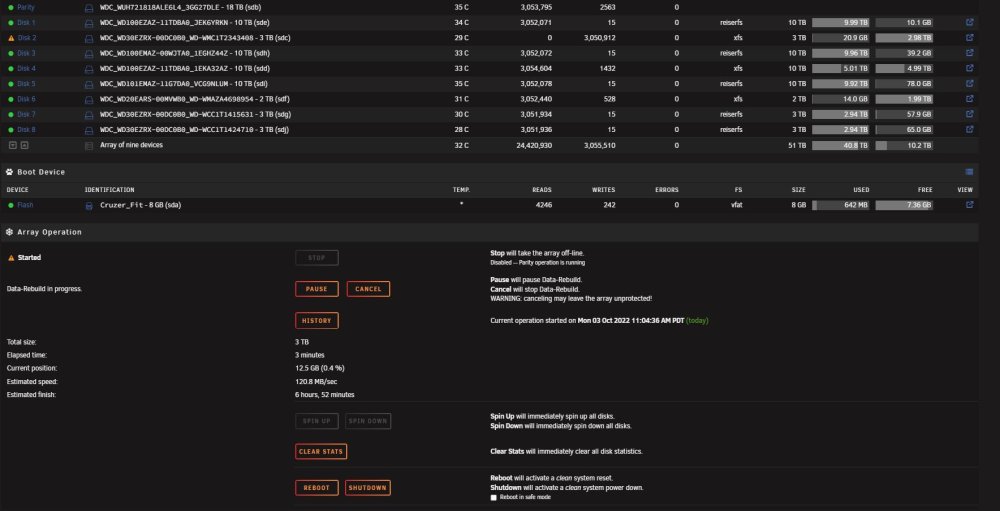
After having shut down, with the 10TB disk still connected (but not detected by Unraid), I connected the 3TB disk again and rebooted. It detected the old 3TB as a new disk and asked to do a data-rebuild. So this is now running. Is this data rebuild necessary knowing that the data from old 3TB disk was formatted to XFS earlier? It's not the first time I've changed disks. This server has been running for almost a decade and now all of a sudden nothing than troubles :s toschestation-diagnostics-20221003-2009.zip
-
Man I'm really getting fed up with all these problems. As told, yesterday I've put the old 3TB disk back, as Unraid didn't wanted to boot with the new 18TB disk. As I knew Unraid booted with the old 10TB data disk (which was previously my parity disk and replaced by another 18TB disk) I decided to replace the 3TB disk with the old 10TB disk. I followed these steps: 1. Stop the array 2. Unassign the old 3TB drive if still assigned (to unassign, set it to No Device) 3. Power down 4. Connected the cables from the 3TB drive to my 10TB drive 5. Power on After that, Unraid tells me the 3TB disk is missing. However, it doesn't mention the 10TB disk. So I can't assign it to the slot of the old 3TB disk. Am I missing something? My goal was to change already the 3TB disk with a 10TB disk before dealing with that new 18TB disk.
-
When connecting the new 18TB disk, I can get into the LSI BIOS but not in the motherboard BIOS. After exiting the LSI BIOS I get the black screen with B2 in the lower right corner. When connecting my old 10TB disk (which served previously as the parity disk and was replaced by another 18TB disk) I can get into the LSI BIOS as well as the motherboard BIOS and Unraid boots. So my guess is the new 18TB is causing the problem. I've tried connecting it to a SATA port on the motherboard and by connecting it to the LSI board. No matter what I do, with the new 18TB disk the system doesn't boot. Any clues as what could cause this? My new 18TB disk as well as my 18TB parity disk are the same type WD 18TB ultrastar dc hc550 disks.
-
As I can't find the server in my network, my guess is it won't boot into Unraid. If it would boot I should be able to see the server in my network. Or not?
-
Unfortunately I can't see anything, except for the black screen with that B2. Some days ago I've updated to the latest version of Unraid but there weren't any problems when shutting down/rebooting the server. Except for yesterday, just after I swapped disks. Would it be a BIOS problem with the motherboard or the LSI board?
-
So just when I tought I was almost done with everything, a new problem occured. After changing 2 disks from reiserfs to xfs and transfering files to another disk, I replaced one of two older disks by a newer/bigger disk. I follow the WIKI procedure for this. After having shut down the server, swapping the old with the new disk, I tried rebooting the server. Unfortunately withouw any luck as the server couldn't be found in my network. After hooking up the server to a screen a can only see a black screen with in the right corner below B2. I've already tried various USB ports without any luck. Should I make a back-up of the files on the USB and then put a new build on the USB? Or are there other steps before doing this? Couldn't find any topics about this B2 message (except for Backblaze B2 topics).
-
Did that and looking good now. Speed is at 120mb/sec (much better than the 1mb I had two days ago). After parity sync is done adding new disks and changing the file system.
-
Yes, I've got 2 Molex to Sata splitters. I think I'm better of finding a PSU with at least 9 SATA power connectors (if that should exist). At the moment, I've changed the SATA data cables for disk 1 and 3. Booted the server and the array and parity-sync started immediately at 2.9GB/sec. That's the good news. The bad news is that for disk 3 Unraid gives me a red cross (device disabled - contents emumated) - unmountable: wrong or no file system. How is this possible? Before changing the cables there wasn't anything with the file system and now, after changing the SATA data cable this... For the moment, I've paused parity sync. toschestation-diagnostics-20220923-1511.zipYes, some of theme have latching SATA cables. Never had problems with those in the past and wasn't aware that this could be a problem with WD drives. I'll guess I'll order some non-latching ones. None of the SATA cables are bundled and they have enough space to sit correct on the connector.Have started this but speed seems very slow unfortunately (1MB/sec at max for the moment). Dashboard shows UMDA CRC errors on several disks. As I've already replaced the motherboard, processor and cables my only guess is that replacing the PSU might solve the problem? toschestation-diagnostics-20220921-2041.zipSo for now, what should I do? Stop the array and add parity again and I'm good to go? If so, what are the steps to convert the filesystem of the existing disks as they are still in reiserfs now. After that I´ll replace 2 existing data disks with a new 18TB and 10TB disk.I'm good. Most of it were movies that can be recovered as I've got the original disks. The important things were back upped on a regular base.toschestation-diagnostics-20220920-1924.zip
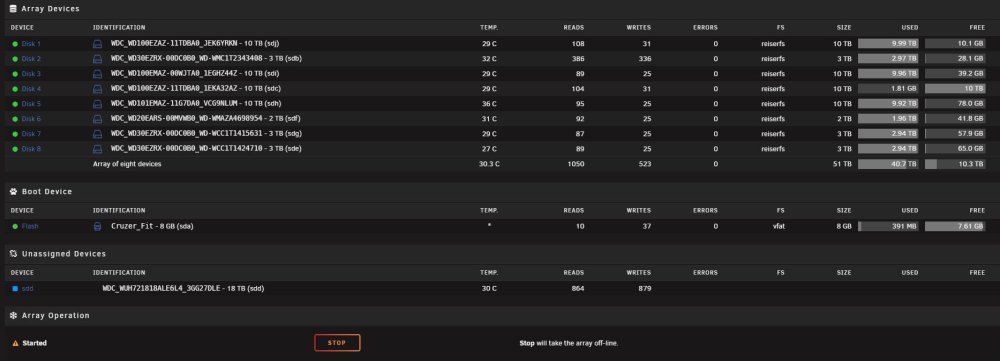 I've got backups from the things that matter. So if I'm correct I assign 32AZ to disk 4 and unassign my parity disk and then go to Tools > New Config?



