





Starkiller
Members
-
Joined
-
Last visited
Everything posted by Starkiller
-
Hmmm can't find it which is logic as Unraid and Community Applications aren't up-to-date. I guess it's ok to update them first, so that I can install Unassigned Devices?
-
Yes and no, I haven't formatted it.
-
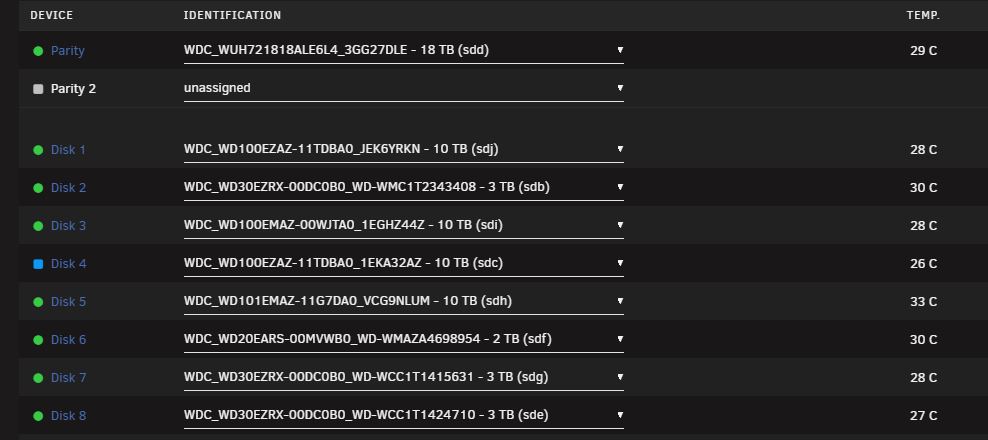
Not sure what happened with disk 4. That disk was also almost full :s Hence the reason why I've changed my parity to replace one of the data disks with an 18th in the end.
-
toschestation-diagnostics-20220918-1935.zip

-
toschestation-diagnostics-20220918-1715.zip

-
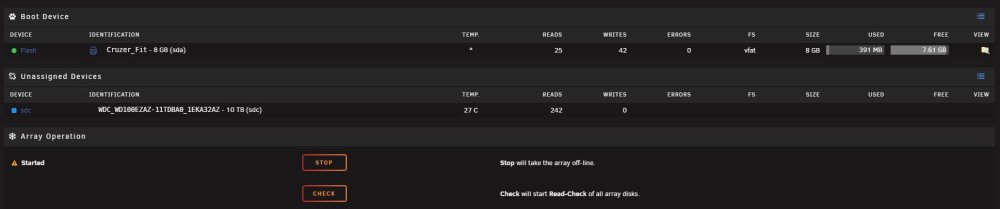
Ok so after replacing a lot of cables I can see all my disks again, even the disabled one. I haven't started the array as Unraid tells me that the disabled disk is a new device. Do I continue by starting the array and putting the diagnostics here? Or should I do something else?
-
toschestation-diagnostics-20220916-1555.zip
-
Did that. All disks, except for disk 4 that is still unassigned/undetected, are available. toschestation-diagnostics-20220916-1424.zip
-
The controller card sees the parity disk, disk 1 and disk 3 but not the disabled disk. Unraid sees only the parity disk and disk 3 and tells me that disk 1 is missing. For the disabled disk it says unassigned. What's the reason why the controller card sees 3 disks and Unraid only 2?
-
toschestation-diagnostics-20220916-1248.zip
-
1st try: New SAS > SATA cable -> detected only 1 disk (my parity disk) 2nd try: Old SAS > SATA cable + two 1 MOLEX > 2 SATA power cables -> detected 3 disks (parity disk, disk 1 and disk 3) After the 2nd try, I rebooted the server to see what Unraid would tell me. Parity disk can be seen as well as disk 3. Disk 1 is missing according to Unraid. Disk 4 is unassigned (which is logic as the controller card couldn't detect it as well). So what should I do next? syslog.txt
-
Didn't run xfs_repair
-
Attached the syslog. Disk 1, 3 and 4 are connected to the LSI controller card (it's brand new as well as the SAS>SATA cable) syslog.txt
-
After having checked the cables, the problem was still there and on top of all there was a power cut in our street. After that I rebooted the server but the problem with disk 4 being disabled was still there and on top of it disk 3 was missing. As I've had problems in the past with SATA cables and SASLP controllers aren't recommended, I've replaced the motherboard, all sata cables and the controller card (I'm using an LSI 9207-8i now). The only thing that wasn't replaced is the PSU. Right now I have disk 1 and 3 missing and disk 4 unassigned (disk 4 isn't even being detected as a device). What should I do now? I've read a lot about Tools -> New Config -> Retain current configuration: All -> Apply but I'm not sure if this is the way to go... I also got the message stale configuration. Should I run a file check of the USB stick first? I've also tried to run the diagnostics tool but this has been running for more than 30 minutes now without any luck to download the diagnostics. Is this caused by the stale configuration?
-
I've shutdown the server and started it again. My guess is there are some problems with the sata cables and or sata connections on the motherboard as after starting the server another disk was also missing. Now I'm back with only disk 4 having a red cross. Unraid tells me now that disk 4 is unmountable. Do I run xfs_repair without -n first now? toschestation-diagnostics-20220825-1049.zip
-
Disk 4 in my Unraid setup has a red cross and is disabled. According to the information in the Unraid dashboard, the disk is healthy although there were a lot of errors during parity rebuild. Before doing anything I prefer to have input of the specialists in here In attachment the diagnostics report. Optional question: My system is still in reiserfs. What are the steps to change it? toschestation-diagnostics-20220824-1038.zip


