





Eric Hollebone
Members
-
Joined
-
Last visited
-
On betas v7.1.0b2-4, the GUI stops working after a day or so. Fir v7.10b2 and b3, its usually happens in less than 24 hours. Where v7.10b4 the GUI crashes within 2-3 days. I can still ssh in to the machine but can't get any diagnostics due to fastCGI/php-fm failures. root@renfrew-unraid:~# diagnostics -bash: diagnostics: command not found I have included the diagnostics from a few days before when there are no issues in order to provide a picture of the configuration and I have made a zip of the /var/logs folder when the GUI problem occurs. From the logs, it looks like php-fm has failed. This is just a typical log entry; it's not specific to the unassigned devices plugin; it's just that I picked that plugin demonstration for this report. All scripts running via php-fm don't work Apr 11 16:36:29 renfrew-unraid nginx: 2025/04/11 16:36:29 [error] 44835#44835: *1585571 FastCGI sent in stderr: "Primary script unknown" while reading response header from upstream, client: 127.0.0.1, server: , request: "POST /plugins/unassigned.devices/include/UnassignedDevices.php HTTP/1.1", upstream: "fastcgi://unix:/var/run/php-fpm.sock:", host: "localhost", referrer: "http://localhost/Main" I have tried restarting both nginx and php-fm in all combinations and it does not help. The only option is to stop the array and then reboot. Any guidance would be helpful at this point, I don't know where to look next. logs.zip renfrew-unraid-diagnostics-20250408-0943.zip
-
Based upon your description, is this a bug then? Because for me, branch is always set to "Stable" when the page is initially loads and I manually switch it to check. I would rather it be set to always be forward looking as either "Next" or "beta/rc". Really anything but "Stable"
-
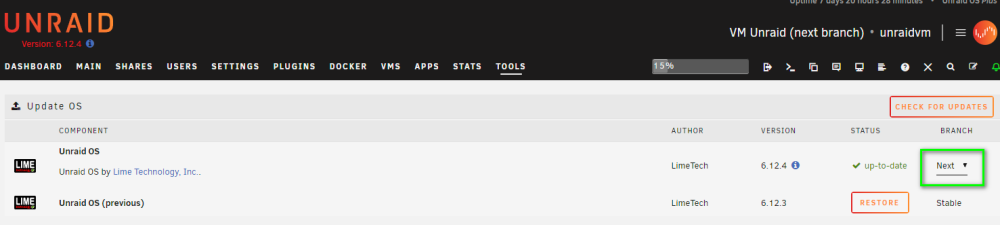
Hi Limetech, First, I am unsure if this is the right forum for this but didn't see a better fit. I hope this is a doable feature request to cover off a small inconvenience. Can a change be made so that users can set the desired branch in the Tools, Update OS tab and be remembered and checked based upon the user's preference instead of the currently installed OS? My use case is I run two instances of Unraid, a production server on the main branch and a virtualized Unraid (i.e.Unraid on Unraid) on the next branch for testing. For my test version of Unraid, I would like it to be set and updated to the "Next" branch all the time. If this isn't clear, I'm happy to expand on idea.
-
after upgrading to 6.10.1, in about 12 hours the CPU is overloaded and consumed by by a whole lot of /usr/bin/php -q /usr/local/emhttp/webGui/nchan/update_<#> processes. - restarting ngnix via /etc/rc.d/rc.nginx restart buys some temporary relief but only for a few minutes diagnostics and htop picture attached. System was stable and operating nominally using 6.9.2 renfrew-unraid-diagnostics-20220525-0935.zip
