





lewcass
Members
-
Joined
-
Last visited
Everything posted by lewcass
-
No individual owns the right or duty to maintain this script or the earlier versions it is based on. These scripts have gradually been built upon with contributions by various users. Bagpuss's version is, imo, by far the clearest and most comprehensive. However he appears to have other demands on his time lately, not having posted on the forum since September. I've made a few changes to his script to suit my needs and shared them because it appeared there were other users who could benefit. Similarly there is no reason for you not to feel free to make any improvements you wish and also share those with the community.
-
4. In main you have this line I imagine this will spam the logfile since it's called every 60s. Perhaps it would make sense to extend the $ticklengthSecs during the noCountdownHours? Or even better, calculate the expiration time of noCountdownHours and use this for ticklength. 1. You need to put each hour there, as per bagpuss's comment. 2. Just a fail safe convention in case someone edits the script with a DOS type editor. Not needed otherwise. 3. Those are edits I made to bagpuss's script. Attached is a cleaned up version from which I've removed the stuff I added for testing when it wouldn't work for me due to the issue I encountered with bwmonitor loaded by Simple Features. Use bwm included with unMENU. 4. Just turn off logging. It's only needed for debugging. Attached version has logging disabled. The attached version also includes this change, which appears to finally have cured my issue with the server occasionally sleeping while I was playing music. noTCP=700 ##what constitutes absence of TCP activity (1024 equals 1KB/s) #- bagpuss default 9000. On my LAN requires 700 to not sleep prematurely. I hope that's got you covered now. auto_s3_sleep.zip
-
No, the line in the GO script is simply telling the auto_s3_sleep script to run in the background (not visible in the console). Changing the + value there only delays when the script begins to execute. You want to edit this portion in the configuration section of the auto_s3 script. # before going to sleep intrnlTimeoutTicks=5 # ticks after HDD spindown before checking for external activity extrnlTimeoutTicks=1 # ticks of no external activity before sleep; only after spindown+internal countdown e.g., change to extrnlTimeoutTicks=10 for a ten minute delay instead of one.
-
There is a provision in the script to ping the ip(s) of computer(s) on the LAN and not sleep if any of those ips are pingable. For this to work you would need to assign a fixed ip to the computer(s) you want the script to check for. For a media player this won't work properly if the media player maintains it's network connection even while "sleeping". This is the case with my WDTV Live. It that situation the media player is always ping-able, so the script would never find a condition that would allow it to sleep.
-
Here is the code I use in "go" to run the script in the background. (It's been a long time but I believe this is per the original wiki article). # Execute auto_s3_sleep.sh sleep script fromdos < /boot/custom/bin/auto_s3_sleep.sh | at now + 1 minute Note that the script needs to be located in the sub-directory it is being executed from, in this case /custom/bin/.
-
I've received pms and seen multiple new threads with questions about S3 sleep with version 5. So bringing this thread back up to post a revised version of Bagpuss's comprehensive S3 script with the changes for unRAID v5 mentioned in my post above: Changed sleep command to echo -n mem > /sys/power/state and logs to v5 directory structure. Also note that, as I reported above, for this to work the bwm-ng version included with unMenu must be running. It would not work for me earlier with SimpleFeatures bwm-ng. Script has been working OK for me on my v5 test rig, but my v4 production server still is occasionally falling asleep when it should be serving music. I have the noTCP variable set all the way down to '1024' and it still is happening. If it continues now that I've recently upgraded that rig to unRAIDServer-5.0-i386, I guess I'll have to get around to some serious trouble-shooting. Interested in hearing if anyone else is having this problem. auto_s3_sleep.zip
-
OK I finally got the auto_sleep_s3 to work with unRAID 5.0rc11. It appears that the installation of bwm-ng by Simple Features was the issue. Once I installed unMENU and loaded the bwm-ng package from there, the sleep script was able to function correctly while running in the background. So the issue probably has nothing to do with release 5. The script worked with my release 4 machine because it had unMENU's bwm-ng installation. It failed to work with my release 5 test machine only because I did not have the same bwm-ng installed.
-
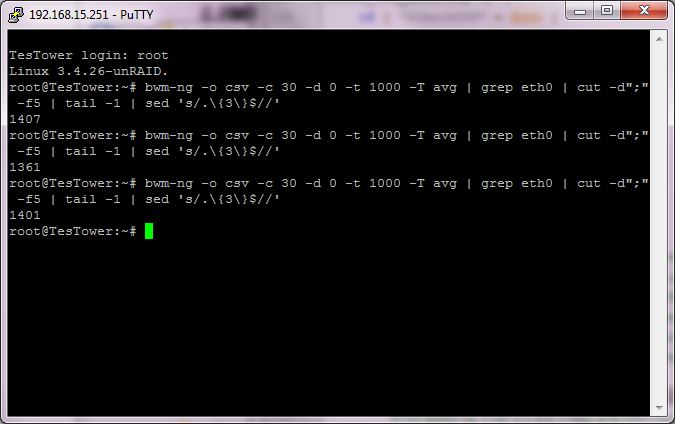
Following up to my previous post, I've spent a ton more time on this and determined definitively that the bwm-ng test for TCP activity does work with 5.0rc11 from a script running in the background, though it does work from the same script in a console or telnet session. Running in a background script the TCP=$(bwm-ng -o csv -c 30 -d 0 -t 1000 -T avg | grep eth0 | cut -d";" -f5 | tail -1 | sed 's/.\{3\}$//') returns nil. Running on the console or telnet session it returns an actual value reflecting network activity. (Hardware is FoxConn A7GM-S 2.0 with Gigabit LAN by Realtek RTL8111B / RTL8111D) The background methods I tested were: nohup /boot/custom/bin/auto_s3_sleep.sh & fromdos < /boot/custom/bin/auto_s3_sleep.sh | at now + 1 minute If any one understands why this is happening and how to fix it, please chime in. I've attached a quick and dirty test script isolating the bwm-ng code to make sure the problem was not caused by any of the logic within Bagpuss's auto_s3_sleep.sh. I also determined in my testing that the code Bagpuss is using to allow sleep even when a cache drive is active will not work properly when there is no cache drive enabled. In that case the check_HDD_activity code as written will always return HDDs=0, no active HDDs, and immediately initiate the rest of the sleep checks. Here is the inelegant brute force fix. ##Why does original auto_s3_sleep.sh script fail with no cache drive? ##From console echo `cat /proc/mounts | grep /mnt/cache | cut -d" " -f1 | cut -c 1-8` returns nil with no cache drive installed ##Then grep -v "$cache" does not work as intended. It should report all HDDs except cache and flash. ##Instead it returns nil so no hdparm is run and HDDs=0 even when it should not be. ##cache=`cat /proc/mounts | grep /mnt/cache | cut -d" " -f1 | cut -c 1-8` if [ $checkHDDs = $yes ] then # probe the flash drive at your peril ##HDDs=$((for d in $(ls /dev/[hs]d? | grep -v "$flash" | grep -v "$cache"); do hdparm -C $d | grep active ; done) | wc -l) HDDs=$((for d in $(ls /dev/[hs]d? | grep -v "$flash"); do hdparm -C $d | grep active ; done) | wc -l) ## Thanks for any assistance, I'm not going anywhere with unRAID 5 until I have a reliable sleep script. tcpcheck.zip
-
Thanks to Bagpuss for cleaning up my original amateur code for checking network activity. Now I know why it occasionally failed for me too! I've been away from unRAID for awhile but am now getting back into into things as I see version 5 is nearly ready for release. I have set up a test server to try it out. The Bagpuss auto_s3_sleep script works fine for me with my production server running release 4.6rc3, but it has not been working on my release 5rc11 test server, and I've been pulling my hair out trying to figure out why. Here is one issue that I've addressed. The sleep command from the original script echo 3 > /proc/acpi/sleep/ does not work with release 5. After reading around here I understand this echo -n mem > /sys/power/state is the answer. I manually confirmed it works via the terminal. But fixing this alone did not result in success. I also noticed that to conform with the logging conventions for release 5 and make the debugging log easily readable via Simple Features, it's best if the log is echoed to /var/log/scripts/auto_s3_sleep.log So I've made this change as well. Reviewing the log reveals that the script appears to not properly handle the network activity check on my release 5rc11 test server, and consequently the server never sleeps. The debug log always shows TCP Activity as null (no value): Wed Jan 30 15:59:51 EST 2013: TCP actvity (30 second average): {nothing} If I repeatedly check from the console at the same time the script is reporting nothing to the log, I will always see some activity. (And even if there actually were no activity I would expect the log to report 0, which it never does.) So the server never sleeps, apparently because the script never returns any value for $TCPact. The same script running on the release 4 server works fine, regularly logging values for $TCPact, and executing the sleep command when the value is appropriate. Unfortunately this never happens with the same script running on the release 5. Any help would be appreciated. auto_s3_sleeplog.txt
-
You should not stop the array before suspending. Yes. All drives will wake up when the server does. No. Windows is not smart enough to send a wake-on-LAN instruction to a sleeping attached network drive. You have to do it manually. Be nice if Microsoft had thought of that though. Might want to suggest it to them. Much more useful than, for example, their lame feature that increases the size of Windows you move to the edge of the screen.
-
You'll probably need to use s2ram to restore your video and nic states. There are plenty of posts throughout this thread on this issue. Search for s2ram to read them all but best place to start may be here with bubbaQ'a very helpful download: http://lime-technology.com/forum/index.php?topic=3657.msg70945;topicseen#msg70945
-
Nice useful topic. Posts would be even better if they included photos along with concise descriptions. That would help readers assess at a glance those enclosures they might be interested in following up on, rather than link clicking or googleing every post, with lower odds what they find is actually of interest to them.
-
Nice job, roastdawg. Well planned, executed, and presented. And the same case I used - looked very familiar at first glance.
-
I love it. UnRAID Minimalist. No noisy fans. Easy to swap out drives. What more could you need! Actually that's almost exactly how mine started out.
-
You should not combine both commands. s2ram takes the place of echo 3 > /proc/acpi/sleep Unless you have already tested them, those parameters (-f -p -s) may or may not work with your motherboard. It's better to test the parameter combinations from the console before building them into your script. This is explained here The best way to start investigating an unknown machine is probably ... s2ram -f if the first try already succeeds, everything is fine. ... If it doesn't, try the following variations: * s2ram -f -a 3 * s2ram -f -a 2 * s2ram -f -a 1 * s2ram -f -p -m * s2ram -f -p -s * s2ram -f -m * s2ram -f -s * s2ram -f -p * s2ram -f -a 1 -m * s2ram -f -a 1 -s If none of those combinations work, start again but add the "-v" switch.
-
If your BIOS has a setting similar to "Repost Video on S3 Resume", try setting it to Yes. Another possible solution is to use the program s2ram. See earlier discussion here. I do not any similiar choice as "...Video on S3 Resume" in BIOS. I am try press any key on keyboard server after wakeup from S3 state. Monitor stay in suspend mode. Server working fine but monitor connected to server not wakeup. Then, as I wrote above, you may be able to get it to work using s2ram. You'll also need the libx86 package. Forum member kricker has helpfully provided this along with s2ram. See this post in the discussion thread I linked for you above. If you need further help it would probably be better to continue your questions under that thread.
-
If your BIOS has a setting similar to "Repost Video on S3 Resume", try setting it to Yes. Another possible solution is to use the program s2ram. See earlier discussion here.
-
Good catch Joe. I don't rely on the ping check, myself, but I do recall now that when I tried it early on it didn't work, and I had two IPs entered. If you can spare some time please keep looking. Maybe there is something else simple like that has been causing my intermittent unintended sleep while playing music.
-
That's OK. I haven't been incorrect about anything myself, for let's see now... 5 minutes?
-
Yes, you do need to set the line to have it check the TCP/IP activity. So, set the IP addresses AND set # control of external timeout checkTCP=$yes # check for TCP activity Are you sure Joe? It looks to me as though the two routines are separate. I think all he needs to do for check_IP_status to run is to include the IP numbers.
-
I'm far from the best person to answer this, that's why I was looking for an article in the wiki on scripting issues that I thought I remembered reading before answering. But I couldn't find it, so here's my meager understanding until someone who knows better can explain it better. Basically IIRC linux and DOS/Windows treat text files differently in how each line is terminated. Windows uses a carriage return character, whereas linux uses a line feed. Having a carriage return at the end of a line in a linux bash script will normally mess things up. However there is a linux command that will allow you to run a script with Windows formatting. Also IIRC there should never be a line feed or any other terminator at the end of the last line of the script. It should only contain done. You can check for the presence of these characters and other invisible formatting characters using most text editors. e.g., in Notepad ++ you select View / Show Symbol.
-
Yes. The only change from ReneV's script is an increase in the bwm-ng average span from 30 sec default to 120 sec. This change probably won't make any noticeable difference in practice, and if it does, should not be harmful.
-
Thanks Rene, I think you're onto something. I found that somehow the version of your script that I had modified, and was using, had a LF terminating the "done" at the end of the script. Also the version that I uploaded on 01/18/10 not only had that extra LF, but also CR after every line. I think these were all errors introduced by me. Apologies to anyone affected. I am attaching a cleaned up version of my modified script and will delete the earlier attachment. s3_notHrHdTcpIp.txt
-
This is interesting. I've been keeping quiet since my last post, because I didn't have anything conclusive to offer. The fact is though that I am also still having trouble with the latest script versions (ReneV's) with going to sleep while connected and playing music. My last tweak to increase the bwm-ng average span did not correct the issue, as I had first thought. In fact, since then, I have experienced the server going to sleep while one of my drives was still spun up (or at least it should have been based on the unRAID timer setting and the time I started playing music). As I wrote previously, it's quite difficult to troubleshoot this when the failures are relatively few and require a lot of time to duplicate. I've carefully gone through all of ReneV's code and could not spot any flaw in the logic or syntax, but I'm only a novice at this. So the approach I have taken for now is to simplify things as much as possible. I have gone back to my last (apparently) trouble free script, which was before ReneV offered his enhancements and more structured code. It's working so far, but it's too early, based on how intermittent my past problems have been, to be certain of anything.
-
I found a second condition causing unwanted sleep initiation while playing music through my media player (WDTV). My earlier issue was caused by sufficient data being buffered in the unRAID RAM to allow the hard drives to spin down while still streaming music. We addressed this by modifying the script to use bwm-ng to check network traffic and to not allow sleep when traffic was present. Seems there is also enough music buffered within this player (~70-90 seconds worth) to pause streaming near the end of tracks thus causing bwm-ng to report zero net traffic if the S3 script happens to check during those times. This occurred rarely enough that it took me awhile to track down the issue and come up with a fix. The previous script has bwm-ng check average traffic over the default span interval of 30 seconds. The following highlighted code changes this span to 120 seconds and this apparently corrects the issue with my player. A player with a larger buffer might require a larger span. bwm-ng -o csv -c 1 -d 0 -T avg -A 120 | grep eth0 | cut -d";" -f5 A script with this mod is attached. Of course, it should be renamed from .txt to .sh to make it executable. Edit 2010-01-22: Further testing revealed the problem was still not 100% cured with this setting. So I changed it to -A 180. So far so good. Testing is time consuming though, so it may take awhile to be certain I have this completely fixed. And, as I mentioned, results will likely vary with different media players. Edit 2010-02-09: Attachment deleted. Contained syntax errors.

