Doridian
Members
-
Joined
-
Last visited
-
Doridian changed their profile photo
-
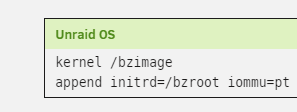
From just skimming your logs: Since you are using VMs, are you using PCIe passthrough? If no, a good candidate to try is always to turn off VT-d (AMD-Vi, IOMMU, or whatever your BIOS calls it) in the BIOS and see if that improves your situation any. Some hardware just really hates being part of the IOMMU. If you are using PCIe passthrough, you can try editing your boot options (main tab, click flash) for the "Unraid OS" boot option. After the append initrd=/bzroot, try adding "iommu=pt". (See attached image, you can just edit in that textfield). Click apply and reboot. iommu=pt will only put devices in the IOMMU that you actually pass through, so hopefully not the problematic device (your NIC it seems from the one fault) //EDIT: I did this on mine because I know my NIC shows instability with the iommu on every device.