





Easy Tec
Members
-
Joined
-
Last visited
Everything posted by Easy Tec
-
#!/bin/bash docker exec mariadb /usr/bin/mysqldump --user=root --password=<dein passwort> <dbname> > /mnt/Backup/MariaDB/dump/<dbname>/dump.sql docker stop mariadb rsync -avPX --delete-during /mnt/pool_nvme/system/appdata/mariadb/ /mnt/Backup/MariaDB/config/ docker start mariadb So würde das skript für eine Datenbanksicherung (ohne meine Daten) abgespeichert werden in Userskripts von Unraid... Das passt ja dann so, aber noch ne frage: Dieses skript würde wenn ich es autostarten lasse, dann jeden Abend (kommt drauf an, wie ich es einstelle) ein Backup von der einen Datenbank die im Skript steht im Pfad /mnt/Backup/MariaDB/dump/<der name meiner Datenbank>/dump.sql speichern. Heißt ich brauche für jede Datenbank dann en solches skript... oder
-
Die kommen bei mir auch noch und müllen das Log zu...
-
Okay. Vielen Dank! Jip. Die mache ich jetzt.
-
Sicher? Weil vorhin haben wir ja festgestellt, das genau das ja wohl das Problem erstell hat... Die "neuste Version" die ich laden kann, müsste doch die sein, die offiziel noch nicht da ist... oder
-
Bingo! Mach das mal aus der mariadb Console "mysqld --tc-heuristic-recover rollback" HEY! Danke! Es geht wieder alles! Muss ich jetzt noch irgendetwas machen? Wahrscheinliche jetzt das, wovon vorhin die rede war oder
-
Dann kommt das hier: # mysqld --tc-heuristic-recover rollback 2021-05-06 16:42:52 0 [Note] mysqld (mysqld 10.4.18-MariaDB-1:10.4.18+maria~bionic-log) starting as process 20441 ... 2021-05-06 16:42:52 0 [ERROR] mysqld: Can't lock aria control file '/config/databases/aria_log_control' for exclusive use, error: 11. Will retry for 30 seconds 2021-05-06 16:42:56 0 [Note] InnoDB: Using Linux native AIO 2021-05-06 16:42:56 0 [Note] InnoDB: Mutexes and rw_locks use GCC atomic builtins 2021-05-06 16:42:56 0 [Note] InnoDB: Uses event mutexes 2021-05-06 16:42:56 0 [Note] InnoDB: Compressed tables use zlib 1.2.11 2021-05-06 16:42:56 0 [Note] InnoDB: Number of pools: 1 2021-05-06 16:42:56 0 [Note] InnoDB: Using SSE2 crc32 instructions 2021-05-06 16:42:56 0 [Note] mysqld: O_TMPFILE is not supported on /tmp (disabling future attempts) 2021-05-06 16:42:56 0 [Note] InnoDB: Initializing buffer pool, total size = 256M, instances = 1, chunk size = 128M 2021-05-06 16:42:56 0 [Note] InnoDB: Completed initialization of buffer pool 2021-05-06 16:42:56 0 [Note] InnoDB: If the mysqld execution user is authorized, page cleaner thread priority can be changed. See the man page of setpriority(). 2021-05-06 16:42:56 0 [Note] InnoDB: Transaction 14467775 was in the XA prepared state. 2021-05-06 16:42:56 0 [Note] InnoDB: 1 transaction(s) which must be rolled back or cleaned up in total 0 row operations to undo 2021-05-06 16:42:56 0 [Note] InnoDB: Trx id counter is 14467776 2021-05-06 16:42:56 0 [Note] InnoDB: 128 out of 128 rollback segments are active. 2021-05-06 16:42:56 0 [Note] InnoDB: Starting in background the rollback of recovered transactions 2021-05-06 16:42:56 0 [Note] InnoDB: Rollback of non-prepared transactions completed 2021-05-06 16:42:56 0 [Note] InnoDB: Creating shared tablespace for temporary tables 2021-05-06 16:42:56 0 [Note] InnoDB: Setting file './ibtmp1' size to 12 MB. Physically writing the file full; Please wait ... 2021-05-06 16:42:56 0 [Note] InnoDB: File './ibtmp1' size is now 12 MB. 2021-05-06 16:42:56 0 [Note] InnoDB: 10.4.18 started; log sequence number 6481427492; transaction id 14467777 2021-05-06 16:42:56 0 [Note] InnoDB: Loading buffer pool(s) from /config/databases/ib_buffer_pool 2021-05-06 16:42:56 0 [Note] Plugin 'FEEDBACK' is disabled. 2021-05-06 16:42:56 0 [Note] Heuristic crash recovery mode 2021-05-06 16:42:56 0 [Note] InnoDB: Starting recovery for XA transactions... 2021-05-06 16:42:56 0 [Note] InnoDB: Transaction 14467775 in prepared state after recovery 2021-05-06 16:42:56 0 [Note] InnoDB: Transaction contains changes to 1 rows 2021-05-06 16:42:56 0 [Note] InnoDB: 1 transactions in prepared state after recovery 2021-05-06 16:42:56 0 [Note] Found 1 prepared transaction(s) in InnoDB 2021-05-06 16:42:56 0 [Note] Please restart mysqld without --tc-heuristic-recover 2021-05-06 16:42:56 0 [ERROR] Can't init tc log 2021-05-06 16:42:56 0 [ERROR] Aborting
-
... und wenn Du das hier jetzt in der mariadb Container Console eingibst: /usr/bin/mysqladmin -h <deine ip> -P <dein port> --user=root --password=<dein passwort> status Da bekomme ich das hier: /usr/bin/mysqladmin: connect to server at '192.168.178.56' failed error: 'Lost connection to MySQL server at 'handshake: reading initial communication packet', system error: 11'
-
Container Console: mysqld_safe --log-error=er.log Und dann: cat /config/databases/er.log Hier kam folgendes raus: 1) 210506 16:30:51 mysqld_safe Can't log to error log and syslog at the same time. Remove all --log-error configuration options for --syslog to take effect. 210506 16:30:51 mysqld_safe Logging to '/config/databases/er.log'. 210506 16:30:51 mysqld_safe Starting mysqld daemon with databases from /config/databases 2) # cat /config/databases/er.log 210506 16:30:51 mysqld_safe Starting mysqld daemon with databases from /config/databases 2021-05-06 16:30:51 0 [Note] /usr/sbin/mysqld (mysqld 10.4.18-MariaDB-1:10.4.18+maria~bionic-log) starting as process 12088 ... 2021-05-06 16:30:51 0 [ERROR] mysqld: Can't lock aria control file '/config/databases/aria_log_control' for exclusive use, error: 11. Will retry for 30 seconds 2021-05-06 16:30:53 0 [Note] InnoDB: Using Linux native AIO 2021-05-06 16:30:53 0 [Note] InnoDB: Mutexes and rw_locks use GCC atomic builtins 2021-05-06 16:30:53 0 [Note] InnoDB: Uses event mutexes 2021-05-06 16:30:53 0 [Note] InnoDB: Compressed tables use zlib 1.2.11 2021-05-06 16:30:53 0 [Note] InnoDB: Number of pools: 1 2021-05-06 16:30:53 0 [Note] InnoDB: Using SSE2 crc32 instructions 2021-05-06 16:30:53 0 [Note] mysqld: O_TMPFILE is not supported on /tmp (disabling future attempts) 2021-05-06 16:30:54 0 [Note] InnoDB: Initializing buffer pool, total size = 256M, instances = 1, chunk size = 128M 2021-05-06 16:30:54 0 [Note] InnoDB: Completed initialization of buffer pool 2021-05-06 16:30:54 0 [Note] InnoDB: If the mysqld execution user is authorized, page cleaner thread priority can be changed. See the man page of setpriority(). 2021-05-06 16:30:54 0 [Note] InnoDB: Transaction 14467775 was in the XA prepared state. 2021-05-06 16:30:54 0 [Note] InnoDB: 1 transaction(s) which must be rolled back or cleaned up in total 0 row operations to undo 2021-05-06 16:30:54 0 [Note] InnoDB: Trx id counter is 14467776 2021-05-06 16:30:54 0 [Note] InnoDB: 128 out of 128 rollback segments are active. 2021-05-06 16:30:54 0 [Note] InnoDB: Starting in background the rollback of recovered transactions 2021-05-06 16:30:54 0 [Note] InnoDB: Rollback of non-prepared transactions completed 2021-05-06 16:30:54 0 [Note] InnoDB: Creating shared tablespace for temporary tables 2021-05-06 16:30:54 0 [Note] InnoDB: Setting file './ibtmp1' size to 12 MB. Physically writing the file full; Please wait ... 2021-05-06 16:30:54 0 [Note] InnoDB: File './ibtmp1' size is now 12 MB. 2021-05-06 16:30:54 0 [Note] InnoDB: 10.4.18 started; log sequence number 6481424660; transaction id 14467777 2021-05-06 16:30:54 0 [Note] InnoDB: Loading buffer pool(s) from /config/databases/ib_buffer_pool 2021-05-06 16:30:54 0 [Note] Plugin 'FEEDBACK' is disabled. 2021-05-06 16:30:54 0 [Note] InnoDB: Starting recovery for XA transactions... 2021-05-06 16:30:54 0 [Note] InnoDB: Transaction 14467775 in prepared state after recovery 2021-05-06 16:30:54 0 [Note] InnoDB: Transaction contains changes to 1 rows 2021-05-06 16:30:54 0 [Note] InnoDB: 1 transactions in prepared state after recovery 2021-05-06 16:30:54 0 [Note] Found 1 prepared transaction(s) in InnoDB 2021-05-06 16:30:54 0 [ERROR] Found 1 prepared transactions! It means that mysqld was not shut down properly last time and critical recovery information (last binlog or tc.log file) was manually deleted after a crash. You have to start mysqld with --tc-heuristic-recover switch to commit or rollback pending transactions. 2021-05-06 16:30:54 0 [ERROR] Aborting 210506 16:30:56 mysqld_safe mysqld from pid file /var/run/mysqld/mysqld.pid ended
-
okay. (Ich hoffe es wird die 2. wahl )
-
Ganz kurz ne frage: Es ist schon klar, das ich das hier noch nicht gemacht habe oder? 8-)
-
Hierbei kommt: /usr/bin/mysqladmin: connect to server at '192.168.178.56' failed error: 'Lost connection to MySQL server at 'handshake: reading initial communication packet', system error: 11' root@Space:~#
-
Nein. Direkt nach dem update von MariaDB habe ich meine WP sites und Nextcloud aufgerufen und alle drei websites hatten nur errors... MariaDB hat laut log nicht richtig starten können (siehe oben)
-
Also mit dem Befehl hier: /config/databases/er.log oder
-
Bei mir kommt das hier wenn ich es eingebe: root@Space:~# docker exec mariadb /usr/bin/mysqladmin --user=root --password=<mein passwort von mariaDB> status /usr/bin/mysqladmin: connect to server at 'localhost' failed error: 'Can't connect to local MySQL server through socket '/var/run/mysqld/mysqld.sock' (2)' Check that mysqld is running and that the socket: '/var/run/mysqld/mysqld.sock' exists! (natürlich habe ich die klammern < und > rausgenommen...)
-
Hier in Nextcloud ist alles richtig.
-
Also: Port ist 3306 (also richtig) Und beide "Bind-adress": ;bind-address = 127.0.0.1 #bind-address=0.0.0.0
-
wo finde ich diese my.cnf?
-
Kann es vielleicht sein, das die Datenbanken einfach nicht die richtigen rechte hat? Also MariaDB hat laut WinSCP diese Rechte hier:
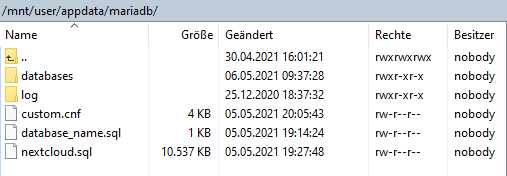
-
Hm. This image will soon be rebased * * from ubuntu to alpine. * * Please be aware, this may cause issues * * It is strongly recommended to make backups * * of your config and databases before * * updating your image to the alpine base. * * * * * ****************************************************** ****************************************************** [cont-init.d] 90-warning: exited 0. [cont-init.d] 99-custom-scripts: executing... [custom-init] no custom files found exiting... [cont-init.d] 99-custom-scripts: exited 0. [cont-init.d] done. [services.d] starting services [services.d] done. 210506 14:46:16 mysqld_safe Logging to syslog. 210506 14:46:16 mysqld_safe Starting mysqld daemon with databases from /config/databases 210506 14:46:19 mysqld_safe Logging to syslog. 210506 14:46:19 mysqld_safe Starting mysqld daemon with databases from /config/databases 210506 14:46:21 mysqld_safe Logging to syslog. 210506 14:46:21 mysqld_safe Starting mysqld daemon with databases from /config/databases 210506 14:46:24 mysqld_safe Logging to syslog. 210506 14:46:24 mysqld_safe Starting mysqld daemon with databases from /config/databases 210506 14:46:26 mysqld_safe Logging to syslog. 210506 14:46:26 mysqld_safe Starting mysqld daemon with databases from /config/databases 210506 14:46:28 mysqld_safe Logging to syslog. 210506 14:46:28 mysqld_safe Starting mysqld daemon with databases from /config/databases 210506 14:46:31 mysqld_safe Logging to syslog. 210506 14:46:31 mysqld_safe Starting mysqld daemon with databases from /config/databases 210506 14:46:33 mysqld_safe Logging to syslog. 210506 14:46:33 mysqld_safe Starting mysqld daemon with databases from /config/databases 210506 14:46:35 mysqld_safe Logging to syslog. 210506 14:46:35 mysqld_safe Starting mysqld daemon with databases from /config/databases 210506 14:46:38 mysqld_safe Logging to syslog. 210506 14:46:38 mysqld_safe Starting mysqld daemon with databases from /config/databases 210506 14:46:38 mysqld_safe Logging to syslog. 210506 14:46:38 mysqld_safe Starting mysqld daemon with databases from /config/databases 210506 14:46:40 mysqld_safe Logging to syslog. 210506 14:46:40 mysqld_safe Starting mysqld daemon with databases from /config/databases 210506 14:46:40 mysqld_safe Logging to syslog. 210506 14:46:40 mysqld_safe Starting mysqld daemon with databases from /config/databases 210506 14:46:42 mysqld_safe Logging to syslog. 210506 14:46:43 mysqld_safe Starting mysqld daemon with databases from /config/databases Das ist ein kleiner abschmitt aus dem Log... es geht immer noch nicht.
-
Ja. Port war auf 3306 gestellt. Okay. Ich versuche dann den hier:
-
Bei mir sieht das so aus: Ich bin gleich soweit, um den text daraus zu kopieren. Und: Ich habe grade HeidiSQL auf meinem Rechner installiert, habe aber diesen fehler hier bekommen:


-
Ja. Okay. Muss ich später dann machen. Danke schon mal im vorraus
-
Stimmt, ja. Ja: Diesen Mode hab ich wieder deaktiviert, da bei einem längeren gebrauch dieser Anleitung MariaDB ihre Daten selber so beschädigen kann, das sie nie wieder wiedeherstellbar sind. Ich habe heute den kompletten /appdata/mariadb/ über WinSCP mal auf meinen PC kopiert. Zählt Winscp dazu? Okay. Tut mir leid, ich hab am anfang viel vergessen. Also: Ich habe die schritte bis "mysqldump -p database_name > database_name.sql" für beide WordPress-pages durchgeführt, bei Nextcloud allerdings hat mich ein fehler davon abgehalten dies zu tun. Deswegen habe ich nicht weiter gemacht. Und hoffe, das ich einen anderen weg finde, weil ich nicht genau weiß, was alles weg ist, wenn ich die Datenbank neu aufsetze.
-
Der Link noch: https://github.com/linuxserver-archive/docker-mariadb-armhf/issues/7
-
Ah. okay. Also sowas wie ein testprogramm und ich muss keine neuen user anlegen und Passwörter vergeben. Das werde ich später mal ausprobieren. Danke

