yan
Members
-
Joined
-
Last visited
-
The recent security announcement prompting us to update lead me to go into the server settings to check the version number and I see a version 4.x instead of the current ranges of 1.42.x. My docker image is at 1.42.1 Just curious what explains this discrepancy?
-
TLDR: fixed by removing nomodeset in syslinux.cfg I dived into the .plg file and I saw better what's going on. The first check of lspci -nn | grep -E "VGA compatible controller|Display controller" | grep "Intel" [...] worked fine and returned the device address (a780). From System Devices info: <td title="00:02.0 VGA compatible controller: Intel Corporation Raptor Lake-S GT1 [UHD Graphics 770] (rev 04) (prog-if 00 [VGA controller]) DeviceName: Onboard - Video Subsystem: Micro-Star International Co., Ltd. [MSI] Device 7e06 Flags: bus master, fast devsel, latency 0, IRQ 255, IOMMU group 0 Memory at 71000000 (64-bit, non-prefetchable) [size=16M] Memory at 80000000 (64-bit, prefetchable) [size=256M] I/O ports at 4000 [size=64] Expansion ROM at 000c0000 [virtual] [disabled] [size=128K] Capabilities: [40] Vendor Specific Information: Len=0c <?> Capabilities: [70] Express Root Complex Integrated Endpoint, IntMsgNum 0 Capabilities: [ac] MSI: Enable- Count=1/1 Maskable+ 64bit- Capabilities: [d0] Power Management version 2 Capabilities: [100] Process Address Space ID (PASID) Capabilities: [200] Address Translation Service (ATS) Capabilities: [300] Page Request Interface (PRI) Capabilities: [320] Single Root I/O Virtualization (SR-IOV) Kernel modules: i915, xe ">[8086:a780] 00:02.0 VGA compatible controller: Intel Corporation Raptor Lake-S GT1 [UHD Graphics 770] (rev 04)</td>But it's the subsequent modprobe i915 that kept failing. No blacklisted items, no more vfio bind were present. I suspect the nomodeset was there from earlier when I was trying to passthrough the graphics card to a VM. Anyway loading i915 is not my end goal but at least I have /dev/dri that I can now map to docker container.
-
I'm trying to install intel.gpu.top but face this error: plugin: installing: intel-gpu-top.plg Executing hook script: pre_plugin_checks plugin: downloading: intel-gpu-top.plg ... done plugin: downloading: intel.gpu.top-2025.03.15.txz ... done +============================================================================== | Skipping package intel.gpu.top-2025.03.15 (already installed) +============================================================================== ---------Enabling Intel Kernel Module---------- ------Something went wrong! Can't enable------- ----Intel Kernel Module, removing package!----- No such package: intel-gpu-top-2025.03.15. Can't remove. plugin: run failed: '/bin/bash' returned 1 Executing hook script: post_plugin_checksHow can I further investigate the failure cause? I do not see the package in /boot/config/plugins. It's very possible that it's an issue with my BIOS. I have tried several things in configuring the IGP. I boot with a monitor connected. I basically just want to setup QSV. So far I'm able to confirm the PCI device exists root@Tower:~# lspci | grep VGA 00:02.0 VGA compatible controller: Intel Corporation Raptor Lake-S GT1 [UHD Graphics 770] (rev 04)However, I don't have a /dev/dri and i915 module fails to load root@Tower:~# modprobe i915 modprobe: ERROR: could not insert 'i915': No such deviceI hope some of this makes sense and someone could send me on the good path to hw accel tower-diagnostics-20250608-1047.zip
-
I'm trying to install intel.gpu.top but face this error: plugin: installing: intel-gpu-top.plg Executing hook script: pre_plugin_checks plugin: downloading: intel-gpu-top.plg ... done plugin: downloading: intel.gpu.top-2025.03.15.txz ... done +============================================================================== | Skipping package intel.gpu.top-2025.03.15 (already installed) +============================================================================== ---------Enabling Intel Kernel Module---------- ------Something went wrong! Can't enable------- ----Intel Kernel Module, removing package!----- No such package: intel-gpu-top-2025.03.15. Can't remove. plugin: run failed: '/bin/bash' returned 1 Executing hook script: post_plugin_checksHow can I further investigate the failure cause? I do not see the package in /boot/config/plugins. It's very possible that it's an issue with my BIOS. I have tried several things in configuring the IGP. I boot with a monitor connected. I basically just want to setup QSV. So far I'm able to confirm the PCI device exists root@Tower:~# lspci | grep VGA 00:02.0 VGA compatible controller: Intel Corporation Raptor Lake-S GT1 [UHD Graphics 770] (rev 04)However, I don't have a /dev/dri and i915 module fails to load root@Tower:~# modprobe i915 modprobe: ERROR: could not insert 'i915': No such deviceI hope some of this makes sense and someone could send me on the good path to hw accel tower-diagnostics-20250608-1047.zip
-
Turns out the solution was found here, even though my issue did not start with an update anywhere close to 6.12.0 (i was on 6.12.10 for several months).
-
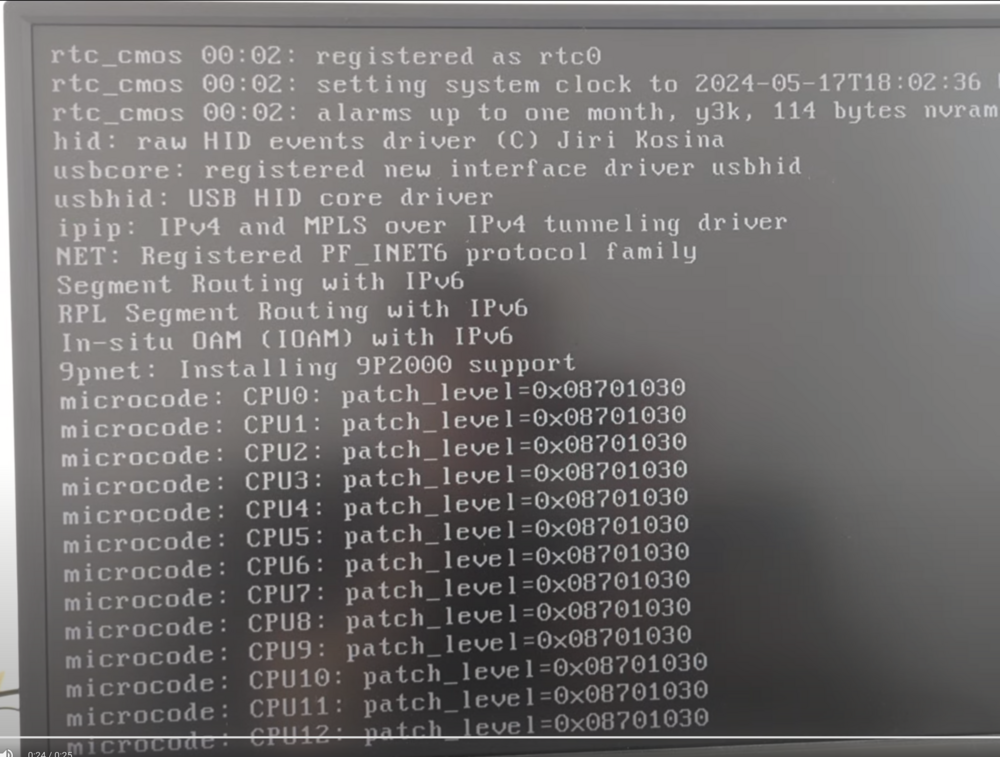
Unraid latest version hangs during boot. It hangs during the "microcode: CPUx: patch_level=0x..." section that occurs following the "verifying bzfirmware checksum". The "microcode" section is also present earlier in the boot process and it goes through it fine. As pictured, it hangs after CPU12 (out of 16 threads). If I boot in safe mode, it can get to CPU15 and is sometimes able to print the line "Micricode Update Driver: v.2.2", but freezes there. If I boot using a freshly downloaded UnRAID version on another stick, it boots fine. I had booted 5 days ago without issue. I did not perform any BIOS update. It did happen however after I added RAM (which I subsequently removed). The fresh UnRAID USB drive also did not have issues with the new RAM. Tried adding nomodeset in syslinux.cfg I'm not sure what to try at this point. Any pointers please?