plsr.50
Members
-
Joined
-
Last visited
-
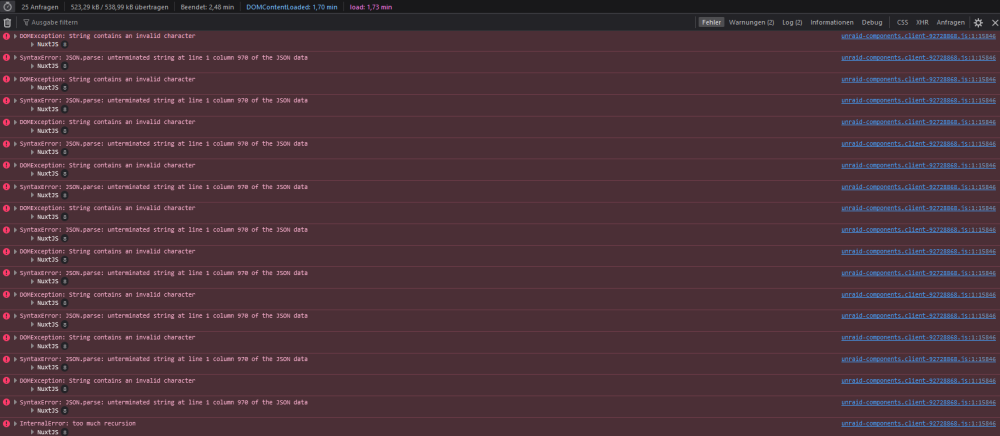
Okay, the problem is fixed. I had the following in the description of Unraid: "I'm the server". I removed the special character. Problem gone. This also explains the error: DOMException: String contains an invalid character
-
Hello! Unfortunately, I have the problem that after updating from 6.12.6 to 6.12.8 the web interface reacts very slowly. I already had this problem once before after an update. It turned out that it was due to the Unraid Connect plugin and that an extremely large number of errors were being stored in the browser console. After uninstalling the plugin, it ran smoothly again. Now, however, after the update to 6.12.8, this unfortunately occurs again, although the plugin is not installed. The errors all originate from the following file: /plugins/dynamix.my.servers/unraid-components/_nuxt/unraid-components.client-92728868.js Errors: SyntaxError: JSON.parse: unterminated string at line 1 column 970 of the JSON data DOMException: String contains an invalid character InternalError: too much recursion raidos-diagnostics-20240220-1300.zip

-
Den USB-Tuner auch mal an Windows / Mac getestet? Wäre halt spannend zu wissen, wie der generell so performt bzw. auch die Pegelwerte passen. Stichwort SNR / Signal Strength in TVH. Btw. ist das der Xbox-DVB-C-Tuner zufällig? Oder ein anderes Modell? EDIT: Wie wirkt sich das mit dem Bildfehler eigentlich aus? Artefakte bzw. Klötzchenbildung, als ob das Bild zusammenbrechen würde? Lässt du die Sender entschlüsseln und wenn ja wie?

-
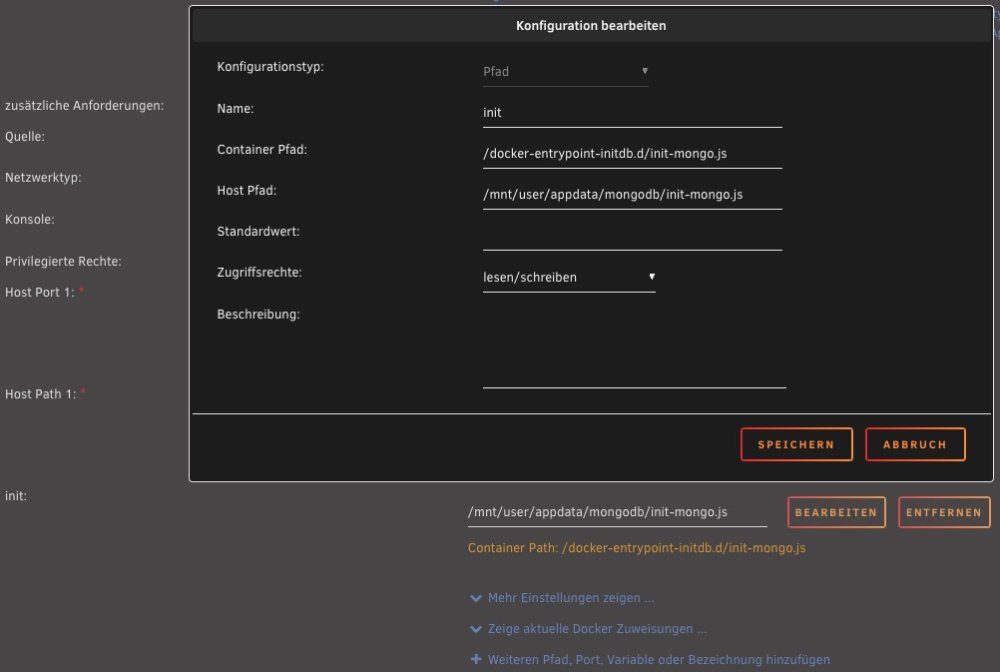
Im Grunde genommen ist's relativ easy, wenn man so macht, wie von linuxserver.io vorgeschlagen (übertragen auf Unraid-Gegebenheiten): Vor dem Installieren des MongoDB-Containers Verzeichnis "mongodb" im Appdata-Ordner erstellen Darin dann die init-mongo.js erstellen (nano init-mongo.js ), mit folgendem Inhalt (Passwort austauschen): db.getSiblingDB("unifi").createUser({user: "unifi", pwd: "HIER STEHT MEIN PASSWORT", roles: [{role: "dbOwner", db: "unifi"}]}); db.getSiblingDB("unifi_stat").createUser({user: "unifi", pwd: "HIER STEHT MEIN PASSWORT", roles: [{role: "dbOwner", db: "unifi_stat"}]}); Danach den MongoDB-Container in Unraid installieren. Vorher jedoch noch einen zusätzlichen Pfad anlegen (wie im angehängten Bild) Dann den linuxserver-io network application Container installieren. Hier beachten: - MONGO_HOST sollte die IP vom Unraid sein, hat sonst bei mir nicht funktioniert. - Wenn so gemacht wie oben: MONGO_USER: unifi, MONGO_DBNAME:: unifi, MONGO_PASS: <wie vergeben> - Rest wie vordefiniert. Backup einspielen, fertig. Edit: Hier noch den Punkt "Device Adoption" beachten (IP von Unraid eintragen in der network-application): https://hub.docker.com/r/linuxserver/unifi-network-application