





supacupa
Members
-
Joined
-
Last visited
-
Agreed, it doesn't make sense. It's not the drives since this problem shows itself on other SAS drives. It's also not likely to be the controller as the problems showed itself on two separate controllers and I've not seen others report this problem on either of them. After a lot of testing and changing things out it's clear the problem is following the server and the UNRAID install. The server has not changed, but the UNRAID install has, so that is the most likely culprit. This same drive and controller setup works find on my EndeavourOS PC which is currently using 6.10.4-zen2-1-zen kernel, and my Debian server which is currently using the 6.9.7+bpo-amd64 kernel. If the 6.8.12-Unraid kernel is to blame there's not much I can do about that other than rollback and stick with slowly aging software with the hope some future update fixes it. I do firmware development so I'm familiar with figuring this kind of problem on bare metal, but I don't really know where to start with Linux unless I can find information online on what component to debug, something I've had some trouble with doing on UNRAID. If something isn't doing what it should be doing it should be possible to trace it. Any ideas on where I can start? Any advice will be appreciated. I need to have somewhat reliable speed which I did have before all this started. It was working perfectly fine on the previous UNRAID version and had been for many years. I was using these exact same drives with this exact same controller about three years ago. I switched to the older LSI card since I had an expander and could run more HDDs, but as I no longer have a need for hundreds of TBs of storage I simplified it to 4 primary 12 TB disks using the rest as cold storage. I primarily use UNRAID for VMs and Dockers. The UNRAID method of data storage and backup was nice back when I had an assortment of disks, but now that I have dozens of the same types of disks with many spares, it may not be the best method of data storage for me now, at least not when its this inconsistent. My current options seem to be as follows: 1. Find and solve the problem so I can continue using UNRAID as I do. That may involve rolling back to an older UNRAID version, which may mean I no longer can update UNRAID which may or may not be a problem. 2. Perhaps attempt to pass the HBA through to a VM and use RAIDZ pools for data storage and let UNRAID focus on only VMs and Dockers. This is a somewhat silly option, but I could see it working. Probably not worth the headache, though. 3. Install another OS that works correctly and run Dockers and VMs the old fashioned way. When I started using UNRAID something like 4 or 5 years ago I didn't have the time to do that, but I've now have other servers I manage and have figured out better ways to do so, so this might be the best option. I've already spent way too much time on this problem and am worried more compatibility issues may crop up in future UNRAID builds.
-
How do I go about finding out where the bottleneck is? There has to be some method of debugging this.
-
Might not be the right setting, but it made a difference. Going through FUSE is now fast and going directly is slow, which is very strange to me. Any tips on what I should set the tunables to? Perhaps I need to write a script to try out several settings to get optimal performance for both use cases. Edit: Actually, cancel that. After trying again through FUSE it's back to running slow. This isn't making any sense at all. It was just writing at acceptable speeds.




-
Now we're gettin' somewhere!!


-
This seems wrong. I'm going to try setting it to 8 in the GUI. root@Blade:~# cat /sys/block/sdl/queue/nr_requests 256
-
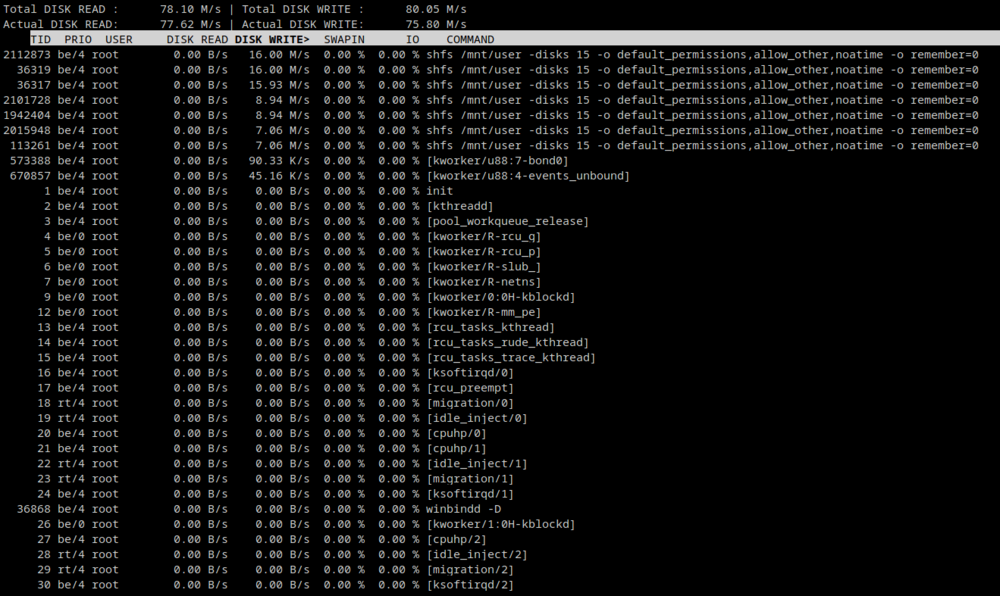
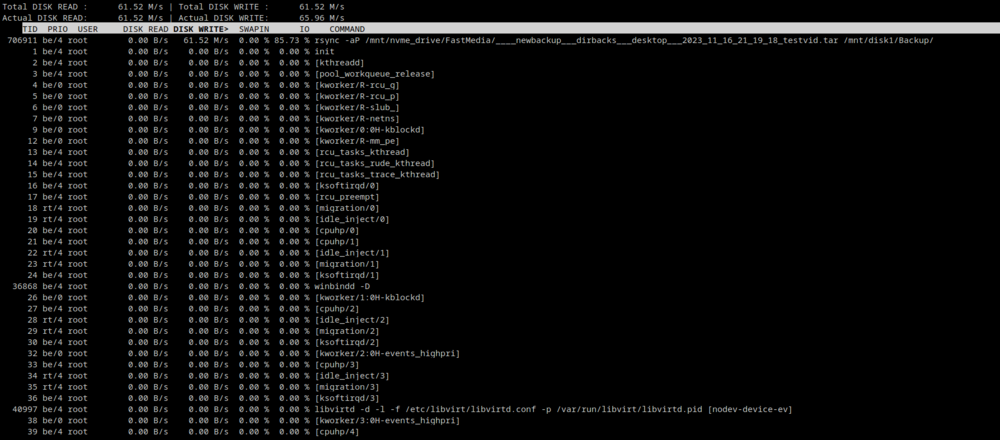
Is this normal for a disk write? Seeing several shfs commands when using rsync from the NVME to one of the disks on the array through FUSE. I'm guessing it is, but I'm not sure where to look for the problem at this point. When not going through FUSE: iowait% is fairly high considering this is a 22 core hyperthread machine. avg-cpu: %user %nice %system %iowait %steal %idle 0.4% 0.0% 1.0% 2.9% 0.0% 95.6% Device r/s rkB/s rrqm/s %rrqm r_await rareq-sz w/s wkB/s wrqm/s %wrqm w_await wareq-sz d/s dkB/s drqm/s %drqm d_await dareq-sz f/s f_await aqu-sz %util loop0 0.00 0.0k 0.00 0.0% 0.00 0.0k 0.00 0.0k 0.00 0.0% 0.00 0.0k 0.00 0.0k 0.00 0.0% 0.00 0.0k 0.00 0.00 0.00 0.0% loop1 0.60 12.0k 0.00 0.0% 0.00 20.0k 0.00 0.0k 0.00 0.0% 0.00 0.0k 0.00 0.0k 0.00 0.0% 0.00 0.0k 0.00 0.00 0.00 0.0% loop2 0.00 0.0k 0.00 0.0% 0.00 0.0k 0.80 4.0k 0.00 0.0% 0.00 5.0k 0.00 0.0k 0.00 0.0% 0.00 0.0k 0.00 0.00 0.00 0.0% loop3 0.00 0.0k 0.00 0.0% 0.00 0.0k 0.00 0.0k 0.00 0.0% 0.00 0.0k 0.00 0.0k 0.00 0.0% 0.00 0.0k 0.00 0.00 0.00 0.0% nvme0n1 276.00 46.0M 0.00 0.0% 0.35 170.7k 0.00 0.0k 0.00 0.0% 0.00 0.0k 0.00 0.0k 0.00 0.0% 0.00 0.0k 0.00 0.00 0.10 6.6% sda 0.00 0.0k 0.00 0.0% 0.00 0.0k 0.00 0.0k 0.00 0.0% 0.00 0.0k 0.00 0.0k 0.00 0.0% 0.00 0.0k 0.00 0.00 0.00 0.0% sdb 0.00 0.0k 0.00 0.0% 0.00 0.0k 0.00 0.0k 0.00 0.0% 0.00 0.0k 0.00 0.0k 0.00 0.0% 0.00 0.0k 0.00 0.00 0.00 0.0% sdc 0.00 0.0k 0.00 0.0% 0.00 0.0k 0.00 0.0k 0.00 0.0% 0.00 0.0k 0.00 0.0k 0.00 0.0% 0.00 0.0k 0.00 0.00 0.00 0.0% sdd 0.00 0.0k 0.00 0.0% 0.00 0.0k 0.00 0.0k 0.00 0.0% 0.00 0.0k 0.00 0.0k 0.00 0.0% 0.00 0.0k 0.00 0.00 0.00 0.0% sde 0.00 0.0k 0.00 0.0% 0.00 0.0k 0.00 0.0k 0.00 0.0% 0.00 0.0k 0.00 0.0k 0.00 0.0% 0.00 0.0k 0.00 0.00 0.00 0.0% sdf 0.00 0.0k 0.00 0.0% 0.00 0.0k 0.00 0.0k 0.00 0.0% 0.00 0.0k 0.00 0.0k 0.00 0.0% 0.00 0.0k 0.00 0.00 0.00 0.0% sdg 947.80 60.4M 14481.40 93.9% 17.96 65.2k 785.20 60.4M 14632.40 94.9% 21.34 78.8k 0.00 0.0k 0.00 0.0% 0.00 0.0k 0.20 40.00 33.79 96.0% sdh 0.00 0.0k 0.00 0.0% 0.00 0.0k 0.00 0.0k 0.00 0.0% 0.00 0.0k 0.00 0.0k 0.00 0.0% 0.00 0.0k 0.00 0.00 0.00 0.0% sdi 0.00 0.0k 0.00 0.0% 0.00 0.0k 0.00 0.0k 0.00 0.0% 0.00 0.0k 0.00 0.0k 0.00 0.0% 0.00 0.0k 0.00 0.00 0.00 0.0% sdj 0.00 0.0k 0.00 0.0% 0.00 0.0k 0.00 0.0k 0.00 0.0% 0.00 0.0k 0.00 0.0k 0.00 0.0% 0.00 0.0k 0.00 0.00 0.00 0.0% sdk 0.00 0.0k 0.00 0.0% 0.00 0.0k 0.00 0.0k 0.00 0.0% 0.00 0.0k 0.00 0.0k 0.00 0.0% 0.00 0.0k 0.00 0.00 0.00 0.0% sdl 944.00 60.3M 14484.20 93.9% 17.66 65.4k 784.60 60.2M 14626.20 94.9% 22.82 78.6k 0.00 0.0k 0.00 0.0% 0.00 0.0k 0.20 49.00 34.58 97.1% sdm 0.00 0.0k 0.00 0.0% 0.00 0.0k 0.00 0.0k 0.00 0.0% 0.00 0.0k 0.00 0.0k 0.00 0.0% 0.00 0.0k 0.00 0.00 0.00 0.0% sdn 0.00 0.0k 0.00 0.0% 0.00 0.0k 0.60 2.4k 0.00 0.0% 0.00 4.0k 0.00 0.0k 0.00 0.0% 0.00 0.0k 0.00 0.00 0.00 0.0% sdo 0.00 0.0k 0.00 0.0% 0.00 0.0k 1.00 4.8k 0.00 0.0% 0.20 4.8k 0.00 0.0k 0.00 0.0% 0.00 0.0k 0.00 0.00 0.00 0.0% sdp 0.00 0.0k 0.00 0.0% 0.00 0.0k 0.60 3.2k 0.20 25.0% 4.67 5.3k 0.00 0.0k 0.00 0.0% 0.00 0.0k 0.00 0.00 0.00 0.1% sdq 0.00 0.0k 0.00 0.0% 0.00 0.0k 0.00 0.0k 0.00 0.0% 0.00 0.0k 0.00 0.0k 0.00 0.0% 0.00 0.0k 0.00 0.00 0.00 0.0% sdr 0.00 0.0k 0.00 0.0% 0.00 0.0k 0.00 0.0k 0.00 0.0% 0.00 0.0k 0.00 0.0k 0.00 0.0% 0.00 0.0k 0.00 0.00 0.00 0.0% sds 0.00 0.0k 0.00 0.0% 0.00 0.0k 0.80 4.0k 0.00 0.0% 4.75 5.0k 0.00 0.0k 0.00 0.0% 0.00 0.0k 0.00 0.00 0.00 0.2% sdt 0.00 0.0k 0.00 0.0% 0.00 0.0k 0.00 0.0k 0.00 0.0% 0.00 0.0k 0.00 0.0k 0.00 0.0% 0.00 0.0k 0.00 0.00 0.00 0.0%
-
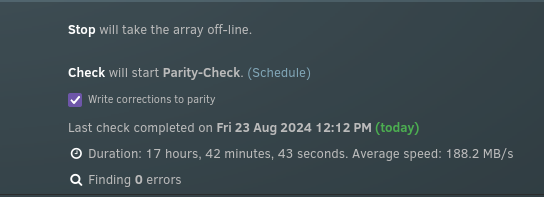
Same problem with BTRFS. These drives worked perfectly well before. They work perfectly fine outside of the array. I transferred from the XFS array to these three new disks and then let the parity sync which took a normal amount of time. Something is wrong when it comes to writing with parity enabled. What other things can I check, is reinstalling UNRAID the next step? Maybe the problem is with the beta. Maybe downgrading is what's needed.


-
They were working fine before, and the problem also showed itself on the XFS array, but I'm copying the entire array to the old XFS drives which have been reformatted to BTRFS to see if that helps now. It'll take a while before I'll know if that makes a difference.
-
OK, so removing the USB drives did nothing, but making a new array without parity on one of the 2.5 inch HDDs is running at its full speed, something it was not able to do in its own pool when the old array was in. RSYNC from NVME drive to SAS array through FUSE after removing USB pool (Average was around 90 MB/s, under half what the drive is capable of at its current fill level): root@Blade:/mnt# rsync -aP /mnt/user/FastMedia/____newbackup___dirbacks___desktop___2023_11_16_21_19_18_testvid.tar /mnt/user/Backup/ sending incremental file list ____newbackup___dirbacks___desktop___2023_11_16_21_19_18_testvid.tar 13,288,439,808 4% 90.00MB/s 0:51:57 ^C RSYNC from NVME to SAS array direct after removing USB pool (Average was around 90 MB/s, under half what the drive is capable of at its current fill level): root@Blade:/mnt# rsync -aP /mnt/nvme_drive/FastMedia/____newbackup___dirbacks___desktop___2023_11_16_21_19_18_testvid.tar /mnt/disk1/Backup/ sending incremental file list ____newbackup___dirbacks___desktop___2023_11_16_21_19_18_testvid.tar 13,893,992,448 4% 85.04MB/s 0:54:52 ^C RSYNC from NVME to new single SATA disk (XFS) parityless array through FUSE (100 MB/s is pretty close to the maximum speed of this disk at this fill level, empty): root@Blade:~# rsync -aP /mnt/user/FastMedia/____newbackup___dirbacks___desktop___2023_11_16_21_19_18_testvid.tar /mnt/user/test/ sending incremental file list ____newbackup___dirbacks___desktop___2023_11_16_21_19_18_testvid.tar 17,351,933,952 5% 100.75MB/s 0:45:45 ^C RSYNC from NVME to new single SATA disk (ZFS compressed) parityless array through FUSE (Less than half the speed of XFS): rsync -aP /mnt/user/FastMedia/____newbackup___dirbacks___desktop___2023_11_16_21_19_18_testvid.tar /mnt/user/test/ sending incremental file list ____newbackup___dirbacks___desktop___2023_11_16_21_19_18_testvid.tar 9,871,884,288 3% 41.85MB/s 1:53:05 ^C RSYNC from NVME to new single SATA disk (ZFS) parityless array through FUSE (Less than half the speed of XFS, about the same with ZFS compression on): rsync -aP /mnt/user/FastMedia/____newbackup___dirbacks___desktop___2023_11_16_21_19_18_testvid.tar /mnt/user/test/ sending incremental file list ____newbackup___dirbacks___desktop___2023_11_16_21_19_18_testvid.tar 9,905,471,488 3% 42.94MB/s 1:50:11 ^C RSYNC from NVME to new single SATA disk (BTRFS compressed) parityless array through FUSE (Near maximum speed of this HDD at this fill level, empty): rsync -aP /mnt/user/FastMedia/____newbackup___dirbacks___desktop___2023_11_16_21_19_18_testvid.tar /mnt/user/test/ sending incremental file list ____newbackup___dirbacks___desktop___2023_11_16_21_19_18_testvid.tar 19,727,220,736 6% 104.44MB/s 0:43:46 ^C RSYNC from NVME to new single SATA disk (BTRFS) parityless array through FUSE (About the same as with BTRFS with compression on): rsync -aP /mnt/user/FastMedia/____newbackup___dirbacks___desktop___2023_11_16_21_19_18_testvid.tar /mnt/user/test/ sending incremental file list ____newbackup___dirbacks___desktop___2023_11_16_21_19_18_testvid.tar 17,185,210,368 5% 106.21MB/s 0:43:26 ^C RSYNC from NVME drive to SAS array through FUSE after doing above tests. Originally I was getting 90 MB/s, now it's down to 22 MB/s. Same disk, but different directory. This doesn't make any sense at all!: rsync -aP /mnt/user/FastMedia/____newbackup___dirbacks___desktop___2023_11_16_21_19_18_testvid.tar /mnt/user/test/ sending incremental file list ____newbackup___dirbacks___desktop___2023_11_16_21_19_18_testvid.tar 5,268,406,272 1% 22.12MB/s 3:37:20 ^C RSYNC from NVME drive to SAS array direct to disk 3, which is at about the same fill level as disk1, about the same as above: rsync -aP /mnt/nvme_drive/FastMedia/____newbackup___dirbacks___desktop___2023_11_16_21_19_18_testvid.tar /mnt/disk3/test/ sending incremental file list created directory /mnt/disk3/test ____newbackup___dirbacks___desktop___2023_11_16_21_19_18_testvid.tar 5,454,987,264 1% 22.78MB/s 3:30:53 ^C
-
Alrighty, I'll use one of the laptop HDDs I have loaded in the front of the server later today. In the pool it was acting similarly, but I'll test as the only array device. I'm getting the feeling something got changed in some setting when the large pool was attached, or maybe a bad shutdown changed something, although that doesn't make a lot of sense since everything should be in RAM and the system resides in flash. Is there some way to verify the files on the flash? My next major step is to just redo the entire install. I've done it before in the past and it's not too hard to do. UNRAID makes managing the array, dockers, and VMs quite easy. I'll also try removing my backup USB drive pool. Maybe it's causing some oddity.
-
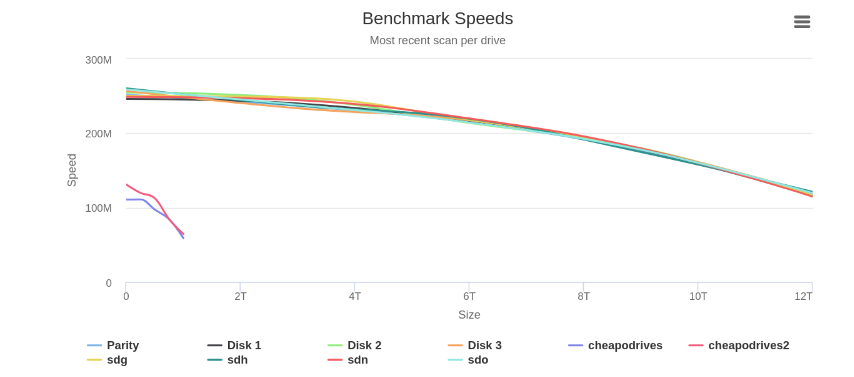
All 8 drives, the 3 XFS + parity and the 3 ZFS + parity all perform well in that test.
-
For clarification, I recently changed from XFS to ZFS, which is why I still had the old array on hand to test. Originally, RSYNCing from the XFS drives to the ZFS drives were at normal speeds. Around 250 MB/s down to about 200 MB/s as the disks became more full for large files. The array was writing about just as fast with the ZFS drives, actually, slightly faster for non compressed files. The problem didn't start until I added the 16 drive pool, not even attached to the array. I used that pool as a backup and wrote about 14 TB to it. That was at the slower speeds so it took quite a while. Since that pool is only meant as a cold backup I disconnected them but was surprised to see the low speeds continued to affect the array which was originally quite fast.
-
Yup, agreed. I am in the process of doing that as well.

-
This seems to have about doubled the speed, but it's still far lower than it should be.
-
No real change in speed using XFS I'm afraid. root@Blade:~# dd if=/dev/zero of=/mnt/disk1/Backup/testdel444.img bs=10G count=1 oflag=dsync 0+1 records in 0+1 records out 2147479552 bytes (2.1 GB, 2.0 GiB) copied, 27.0612 s, 79.4 MB/s root@Blade:~# dd if=/dev/zero of=/mnt/user/Backup/testdel4444.img bs=10G count=1 oflag=dsync 0+1 records in 0+1 records out 2147479552 bytes (2.1 GB, 2.0 GiB) copied, 118.373 s, 18.1 MB/s



