





Rumint
Members
-
Joined
-
Last visited
-
Hello. tried the docker. But it will not start. will supply the logs. At first it would start but could not be reached. now it tries to start bud ends up stopped. vault-diagnostics-20241207-2306.zip
-
So. update. i managed to recover almost every file. Thare some witout any filetyp that are left. that i cannot recover sadly. otherwise the server is back up again with new hardware. Hopefully without further issues.
-
i feared that. but i will report back if i managed to save it with UFS explorer. Is there any difference between UFS explorer and UFS recover?
-
its the old server. it the same brand and model of raid card. im trying to configure the "new" server and its raid card to run in IT mode. so it is not connected to unraid at all.
-
vault-diagnostics-20240925-1815.zip Sadly no progress.
-
sadly it does not seem to emulate the disk. and as it is a sas disk i will have to figure out how to connect it to another PC to access it with software like UFS. vault-diagnostics-20240925-1708.zip
-
Did that. Same issues. Did the xfs repair but same result. tried to convert the new raidcontroller to it mode but fails to innitiate the hp SPP after selecting what firmware to update. Did not even manage to burn the iso file to a bootable cd. 🥺 as parity and 2 other disks managed to mount im confused. tried to find a way to use testdisk software. But cant find a good bootable release.
-
It is a new one. As i went from a ml350 g6to a dl380 g7. But the disks have been assign at the right spot.
-
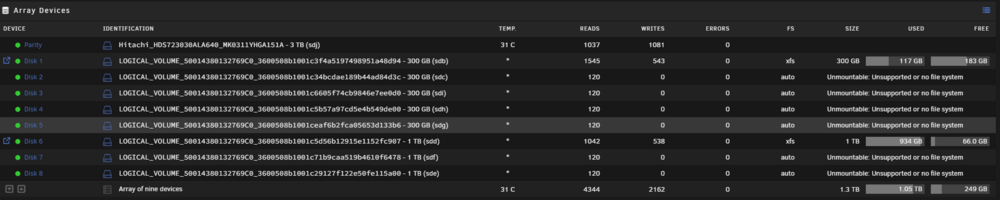
here´s a visual of the disks
-
Hello guys. I turn to you as the last hope. I have changed hardware and transfered my disk to a knew server. All went well and it booted up just fine. untill i was going to mount my disks. 7 out of 9 show up as no filesystem. i have done all the xfs_repair fixes that i can find on the interwebs. But i only get that it failed and i should try again. This is what xfs_repair say. vault-diagnostics-20240924-2236.zip
-
Here are the diagnostics. I can't see the card in win10 vm, i can't pass it tru either. but it shows in the system devices. im not sure if i have the MD3220 setup right. I hope that the disks will show as the Integrated H710 does. vault2-diagnostics-20240801-2352.zip
-
Hello guys. I have a MD3220 powervault that i would like to use in my system. Im currently trying it out on a test system. Anyways, It detects in "system devices" but i cant see it when powering upp my R620 server. the onboard HBA is showing (PERC H710 or something) i can mount disck fron the onboard. But i cant use the 9201. It does not show in VMs. have flashed the FW: But as the logs show, i do not get any errors? When i look at the card itself i see a flashing green LED. So, where to go from here? Any ideas? vault2-syslog-20240730-2229.zip
-
I've run in to some similar issues. and this goes both for a Nvidia quadro card and a Intel Nic. internal error: qemu unexpectedly closed the monitor: 2021-05-20T17:57:42.413287Z qemu-system-x86_64: -device vfio-pci,host=0000:16:00.0,id=hostdev0,bus=pci.1,addr=0x0: vfio 0000:16:00.0: failed to setup container for group 34: Failed to set iommu for container: Operation not permitted tried all of the solutions offered in this thread. and even tried the Kennel hack from the Nvidia GPU thread. But it wont let me pass those cards thru. Any ideas?

