





ldog88
Members
-
Joined
-
Last visited
Everything posted by ldog88
-
Hi, My unraid server has suddenly got BTRFS errors on the cache drive that are causing docker to not run. Please can someone offer some assistance as to how to fix this? Whilst the server has been up and running well for some time, I am definitely a newbie so layman's terms would be appreciated. I have attached the diagnostics. Thanks diagnostics-20220901-1850.zip
-
Hi, I've managed to set up tailscale so I can access my unraid web UI from outside my home however I cannot then access the individual docker containers from here. Please can someone point me in the right direction for finding instructions on how to set this up? Thanks
-
Perfect. Thank you so much for your help.
-
Just done so hopefully all good now. Just to check, when re-adding the other nvme, I can just create a seperate pool and put it in there? Will it need to be formatted etc? Thanks lawson-nas-diagnostics-20210714-1521.zip
-
I have deleted this file however unfortunately this donesn't look to have fixed things. Thanks lawson-nas-diagnostics-20210714-1453.zip
-
I've just run the scrub and got the attached error. To clarify, the system appears to be working as expected other than the errors in the log. lawson-nas-diagnostics-20210714-1141.zip
-
So I have followed the steps you said above and it appears to have worked but there have been some errors on the log. Are you able to confirm if this has been executed as expected? Thanks lawson-nas-diagnostics-20210714-0903.zip
-
Great, thank you for your help. It looks as though my dockers have all been restored now along with the cache funcitoning as normal. I have attached the logs. To clarify my intentions, I wish to seperate out the SSDs into seperate cache pools, one for docker images and one for downloads etc. What is the easiest way to do this? Thanks lawson-nas-diagnostics-20210713-1923.zip
-
Hi, sorry I'm new to unraid and the forum protocol! I have attached the diagnostics to this post. Please let me know if there is anything else I should do. Thanks lawson-nas-diagnostics-20210713-1724.zip
-
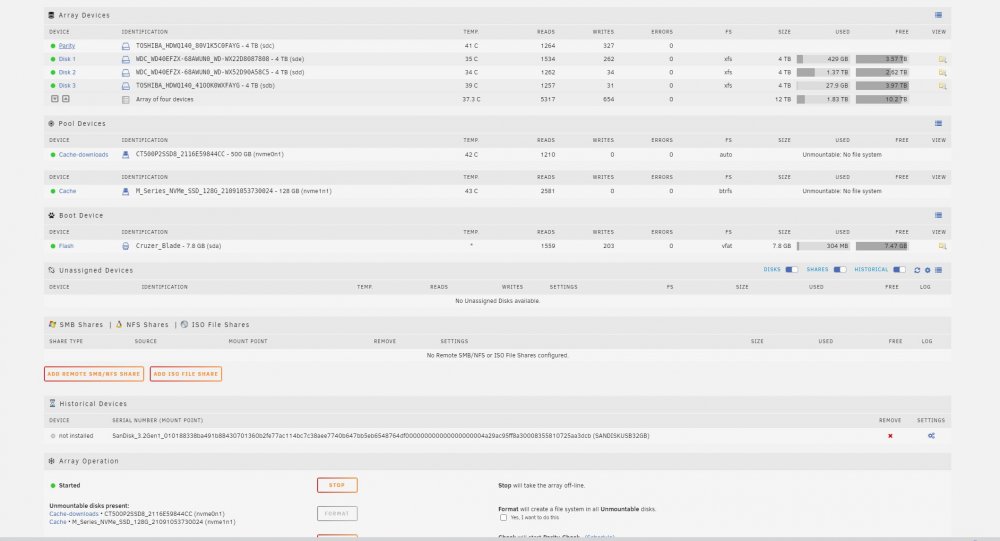
Hi, I've been trying to understand the below post but am new to unraid/linux so am struggling to do so. Please can someone confirm what the exact terminal line entries I should be tryping to recover a unmountable cache pool as seen in the attached screenshot. To clarify, I was trying to seperate the two cache drives into seperate pools when they were prevously one combined pool. Edit: I have worked out the correct terminal entry for the BTRFS filecheck however am now getting the following error: Starting repair. Opening filesystem to check... No valid Btrfs found on /dev/nvme1n1 ERROR: cannot open file system Thanks
-
HI, I've finally managed to link Radarr to DelugeVPN however now when the torrents are added, they just remain at 0% downloaded and eventually move to Paused. Is this a common issue or one that can easily be resolved? Thanks

