





AquaWolf
Members
-
Joined
-
Last visited
-
Solved it by using OVMF TPU Bios and reinstalling Windows.
-
Ok I tried the GPU Passthrough with a Ubuntu VM and there is everything working the difference between the Ubuntu and Windows is that im using in Ubuntu OVMF and for Windows SeaBios. I tried to recreate the Windows VM with a OVMF but im only getting a shell console when starting with only VNC graphics to test if the VM is booting.
-
Hey there, i tried the upgrade form 6.9 to 6.11 today hoping everything will go right. Actually i have now the Problem my GPU passthrough is not working anymore with my Windows VM. I had the same issue with 6.10.RC4 I think. When I'm starting the Windows VM with VNC the vm starts and boots into windows. Does anybody has an idea what could be wrong after upgrade? tower-diagnostics-20221017-1316.zip windowsvm.txt
-
Ok I tried to restore from the backup before Unraid upgrade to rc2. I was not able to start there the VM in beginning, but after deleting the libvirt.img repasting the xml for the vm the passthrough worked. I noticed that I don't had all thes option in the syslinux settings. Then I rerolled the backup of the rc2 and tried there also with and without all these syslinux settings but the gpu passthrough won't work. I also did a delete of libvirt img on rc2 but no success. I'm a bit out of options... perhaps i have to rollback the unraid version and try to fix the mac vlan issue of docker another way
-
I have a complete backup of the usb boot device, should I restore it? I'm having then again the problem with the docker net.
-
no sadfully it does not change it.
-
I have system diagnostics from before, but honestly after the VMs did not started I tried many combinations to try fixing the passthrough problem. Here is an old diagnostics file where the VMs worked with passthrough but there was an issue with docker mac-vlan what has been solved now by ip-vlan implementation. I also tried rollback to the old Unraid version but there the passthrough is also not working anymore. tower-diagnostics-20220206-2004.zip
-
Regarding driver I installed the most current livirt driver. (removed it before) I did this with the build-in vnc client from unraid. Regarding correctness of the bios rom file I really don't understand why it worked before on lower unraid version, there i had no problem with Error 43 or booting. yeha I extracted with a windows (dual) boot and gpuz and removed all the lines before U� until the start of the rom file the selected is removed in the fixed rom file. I did extracted the rom yesterday. Edit: On addition, when selecting the bios from config gui there is a empty block so no access to the filesystem via gui i have to paste the path manually:
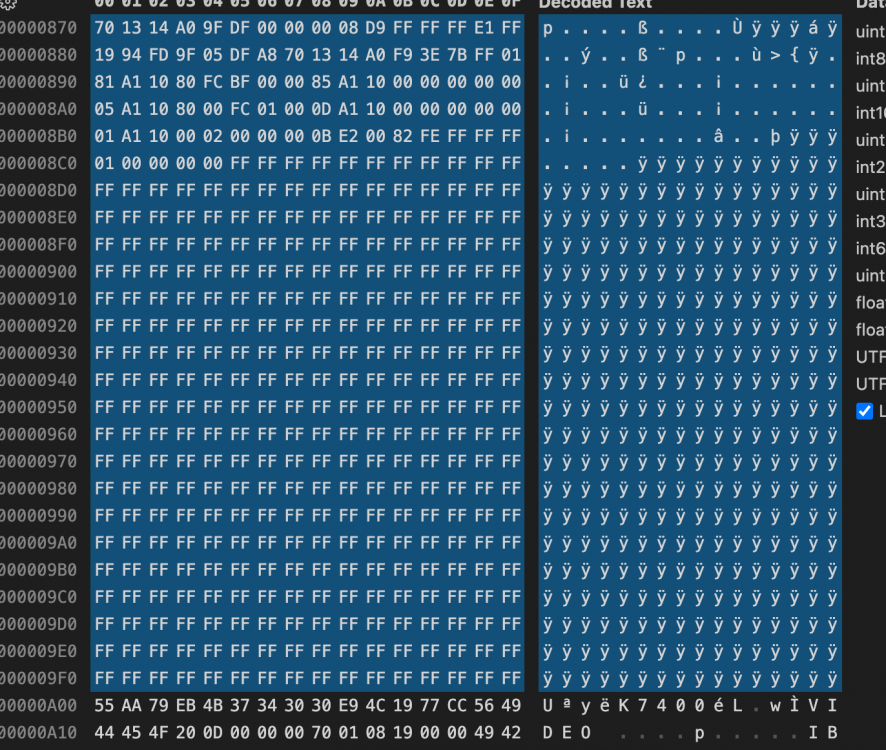
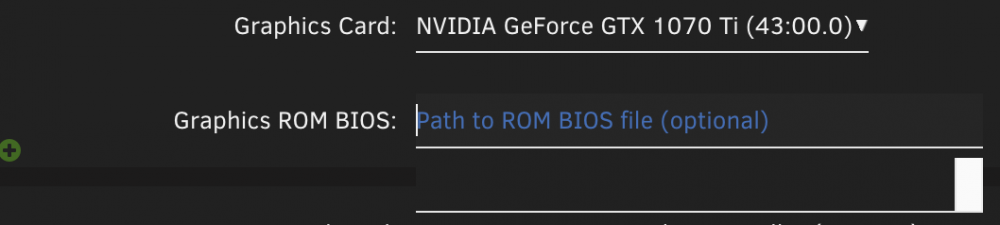
-
yep did this already this BAR error is gone now. My Syslinux config looks actually like this: default menu.c32 menu title Lime Technology, Inc. prompt 0 timeout 50 label Unraid OS menu default kernel /bzimage append iommu=pt pci=noaer video=vesafb:off video=efifb:off pcie_acs_override=downstream initrd=/bzroot label Unraid OS GUI Mode kernel /bzimage append pcie_acs_override=downstream initrd=/bzroot,/bzroot-gui label Unraid OS Safe Mode (no plugins, no GUI) kernel /bzimage append initrd=/bzroot unraidsafemode label Unraid OS GUI Safe Mode (no plugins) kernel /bzimage append initrd=/bzroot,/bzroot-gui unraidsafemode label Memtest86+ kernel /memtest tower-diagnostics-20220222-0933.zip
-
Hey there on 6.9.2 Unraid my both windows 10 VMs worked like they should both were working with GPU passthrough with a gtx 1070 ti. After upgrade the gpu passthrough is not working anymore. I tried it with several boot settings found here in the forum but no luck yet. When have a rom selected for the GPU the machine gets somehow a ip address from my router, but when I try to connect via rdp I get a timeout error. I also cannot ping the machine. When I remove the line of the rom the machine boots up correctly I can rdp then on it, but the graphics card has a 43 error. Actually I'm a bit lost of option what I could to to get these machines working again. Does anybody got an advice? Kind regards tower-diagnostics-20220221-2155.zip
-
Regarding GPU Passthrough I noticed that after removing the Graphics ROM BIOS the VM is booting correctly. When I try to pick the BIOS file from the GUI it only shows a blank selection could this be somehow related?
-
Yep 👍 Does anybody got an idea why the gpu passthrough VMs not working anymore?
-
yep recreated docker image, now it's working (have to restore all my containers from Apps Tab now) Here the diagnostics. tower-diagnostics-20220216-1401.zip
-
I Upgrade to rc2 Docker is not working starting anymore seems to be a Problem with the docker image Feb 16 13:32:59 Tower emhttpd: shcmd (68): /usr/local/sbin/mount_image '/mnt/user/system/docker/docker.img' /var/lib/docker 100 Feb 16 13:32:59 Tower kernel: loop2: detected capacity change from 0 to 209715200 Feb 16 13:32:59 Tower kernel: BTRFS: device fsid b7558f03-4ad1-4884-b9b7-9fe63d3900b9 devid 1 transid 2830106 /dev/loop2 scanned by mount (4507) Feb 16 13:32:59 Tower kernel: BTRFS info (device loop2): flagging fs with big metadata feature Feb 16 13:32:59 Tower kernel: BTRFS info (device loop2): using free space tree Feb 16 13:32:59 Tower kernel: BTRFS info (device loop2): has skinny extents Feb 16 13:32:59 Tower kernel: BTRFS info (device loop2): bdev /dev/loop2 errs: wr 0, rd 0, flush 0, corrupt 4, gen 0 Feb 16 13:32:59 Tower kernel: BTRFS info (device loop2): enabling ssd optimizations Feb 16 13:32:59 Tower kernel: BTRFS info (device loop2): cleaning free space cache v1 Feb 16 13:32:59 Tower kernel: BTRFS warning (device loop2): checksum verify failed on 28567109632 wanted 0x92b333b4 found 0x5563533e level 0 Feb 16 13:32:59 Tower kernel: BTRFS warning (device loop2): checksum verify failed on 28567109632 wanted 0x92b333b4 found 0x5563533e level 0 Feb 16 13:32:59 Tower kernel: BTRFS: error (device loop2) in btrfs_set_free_space_cache_v1_active:3992: errno=-5 IO failure Feb 16 13:32:59 Tower kernel: BTRFS error (device loop2): commit super ret -30 Feb 16 13:32:59 Tower root: mount: /var/lib/docker: can't read superblock on /dev/loop2. Feb 16 13:32:59 Tower kernel: BTRFS error (device loop2): open_ctree failed Feb 16 13:32:59 Tower root: mount error And my VMs with GPU Passthrough are not working anymore I'm getting just a few lines in syslog: Feb 16 13:38:13 Tower kernel: br0: port 2(vnet1) entered blocking state Feb 16 13:38:13 Tower kernel: br0: port 2(vnet1) entered disabled state Feb 16 13:38:13 Tower kernel: device vnet1 entered promiscuous mode Feb 16 13:38:13 Tower kernel: br0: port 2(vnet1) entered blocking state Feb 16 13:38:13 Tower kernel: br0: port 2(vnet1) entered forwarding state Feb 16 13:38:15 Tower avahi-daemon[4465]: Joining mDNS multicast group on interface vnet1.IPv6 with address fe80::fc54:ff:fe30:3c6e. Feb 16 13:38:15 Tower avahi-daemon[4465]: New relevant interface vnet1.IPv6 for mDNS. Feb 16 13:38:15 Tower avahi-daemon[4465]: Registering new address record for fe80::fc54:ff:fe30:3c6e on vnet1.*. Feb 16 13:38:19 Tower kernel: vfio-pci 0000:43:00.0: vfio_ecap_init: hiding ecap 0x19@0x900 Feb 16 13:38:19 Tower kernel: vfio-pci 0000:43:00.0: No more image in the PCI ROM Feb 16 13:38:19 Tower kernel: vfio-pci 0000:41:00.0: vfio_ecap_init: hiding ecap 0x1e@0x110 Feb 16 13:38:19 Tower kernel: vfio-pci 0000:41:00.0: vfio_ecap_init: hiding ecap 0x19@0x300
-
Ok I'll give that a try this applies to me I'll report back this weekend.

