





Nomaran
Members
-
Joined
-
Last visited
-
Server B has NFS enabled, did a reboot and waited. Still unable to connect. Also rebooted Server A, no dice.
-
So I'm a bit lost and I'm hoping for a little guidance. A friend and I have set up a wireguard tunnel and an NFS share for offsite backups. Server A and Server B are connected VIA wireguard, both servers are able to ping each other. Server B can connect to Server A's NFS share. Server A however cannot connect to Server B's share. I've gone through everything I can think of but I cannot get the "LED" to turn green on Server A's end. Both servers have the same configuration. Both are running 6.12.13 along with the latest current release of 2024.10.02 for the plugin. What's weird is, when going through to mount the NFS share I can see the share if I click the "load shares" button. Kinda lost as what to do next. I can mount a local NFS share I spun up on a laptop for what's it worth. Thanks,
-
Thanks for the info, I appreciate it.
-
I got it! I updated the BIOS for the R440 and now I'm able to boot into the installer. Thanks trurl for the assist!
-
Alright I followed those steps on three different USB drives, I'm getting the same error.
-
Nomaran changed their profile photo
-
I'll try that tomorrow after work and I'll report back. thanks for your help so far trurl.
-
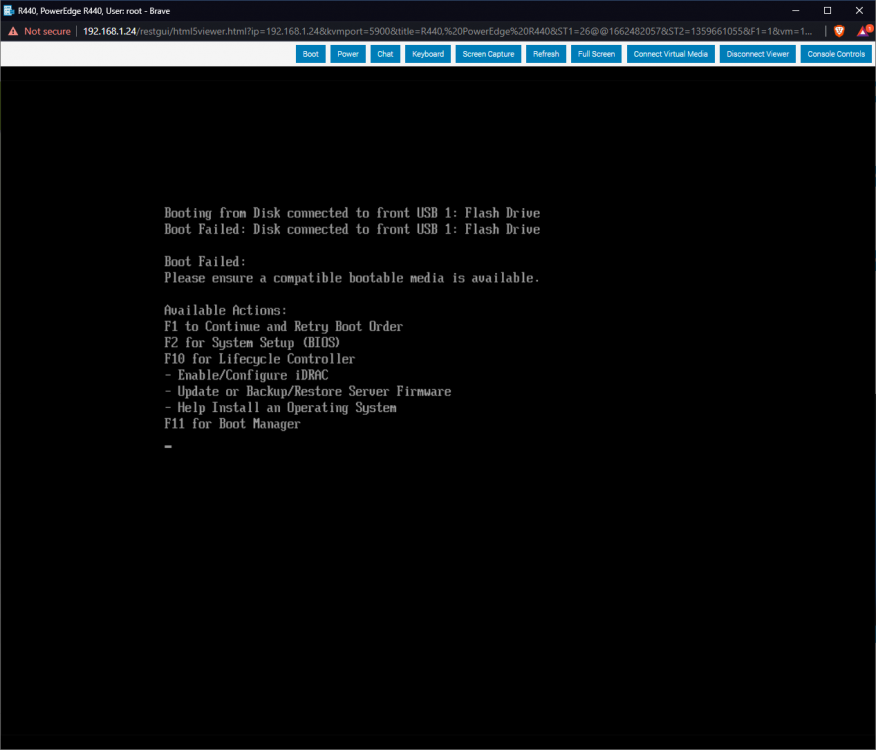
Boot failed: Please ensure a compatible bootable media is available.
-
Hi all, I've been spending probably the last few days trying to get my R440 to boot into the Unraid installer. So far this is what I've tried: Used both the tool and did the manual method to create a USB stick. Testing the USB on another machine - it boots into the installer. Trying every USB port on the R440. Trying two other USB flashdrives from different vendors. Confirmed that I can boot into another OS. I was able to boot into Windows Sever 2016, Ubuntu Server 20.01.2, and ESXi. I've played with multiple BIOS settings in attempt to get it to boot. I'm hoping someone that has installed on an R440 can point me in the right direction. Thanks!

