10bn
Members
-
Joined
-
Last visited
-
Würde man über den 4x NVME SSF Port auch 8x SATA anschließen können?
-
Hi all, I’m having an issue where my Plex container randomly freezes and becomes unresponsive. I can’t restart or kill it, and even rebooting the server doesn’t work unless I force it via the command line, which then triggers a parity check. I recently started using the Spaceinvader NVIDIA power save script, but I’m not sure if it’s the cause. Diagnostics are attached—any advice is appreciated! Thanks! tower-diagnostics-20250127-1745.zip
-
I don't know why it was on, must have changed it when I checked the settings, but turning of vIOMMU fixed it fore me.
-
hmm, I just tried and removed all pcie device so now it's a plain vm with just the usb attached and I run into the same issue. Starting off the usb barematel works without problem. I also tried setting um udev rules as mentioned here: https://github.com/unraid/webgui/commit/bc761b06791f9ed38d47a269db4c9fac0a9c1786 mkdir -p /boot/config/udev/rules.d touch /boot/config/udev/rules.d/99-unraid.rules echo 'SUBSYSTEM=="block", ENV{ID_FS_UUID}=="XXXX-XXXX", NAME="sda1"' >> /boot/config/udev/rules.d/99-unraid.rules Any suggestions are welcome.
-
Did you find a way to fix it?
-
Eigentlich wollte ich auf Deutsch auf posten, aber irgendwie kommt man manchmal durcheinander. 😅 Ich werde es nochmal in dem von dir genannten Thread versuchen.
-
I'm trying to get Plex to perform HDR tone mapping on a 780M iGPU, but the transcoding speed is around 0.7, which is obviously too low. From my understanding, the iGPU should be more than capable of handling this task with tone mapping enabled. Does anyone have suggestions on why this might not be working?
-
FYI: I compiled the module using ich777's unraid kenel repo. Unfotunately non of the methods of the vendor reset worked.
-
yes ^^, but it was just 90€ and also draws around 5watts on idle. There is also an nvidia vgpu driver for unraid which should work with that card but I had no success setting it up. I might get a new board in the future that has more than one pci slot but for now things have to work like they are. As a last resort option i'll just never turn of the vm. 😅 ok, thanks, maybe for now then I'll try the never turn of vm option. 🤣
-
Yes, unfortuantely it does. I'll check the unraid kernel stuff you linked, thanks. I got an Nvida P4 which handles the transcoding, the 780m igpu is quite troublesome when used for transcoding.
-
Thank for the quick respone. Do you may have a suggestion, how I could approach the reset issue for the for the 780m igpu instead? There is also on guy who commented on some the issues that it's worth trying through some of the methods. Since they might work also for other igpus. So anyhow I would like to give it a shot, but I couldn't figure out yet how to compile this for unriad.
-
@ich777 I would like to test adding my iGPU (780M, Ryzen 7840HS) to the various reset methods in the vendor-reset plugin to see if any of them work. Could you please provide guidance on how to build the vendor-reset for Unraid? https://github.com/gnif/vendor-reset/issues/82
-
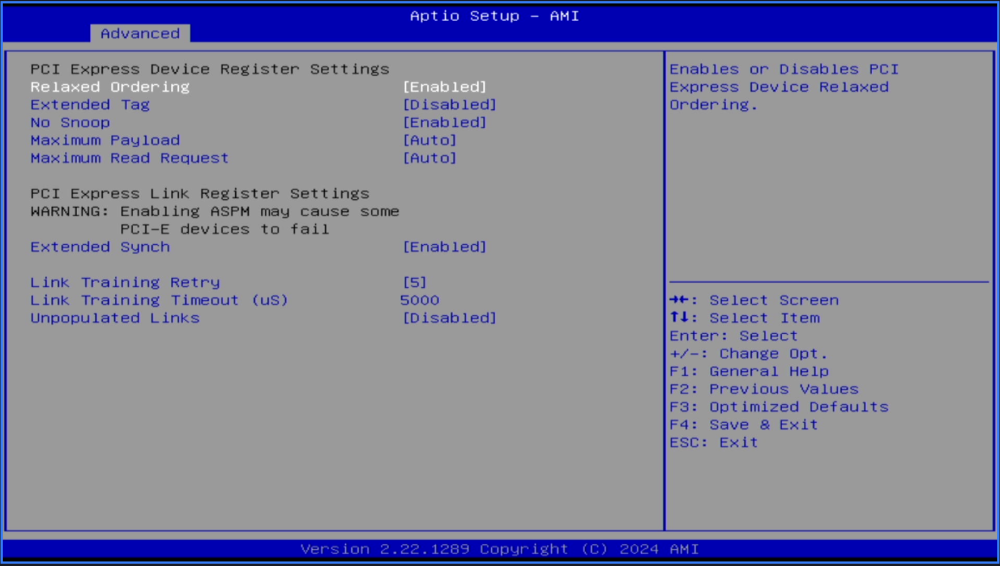
I'd like to have some kind of editing option for config files when the array isn't online. It doesn't have to be the Monaco editor; if there is something simpler to start off with, even better.Hi Guys, I'm trying to put my Asrock Intel ARC A380 to L1 but the power conumption dosen't change. Wouthout the card its around 30W and with the card inserted I'm at around 50W. I hope someone can help with this, I don't know what else I could try. Used Kernerl to enable ARC support: https://github.com/thor2002ro/unraid_kernel/releases What I've tryied so far: 1. Check ASPM Status: sudo lspci -vv | awk '/ASPM/{print $0}' RS= | grep --color -P '(^[a-z0-9:.]+|ASPM )' 2. Used this script to change the ASPM Settings. #!/bin/bash # Copyright (c) 2010-2013 Luis R. Rodriguez <[email protected]> # # Permission to use, copy, modify, and/or distribute this software for any # purpose with or without fee is hereby granted, provided that the above # copyright notice and this permission notice appear in all copies. # # THE SOFTWARE IS PROVIDED "AS IS" AND THE AUTHOR DISCLAIMS ALL WARRANTIES # WITH REGARD TO THIS SOFTWARE INCLUDING ALL IMPLIED WARRANTIES OF # MERCHANTABILITY AND FITNESS. IN NO EVENT SHALL THE AUTHOR BE LIABLE FOR # ANY SPECIAL, DIRECT, INDIRECT, OR CONSEQUENTIAL DAMAGES OR ANY DAMAGES # WHATSOEVER RESULTING FROM LOSS OF USE, DATA OR PROFITS, WHETHER IN AN # ACTION OF CONTRACT, NEGLIGENCE OR OTHER TORTIOUS ACTION, ARISING OUT OF # OR IN CONNECTION WITH THE USE OR PERFORMANCE OF THIS SOFTWARE. # ASPM Tuning script # # This script lets you enable ASPM on your devices in case your BIOS # does not have it enabled for some reason. If your BIOS does not have # it enabled it is usually for a good reason so you should only use this if # you know what you are doing. Typically you would only need to enable # ASPM manually when doing development and using a card that typically # is not present on a laptop, or using the cardbus slot. The BIOS typically # disables ASPM for foreign cards and on the cardbus slot. Check also # if you may need to do other things than what is below on your vendor # documentation. # # To use this script You will need for now to at least query your device # PCI endpoint and root complex addresses using the convention output by # lspci: [<bus>]:[<slot>].[<func>] # # For example: # # 03:00.0 Network controller: Atheros Communications Inc. AR9300 Wireless LAN adaptor (rev 01 # 00:1c.1 PCI bridge: Intel Corporation 82801H (ICH8 Family) PCI Express Port 2 (rev 03) # # The root complex for the endpoint can be found using lspci -t # # For more details refer to: # # http://wireless.kernel.org/en/users/Documentation/ASPM # You just need to modify these three values: ROOT_COMPLEX="01.1" ENDPOINT="03:00.0" # ARC GPU #ENDPOINT="04:00.0" # ARC AUDIO # We'll only enable the last 2 bits by using a mask # of :3 to setpci, this will ensure we keep the existing # values on the byte. # # Hex Binary Meaning # ------------------------- # 0 0b00 L0 only # 1 0b01 L0s only # 2 0b10 L1 only # 3 0b11 L1 and L0s ASPM_SETTING=2 function aspm_setting_to_string() { case $1 in 0) echo -e "\t${BLUE}L0 only${NORMAL}, ${RED}ASPM disabled${NORMAL}" ;; 1) ;; 2) echo -e "\t${GREEN}L1 only${NORMAL}" ;; 3) echo -e "\t${GREEN}L1 and L0s${NORMAL}" ;; *) echo -e "\t${RED}Invalid${NORMAL}" ;; esac } ################################################################### # Do not edit below here unless you are sending me a patch ################################################################### # # TODO: patches are welcomed to me until we submit to to # PCI Utilities upstream. # # This can be improved by in this order: # # * Accept arguments for endpoint and root complex address, and # desired ASPM settings # * Look for your ASPM capabilities by quering your # LnkCap register first. Use these values to let you # select whether you want to enable only L1 or L1 & L0s # * Searching for your root complex for you # * Search for your PCI device by using the driver # * Disable your driver and ask to reboot ? # * Rewrite in C # * Write ncurses interface [ wishlist ] # * Write GTK/QT interface [ wishlist ] # * Submit upstream as aspm.c to the PCI Utilities, which are # maintained by Martin Mares <[email protected]> # Pretty colors GREEN="\033[01;32m" YELLOW="\033[01;33m" NORMAL="\033[00m" BLUE="\033[34m" RED="\033[31m" PURPLE="\033[35m" CYAN="\033[36m" UNDERLINE="\033[02m" # we can surely read the spec to get a better value MAX_SEARCH=20 SEARCH_COUNT=1 ASPM_BYTE_ADDRESS="INVALID" ROOT_PRESENT=$(lspci | grep -c "$ROOT_COMPLEXT") ENDPOINT_PRESENT=$(lspci | grep -c "$ENDPOINT") if [[ $(id -u) != 0 ]]; then echo "This needs to be run as root" exit 1 fi if [[ $ROOT_PRESENT -eq 0 ]]; then echo "Root complex $ROOT_COMPLEX is not present" exit fi if [[ $ENDPOINT_PRESENT -eq 0 ]]; then echo "Endpoint $ENDPOINT is not present" exit fi # XXX: lspci -s some_device_not_existing does not return positive # if the device does not exist, fix this upstream function device_present() { PRESENT=$(lspci | grep -c "$1") COMPLAINT="${RED}not present${NORMAL}" if [[ $PRESENT -eq 0 ]]; then if [[ $2 != "present" ]]; then COMPLAINT="${RED}disappeared${NORMAL}" fi echo -e "Device ${BLUE}${1}${NORMAL} $COMPLAINT" return 1 fi return 0 } function find_aspm_byte_address() { device_present $ENDPOINT present if [[ $? -ne 0 ]]; then exit fi SEARCH=$(setpci -s $1 34.b) # We know on the first search $SEARCH will not be # 10 but this simplifies the implementation. while [[ $SEARCH != 10 && $SEARCH_COUNT -le $MAX_SEARCH ]]; do END_SEARCH=$(setpci -s $1 ${SEARCH}.b) # Convert hex digits to uppercase for bc SEARCH_UPPER=$(printf "%X" 0x${SEARCH}) if [[ $END_SEARCH = 10 ]]; then ASPM_BYTE_ADDRESS=$(echo "obase=16; ibase=16; $SEARCH_UPPER + 10" | bc) break fi SEARCH=$(echo "obase=16; ibase=16; $SEARCH + 1" | bc) SEARCH=$(setpci -s $1 ${SEARCH}.b) let SEARCH_COUNT=$SEARCH_COUNT+1 done if [[ $SEARCH_COUNT -ge $MAX_SEARCH ]]; then echo -e "Long loop while looking for ASPM word for $1" return 1 fi return 0 } function enable_aspm_byte() { device_present $1 present if [[ $? -ne 0 ]]; then exit fi find_aspm_byte_address $1 if [[ $? -ne 0 ]]; then return 1 fi ASPM_BYTE_HEX=$(setpci -s $1 ${ASPM_BYTE_ADDRESS}.b) ASPM_BYTE_HEX=$(printf "%X" 0x${ASPM_BYTE_HEX}) # setpci doesn't support a mask on the query yet, only on the set, # so to verify a setting on a mask we have no other optoin but # to do do this stuff ourselves. DESIRED_ASPM_BYTE_HEX=$(printf "%X" $(( (0x${ASPM_BYTE_HEX} & ~0x7) |0x${ASPM_SETTING}))) if [[ $ASPM_BYTE_ADDRESS = "INVALID" ]]; then echo -e "No ASPM byte could be found for $(lspci -s $1)" return fi echo -e "$(lspci -s $1)" echo -en "\t${YELLOW}0x${ASPM_BYTE_ADDRESS}${NORMAL} : ${CYAN}0x${ASPM_BYTE_HEX}${GREEN} --> ${BLUE}0x${DESIRED_ASPM_BYTE_HEX}${NORMAL} ... " device_present $1 present if [[ $? -ne 0 ]]; then exit fi # Avoid setting if already set if [[ $ASPM_BYTE_HEX = $DESIRED_ASPM_BYTE_HEX ]]; then echo -e "[${GREEN}SUCESS${NORMAL}] (${GREEN}already set${NORMAL})" aspm_setting_to_string $ASPM_SETTING return 0 fi # This only writes the last 3 bits setpci -s $1 ${ASPM_BYTE_ADDRESS}.b=${ASPM_SETTING}:3 sleep 3 ACTUAL_ASPM_BYTE_HEX=$(setpci -s $1 ${ASPM_BYTE_ADDRESS}.b) ACTUAL_ASPM_BYTE_HEX=$(printf "%X" 0x${ACTUAL_ASPM_BYTE_HEX}) # Do not retry this if it failed, if it failed to set. # Likey if it failed its a good reason and you should look # into that. if [[ $ACTUAL_ASPM_BYTE_HEX != $DESIRED_ASPM_BYTE_HEX ]]; then echo -e "\t[${RED}FAIL${NORMAL}] (0x${ACTUAL_ASPM_BYTE_HEX})" return 1 fi echo -e "\t[${GREEN}SUCCESS]${NORMAL}]" aspm_setting_to_string $ASPM_SETTING return 0 } device_present $ENDPOINT not_sure if [[ $? -ne 0 ]]; then exit fi echo -e "${CYAN}Root complex${NORMAL}:" enable_aspm_byte $ROOT_COMPLEX echo echo -e "${CYAN}Endpoint${NORMAL}:" enable_aspm_byte $ENDPOINT echo Now the ASPM Status is enabled: I also set Unpopulated Links in the BIOS to disabled. I gues this is what they call ASMP? Further, I used powertop to check if the ARC device is on AUTO, and yes, it is, but the actions taken don't seem to bring any effect regarding the power consumption. When I run powertop --auto-tune the system freezes. I tried to set all pci devices to auto one by one but could figure out which on freezes the system. Do you guys have any suggestions what else I could try to get the ARC Card to sleep when it's not in use? System Profile Motherboard: CWWK AMD 7735HS/7840HS/8845HS/7940HS 8-Bay/9-Bay NAS OS: Unraid Server Pro 6.12.8 CPU: AMD Ryzen 7 7840HS @ 3.8 GHz Integrated GPU: AMD Radeon™ 780M Memory: 64GB DDR5 (2x 32GB @ 5600 MT/s CT32G56C46S5) DGPU: Asrock Intel ARC A380 Storage Configuration: NVMe SSDs: 2x 512GB Crucial (ZFS) HDDs: 4x 18TB WDC WUH721818AL (XFS) (6,5W per disk when spinning) 1x 6TB WDC WD6003FFBX-6 (ZFS) SSD: 1x 1TB Samsung SSD 840 (ZFS) Power Supply: Corsair RM550x (Checkout Wolfgangs Video: What's the Best PSU For Your Low Idle Home Server?) Case: Lian Li Q25 Accessories: 2x MiniSAS to SATA cables for extended storage options