





thetadawg
Members
-
Joined
-
Last visited
-
HELL YEAH!!! That was it! I had 2 cables connected. I powered down and removed the power just to give me a piece of mind and then saw that I had 2 cables connected, which created the multipath as you stated above. I powered it back up removed all devices and then did a restore from previous backup. All is good now. THANKS SO MUCH!!!!
-
I will have to open up the server and take a look at the SAS backplane on my supermicro cse-847. It has been awhile and I really can't remember how it is hooked up, But I do remember it working with version 2024 of disk location. I haven't changed anything, since 2024 version. But, it might have the cables in a way that it's creating a loop of some sort.
-
I just noticed something. Even though I have assigned the drive the picture at the top of the tray allocation tab states that they are empty.
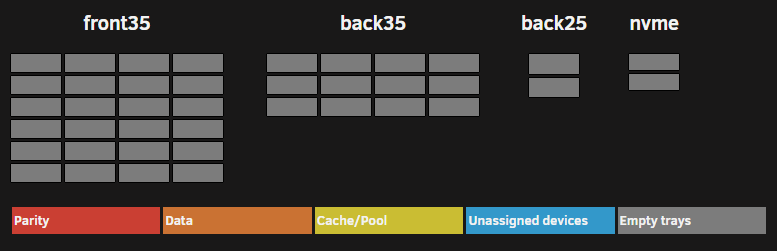
-
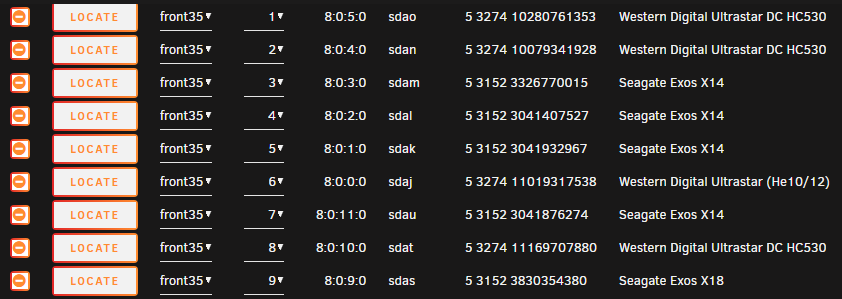
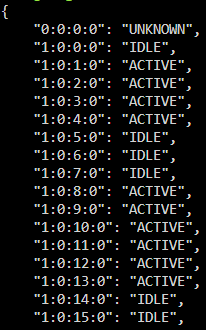
These are my current findings (below is a quick snip) I have assigned the drives multiple times during my past troubleshooting Does /tmp/disklocation exists, and does it contain files. Can those files be edited, or has it been mounted as read-only or something? Please check these: ls /tmp/disklocation/smart (should countain one json file per drive) 36 json files are in this location with 644 root root for the files and 755 for the 'smart' folder cat /tmp/disklocation/powermode.json (should contain a list of drive states with PATH) Is this what it should look like? Have you tested for faulty RAM? /tmp folder are mounted in the memory. Maybe a proper power off (with plugging out the cord) for some minutes will solve things too (if you have faulty files/write permission issues etc). I haven't pulled power from the server in awhile, but have done multiple restarts and shutdowns while troubleshooting
-
@FlamongOle log file was sent via message. I didn't see anything stand out. Thanx again for the help!!!
-
When I go to Tools -> PHP it states the following "LOG size: 0 B". I do have a remote log server that I did look into for S&G and did not see anything in there.
-
Looking for some help. I've used this plugin before the 7.x version and loved it. So after the 7.x upgrade, I have yet to get this to work again. I get the dreaded 'Go to System and initialize a "Force SMART+DB"' and no matter what I do, nothing changes on the dashboard tab. I have even went back to the 2024 edition while on 7.x and the plugin works. After this I have just waited for an update on the plugin by removing the 2024 edition and then installing from the UNRAID APPS tab. But nothing is populating in the dashboard. I restored from a 2024 backup and nothing. I even reset the devices and click on Force SMART +DB again. I'm not sure what info you would need from me to help troubleshoot this issue. Thanx in advance

