





jricica2
Members
-
Joined
-
Last visited
Everything posted by jricica2
-
This must have been the issue. I unplugged and re-plugged all of the cables connected to the backplane last night and when I powered the server back on the drives were all detected and the array started. Talk about a sigh of relief! My guess is that the refurbishing/reseller company I bought from must have Frankenstein'ed this server from a couple of others and a connection wasn't fully secure. Thank you for all your help during the troubleshooting process.
-
Would likely be bad power (hopefully just a loose connection) as all of my drives are NAS/enterprise hard drives. The current drives I have installed are HGST drives and the others I have on standby are WD Red drives. Thank you for the assistance!
-
Yes, this drawing is correct as to how things are connected currently. I do not hear the disks spinning up nor see any activity lights blinking on the front of the server/drive trays (not sure if the trays will blink or not yet). I've tried to locate a SAS drive at work and have been unable to do so, and the ~36 drives I have at home are all SATA unfortunately. I will plan to unplug and re-plug all connectors on the backplane this evening when I get home from work and report back. Obviously I really want to get things working with the H310 Mini since 1. it should work without issue and 2. I spent money on buying it to swap out the H710, BUT I do still have the HBA and SAS expander card from the old server that I could potentially use with the downside that they will occupy 2 of my PCIe slots in addition to the Nvidia GPU I have for Plex transcoding. Hopefully I have enough full-height slots available or I might have to re-buy some of them as half-height cards. This was initially why I thought it could potentially be just a configuration issue within Unraid since the old server used the other HBA and SAS expander and the drives were recognized. I thought I may have to delete that configuration somewhere and reboot and the new controller and drives would be detected automatically.
-
As far as I know that's the only place that it would plug in? My understanding is that the PCIe connection of the H310 mini is a proprietary one that is connected to that double SAS connector port via the board, but I'm not super familiar with this model yet. The H310 doesn't have anything to plug into though. I took a few pictures, one of the backplane that is in the front of the chassis just behind the 3.5" drives and called out which connection is for the Flex Bay, a picture of the Flex Bay daughter board, and the H310 Mini and the double-SAS connector that would be carrying the other 2 connections on the backplane.
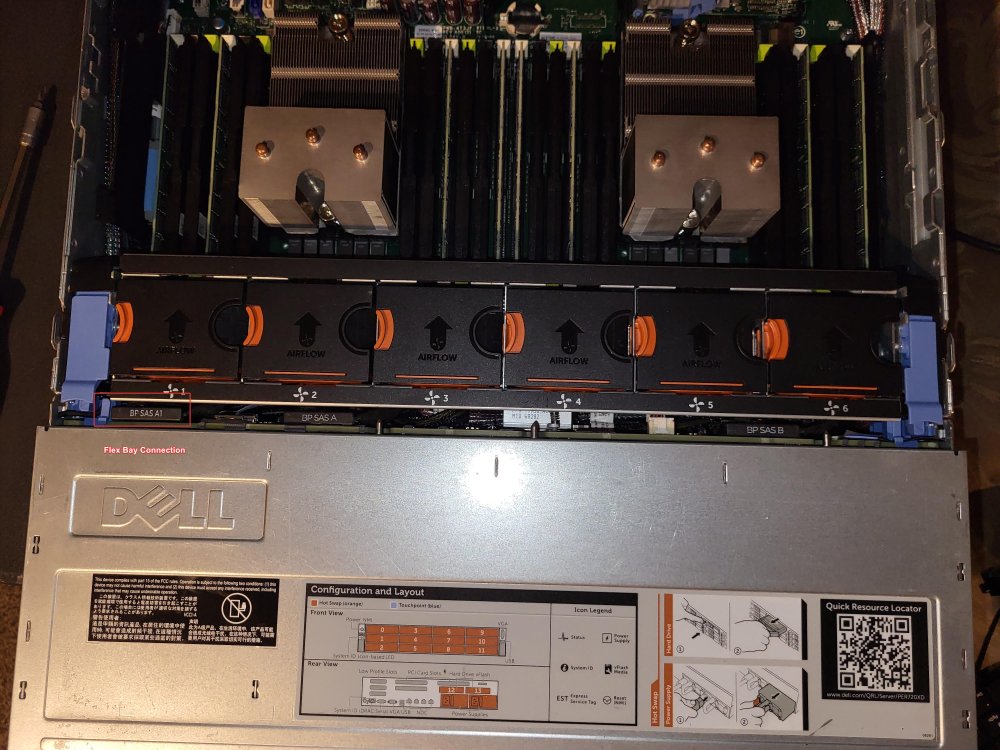
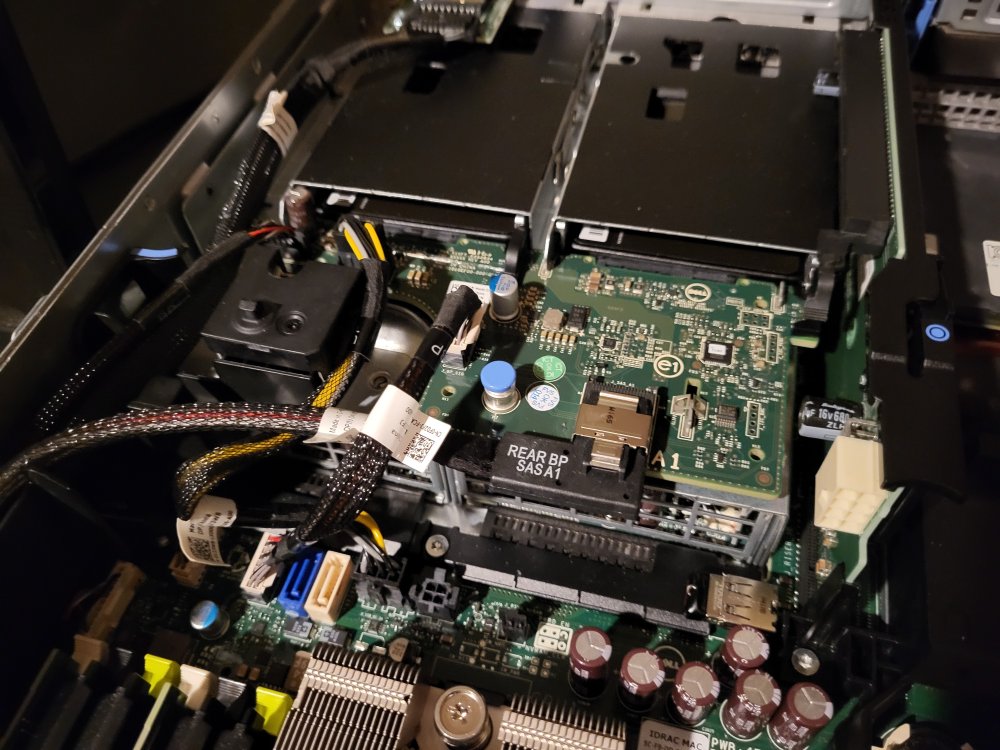
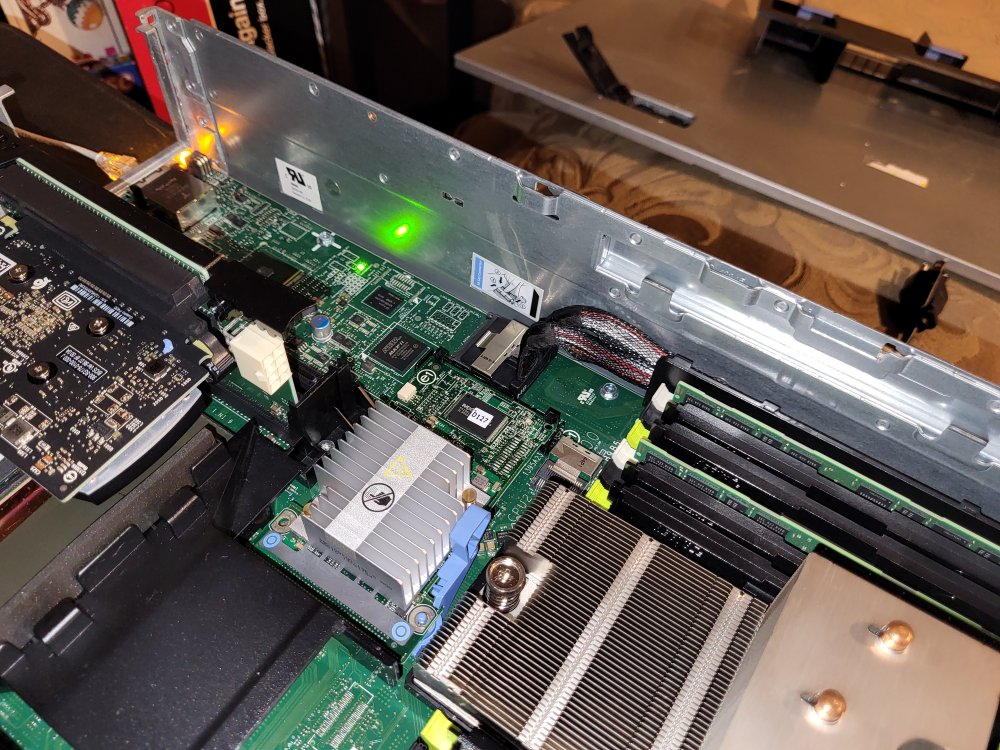
-
Thanks for the response. The Flex Bay is an expansion board that slots into the riser in the back and connects to the board via several cables and the SAS connection runs to the front of the server and connects to the same backplane that the 3.5" hard drives connect to. The main backplane runs along the right side of the case/board (looking from the front) and connects to the board via what looks like a double-wide SAS connection. The attached picture shows where the H310 Mini sits on the board and the double-wide connection where the backplane is plugged in. I can take actual pictures of my setup when I'm at home if that would be helpful.
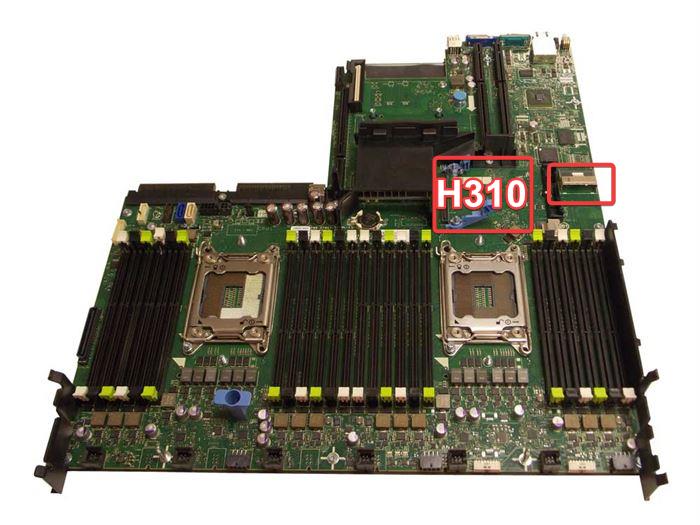
-
Hello, I was running Unraid in a retired Avamar storage node and its performance was starting to get flakey and slow, so I decided to purchase some similar-but-newer hardware and opted to go with a Dell R720xd LFF model with 12 x 3.5" drive slots, and I also bought the Flex Bay to include my 2 x 2.5" SSD cache drives. I bought a Dell H310 Mini HBA flashed to IT mode by The Art of Server on eBay to use with the new server, and I installed it and connected all the cables for the H310 Mini as well as the Flex Bay and plugged my USB drive from the previous server in and it booted with no issue (I did not have any drives installed at this point, just wanted to make sure it would boot before removing all the drives from the old server's trays and installing them in the Dell's trays). Once I had the drives installed in the Dell trays and in the server, I was excited to get things back up-and-running. Much to my dismay, the only drives that are recognized by the system are the 2 x 2.5" SSD cache drives. None of the 3.5" drives are displaying. They are SATA drives, not SAS, but they were being used with an HBA in IT mode on the old server so I didn't think it would matter much that I was using SATA drives. I believe the H310 Mini IS being recognized by the BIOS since it shows the "Avago Technologies MPT SAS2 BIOS" info during boot up as well as the results of running an lspci command in Linux. I'm able to launch the configuration utility and it shows up as an enclosure but does not have any drives listed. I'm hoping it's just a stupid configuration change that needs made or something that is carrying over from the previous server's hardware that needs undone and re-configured, but I'm not sure what to try next to get things working. Let me know if there is any other information that is needed or if a screenshot of anything would be helpful to the process. Any help is greatly appreciated! tower-diagnostics-20221203-1912.zip
-
Following this thread closely as I started having the same issue just last night/this morning.



