





97WaterPolo
Members
-
Joined
-
Last visited
-
Got it, thank you, I was wondering if I had messed up the formatting or had some partition on it that Unraid thought was occupied. That takes a good chunk of space for XFS though, I thought the main change for 7.0 was ZFS, which isn't my format? Do my other drives have it and I just don't realize it?
-
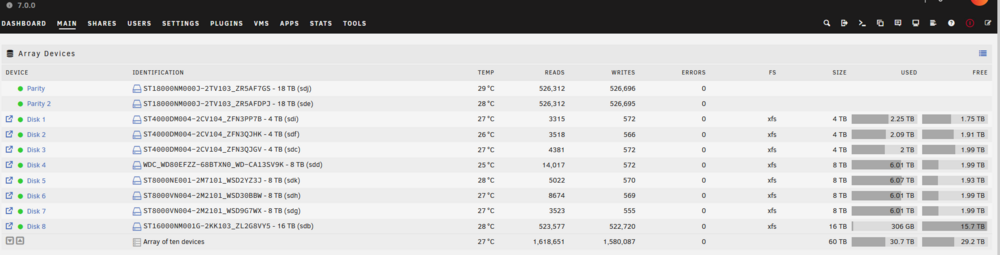
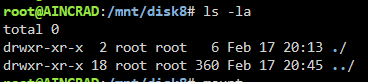
Hi everyone, I just added a new 16TB HDD that I precleared/erased to my array, when I first added the disk to the array it showed up as unsupported fs, I went to the bottom and formatted it and it now seems to be part of the array, but there is 306GB Used on the disk and I can't figure out where it is from. If I use shell to go into the directory there is no data at all there, why would there be data on this drive if its just been added? I don't have unbalance or my docker containers running or any VMs, not sure where it came from? Any possible ideas? I've made sure this disk was completely cleared, and the total size is correct. Specifically disk 8, I see about 500K writes but I'm not sure from what because the disk looks empty aincrad-diagnostics-20250217-2054.zip
-
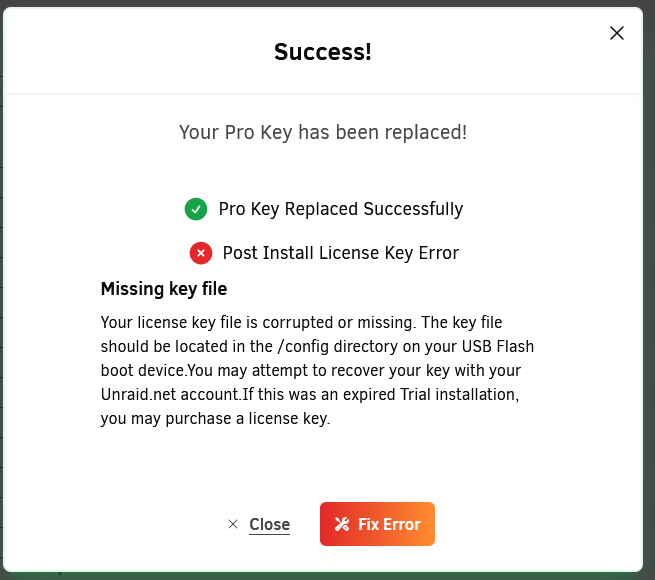
I ended up upgrading to Version 7. After I upgraded I had a giant popup that said "Replace Key" and then I clicked on that and it went to an Unraid page where it asked me to confirm blacklisting my old USB and transferring to the new one. I clicked accept and it went back to unraid and it did some popups and then ended on this one. After I clicked Fix error it correctly associated the key and it seems like everything is working now in terms of the license. Now onto testing v7.0.0. Sucks that it requires upgrading to latest version to migrate the license key, but at least no longer dead on the water.
-
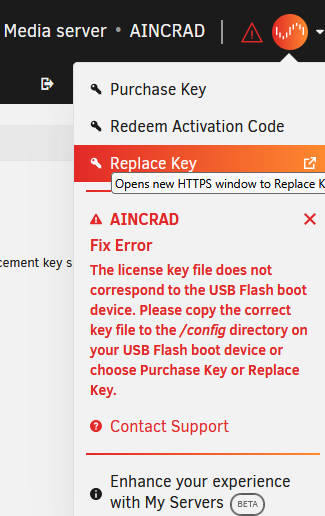
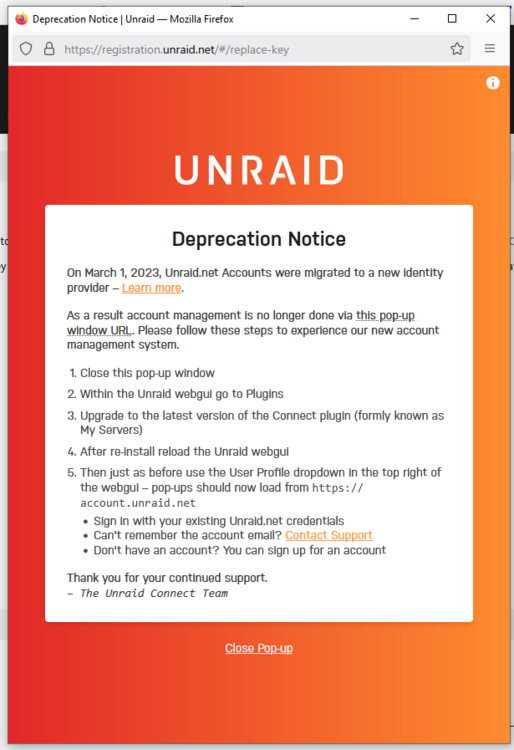
Hi everyone, I just migrated from my old unraid build to new hardware (including a new USB). Everything seems to be going well, and my understanding was that I could easily do a once a year transfer of my license to a new USB, however after booting into 6.11.5 I go to Tools > Registration, there is no "Replace Key" option that I would expect to see from https://docs.unraid.net/unraid-os/manual/changing-the-flash-device/ I then click the drop down on the top right and I see an option for "Replace Key" but when I click on it, it fails with this error message. I saw on some reddit posts you need this "Unraid Connect Plugin", I attempted to install it however it states that I need to upgrade to a newer version of Unraid in order to enjoy Unraid Connect Even after installing it and trying to go to "Replace Key" again, it is still the same error. Any suggestions on what I should do? I'm dead in the water right now until I can get my array started.

-
Hi everyone, My UPS died in the middle of the night so when I woke up this morning it was beeping and throwing an F04 and my unraid box was dead. I restarted it and was able to log into it on my phone at the static numerical ip (192.168.68.14) and view the UI. Since it was unclean I manually clicked "Start" on the array and then I got disconnected from the page and it became completely unresponsive, I could not access it anymore at the numerical IP. I ended up restarting it again and booting into the GUI mode on a spare monitor and got everything setup connecting directly to unraid. Here is where it gets weird All of my containers run on static IPs, 192.168.68.14 and those are all accessible through my network Plex is accessible through 192.168.68.X AdGuard is accessible through 192.168.68.X Nginx is accessbile through 192.168.68.X The containers that are routed through Nginx ALSO are publicly accessible at the corresponding subdomain, and they all work fine. I also have a VM spun up which I can completely access through the network and publicly as well I have tailscale installed, if I connect to it on my phone, I am able to connect to the Unraid Web GUI I am able to ping google.com and github.com from console, as well as access all of the apps in the my community section The only thing that I can't access is my Unraid server at 192.168.68.14. I can't access any of my mounted shares on my windows PC because they are using the numerical IP Some other random things I've tried I tried doing a /etc/rc.d/rcinetd restart (can't remeber the exact command) to try and restart it and nothing happened. I can ping the default gateway at 192.168.68.1 from unraid I can not ping another computer on my network 192.168.68.135 from unraid I can ping the default gateway at 192.168.68.1 from another computer (192.168.68.135) I can ping unraid (192.168.68.14) from another computer (192.168.68.135) It almost seems like it is on the network, and visible, but Unraid itself isn't responding to requests on that specific IP, I know it has internet connectivity because all of my docker containers and VMs are up, and can access the internet no problem, just the root URL that is the issue. Please let me know if I am missing anything, I've attached diagnostics. Any help would be greatly appreciated!! aincrad-diagnostics-20241217-0845.zip
-
I did what was suggested and did a full power cycle, shut down fully, then bring back up. My cache pool seemed to have mounted in read-only mode since one of the disks was failing. I did do a btrfs dev stats and the same drive still had corruption errors after wiping. So I did do a "rsyc" to copy as much as I could off the cache pool to the array, I had a tail running on the syslog and it was constantly spouting errors about corruption, thankfully it finished and spot checking the data it looked good. I then shutdown the server again and took it out to be worked on. I gave the whole thing a good dusting and replaced the 970 Evo Plus drive with a 980 Pro. I then restarted my system which gave me an error stating that the drive was missing. I then mounted the new drive as part of the cache pool and started the array. Once started I saw that it started a balance operation on its own and was reading a bunch from the good drive and writing to the new drive. Took < 1 hour for it to build and balance (unfortunately the new drive "overheated" so i got the notification but it seems all good). I had some issues bring my docker container back up because the br0 network interface was in use but I just brought it down/up again and everything was working great! Thank you!
-
Even if it dropped offline the restart should've fixed it right? It seems like that 1 drive that's bad is consistently failing to read and write in syslog as well. If I reformat it there's a strong chance that I'll lose all the data on both the drives, so if data preservation is my main goal swapping it out and letting it rebuild would be the best? It looks like the cache pool is mounted in read only mode since I can't run a btrfs scrub, it just instantly aborts if run through GUI or through cmd line. Are you saying if I stop the array and unmount the drive that's having issues from the pool and then restart the array it'll resume just fine since the good drive is still in the "pool"? I thought I'd need at least two drives for it to be a cache pool and if I remove one it won't start up since it's supposed to be mirrored.
-
Since only one of the drives is failing, can I just swap out that one drive and see if it rebuilds from the good drive to the new drive? I did do an rsync onto my array but it completed with some file errors so I'm not sure if I have a perfect copy. I do use CA backup, but I never realized that it was wiping all of the previous runs. So I only have a backup from this past Monday but I'm not sure when the corruption started so I'd like to resort to wiping and reformatting as the last result in the event my backup is corrupted. Will swapping out the bad drive with the new one and letting the system rebuild the pool work?
-
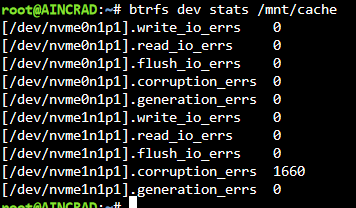
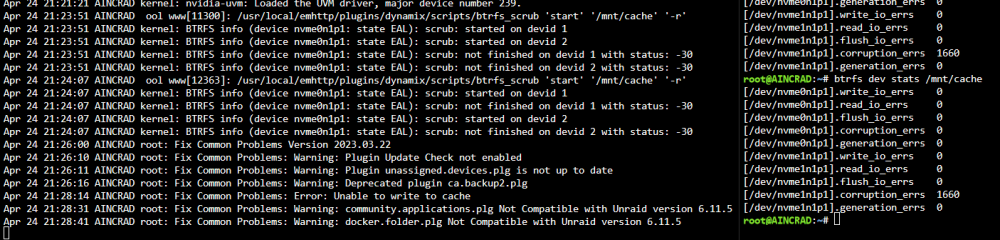
Hi @JorgeB I did do a restart, but once I re-enabled anything reading/writing from the cache drive it started throwing errors in syslog and I am seeing errors again on btrfs dev stats after wiping it. I think that specific drive might be shot? Is there any issue if I were to swap it out with a new 2TB NVME SSD or should I try to wipe and reformat the bad drive? I also tried scrubbing that drive and I am getting an error code of -30. I also see a Fix common problems error where it is Unable to write to cache, I feel like after the reboot I am in a worse state as before it was still able to read/write from the cache pool. I do however see the device back in the dashboard as accessible and reading a temperature again What are your thoughts on migrating to 6.12.X to use ZFS instead of btrfs? aincrad-diagnostics-20240424-2120.zip


-
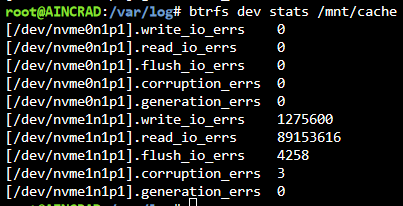
Hi everyone, Server (6.11.5) has been running like a dream for so long I forgot it exists. Anyways I hopped on today and I got a bunch of errors on 1 of my cache drives. I ran the btrfs dev stats and noticed my nvme1n1p1 had a bunch of errors, I zeroed it out and run btrfs scrub and still have numerous errors. From what I've seen on other forum posts looks like my drive is on the way out. I ordered a new 980 PRO 2TB NVME and it should be here tomorrow, but I'd like some advice on how to migrate over. So for right now it looks like all my docker containers and VMs are running without any issue and seem to be writing to the Cache 2 (the drive without any errors). I am planning on leaving everything running until tomorrow evening when I get the new drive in from Amazon (I assume this would be okay since the other drive is operating fine). Once I receive it I am planning on doing the following. Stopping all VMs/Docker containers Change all my Shares to "Yes" where it has Cache as Only/Prefer (I am still on 6.11.5) Run the mover to get everything off the cache drives and onto my array. Shutdown the server Replace the bad drive with the new one from amazon Start array and assign the new drive to the pool Let the pool rebuild and then revert my changes to the shares from above, Run mover Restart VMs/Docker containers Does this seem like an appropriate checklist to get my cache pool back up and running without any data loss? I've also been reading up about ZFS and using it for the cache pool, but it looks like for stable support I would do best upgrading to 6.12.X and then trying to set up my cache pool in ZFS instead of BTRFS. I assume it would be worth it to get my existing cache pool back up and running first before I do any migration of sort, but if ZFS is less prone to errors for a cache pool, would it make sense to stop at step 6 and do the following? 6. Start array and assign the new drive to the pool 7. Upgrade UnraidOS to 6.12.X 8. Setup the new cache pool as ZFS 9. Revert changes to share and then run mover 10. Restart VMs/Docker containers My only hesitation is that it seems like a major jump in versions from 6.11 to 6.12, should I wait until my array is in a stable state before I do the upgrade? Is it even worth to upgrade if the only thing I want out of it is ZFS for my cache pool? aincrad-diagnostics-20240423-2306.zip

-
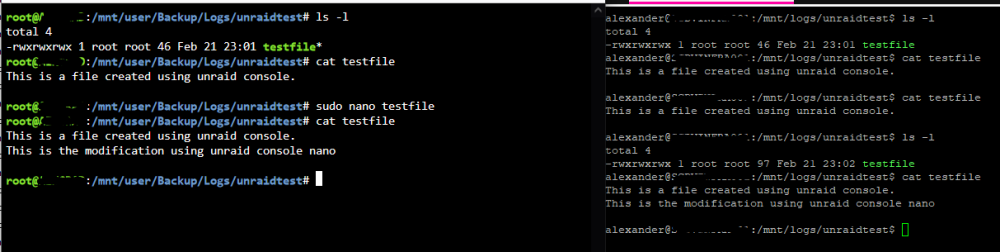
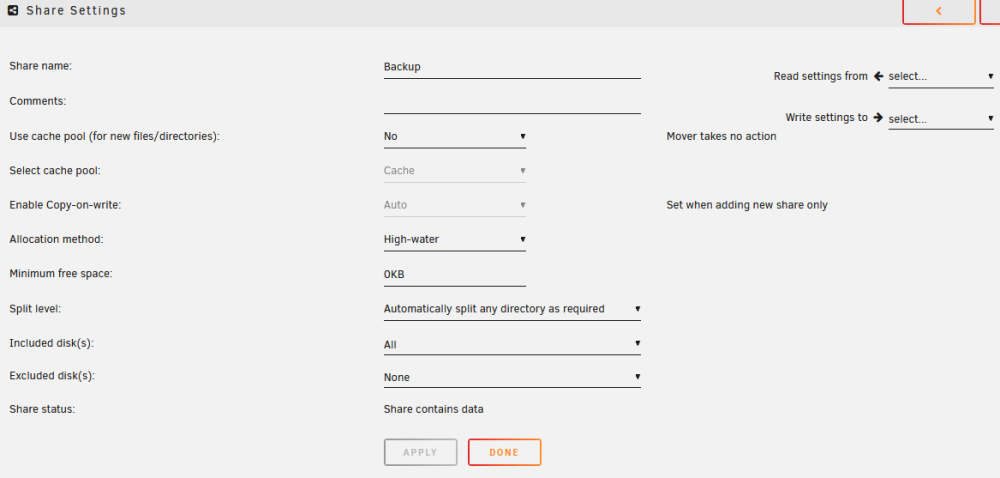
Hi everyone, I set up a little test scenario below that illustrates the symptoms of what I am experiencing, So I have the following criteria Virtiofs Mode for "/mnt/user/Backup/Logs/" => "logs" fstab entry of "logs /mnt/logs virtiofs ro,relatime,sync 0 0" Full rwe on the test file I executed the commands back and forth from left to right. root "ls -l" to display the current directory on unraid os alexander "ls -l" to display current directory on the virtual machine root "cat testfile" to display the content of the file on unraid alexander "cat testfile" to display the content of the file on the virtual machine root "sudo nano testfile" and append a string in nano root "cat testfile" to display the new content after nano modify alexander "cat testfile" still has the old content of the file alexander "ls -l" which relists the directory and refreshes some cache alexander "cat testfile" now has the new content from unraid drive. I have tried this routine numerous times and it seems to always to have the old file until I do "ls -l" or some background process that I am not aware of refreshes the file. So far the only thing that will for sure refresh the file is "ls -l", I could consistently "cat testfile" for 10+ runs and it won't change until a "ls -l" was ran, then it changed instantly. One of the things that I thought might be an issue was if the share was on a cache pool, but upon checking it is disabled for my "Backup" share. Any help would be greatly appreciated!! Thank you!
-
Had another MCE error today, checked the logs and I got an unhelpful message. Is there a way to check what went wrong without running mce since my CPU doesn't support it? May 7 04:30:08 AINCRAD root: Fix Common Problems: Error: Machine Check Events detected on your server May 7 04:30:08 AINCRAD root: mcelog: ERROR: AMD Processor family 25: mcelog does not support this processor. Please use the edac_mce_amd module instead. May 7 04:30:08 AINCRAD root: CPU is unsupported May 7 04:30:12 AINCRAD root: Fix Common Problems: Warning: Docker Update Patch not installed aincrad-diagnostics-20230507-2218.zip
-
Hi, I logged on today and saw this error in my Fix Common Problems tab! I’ve seen it once before about a month ago and I cleared it as I thought it was a fluke since I recently did a restart. Now that the server has been running for awhile and I got this error I’m hoping someone could point me in the right direction. I tried running mcelog, but I got mcelog: ERROR: AMD Processor family 25: mcelog does not support this processor. dule instead. CPU is unsupported Please use the edac_mce_amdmo I have also attached my diagnostics in the hope someone could help! I haven’t noticed any issues or failures since I got the message. Thank you!! aincrad-diagnostics-20230430-2239.zip
-
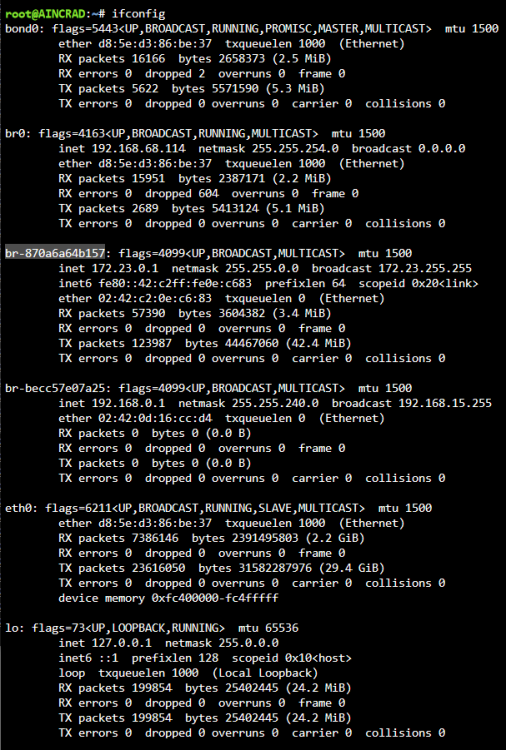
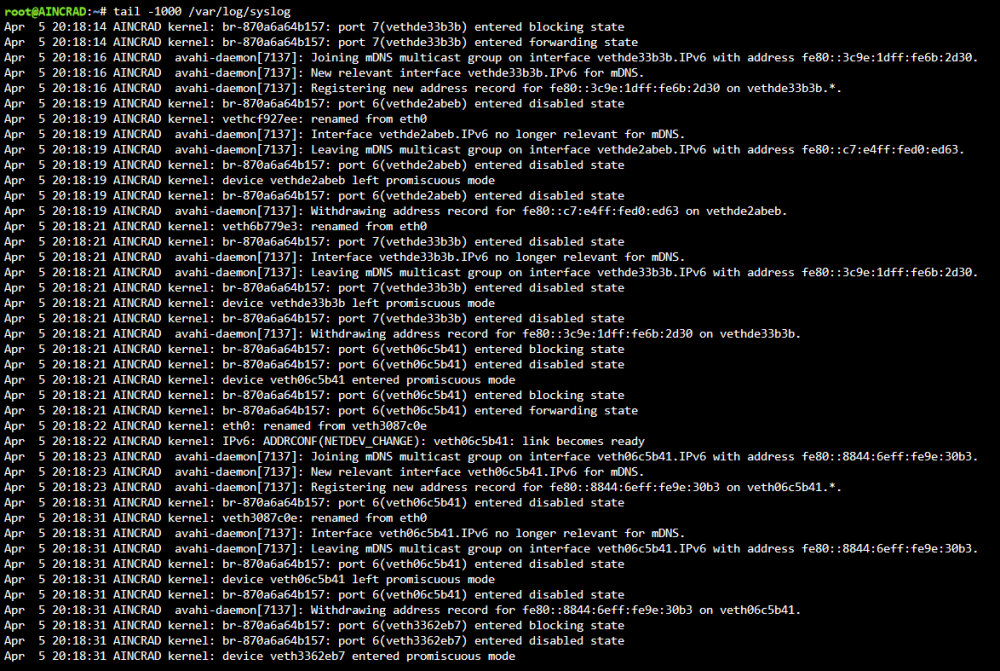
Hi everyone, Little nervous given the topics of the forums that I've found from searching, especially the one starting with "TL;DR If you're seeing constant logs from avahi-daemon, beware, you probably got hacked." What has happened recently: For the past few months I've had random crashes where unraidos would freeze up, I thought it was because of my build as well as docker containers, etc but none of it has stopped it. I've disabled C-States, locked docker containers to the core, altered the power idling, and I still have random crashes ranging from 1 day to 3 months (increasing more recently) Starting today I've had logs spamming my syslog from avahi-daemon and that lead me on a search to the attached forum posts I checked my ifconfig and I've found a bunch of Network Interfaces I've never seen before (I'm used to eth0, lo, wgo, and br0. I had a bond0, and multiple br-XXXXXXX I've had issues connecting to my server VIA WireGuard and Tailscale. I was able to a few weeks ago but I tried this morning and no connection. I was unable to ping anything, hostnames (google.com) or numerical lookup of google (142.250.68.110) Docker Community Apps throws an error saying it can't retrieve a feed Common Fix and Problems reports that it can't connect to github.com Recently got alerts from my "Deco" app, which notifies my whenever a new device joins the network and I've been getting a few "UNKNOWN DEVICE HAS JOINED THE NETWORK". This pops up from time to time so never thought about it till now. Exposure of UnraidOS server (192.168.68.114): Port Forwardings 192.168.68.114 (UnraidOS Server) Internal: 6881 External: 6881 (nothing running on that port) 192.168.68.114 (UnraidOS Server) Internal: 51820 External: 51820 (Wireguard VPN Service) 192.168.68.48 (Nginx) Internal: 8080 External: 80 (Nginx Proxy Manager) 192.168.68.48 (Nginx) Internal: 4443 External: 443(Nginx Proxy Manager) Nginx Proxy Manager All of my docker containers are on br0 and all have static IPs assigned to them, and then I do routing of services I want to expose outside (like Jellyfin, or Gitea, etc) of my network. All have SSL certs I have numerous shares on my network and they all require a username and password to access Only recently starting working on my UnraidOS instance again last couple days. For the most part I leave it alone, but one of the things I wanted to do was create VLANs either at the Router level, Unraid Level, or Software level so I enabled Virtual Machines and installed the stock CentOS iso to play around with. I've made some VLANs VIA Unraid and also tried to do some VIA my router but none of it has worked so I've kind of reversed whatever I did. Please any advice would be appreciated, my server crashed at 3AM this morning so I had to do an unclean shutdown so my parity is currently rebuilding.
-
@kodyorris Did you ever figure out what happened with your UnraidOS box. I just started having those logs in console today and I have no clue what's happening.





