LP_LP_LP
Members
-
Joined
-
Last visited
-
I post here hoping that it will be helpful in the future. As of July 2022 (Unraid v6.10.3), I still encountered the USB passthrough issue described above with the Home Assistant VM. Adding the lines in the XML file did not solve the issue alone: I also had to revert back to Q35-4.2.
-
@JorgeB Thank you SO MUCH for all your help. I've been able to rebuild all disks. Currently syncing the parity. I'll tag the topic as solved.
-
@JorgeB thanks for the help. I’ve been able to recreate the cache pool. Some libvert settings seem to have been wiped but no big deal. However, before moving to the actual array disks (which contain more important and permanent data), I’d like to make sure that I’m using the correct procedure to restore the XFS partition. Currently the array disks are unmountable. Is it preferable to try to check and repair the disks in the GUI maintenance mode first?
-
With Testdisk, I have rewritten the primary partition of each cache disk. The Unraid GUI now mounts the two disks. I can see and compute the shares. However the pool does not seem to be correctly set up, since its size should be 500Gb and it currently lists 1Tb of available storage. Libvirt has failed to initialize has well. Complete logs and diagnostics are attached. The logs show multiple errors: Oct 7 10:20:24 nostromo kernel: BTRFS info (device nvme0n1p1): turning on async discard Oct 7 10:20:24 nostromo kernel: BTRFS info (device nvme0n1p1): using free space tree Oct 7 10:20:24 nostromo kernel: BTRFS info (device nvme0n1p1): has skinny extents Oct 7 10:20:24 nostromo kernel: BTRFS error (device nvme0n1p1): parent transid verify failed on 731340898304 wanted 3342300 found 3342051 Oct 7 10:20:24 nostromo kernel: BTRFS info (device nvme0n1p1): read error corrected: ino 0 off 731340898304 (dev /dev/nvme2n1p1 sector 35653696) Oct 7 10:20:24 nostromo kernel: BTRFS info (device nvme0n1p1): read error corrected: ino 0 off 731340902400 (dev /dev/nvme2n1p1 sector 35653704) Oct 7 10:20:24 nostromo kernel: BTRFS info (device nvme0n1p1): read error corrected: ino 0 off 731340906496 (dev /dev/nvme2n1p1 sector 35653712) Oct 7 10:20:24 nostromo kernel: BTRFS info (device nvme0n1p1): read error corrected: ino 0 off 731340910592 (dev /dev/nvme2n1p1 sector 35653720) Oct 7 10:20:24 nostromo kernel: BTRFS error (device nvme0n1p1): parent transid verify failed on 731405582336 wanted 3342305 found 3342294 Oct 7 10:20:24 nostromo kernel: BTRFS info (device nvme0n1p1): read error corrected: ino 0 off 731405582336 (dev /dev/nvme2n1p1 sector 33617344) Oct 7 10:20:24 nostromo kernel: BTRFS info (device nvme0n1p1): read error corrected: ino 0 off 731405586432 (dev /dev/nvme2n1p1 sector 33617352) Oct 7 10:20:24 nostromo kernel: BTRFS info (device nvme0n1p1): read error corrected: ino 0 off 731405590528 (dev /dev/nvme2n1p1 sector 33617360) Oct 7 10:20:24 nostromo kernel: BTRFS info (device nvme0n1p1): read error corrected: ino 0 off 731405594624 (dev /dev/nvme2n1p1 sector 33617368) Oct 7 10:20:24 nostromo kernel: BTRFS error (device nvme0n1p1): parent transid verify failed on 731405500416 wanted 3342304 found 3342294 Oct 7 10:20:24 nostromo kernel: BTRFS info (device nvme0n1p1): read error corrected: ino 0 off 731405500416 (dev /dev/nvme2n1p1 sector 33617184) Oct 7 10:20:24 nostromo kernel: BTRFS info (device nvme0n1p1): read error corrected: ino 0 off 731405504512 (dev /dev/nvme2n1p1 sector 33617192) Oct 7 10:20:24 nostromo kernel: BTRFS error (device nvme0n1p1): parent transid verify failed on 731405680640 wanted 3342305 found 3342294 Oct 7 10:20:24 nostromo kernel: BTRFS error (device nvme0n1p1): parent transid verify failed on 731405598720 wanted 3342305 found 3342294 Oct 7 10:20:24 nostromo kernel: BTRFS error (device nvme0n1p1): parent transid verify failed on 731374616576 wanted 3342300 found 3342294 Oct 7 10:20:24 nostromo kernel: BTRFS error (device nvme0n1p1): parent transid verify failed on 731404664832 wanted 3342304 found 3342294 Oct 7 10:20:24 nostromo kernel: BTRFS error (device nvme0n1p1): parent transid verify failed on 731375321088 wanted 3342300 found 3342292 Oct 7 10:20:24 nostromo kernel: BTRFS error (device nvme0n1p1): parent transid verify failed on 731405647872 wanted 3342305 found 3342294 Oct 7 10:20:24 nostromo kernel: BTRFS error (device nvme0n1p1): parent transid verify failed on 731374632960 wanted 3342300 found 3342294 Oct 7 10:20:24 nostromo kernel: BTRFS info (device nvme0n1p1): enabling ssd optimizations Any idea? nostromo-diagnostics-20211007-1030.zip nostromo-syslog-20211007-1425.zip
-
@JorgeB Thanks for the quick answer! Appreciate it. I will give it a shot and report back.
-
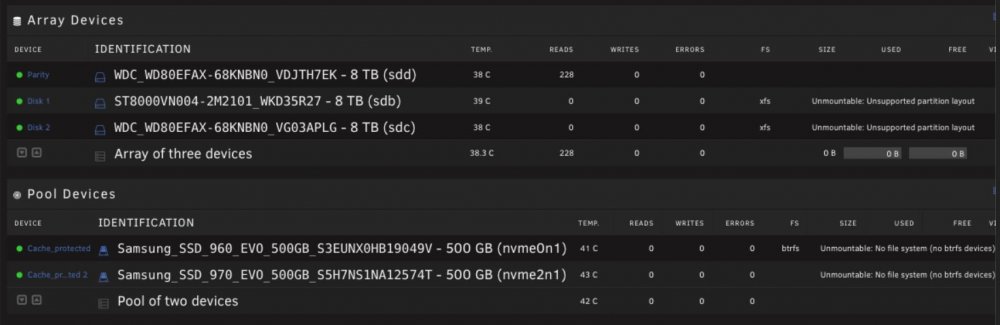
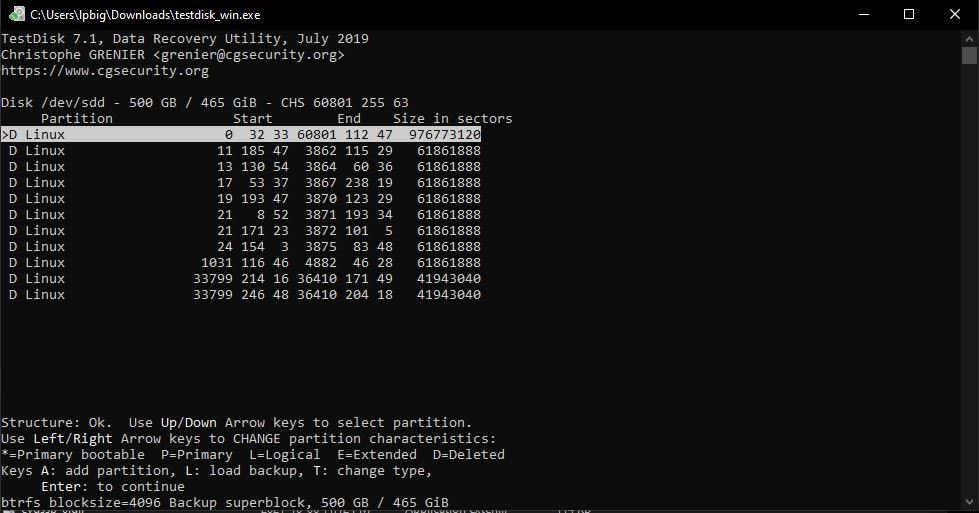
Hello Unraiders, This forum has been very helpful to me in the the past, as I've always resolved my issues by reading through other users' posts. This time however I can't seem to find any answers. I have limited understanding of filesystems and partitions, so please bear with me. Long story short, while installing windows on an unassigned device, I accidentally deleted my cache, parity and data disks partitions all at once (I know, this is bad). I realized my mistake right after deleting the partitions, so nothing has since been written on the Unraid disks. When booting Unraid and accessing the GUI, the main tab shows the following: My understanding is that since no data has been overwritten after the partitions were deleted, it is possible with the Testdisk software to reconstruct the partition tables of the disks. If I remember correctly, the Windows installer listed 1 partition per disk. I started the recovery on the 960 EVO cache disk, its smaller and faster to work with. I analyzed the disk with the partition recovery utility of Testdisk. I chose Intel for the partition type and performed a deep search. Testdisk lists the following deleted partitions: As you can see, the notes under the highlighted first partition state: 'btrfs blocksize=4096 Backup superblock, 500 GB / 465 GiB' The notes under the following partitions sized at 61861888 sectors state: 'ext4 blocksize=4096 Large_file Sparse_SB Recover, 31 GB / 29 GiB' The notes under the last partition sized at 61861888 sectors state: 'ext4 blocksize=4096 Large_file Sparse_SB Backup_SB, 31 GB / 29 GiB' The notes under the last two partitions sized at 41943040 sectors state: 'btrfs blocksize=4096 Backup superblock, 21 GB / 20 GiB' At this point, I am not sure which partition characteristics should be used to reconstruct the partition table. Should the partitions be Primary, Logical or Extended? Also, are all these partitions required to mount back the SSD drive in Unraid? Does Unraid create multiple BTRFS partitions when formatting the cache drive (I only saw one per drive when installing Windows)? Thanks A LOT for your patience and your help guys,