





Dinglestains
Members
-
Joined
-
Last visited
Everything posted by Dinglestains
-
Thanks. I'll check it out. Is there a way to get these two drives mounted if I'm not worried about recovering any data that may have been on them?
-
Thanks for trying to help me out. I've searched Unraid apps and don't see one named UFS Explorer. Is this an app I'll need to use on a Windows PC and pull the drive out of the server to check out? Also, any idea how I can get the other drive mounted?
-
Here's the output for this one. root@AdamNAS:~# xfs_repair -v /dev/sdt1 Phase 1 - find and verify superblock... - block cache size set to 12287368 entries Phase 2 - using internal log - zero log... zero_log: head block 0 tail block 0 - scan filesystem freespace and inode maps... clearing needsrepair flag and regenerating metadata sb_icount 204160, counted 32 sb_ifree 186, counted 29 sb_fdblocks 3646991750, counted 2929199533 - found root inode chunk Phase 3 - for each AG... - scan and clear agi unlinked lists... - process known inodes and perform inode discovery... - agno = 0 - agno = 1 - agno = 2 - agno = 3 - agno = 4 - agno = 5 - agno = 6 - agno = 7 - agno = 8 - agno = 9 - agno = 10 - process newly discovered inodes... Phase 4 - check for duplicate blocks... - setting up duplicate extent list... - check for inodes claiming duplicate blocks... - agno = 0 - agno = 2 - agno = 6 - agno = 4 - agno = 10 - agno = 1 - agno = 7 - agno = 8 - agno = 9 - agno = 3 - agno = 5 Phase 5 - rebuild AG headers and trees... - agno = 0 - agno = 1 - agno = 2 - agno = 3 - agno = 4 - agno = 5 - agno = 6 - agno = 7 - agno = 8 - agno = 9 - agno = 10 - reset superblock... Phase 6 - check inode connectivity... - resetting contents of realtime bitmap and summary inodes - traversing filesystem ... - agno = 0 - agno = 1 - agno = 2 - agno = 3 - agno = 4 - agno = 5 - agno = 6 - agno = 7 - agno = 8 - agno = 9 - agno = 10 - traversal finished ... - moving disconnected inodes to lost+found ... Phase 7 - verify and correct link counts... SB summary counter sanity check failed Metadata corruption detected at 0x47c2cb, xfs_sb block 0x0/0x200 libxfs_bwrite: write verifier failed on xfs_sb bno 0x0/0x1 SB summary counter sanity check failed Metadata corruption detected at 0x47c2cb, xfs_sb block 0x0/0x200 libxfs_bwrite: write verifier failed on xfs_sb bno 0x0/0x1 xfs_repair: Releasing dirty buffer to free list! xfs_repair: Refusing to write a corrupt buffer to the data device! xfs_repair: Lost a write to the data device! fatal error -- File system metadata writeout failed, err=117. Re-run xfs_repair. root@AdamNAS:~#
-
The output of that one was too large where I couldn't scroll to the beginning. Any idea where I can find the full output of the command to share?
-
Thanks. Here's what I get when I enter those two commands. root@AdamNAS:~# xfs_repair -v /dev/sdt1 Phase 1 - find and verify superblock... - block cache size set to 12287368 entries Phase 2 - using internal log - zero log... * ERROR: mismatched uuid in log * SB : 5039051f-fbf5-4a89-bc8a-d051d362681c * log: 1f85b4a8-9091-00d4-8094-6d04e9d2bca1 zero_log: head block 412672 tail block 2262025269 ERROR: The filesystem has valuable metadata changes in a log which needs to be replayed. Mount the filesystem to replay the log, and unmount it before re-running xfs_repair. If you are unable to mount the filesystem, then use the -L option to destroy the log and attempt a repair. Note that destroying the log may cause corruption -- please attempt a mount of the filesystem before doing this. root@AdamNAS:~# wipefs /dev/sdp1 root@AdamNAS:~#
-
Will this clear anything on the drive if there was something? Just want to know before I try running them.
-
Is this correct? root@AdamNAS:~# blkid /dev/sda1: LABEL_FATBOOT="UNRAID" LABEL="UNRAID" UUID="2736-60C3" BLOCK_SIZE="512" TYPE="vfat" /dev/loop1: TYPE="squashfs" /dev/sdy1: UUID="2a2cca95-85bc-499d-a01d-5bc27078dddd" BLOCK_SIZE="512" TYPE="xfs" PARTUUID="7e31c44b-f123-40dd-a67e-5992250dac55" /dev/sdf1: UUID="75f9d0ec-3a38-433e-b12b-7c0cddc37b44" BLOCK_SIZE="512" TYPE="xfs" PARTUUID="139e5605-cf3f-462a-bae1-0699343b183e" /dev/md9p1: UUID="01d2b033-56eb-4a92-8140-e7a2c67c723e" BLOCK_SIZE="512" TYPE="xfs" /dev/md24p1: UUID="5cbca378-bebc-4350-b0ae-9a25b89694ef" BLOCK_SIZE="512" TYPE="xfs" /dev/sdab1: UUID="5cbca378-bebc-4350-b0ae-9a25b89694ef" BLOCK_SIZE="512" TYPE="xfs" /dev/nvme0n1p1: UUID="344c99ee-b4f3-4f0f-b5e7-7aaee08452db" UUID_SUB="909b61da-ebe7-48df-b330-3b9ef31d34a2" BLOCK_SIZE="4096" TYPE="btrfs" /dev/md15p1: UUID="a35a64da-1fc6-4f28-be6a-a8be2635cfa5" BLOCK_SIZE="512" TYPE="xfs" /dev/sdo1: UUID="a2c39444-e2c1-4e83-9774-2d256d5731c6" BLOCK_SIZE="512" TYPE="xfs" PARTUUID="feeb342c-6327-49f2-a12d-1fb2bbc211a4" /dev/sdw1: UUID="c824f10f-5b50-48ab-9a98-5b2bee9959ec" BLOCK_SIZE="512" TYPE="xfs" PARTUUID="c70a31ee-1968-4173-848d-147c33045def" /dev/sdd1: UUID="7a894f21-5d44-4d0a-9c3b-baa0b302946a" BLOCK_SIZE="512" TYPE="xfs" PARTUUID="9d94fbfe-f13a-45b4-837b-82667e5ecafe" /dev/md2p1: UUID="5c3f92e6-0b17-4086-809b-f72ce2324007" BLOCK_SIZE="512" TYPE="xfs" /dev/md18p1: UUID="47686ff8-cb47-46fc-8f1d-a6936eab73cc" BLOCK_SIZE="512" TYPE="xfs" /dev/sdm1: UUID="b8947b2a-5d63-4579-a200-64ff0edd0b4c" BLOCK_SIZE="512" TYPE="xfs" PARTUUID="d32a0e1e-1bb5-4b81-bbf5-bc56ae66488e" /dev/sdu1: UUID="939316bb-0aee-4c42-a23f-3839a624e325" BLOCK_SIZE="512" TYPE="xfs" PARTUUID="41f4fe70-c973-427f-9791-2a652067d59a" /dev/sdb1: UUID="7cac0bbb-7684-4770-81eb-a895d087e38d" BLOCK_SIZE="512" TYPE="xfs" PARTUUID="4ffe5da3-d79c-417e-aa6b-4740c6f092ec" /dev/md5p1: UUID="a97b1e67-ef02-4cb2-b8d2-8127b90269af" BLOCK_SIZE="512" TYPE="xfs" /dev/md20p1: UUID="fa6c6f67-cd60-4455-8be1-e75f19bbda88" BLOCK_SIZE="512" TYPE="xfs" /dev/sdk1: UUID="adf5de3b-0356-4037-8014-e5589c82c679" BLOCK_SIZE="512" TYPE="xfs" PARTUUID="e4e6b69b-e60c-4848-a1eb-63a7540c2f5b" /dev/md11p1: UUID="612ec3b3-438d-4dc6-a970-d93ccbe3d49d" BLOCK_SIZE="512" TYPE="xfs" /dev/sds1: UUID="a35a64da-1fc6-4f28-be6a-a8be2635cfa5" BLOCK_SIZE="512" TYPE="xfs" PARTUUID="667314ed-7221-4313-a555-07b7e1aea25f" /dev/md8p1: UUID="319360c3-4cf1-4169-a0eb-ba7a59bde24d" BLOCK_SIZE="512" TYPE="xfs" /dev/md23p1: UUID="5e0928e9-591a-4557-a88b-02bc2512b85e" BLOCK_SIZE="512" TYPE="xfs" /dev/md14p1: UUID="c8a417b0-ac7b-43a3-9c1b-602a6660f499" BLOCK_SIZE="512" TYPE="xfs" /dev/sdi1: UUID="01d2b033-56eb-4a92-8140-e7a2c67c723e" BLOCK_SIZE="512" TYPE="xfs" PARTUUID="41e27694-0d4e-4533-b2df-dcc5a4c335ee" /dev/sdq1: UUID="c8a417b0-ac7b-43a3-9c1b-602a6660f499" BLOCK_SIZE="512" TYPE="xfs" PARTUUID="32d2d244-ad46-44b7-8800-c4681355d25c" /dev/md1p1: UUID="75f9d0ec-3a38-433e-b12b-7c0cddc37b44" BLOCK_SIZE="512" TYPE="xfs" /dev/sdz1: UUID="82df71e7-39c0-496a-a478-2e993805fe84" BLOCK_SIZE="512" TYPE="xfs" PARTUUID="61dd3ba6-23a7-4a9d-aa39-557b1a5d4838" /dev/md17p1: UUID="939316bb-0aee-4c42-a23f-3839a624e325" BLOCK_SIZE="512" TYPE="xfs" /dev/sdg1: UUID="dc259314-267a-4920-a063-c4da71bb36c9" BLOCK_SIZE="512" TYPE="xfs" PARTUUID="a8706993-478e-4e4b-a2a9-4924e3bf6de6" /dev/md4p1: UUID="b8947b2a-5d63-4579-a200-64ff0edd0b4c" BLOCK_SIZE="512" TYPE="xfs" /dev/loop0: TYPE="squashfs" /dev/sdx1: UUID="fa6c6f67-cd60-4455-8be1-e75f19bbda88" BLOCK_SIZE="512" TYPE="xfs" PARTUUID="f342fc87-40a9-4e1e-9f4d-42a054aaaf6e" /dev/sdaa1: UUID="5e0928e9-591a-4557-a88b-02bc2512b85e" BLOCK_SIZE="512" TYPE="xfs" PARTUUID="4795e3a7-7c38-4e16-b077-2033ded1ea3a" /dev/md10p1: UUID="dc259314-267a-4920-a063-c4da71bb36c9" BLOCK_SIZE="512" TYPE="xfs" /dev/md7p1: UUID="adf5de3b-0356-4037-8014-e5589c82c679" BLOCK_SIZE="512" TYPE="xfs" /dev/sdn1: UUID="9bc821c4-c5ce-4ea1-8a4d-9bbc38ab963f" BLOCK_SIZE="512" TYPE="xfs" PARTUUID="5380f5c8-95cb-4b07-a58c-3ca630ea44c0" /dev/md22p1: UUID="2a2cca95-85bc-499d-a01d-5bc27078dddd" BLOCK_SIZE="512" TYPE="xfs" /dev/sdv1: UUID="47686ff8-cb47-46fc-8f1d-a6936eab73cc" BLOCK_SIZE="512" TYPE="xfs" PARTUUID="13461bc2-ce77-42b8-8283-24f95b6cb381" /dev/sdl1: UUID="a97b1e67-ef02-4cb2-b8d2-8127b90269af" BLOCK_SIZE="512" TYPE="xfs" PARTUUID="9446ecdc-334b-46a8-ab1b-957ca576b7ac" /dev/sdt1: UUID="5039051f-fbf5-4a89-bc8a-d051d362681c" BLOCK_SIZE="512" TYPE="xfs" PARTUUID="592f0896-bd2e-4b74-a617-864794da6b81" /dev/md16p1: UUID="82df71e7-39c0-496a-a478-2e993805fe84" BLOCK_SIZE="512" TYPE="xfs" /dev/sdj1: UUID="319360c3-4cf1-4169-a0eb-ba7a59bde24d" BLOCK_SIZE="512" TYPE="xfs" PARTUUID="f0f7ef4d-fe93-41d0-bbad-2faf7200fe4f" /dev/md3p1: UUID="7cac0bbb-7684-4770-81eb-a895d087e38d" BLOCK_SIZE="512" TYPE="xfs" /dev/sdr1: UUID="612ec3b3-438d-4dc6-a970-d93ccbe3d49d" BLOCK_SIZE="512" TYPE="xfs" PARTUUID="8d261e3e-6664-4167-8004-20ee2410e00f" /dev/md19p1: UUID="9bc821c4-c5ce-4ea1-8a4d-9bbc38ab963f" BLOCK_SIZE="512" TYPE="xfs" /dev/sdh1: UUID="5c3f92e6-0b17-4086-809b-f72ce2324007" BLOCK_SIZE="512" TYPE="xfs" PARTUUID="d1c02c79-3e45-4804-8ec9-be020223bb68" /dev/md6p1: UUID="7a894f21-5d44-4d0a-9c3b-baa0b302946a" BLOCK_SIZE="512" TYPE="xfs" /dev/md21p1: UUID="c824f10f-5b50-48ab-9a98-5b2bee9959ec" BLOCK_SIZE="512" TYPE="xfs" /dev/md12p1: UUID="a2c39444-e2c1-4e83-9774-2d256d5731c6" BLOCK_SIZE="512" TYPE="xfs" /dev/loop2: UUID="3d262e10-4bbb-4e31-81d3-9fd8d2ea4482" UUID_SUB="cae900b1-0a19-4150-bcd1-ef25d0a4575b" BLOCK_SIZE="4096" TYPE="btrfs" /dev/sde1: PARTUUID="14d387da-b710-49d3-8a91-345dcf9458fb" /dev/sdc1: PARTUUID="dfe0aca6-eac0-4d67-b17c-a27e44e4e4af" /dev/loop3: UUID="80d91b4d-599f-409f-a343-e5e028ac3f84" UUID_SUB="685c96dd-d859-4b16-9386-d6f5d193702c" BLOCK_SIZE="4096" TYPE="btrfs" /dev/sdp1: PARTUUID="c2b135b9-8332-11ed-9f01-841b7729c4a2" root@AdamNAS:~#
-
I have two disks that I can't get mounted. I don't recall these two disks being unmounted in the past. I just happened to look in the Main tab in Unraid today and noticed both of these weren't mounted. The log tells me that I should run xfs repair on the disk. That doesn't appear to help anyone from what I've been able to read in the comments. The Mount button is greyed out on the other disk ("Dev 2") so I don't know how I can even attempt to mount it. Any idea how I can get these two drives mounted? Also, did I lose any data or was all of the data recovered using my other drives? Below are screenshots showing the unmounted disks and the error I receive when I attempt to mount "Dev 1." I've also attached the Unraid log. adamnas-syslog-20250917-0122.zip
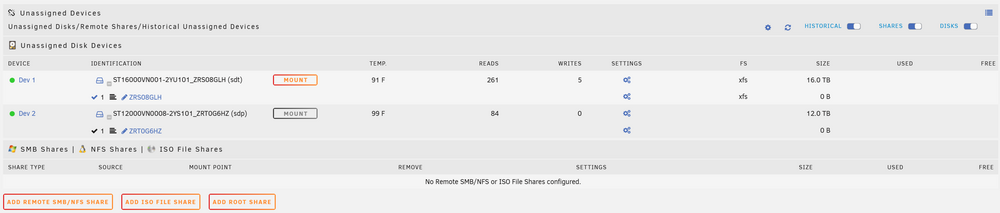
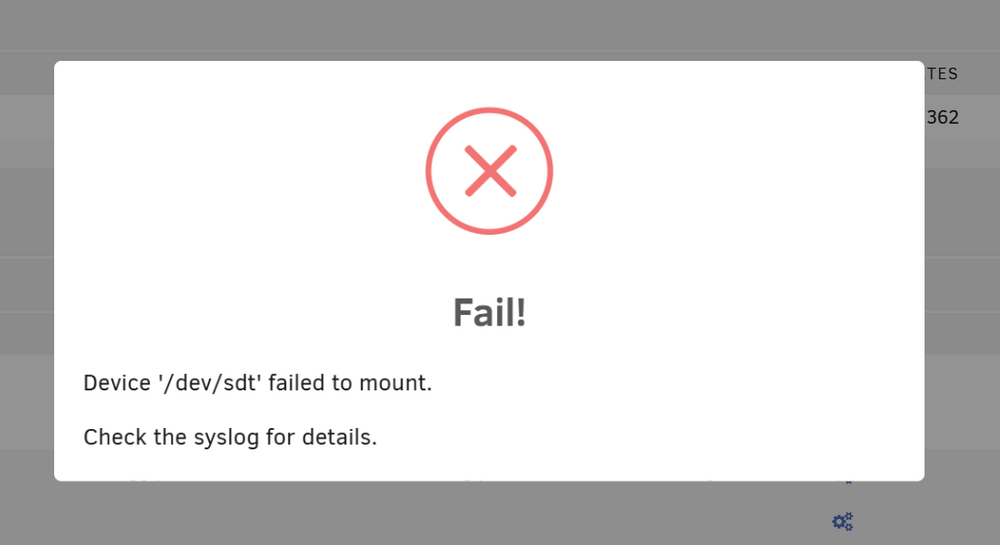
-
That’s a good idea. I thought about building a second server to back up everything at another family members house. Might be a project that I do later. I just looked and I’m at 75TB used now so I’ve used more than I thought.
-
I backup my important files to another PC and to cloud storage. This Unraid server is mainly to host media files that can be replaced. It would be a long painful process to replace them but I'm not willing to pay for ~40 TB of cloud storage or whatever I'm using now.
-
Thanks for reviewing all of these for me. I think one of the drives in this server might be older than the 12 year old disk 24. I know there was a smaller (like 2 TB) drive I shucked a long time ago and I think its running still with no SMART warnings/errors. What would you recommend I do with these drives then? I don't really have any use for them and that's why I just added them all to the Unraid server. I guess the Windows Storage Space I had used a lot more space for redundancy because I didn't have nearly this much capacity in Windows Storage Space. I did add 12 12TB disks when I bought the server though so that probably would've made a big difference.
-
The disks with SMART warnings are disks 11, 15, 18, 23, and 24. Are the numbers all you needed to see how bad the errors are?
-
Thanks for the information. I wish I had read or asked for advice before formatting the drive. Nothing critical and just more annoying than anything to lose the files. I do wish Unraid made it simpler to bring a drive back online after something simple as it coming unplugged.
-
Just for future knowledge, what should I have done in that situation? I don't know why it popped up the prompt to format the drive. I just thought it was getting it ready to rebuild. So weird that it takes it offline even after I inserted it back in within ~10 mins and rebooted the server. I have 5 disks that have some type of SMART warnings. I have so many because I transferred them over from my previous Windows Storage Space server. I added 12 12TB drives when I built the new 36-bay server and switched from Windows Storage Spaces to Unraid. Do you recommend I replace the drives with SMART warnings? I didn't ever take them seriously. Some of them may still be covered by a warranty and I might be able to get replacements from the manufacturer.
-
I don't think the files were that important. I store a bunch of files on the share and I don't really know what files went missing. My important files are backed up to cloud storage so I'm not worried about losing anything important. I've attached the diagnostics from my server. I kind of assumed that the format shouldn't have occurred after I started noticing some files missing. It should be media that I can recover with time but I wish I knew what files were missing. adamnas-diagnostics-20250313-2027.zip
-
I have Unraid v6.12.15 installed. Recently, my dog did something near my server and unlatched one of the drives. This caused Unraid to show the drive wasn't available even after I closed the latch. I rebooted the system and nothing changed. It gave me the option to format and then rebuild the drive so I did. That seemed to go well except now I'm missing random files that I assume were on that drive. Does anyone know if there's a log or something that can show me the files that were deleted? I've also tried seeing what items from Plex were removed but had no luck figuring that out either.
-
Sorry, I thought it was part of Diagnostics. Attached is the Syslog file. syslog-192.168.1.189.log
-
My server was super stable up until last weekend when I decided to upgrade it to 7.0.0. I had issues with the server becoming unresponsive so I downgraded it back to 6.12.14. It ran fine for a few days until I started adding drives to the server. I wanted to swap out one of my parity drives for a larger drive so I started the parity-sync. Ever since, my server becomes unresponsive when trying to finish a parity-sync. i've tried removing the new parity drive from the array and going back to the original 12TB drive. The server still becomes unresponsive at some point during the parity-sync. I've enabled the syslog server. I don't see anything relevant in the logs. I've attached it in case anyone else might be able to help me figure out why the system is crashing. adamnas-diagnostics-20250123-2209.zip
-
I’m having the same issue. My server is becoming unresponsive about twice per day since upgrading to 7.0. Going to try to figure out how to roll mine back a version when I get home.
-
Is this where I come for support with Plex in unRaid? I don't think I installed the binhex version but I didn't see a support thread for the official Plex docker. I don't know the difference in the binhex version and the official version. I'm having trouble getting Remote Access to work correctly and I know that I've forwarded each port that Plex uses correctly in my modem settings. I had Plex working on a Windows server prior to moving it to unRaid and I had the same port forward rules setup for my Windows machine. I have the Plex docker setup as "Host" network type so it should be using my server's IP address. Can someone help me get the remote access working correctly? I think its causing all my clients to connect indirectly. Plex Docker Port Mapings: Modem Port Forwarding Rules (AdamNas = 192.168.1.189) This just show how the rules above are defined in the modem/router. Plex test for remote accessibility. Modem NAT for Plex Server IP (192.168.1.189). I post this because it looks like other ports about being used. (1 of 2...had to scroll to the right to see the rest) Modem NAT for Plex Server IP (192.168.1.189). (2 of 2...had to scroll to the right to see the rest)
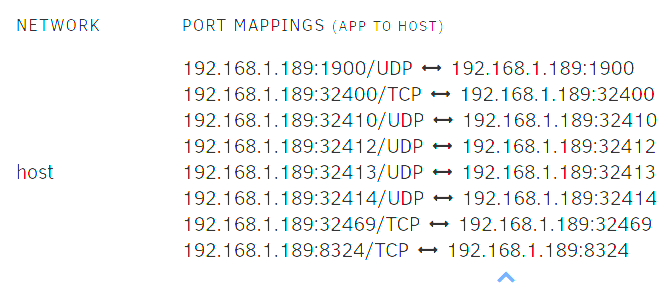
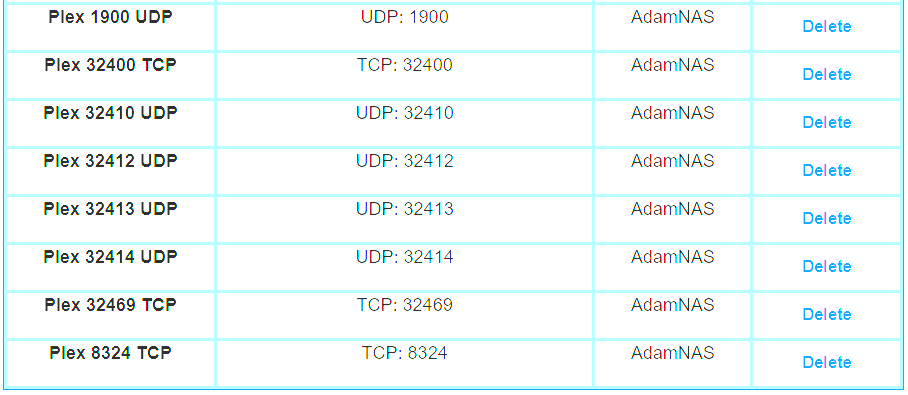
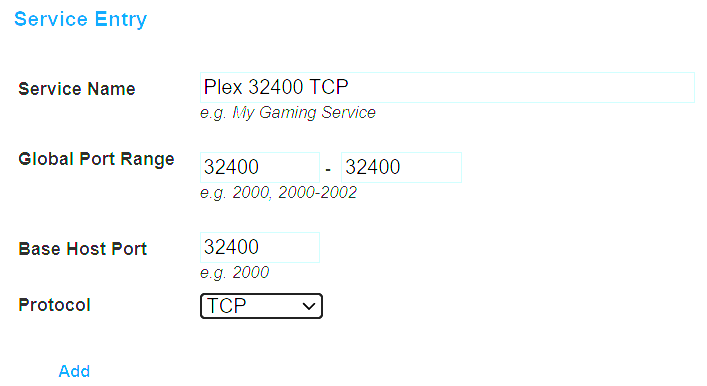
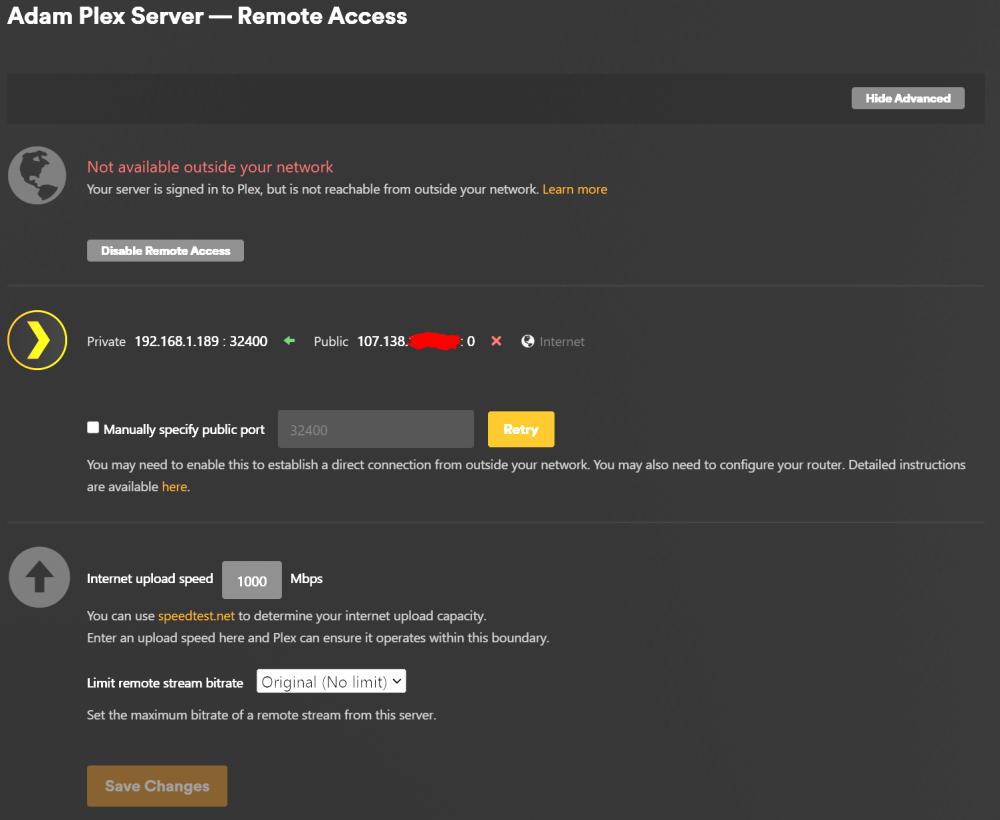
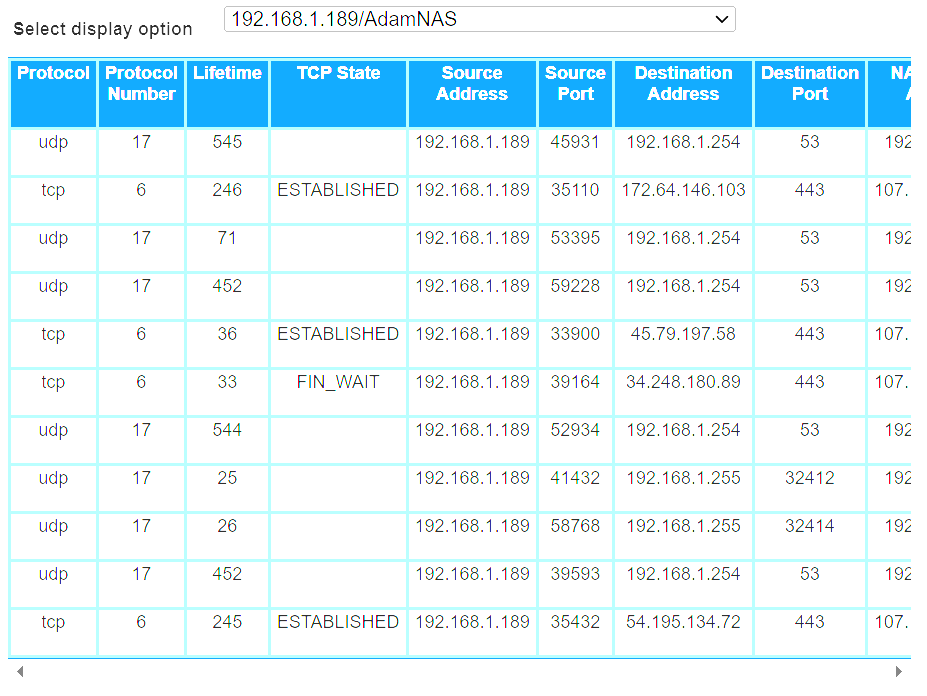
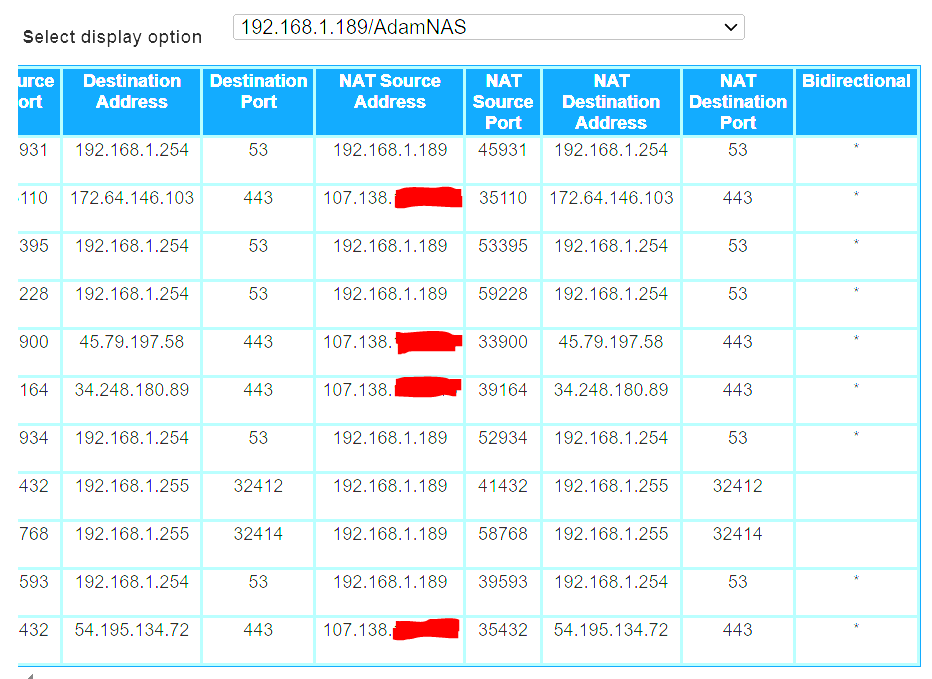
-
I think that means the 2 12TB drives would be okay in my setup then. The largest drive size I have in the pool of data drives is 8TB. Does this also limit my ability to install larger data drives in the future? For example, if I wanted to install a 14TB data drive in the future, does that mean I would need to upgrade my parity drive to something larger? Or would Unraid simply assign the new 14TB drive to the parity drive and the old 12TB parity drive becomes the additional data drive? Are you saying I could lose 2 data drives simultaneously without losing data if I have 2 parity drives?
-
Thanks. I think I read that in the setup but assumed it stored something on the hard drives. That's good to know that the OS won't need its own SSD.
-
I'm looking to build an Unraid server and move all of my data over from my Windows Storage Space. The Windows Storage Space performance isn't that great and I feel like Unraid would be better to host all of this data. The server will mainly be used for Plex and I'll probably go with a decent graphics card for transcoding. I have two concerns/questions about the hardware to get started. My Storage Space currently has 14 hard drives, each varying in capacity, for a total of 72.21 TB. I'm using 27.9 TB of the Storage Space. I'm curious what is the most economical way to build an Unraid server without buying a bunch of extra hard drives to temporarily host the 27.9 TB of data while I'm moving everything over? I'm thinking I'll need a minimal amount of storage to get started and I can slowly remove one disk at a time from the Storage Space to be added to the Unraid server. Also, what would be the best motherboard and case to use for all of these drives? I'd like to have them all connected via Sata but I don't know if that's possible. They're all 3.5" drives and I don't know if there's a case that can hold that many drives or maybe there's a better way to do it? I'm curious about the parity and cache drives as well. The documentation shows that you should have two large parity drives. Would two 12TB drives give me a good amount of parity for a pool of this size? How many drives could I lose without losing any data? I would like to install cache SSDs in the server. Can one of the SSDs host the OS or should I have 3 SSDs (one for the OS, two for caching)? Any advantages or disadvantages for using AMD versus Intel processors? Also, any advantages or disadvantages for using NVIDIA versus AMD GPUs? Sorry for all of the questions and thanks to anyone who takes the time to respond.


