





SiliconFalcon
Members
-
Joined
-
Last visited
-
root@Tower:~# ls -lah /mnt/disk7/docker total 41G drwxrwxrwx 2 nobody users 36 Feb 26 18:33 ./ drwxrwxrwx 8 nobody users 137 Feb 26 18:33 ../ -rw-rw-rw- 1 nobody users 40G Feb 27 18:08 docker-xfs.img root@Tower:~# ls -lah /mnt/cache/docker total 0 drwxrwxrwx 2 nobody users 6 Feb 26 18:33 ./ drwxrwxrwx 5 nobody users 49 Feb 26 18:23 ../
-
ok I got Docker back up and 3 apps installed. I think I did it right this time 🤔 tower-diagnostics-20230226-2246.zip
-
Since I screwed up the first time, I don't want to reinstall anything with the same settings. I will just rebuild. I have gone in and removed all previous apps. After going to the docker settings and deleting the docker file, I'm wondering if I should take a look and make sure that the Docker and Appdata folders are completely gone? If not, should I manually remove them?
-
Is there any clean up that I should do before reinstalling? System settings that I have screwed up that I should fix. Permissions ect...
-
Now none of my Dockers are working. This sucks so bad 😭
-
Well now I went and done it... I used Unballance to move my docker files to a drive with more space now a couple of apps don't run. I tried reinstalling Lidarr-Extended but get an error. docker: Error response from daemon: error creating overlay mount to /var/lib/docker/overlay2/7475db062a75fb20eff1db54beb341e7bd7261ce4eabc9f50da58e5b6028be51-init/merged: no such file or directory. I removed it from previous apps but it still will not reinstall.
-
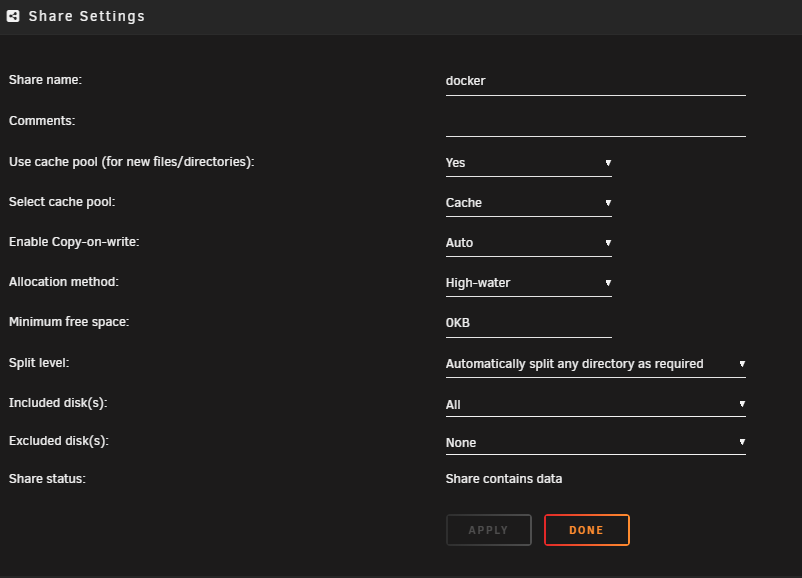
I don't see that I am restricting this share to a single drive. What am I doing wrong... please don't say "EVERYTHING"!
-
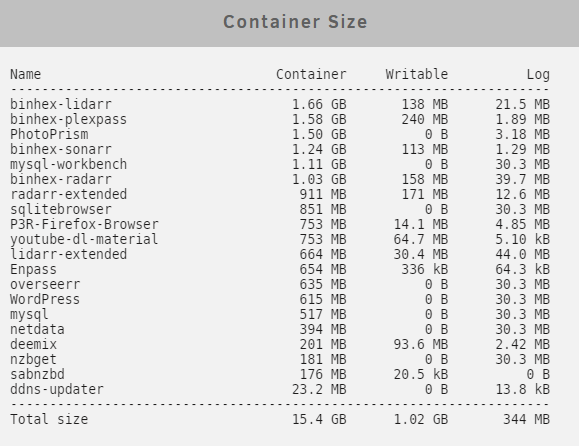
I have been doing a ton of guess-work on this thing as I don't understand it all.
-
I guess I don't understand. Is the docker image stored someplace else? I have 18TB free on my array. tower-diagnostics-20230224-1119.zip
-
I guess I don't understand. Is the docker image stored someplace else? I have 18TB free on my array.
-
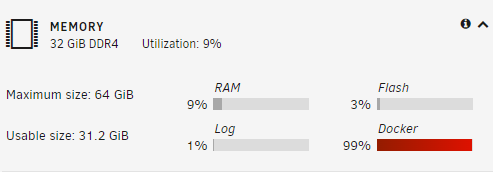
Hi friends, Why do I only show 30GB of usable memory and the Docker allocation is full? How do I fix this? Thanks in advance
-
Well now I don't feel so stupid Thanks! So, how are folks protecting their data from catastrophic events like fire and flood?
-
I feel really stupid but I can't figure out what to do after I install. It says I need to install a "Client" but I don't see a client to install or know where to install the downloaded client to. I have an Unraid server that I want to backup certain folders. This UrBackup is installed to my UnRaid Server. I tried to "Add a new client" with the IPAddress of my server but it returns that it is not online. I assume that this is because I didn't install a "Client". What am I doing wrong?
-
Sorry, the question is, I am looking for the Task/Process Manager for Unraid.
-
My CPU usage is pegged constantly and I have no way of seeing which application is doing it. I have restarted but whatever it is restarts and kills my CPU again. How can I tell what is doing what on an Unraid system.
