





matus
Members
-
Joined
-
Last visited
-
I think it's working. I've re-enabled docker and stopped all individual dockers. After that, I've disabled docker again. Mover started immediately and now I have everything on my Array. So this is the solution - together with correct shares setting. Any pointers regarding issue that started it all? I don't think I can trust this disk until I know what caused it. Oh, and thank you both itimpi & JorgeB for your patience and support.
-
Don't know what's happened now, but mover is running currently. I don't think it will actually move anything, so I can try again once it's finished and will post new diags. How should I set it to test the mover (I've tried all possible combinations for appdata and mover only blinked so I'm paranoid and doubting myself)?
-
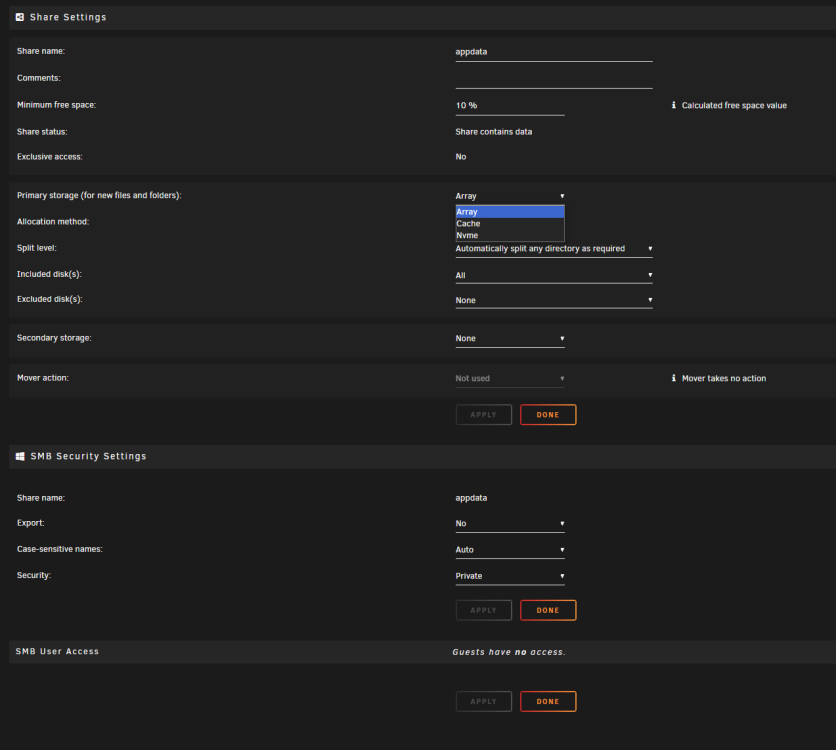
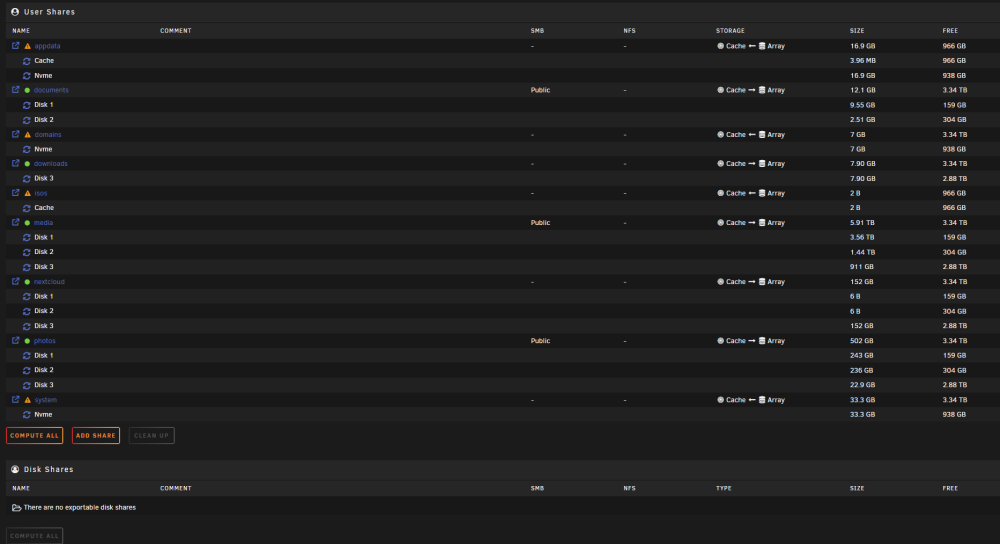
It's weird, cause I can't initialize mover in any case (e.g. I've tried appdata: cache; NVME; array - mover just blinks and that's it). As per the screenshot in my first post, files are not in locations set and mover is still not doing anything. Multiple shares are physically in NVME even though I don't have NVME set for any share. Just a little background: yesterday I found out my server is down. I could access gui, but couldn't do anything. I found this in log: I was freaking out and thought my setup is gone, because I didn't have appdata & system backed-up (they were in NVME pool). I turned server off and on and everything seemed to be fine. Until I find out what was the failure with NVME I wanted to move everything from NVME to cache, but with no success. I was able to initialize mover once after I installed Mover Tuning and set "Only move at this threshold of used cache space:" to 5%. It went for some time, but physically mover didn't do anything. I've uninstalled & installed Mover Tuning, but can't replicate it anymore. But I can't move files from nvme to array as well?
-
Thank you! Here it is, hope it helps. diagnostics-20230824-1235.zip
-
I'd love to, but I think Diagnostics froze after 3 hours of generating Download. Is this normal time to generate Diagnostics report? Think it took seconds last time I needed it.
-
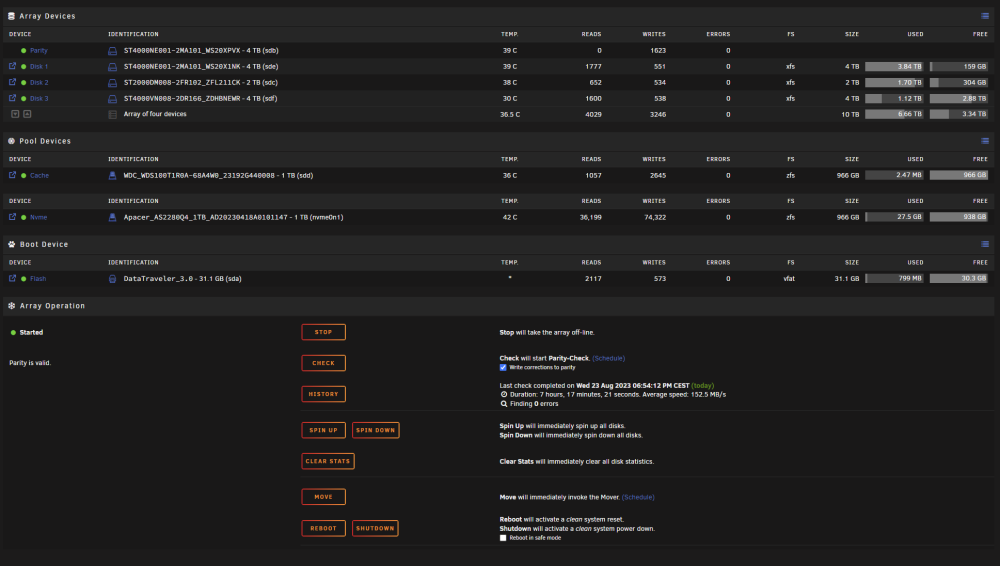
Hi all, I have all sorts of problems since I replaced my cache SSD for 1 cache & 1 NVME and changed FS to ZFS. Currently mover is not working at all. It just blinks and log is showing: Changed share settings multiple times, downloaded mover plugin, uninstalled mover plugin. Tried with VMs & Docker off and on and still nothing. My settings: I don't think I can go back to previous Unraid version as I've set NVME & Cache to ZFS and my previous version was 6.11.5.
-
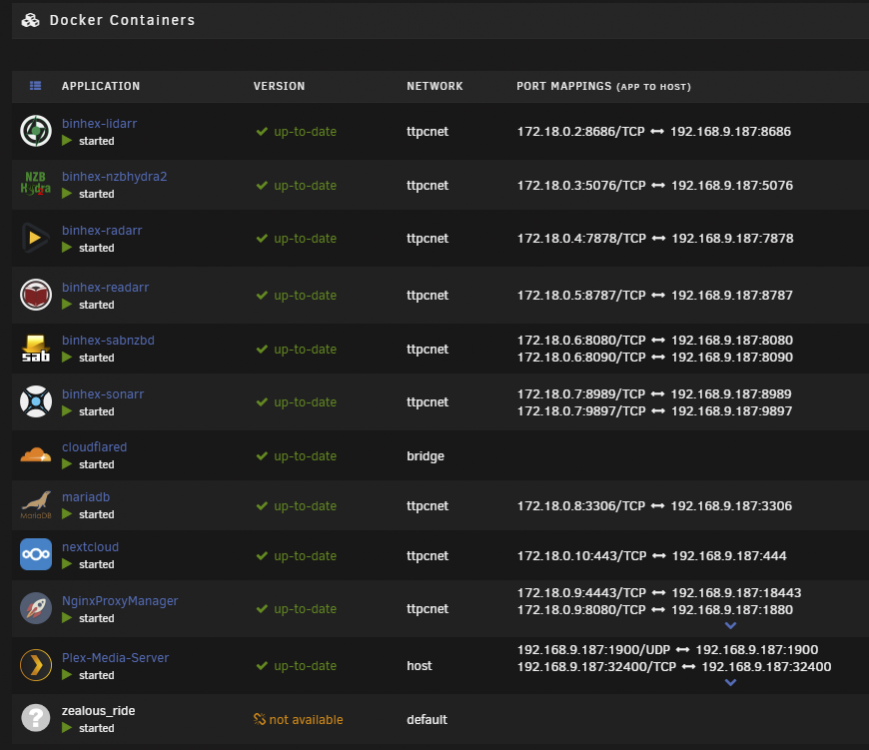
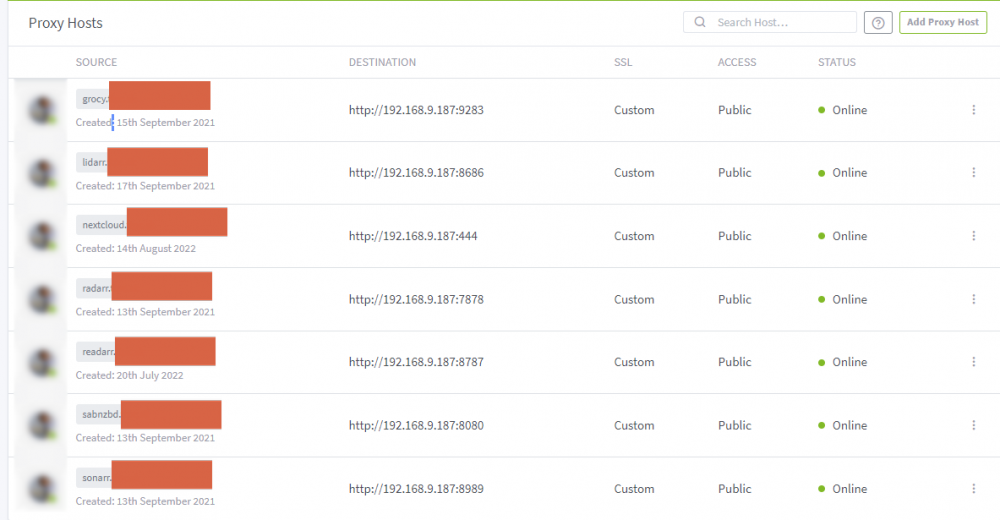
Hi all, I'm now really struggling to fix my Nextcloud. It was working perfectly for months, but unfortunately my son turned off my server and since then I'm lost. I'm using Nginx Proxy manager & Cloudflare tunnels with my own domain. Need to say that I've managed to fix all other applications running like that (Sonarr, Radarr, SABnzbd...), nextcloud is the only one not working. Nginx Proxy setup Nextcloud config <?php $CONFIG = array ( 'memcache.local' => '\\OC\\Memcache\\APCu', 'datadirectory' => '/data', 'instanceid' => 'SET BUT CHANGED BECAUSE OF PRIVACY', 'passwordsalt' => 'SET BUT CHANGED BECAUSE OF PRIVACY', 'secret' => 'SET BUT CHANGED BECAUSE OF PRIVACY', 'trusted_domains' => array ( 0 => '192.168.9.187:444', 1 => 'nextcloud.MYDOMAIN.XYZ', ), 'overwrite.cli.url' => 'https://nextcloud.MYDOMAIN.XYZ', 'overwritehost' => 'nextcloud.MYDOMAIN.XYZ', 'overwriteprotocol' => 'https', 'dbtype' => 'mysql', 'version' => '22.1.1.2', 'dbname' => 'nextcloud', 'dbhost' => '192.168.9.187:3306', 'dbport' => '', 'dbtableprefix' => 'oc_', 'mysql.utf8mb4' => true, 'dbuser' => 'SET BUT CHANGED BECAUSE OF PRIVACY', 'dbpassword' => 'SET BUT CHANGED BECAUSE OF PRIVACY', 'installed' => true, 'maintenance' => false, ); If I remove overwrite.cli.url; overwritehost; overwriteprotocol I can access nextcloud through IP correctly. But when I try to set it up with nginx and cloudflare tunnel, I will get: I'd appreciate if you could point me in the right direction..
-
My son accidently turned off my unraid server. Everything works just fine, I'm just not able to access some of the services through cloudflared (I have custom domains for sonarr, radarr & nextcloud). I don't know what to check - I've basically set & forgot everything many months ago. Appreciate any help - I don't even know where to start..
-
Thank you, missed this one. I'm trying this right now.
-
hi all, I'm in trial period of unraid, as I'm trying to configure simple NAS with plex. I've had some old HW, combined it with some new buys and created this: AMD RYZEN 7 1700x ASUS GTX 750ti MSI B450M Mortar mas 2 x 4TB HDD seagate ironwolf pro 1 x 2TB HDD seagate ironwolf 1 x 240GB SSD WD Green Corsair HX520W Kingston 16GB 2666 kit DDR4 I didn't change much in the settings, just stuff I found in most tutorials and how to guides. Used one 4TB HDD as parity, SSD as cache and that was pretty much it. After parity check, I've left it running overnight, but I woke up with unraid stopped after reboot. That happened 3 or 4 times. I couldn't find anything in the log - as it appears it started logging only after new login? I didn't have plex installed first three times, so I don't think this is causing any issue. I've checked the build multiple times during weekend, changed the case, changed the cpu fan, made sure all the cables are connected correctly, made sure the airflow and temperature is optimal, but it keeps happening. I've checked ram through memtes86 - no issues. Your help is much appreciated, I don't know where to go from here. ttpcnas-diagnostics-20210822-2007.zip


