





bchng
Members
-
Joined
-
Last visited
-
Assign either 00:02:C9:04:37:A0 or 00:02:C9:04:37:A1 to eth0 which ever port the fiber is connected to.
-
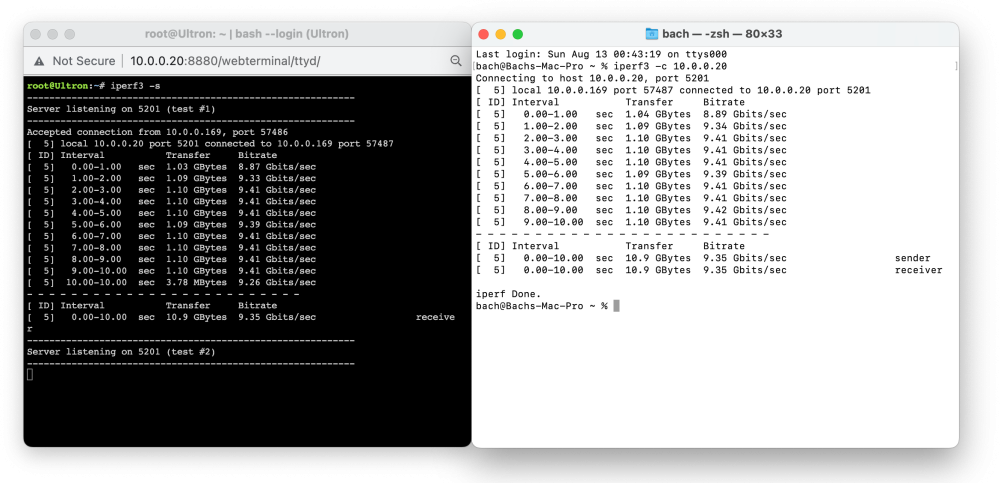
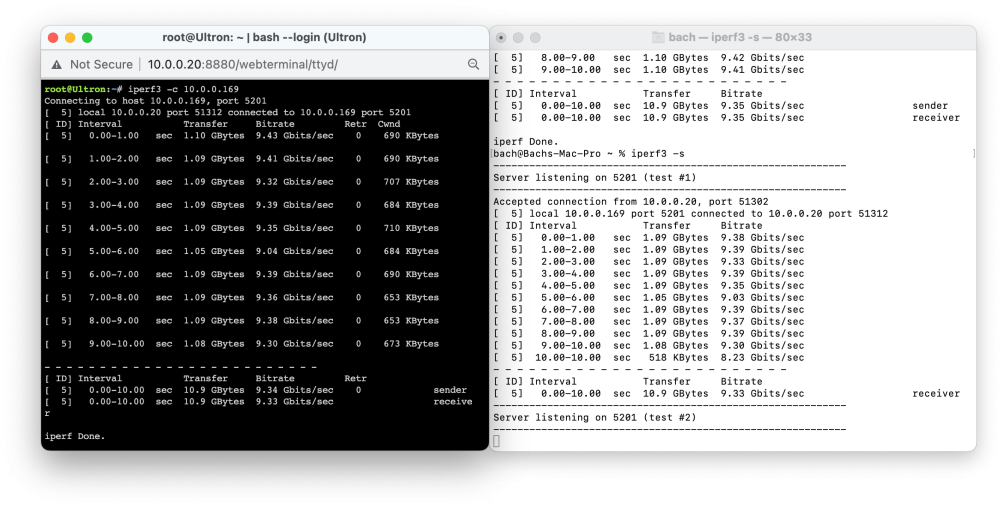
Yes, using network. I have attached iperf results. It shows 10 GBe in speed both directions
-
I have to disagree with you in this regard. Both 980 Pro and 990 Pro have inferior cell technology (TLC) vs. 970 Pro (MLC) making the 970 Pro very robust. 970 Pro can have sustained write speed at max speed (around 2 GB/s) indefinitely because it has no write cache. 970 Pro is the crown jewel of its time or even now. I also have a massive heatsink on the nvme so temp is never above 37 °C under load.
-
Issue: Transfer speed is limited to 1 Gbe (128 MB/s) even though my infrastructure is 10 Gbe. Transferring to my cache drives always starts out really fast around 500 MB/s then drops to 128MB/s after a couple of seconds. I'm using disk shares for all my cache drives (Intel DC S4500, Samsung 970 Pro ) and still get the same result. In addition, using Finder or any copying app yields similar slow speed. When monitoring the Pool Devices section during transfer, I notice the write speed of my Samsung 970 Pro would jump to 800 MB/s for few seconds then drops to 0 MB/s. My 16 GB RAM is never full. I'm pulling my hair because I have no idea where the bottleneck is. The issue arises after I recreated and started fresh with new USB boot drive (Unraid 6.12.3). The original boot drive (Unraid 6.11.5) got toasted and I didn't have a backup. Before the new boot drive, my system was running perfectly with transfer speed at around 800MB/s to my NVME cache drive. All hardwares are unchanged beside the new USB boot drive. Also, I have done all of the recommended MacOS SMB optimizations. Tests I have done: Iperf - shows 1GB/s transfer speed between UNRAID and my Mac rsync and MC - shows 1GB/s transfer speed between cache drives. smb-extra.conf [global] use sendfile = yes allow insecure wide links = yes min protocol = SMB2 smb-fruit.conf # global parameters are defined in /etc/samba/smb.conf # current per-share Unraid OS defaults #fruit:locking = netatalk fruit:appl = yes fruit:resource = file use sendfile = yes fruit:encoding = native vfs objects = catia fruit streams_xattr fruit:advertise_fullsync = true fruit:metadata = stream fruit:encoding = native fruit:veto_appledouble = no fruit:wipe_intentionally_left_blank_rfork = yes fruit:delete_empty_adfiles = yes fruit:posix_rename = yes readdir_attr:aapl_rsize = no readdir_attr:aapl_finder_info = no readdir_attr:aapl_max_access = no fruit:nfs_aces = no fruit:zero_file_id = yes fruit:model = MacPro7,1@ECOLOR=226,226,224 spotlight = yes aio read size = 1 io write size = 1 #Mac cleaup #veto files = /._*/.DS_Store/.AppleDouble/.Trashes/.TemporaryItems/.Spotlight-V100/ #delete veto files = yes ultron-diagnostics-20230813-0026.zip

