






Azarog
Members
-
Joined
-
Last visited
Everything posted by Azarog
-
Ok so everything is working nicely under ubuntu (even with no rom for the GPU) On the windows VM, the card is recognized (when i go through VNC) but nothing comes out of the HDMI port
-
Ok, since i posted i managed to have both working (vnc and gpu passtrough) for ubuntu ... Perhaps it is something related to the windows VM not being activated ?
-
Hello, I would like to use my GTX660Ti as an output for a windows VM. M/B: Supermicro H11SSL-i Version 2.00 - s/n: WM204S602455 BIOS: American Megatrends Inc. Version 2.1. Dated: 02/21/2020 CPU: AMD EPYC 7401P 24-Core @ 2000 MHz HVM: Enabled IOMMU: Enabled Memory: 64 GiB DDR4 Multi-bit ECC (max. installable capacity 2048 GiB) Kernel: Linux 5.10.28-Unraid x86_64 Everything starts smoothly and i'm prompted by the windows installation thingy in VNC But nothing on the real screen connected to the GPU. Here is my VM xml : <?xml version='1.0' encoding='UTF-8'?> <domain type='kvm'> <name>660 Ti</name> <uuid>a517245a-6a95-5b5a-e9c5-2a323c221f6d</uuid> <metadata> <vmtemplate xmlns="unraid" name="Windows 10" icon="windows.png" os="windows10"/> </metadata> <memory unit='KiB'>8388608</memory> <currentMemory unit='KiB'>8388608</currentMemory> <memoryBacking> <nosharepages/> </memoryBacking> <vcpu placement='static'>8</vcpu> <cputune> <vcpupin vcpu='0' cpuset='0'/> <vcpupin vcpu='1' cpuset='24'/> <vcpupin vcpu='2' cpuset='2'/> <vcpupin vcpu='3' cpuset='26'/> <vcpupin vcpu='4' cpuset='4'/> <vcpupin vcpu='5' cpuset='28'/> <vcpupin vcpu='6' cpuset='6'/> <vcpupin vcpu='7' cpuset='30'/> </cputune> <os> <type arch='x86_64' machine='pc-q35-5.0'>hvm</type> </os> <features> <acpi/> <apic/> <hyperv> <relaxed state='on'/> <vapic state='on'/> <spinlocks state='on' retries='8191'/> <vendor_id state='on' value='none'/> </hyperv> </features> <cpu mode='host-passthrough' check='none' migratable='on'> <topology sockets='1' dies='1' cores='4' threads='2'/> <cache mode='passthrough'/> <feature policy='require' name='topoext'/> </cpu> <clock offset='localtime'> <timer name='hypervclock' present='yes'/> <timer name='hpet' present='no'/> </clock> <on_poweroff>destroy</on_poweroff> <on_reboot>restart</on_reboot> <on_crash>restart</on_crash> <devices> <emulator>/usr/local/sbin/qemu</emulator> <disk type='file' device='disk'> <driver name='qemu' type='raw' cache='writeback'/> <source file='/mnt/vms/660 Ti/vdisk1.img'/> <target dev='hdc' bus='virtio'/> <boot order='1'/> <address type='pci' domain='0x0000' bus='0x03' slot='0x00' function='0x0'/> </disk> <disk type='file' device='cdrom'> <driver name='qemu' type='raw'/> <source file='/mnt/user/isos/Windows.iso'/> <target dev='hda' bus='sata'/> <readonly/> <boot order='2'/> <address type='drive' controller='0' bus='0' target='0' unit='0'/> </disk> <controller type='sata' index='0'> <address type='pci' domain='0x0000' bus='0x00' slot='0x1f' function='0x2'/> </controller> <controller type='pci' index='0' model='pcie-root'/> <controller type='pci' index='1' model='pcie-root-port'> <model name='pcie-root-port'/> <target chassis='1' port='0x10'/> <address type='pci' domain='0x0000' bus='0x00' slot='0x02' function='0x0' multifunction='on'/> </controller> <controller type='pci' index='2' model='pcie-root-port'> <model name='pcie-root-port'/> <target chassis='2' port='0x11'/> <address type='pci' domain='0x0000' bus='0x00' slot='0x02' function='0x1'/> </controller> <controller type='pci' index='3' model='pcie-root-port'> <model name='pcie-root-port'/> <target chassis='3' port='0x12'/> <address type='pci' domain='0x0000' bus='0x00' slot='0x02' function='0x2'/> </controller> <controller type='pci' index='4' model='pcie-root-port'> <model name='pcie-root-port'/> <target chassis='4' port='0x13'/> <address type='pci' domain='0x0000' bus='0x00' slot='0x02' function='0x3'/> </controller> <controller type='pci' index='5' model='pcie-root-port'> <model name='pcie-root-port'/> <target chassis='5' port='0x14'/> <address type='pci' domain='0x0000' bus='0x00' slot='0x02' function='0x4'/> </controller> <controller type='pci' index='6' model='pcie-root-port'> <model name='pcie-root-port'/> <target chassis='6' port='0x15'/> <address type='pci' domain='0x0000' bus='0x00' slot='0x02' function='0x5'/> </controller> <controller type='virtio-serial' index='0'> <address type='pci' domain='0x0000' bus='0x02' slot='0x00' function='0x0'/> </controller> <controller type='usb' index='0' model='ich9-ehci1'> <address type='pci' domain='0x0000' bus='0x00' slot='0x07' function='0x7'/> </controller> <controller type='usb' index='0' model='ich9-uhci1'> <master startport='0'/> <address type='pci' domain='0x0000' bus='0x00' slot='0x07' function='0x0' multifunction='on'/> </controller> <controller type='usb' index='0' model='ich9-uhci2'> <master startport='2'/> <address type='pci' domain='0x0000' bus='0x00' slot='0x07' function='0x1'/> </controller> <controller type='usb' index='0' model='ich9-uhci3'> <master startport='4'/> <address type='pci' domain='0x0000' bus='0x00' slot='0x07' function='0x2'/> </controller> <interface type='bridge'> <mac address='52:54:00:31:0f:a7'/> <source bridge='br0'/> <model type='virtio-net'/> <address type='pci' domain='0x0000' bus='0x01' slot='0x00' function='0x0'/> </interface> <serial type='pty'> <target type='isa-serial' port='0'> <model name='isa-serial'/> </target> </serial> <console type='pty'> <target type='serial' port='0'/> </console> <channel type='unix'> <target type='virtio' name='org.qemu.guest_agent.0'/> <address type='virtio-serial' controller='0' bus='0' port='1'/> </channel> <input type='tablet' bus='usb'> <address type='usb' bus='0' port='3'/> </input> <input type='mouse' bus='ps2'/> <input type='keyboard' bus='ps2'/> <graphics type='vnc' port='-1' autoport='yes' websocket='-1' listen='0.0.0.0' keymap='en-us'> <listen type='address' address='0.0.0.0'/> </graphics> <video> <model type='qxl' ram='65536' vram='65536' vgamem='16384' heads='1' primary='yes'/> <address type='pci' domain='0x0000' bus='0x00' slot='0x01' function='0x0'/> </video> <hostdev mode='subsystem' type='pci' managed='yes'> <driver name='vfio'/> <source> <address domain='0x0000' bus='0x21' slot='0x00' function='0x0'/> </source> <rom file='/mnt/user/isos/rom/NVIDIA.GTX660Ti.2048.120709.rom'/> <address type='pci' domain='0x0000' bus='0x04' slot='0x00' function='0x0'/> </hostdev> <hostdev mode='subsystem' type='pci' managed='yes'> <driver name='vfio'/> <source> <address domain='0x0000' bus='0x21' slot='0x00' function='0x1'/> </source> <address type='pci' domain='0x0000' bus='0x05' slot='0x00' function='0x0'/> </hostdev> <hostdev mode='subsystem' type='usb' managed='no'> <source> <vendor id='0x05ac'/> <product id='0x024f'/> </source> <address type='usb' bus='0' port='1'/> </hostdev> <hostdev mode='subsystem' type='usb' managed='no'> <source> <vendor id='0x1532'/> <product id='0x0043'/> </source> <address type='usb' bus='0' port='2'/> </hostdev> <memballoon model='none'/> </devices> </domain> As you can see i use the "official" rom but i also tried the SpaceInvaderOne's method from his video using the one from the card itself, nothing worked yet. Hope we can find a way to have it work ! Thanks PS: This is the only PCIe device (alongisde the NVMe on the right of the PCIe slot under the one the GPU is connected)
-
Hello, any update on the matter, did you manage to solve it ? I think i have the same issue, cold boot -> can't start because of no media (found) to boot on reset switch from there -> works like a charm Indeed it's a not a big issue as the server should be working 24/7 but just in case, i'd love to solve the issue.
-
I thought there was a plugin to have an unraid feedback in dashboard or something. So that did the job for me : mount devices in Unassigned Devices copy entire disk : rsync -avxHAXh --progress /mnt/disks/source/ /mnt/disks/destination/ put old drive in array format old drive add destination folder as a share Copy back all the files : rsync -avxHAXh --progress /mnt/disks/source/ /mnt/user/destinationshare/ Rinse and repeat for any drive.
-
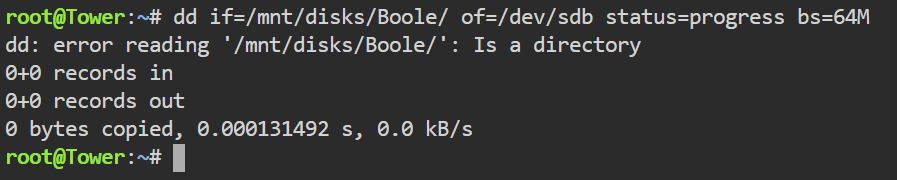
how so ? How should id do it then ? (using cli for instance ) I get this : (i did not fiddle with shares just yet)
-
yes i did, and the "best" way i found is going into console and doing. dd if=/path/to/input of=/path/to/output status=progress Although i'm not sure i need to mount them as they are seen in /dev, right ?
-
yes, i've read about mc but it is not as straightforward as i thought, am i missing something ? i thought the steps would be in a tutorial somewhere as i thought it would be "starting unraid 101" kind of process
-
My main concern is not about the parity, i just wanted to give some general context. What i try to achieve is. Also, my backup plan is to use cli to do the job but i was looking for a way to do it more easily (i'm pretty sure it's a case that a lot of people will face)
-
Thanks, i'll give it a try
-
Definetely not.
-
I only have 1x 4TB After it has done the moving, it will be used for parity. As for now I have 1x 320GB old and ureliable drive as array and nothing else (no parity)
-
Hello, my problem is fairly simple, yet i couldn't find a clear approach in other threads (i hope i search enough, else, don't hesitate to redirect me to the right thread) I have an old server with 1x 3TB, 2x 1TB filled drives. On the new server i have a new (empty) 1x 4TB drive. I would like: copy the content of the 3TB to the 4TB. Format the 3TB to have it ready for array. copy back the content of the 4TB to the prepared 3TB repeat for both 1TB drives. after everything is ready for the array put the 4TB as parity and the prepared drives too On a side note i have a 1TB NVMe, empty that can help for the heavy lifting but i plan to use it for the windows gaming VM only afterward For what i've read: copy is better than moving (in any case i assume that by preparing the disks for array, they'll be erased of zeroed) it's better to do all the preparation part outside of an array (so, not adding the 3TB to the array before copying back) My question is How to do it? I was hoping for an app to automate the cp - clear disk - cp back (with a gui would be awesome) but i don't mind doing cli commands Thank you all,

