





Jama
Members
-
Joined
-
Last visited
-
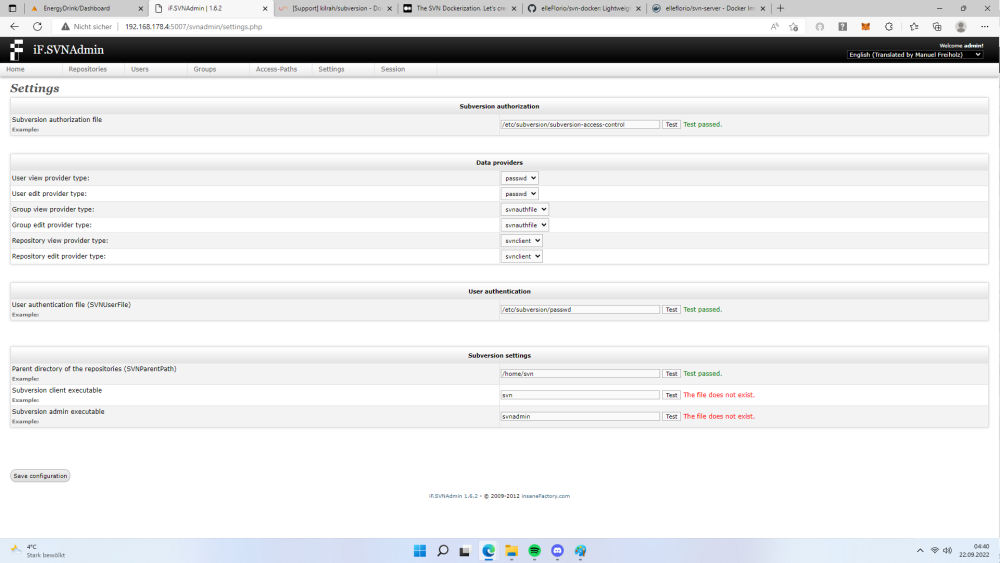
okay I found the solution and would like to share it, now I understand a little better what docker means with the paths and executable. Even if it says "The file does not exist." the command must be specified in this case. Now I can also create a repository before there were only error messages. I hope this helps someone...sorry to bother Kilrah unnecessarily. Greetings Jama
-
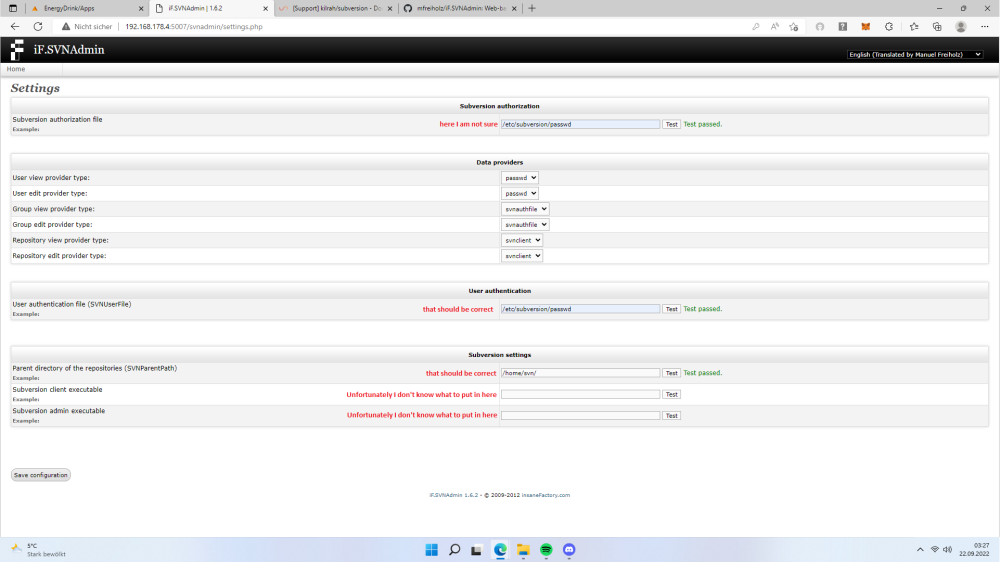
Thanks for the answer. Then how do you manage the users, groups and repository? I have multiple users and multiple repositories, one of the users is leaving and new ones are joining. Would like to manage it in the GUI. Then I would have the groups and users under control. I've always done it with Ubuntu and maintained the config files in the editor. Unfortunately, I'm not very familiar with Docker yet, but I don't like running an additional VM on Unraid. I've attached the picture, maybe you have an idea. (I wrote the text in red) I think the Subversion authorization file must be different than the user authentication file (SVNUserFile) but I'm not sure what the path is. Greetings Jama
-
Hello, I tried the alternative configuration via SVNADMIN but I have a problem because I don't know all the information I need to enter. Can you help me ? or maybe you know a guide ? Greetings Jama

