





jcofer555
Members
-
Joined
-
Last visited
Everything posted by jcofer555
-
can you show a screenshot of how you are attempting to do it
-
reserved
-
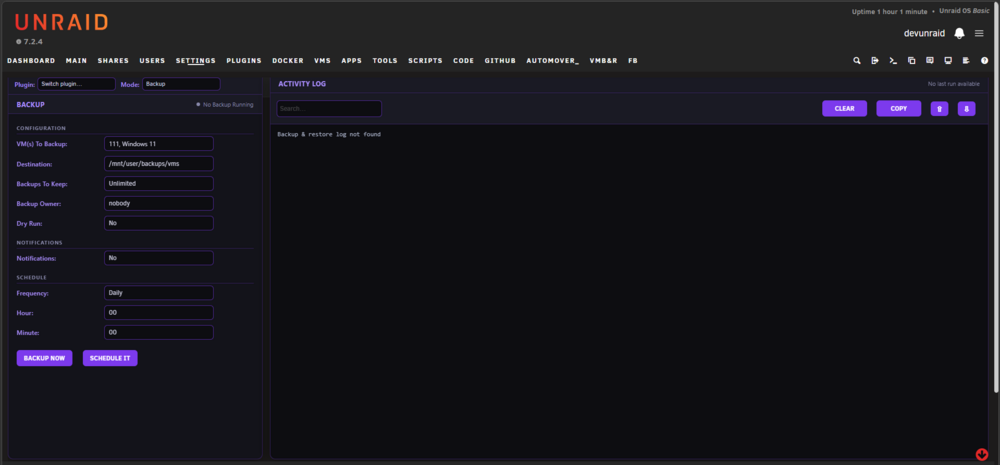
VM Backup & Restore for unRAID Github link - https://github.com/jcofer555/vm-backup-and-restore A utility to backup a VM's vdisk, nvram, and xml and restore when needed Development has ended and no further updates will be released ## Features ## - Backing up of a single VM or multiple VMs - Restoring of a single VM or multiple VMs - Offers scheduling of backups - Ability to set how many backups you want to keep - Dry run support - Notification support for discord, gotify, ntfy, pushover, slack, and unraids built in - Ability to set an owner for your backups - Logging available in the webui and at /tmp/vm-backup-and-restore - NOTE: When running a backup or restore, selected VMs are stopped and then restarted only if they were running beforehand
-
can't guarentee that i'll add it but i'll look into it, glad you are liking the plugin
-
Odd as move now should disable any filters preventing files from moving so thats weird it didn't do it For cleanup of empty folders parts. Was it folders not involved with the move of files? Iirc I have it so it removes empty folders that had a file moved
-
And there's files in the data share that are on that pool? Can verify by clicking compute for the share and seeing what disks comes up
-
Its not finding any files to move. Is there a share on that pool that is configured with secondary storage and mover direction pool -> pool or pool ->array?
-
the fix has been released as v2026.01.17.01 @Stardog and @Tore Hammervoll
-
how is your pool setup? i just tested on my zfs mirror and it's working properly
-
Thanks for the report, ill have a look here soon
-
there is a memory limit with php being processed in a browser from what i remember and i think your file might just be too much for the webui to process. i'd guess if you used command line with direct commands it might work.
-
can't be sure i will have the answer but you'd want to generate diagnostics to be looked at
-
the qbit script does pausing and resuming in one function. most people use the default status type of "completed" and then you set the days from and days to to whatever you want. this will pause any torrent that is completed and is withing those days so if a torrent is 3 days old and you have days from set to 0 and days to set to 2 than that 3 day old torrent won't be touched because it doesn't fall within. stop threshold means if while moving the pool gets to that % the moving will stop, if you aren't reaching that low like you say then it would be because of ineligible files be it they are in use, set to exclusions, or filtered by a filter you have enabled or you have shares not set to move off of the pool. you can manually browse your pool and see what files are on it and if they are a bunch of torrent files from qbit and you want one big push of them off to the array before then using the qbit script to handle things from then yea you could just stop all torrents in qbit and use the move now button in automover to bypass all filters and exclusions you may have set so that it'll move everything it can that's not in use or set not to move from a shares settings. i don't plan to add switches to jdupes i'm sorry but you can edit /usr/local/emhttp/plugins/automover/helpers/automover.sh and edit the line below to add your flags. keep in mind this would reset each unraid reboot /usr/bin/jdupes -rLX onlyext:mp4,mkv,avi -y "$HASH_DB" "$SHARE_PATH" 2>&1 \
-
i'll look into it
-
tonights went fine for me as well, i did just push an update so the pauses and resumes go to seperate log files so you can check those to see what it's saying
-
my last nights stop and resume seemed to work but i'll check again later today when i do some more. for you when it happens you can check the file /tmp/automover/automover_qbittorrent_paused.txt to make sure it's listed the torrents there which would confirm which were paused by the system and which the resume works off of when resuming. that file gets cleared on each move so it only keeps the pauses for each run it does so you gotta check it before the next run of automover happens.
-
got both added for you, ty for the suggestions
-
stop all i can definitely do, the script one i'll have to look into further
-
in 7.2.2 there is no interface rules any longer to reconfigure which nic is which eth. tower-diagnostics-20251204-1647.zip
-
rip for sure, you did such good work helping the unraid community. best wishes to the family and friends
-
here is preferred for now i see the issue and a fix has been released
-
update is pushed, also made the change for stop/start containers so now they will only stop/start if files are going to be moved. did the same for the qbittorrent pause and resume
-
yea it's on my to-do list along with better reporting of the setting in the logs
-
when selecting files and hitting calculate it lists every file selected in the results popup so when selecting a lot of files it makes it too long of a list and the results are off page and no way to click ok so am forced to refresh the page
-
2025.10.82 is released with a fix for this



