





apraetor
Members
-
Joined
-
No, there is not option for encrypting backups that I've ever found. I think the rationale is that it's pointless, since the source (AppData) isn't encrypted. Most folks store the tarball in their array. If you're pushing the tarball to somewhere else, such a cloud storage server, then you'll have to encrypt it yourself or use an automated tool.
-
When you restore there's an option to select what appdata to restore. Simply select the appdata for the Dockers you wish to restore, and skip the rest.
-
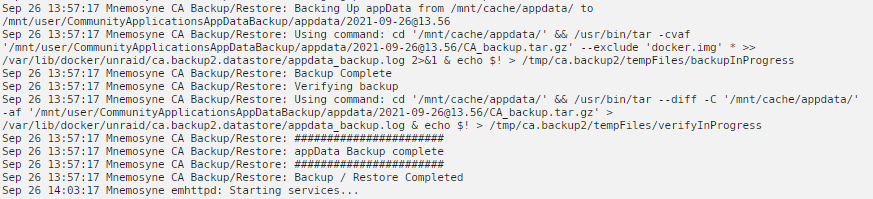
Ok, I'm completely lost. I've got a perfectly generic UnRaid config, trying to back up /mnt/cache/appdata/ to /mnt/user/CommunityApplicationsAppData/appdata/ It runs the backup without errors, and creates the dated subdirectory... but it's empty. No .tar, no nothing. I've tried with compression both on and off. I've got to be missing something obvious, right? Changing it to /mnt/user/appdata/ results in a full backup.. but the data lives on the cache anyway, so I'm not sure why the default value isn't working! I didn't change anything else in the CA AppData Backup configuration, no excluded folders, etc. It stops the dockers fine, ought to be backing up binhex-plexpass's data. Total size on cache is 2.65 GB.
-
THIS. I've been trying to run down an issue and this is the answer. When moving a single large file from cache to array, turbo write performance is great. If there's more than 1 file, then it often drops to a constant ~30 MB/s read + ~30 MB/s write to all disks by the second file. The thrashing really kills throughput. From the looks of it, Turbo Write isn't smart enough to realize that the current multi-disk IO is actually to consecutive writes briefly overlapping. It's a shame -- my reason for using Most-Free Allocation is to maximize read performance by spreading data across as many disks as possible. It also begs the question, why is the OS reporting the mover's write is complete before it's actually finished writing out that file to the array..?!

