





TexasUnraid
Members
-
Joined
-
Last visited
-
Yes, I still can not get TMM to work on anything, it refuses to write to anything even though I can happily write to the folders from the docker console. It just suddenly broke one day and I can't figure out why.
-
No, I was hoping to avoid having to re setup all the settings but that might be needed lol
-
Yes, I tried that as well, I am out of ideas as well.
-
Yeah I considered that as well which is why I tried editing/writing/moving files from the docker console, so inside the TMM instance. It all works fine in there so the docker instance itself is not the issue, it has to be something with TMM it would seem. I also ran the docker safe permissions script from the unraid tools menu as well to make sure permissions were not an issue. The strange part is it used to work fine, it just stopped working for some reason.
-
I have it set to the standard 100 and 99
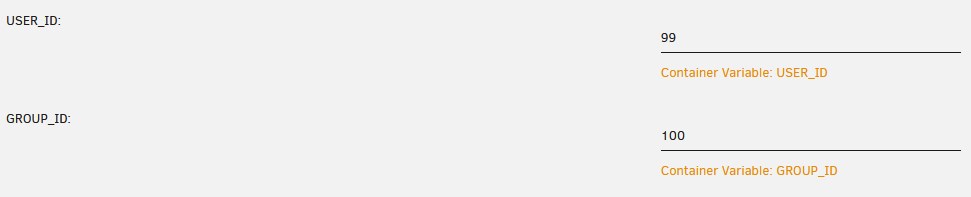
-
So I am trying to use this version of TMM but anytime I try to do anything with it, it just throws errors complaining about not being able to rename/move files. Seems like it does not have write permission? Yet if I go into the console for the container I can write, move, rename etc into the folders perfectly fine?
-
Yeah, I was surprised by this as well, seems like one of the more vital things I would want to monitor, all I really look at in netdata are temps, fan speeds and then the basic cpu/ram/disk etc
-
I have no idea but I am interested in what you find out. I used hddtemp for awhile and it works but I found it broke drive spinddown. I would like to get drive temps back into netdata. The better place to ask about this type of stuff is the github, they have been real good when I have had questions over there.
-
Yes, all the temps show up fine.
-
I didn't feel safe using the wireguard tunnel so I just stuck with the individual docker VPN's. Have not had any issues with those.
-
Yes it is, that is why I would prefer to use ZFS but until that add it in to the stable release that is not really an option in this case.
-
Ok, guess I will see where things stand once the hardware is ordered.
-
Thanks for that, I didn't read the whole thread but looks like it is getting close? Is there any indication when it would be put into a stable release? month? 6 months? A year? If it is semi-soon I think I will just have his collect the hardware and wait on actually setting things up until ZFS is supported. That will work a lot better.
-
Long story short, someone wants me to build them a killer NAS with all the fixins. The issue I am running into is that this server will be a VERY high end system, having more then the 30 drives that unraid allows in the array is highly likely. They also plan to have many users using it at once (plex), so the normal array will not be ideal from a bandwidth perspective either. This leaves me with using BTRFS raid 5 pools or the ZFS plugin (which I have not done a tone of research on). Raid1 is not practical at this scale. Is there any indication of when official ZFS support will be added to unraid? Suggestions for the best option?
-
It always checks for the keyfile before starting the array, if it is there it tries it first and complains if it doesn't work. If it is missing it prompts for you to enter the password

