





tomfool
Members
-
Joined
-
Last visited
Everything posted by tomfool
-
Information Overview: Support for Docker image sync-dropbox by toroskilly Application: Dropbox - https://www.dropbox.com/ GitHub: https://github.com/roninkenji/dropbox-docker Please post any support queries relating to this Docker image here.
-
Yes, @smileybri I agree with @JonathanM. Although Ken-ji was really helpful and active up until 3 years ago, he has not been on here in ages. I am now using Dropbox-by-otherguy (Repository: otherguy/dropbox:1.9.0). Would love to know if anyone has progressed on from this version yet! I think the latest is 1.12.0? Dropbox changed their API quite dramatically a while back and it coincided with Ken-ji's absence. So, I wouldn't put too much weight on solutions that were being used in 2019. As long as you used /mnt/disk1/desired-location for the Dropbox user files field, your files will appear there. After you have started the container and opened the Dropbox Auth URL that gets posted in the container Logs, it can take a while before the syncing kicks into gear. On one occasion I had to reset permissions on the Dropbox synced files location via unraid Tools > New Permissions, then restarted the Dropbox container, before it would sync properly. Let us know what is appearing in your container Logs if you are still struggling.
-
Hi vmontserrat "DROPBOX_SKIP_UPDATE" variable set as "True" (Manually entered into the Extra Parameters area) was a fix we used a while back, when the latest Dropbox version was throwing errors. To give context, we had to use a different repository from otherguy, when ken-ji's version was no longer able to connect to Dropbox. Unfortunately, the other repository had issues as well and so we had to force it not to update. If you are starting afresh, then DROPBOX_SKIP_UPDATE might not apply to you.
-
I got that message a while back, but took a chance and removed "TRUE" from the DROPBOX_SKIP_UPDATE: field. After a few attempts this worked for me, but I had to rename the location of my Dropbox user files, to create a fresh copy of my files, it seemed to get stuck otherwise.
-
When you switched repositories, was it an entirely fresh install? Also, what is in your Repository and Docker Hub URL fields?
-
I think it is the folder in /appdata/dropbox called Dropbox. As I can replicate this error even if I use a different folder name for the location of my files and lower case the container folder.
-
Sorry that's my mistake. I forgot that I swapped repositories too, so it's probably not a valid post here. However, I think the second repository I tried had the exact same issues that we were experiencing with roninkenji's So there might be a clue in there somewhere for you Kenji. I'm not knowledgable enough to work it out, sorry. Anyway, after deleting the container, image and files in appdata I put otherguy/dropbox:1.9.0 in the repository field, put the extra parameters info in and followed the instructions as normal. I really appreciated the speedy responses from you Kenji. Please let me know if you'd like me to test out your repository again, if you make any changes.
-
I finally got it working in bridge mode by specifying dropbox version 1.9 and setting dropbox_skip_update to true in extra parameters
-
I dont suppose it has something to do with the network type?
-
thanks Ken-ji here is what i get
-
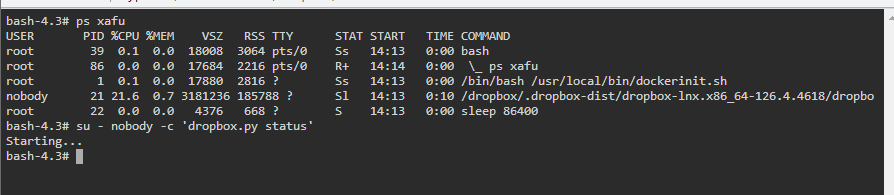
Hi Ken-ji What is the usual time-period for folders to start appearing from Dropbox? I've been up and running for 30 mins now and all I am getting in the console is "Starting...", when I run this: sh-4.3# su - nobody -c 'dropbox.py status' Starting... The logs show: dropbox: load fq extension '/dropbox/.dropbox-dist/dropbox-lnx.x86_64-126.4.4618/cryptography.hazmat.bindings._openssl.cpython-38-x86_64-linux-gnu.so' dropbox: load fq extension '/dropbox/.dropbox-dist/dropbox-lnx.x86_64-126.4.4618/cryptography.hazmat.bindings._padding.cpython-38-x86_64-linux-gnu.so' dropbox: load fq extension '/dropbox/.dropbox-dist/dropbox-lnx.x86_64-126.4.4618/psutil._psutil_linux.cpython-38-x86_64-linux-gnu.so' dropbox: load fq extension '/dropbox/.dropbox-dist/dropbox-lnx.x86_64-126.4.4618/psutil._psutil_posix.cpython-38-x86_64-linux-gnu.so' dropbox: load fq extension '/dropbox/.dropbox-dist/dropbox-lnx.x86_64-126.4.4618/apex._apex.cpython-38-x86_64-linux-gnu.so' dropbox: load fq extension '/dropbox/.dropbox-dist/dropbox-lnx.x86_64-126.4.4618/tornado.speedups.cpython-38-x86_64-linux-gnu.so' dropbox: load fq extension '/dropbox/.dropbox-dist/dropbox-lnx.x86_64-126.4.4618/wrapt._wrappers.cpython-38-x86_64-linux-gnu.so' dropbox: load fq extension '/dropbox/.dropbox-dist/dropbox-lnx.x86_64-126.4.4618/PyQt5.QtWidgets.cpython-38-x86_64-linux-gnu.so' dropbox: load fq extension '/dropbox/.dropbox-dist/dropbox-lnx.x86_64-126.4.4618/PyQt5.QtCore.cpython-38-x86_64-linux-gnu.so' dropbox: load fq extension '/dropbox/.dropbox-dist/dropbox-lnx.x86_64-126.4.4618/PyQt5.QtGui.cpython-38-x86_64-linux-gnu.so'
-
I am also having this problem Edit: Rebooting, doing the unraid-api restart and going to tools/registration and download/install the upgrade key worked the second time. Maybe I did it in the wrong order the first time??
