





syko91
Members
-
Joined
-
Last visited
Everything posted by syko91
-
could XMP make server crash
-
the cpu and mb is used from ebay the ram is brand new but ill test the ram
-
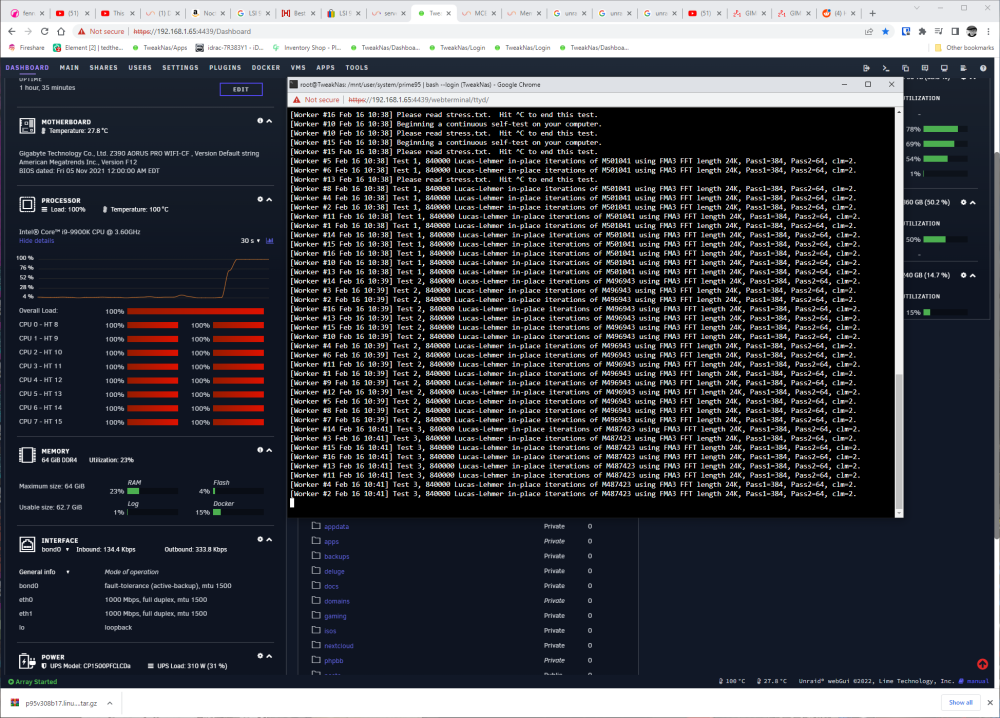
don't think its the cpu
-
no can't take my server down long enough to try im running a rust server with pop
-
so cpu? mb? ram? ram is brand new
-
could this be from a bad sata card
-
updated 6.11.5 tweaknas-diagnostics-20230216-0911.ziptweaknas-syslog-20230216-1412.zip syslog-192.168.1.65.log
-
no overclock just intel turbo boost and XMP
-
already setup syslog-192.168.1.65.log
-
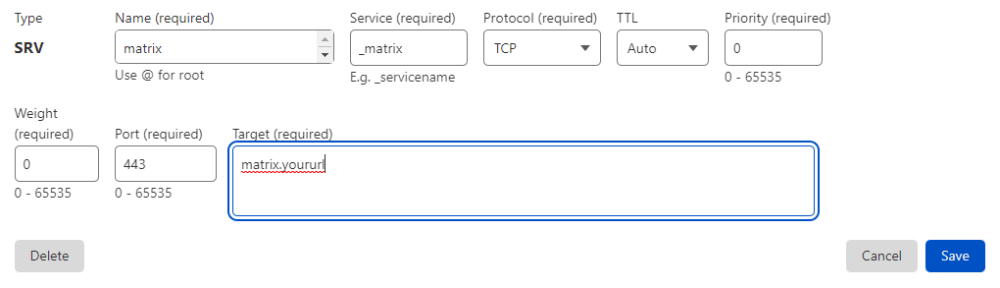
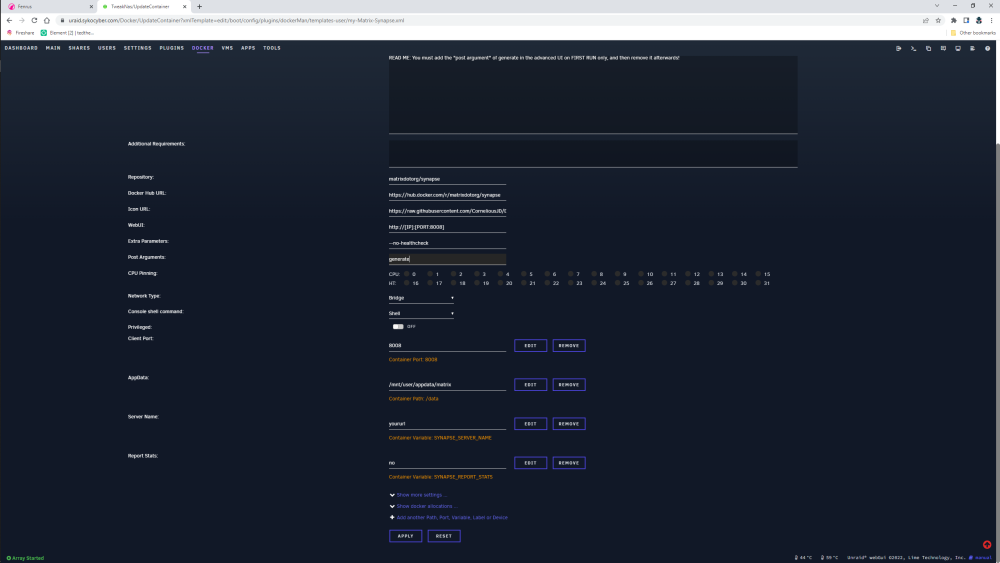
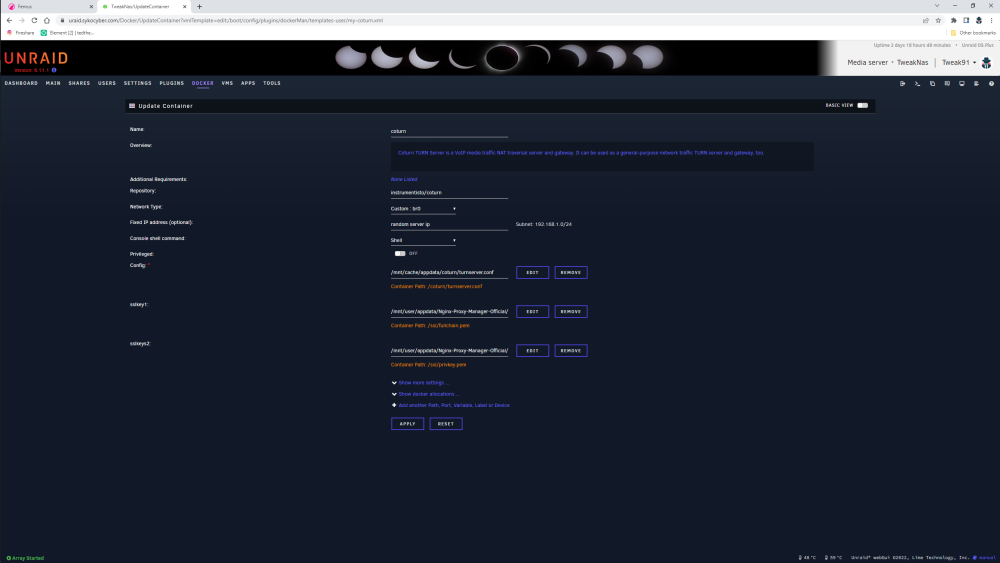
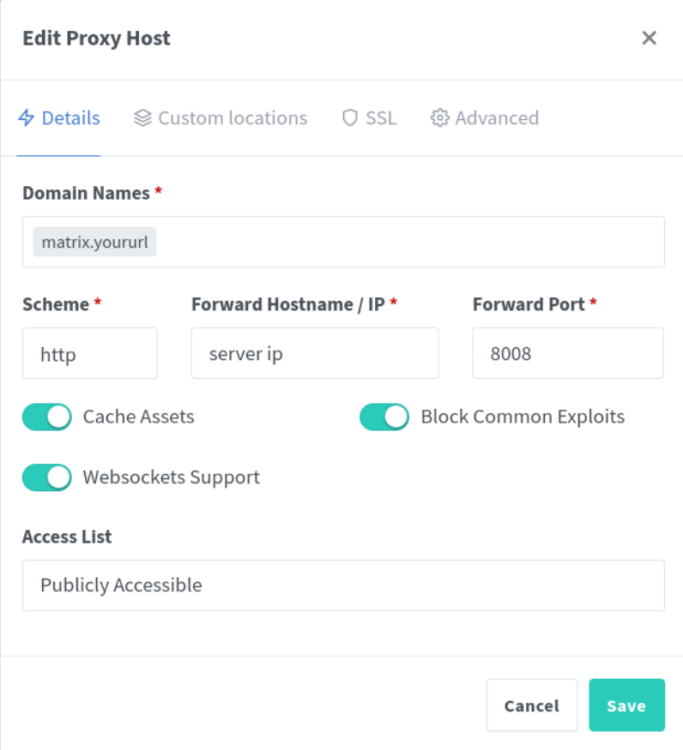
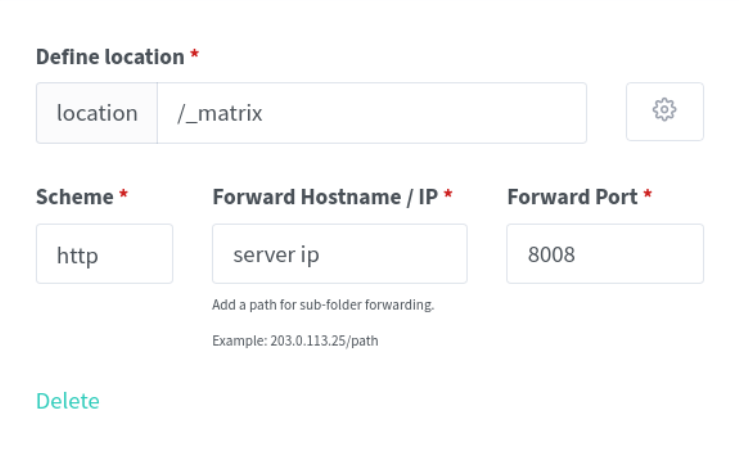
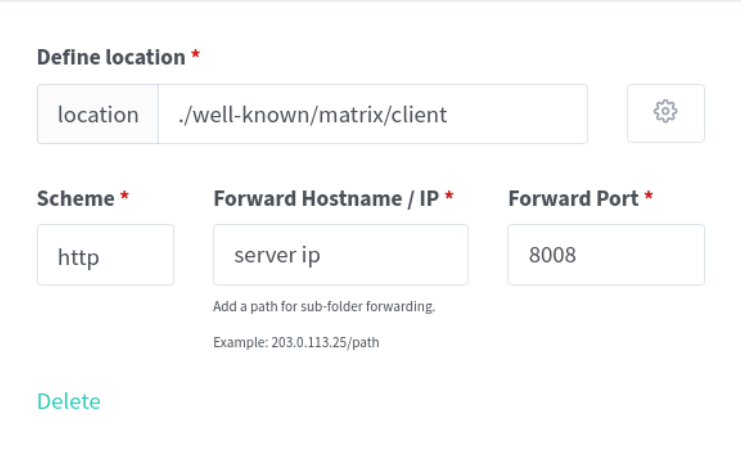
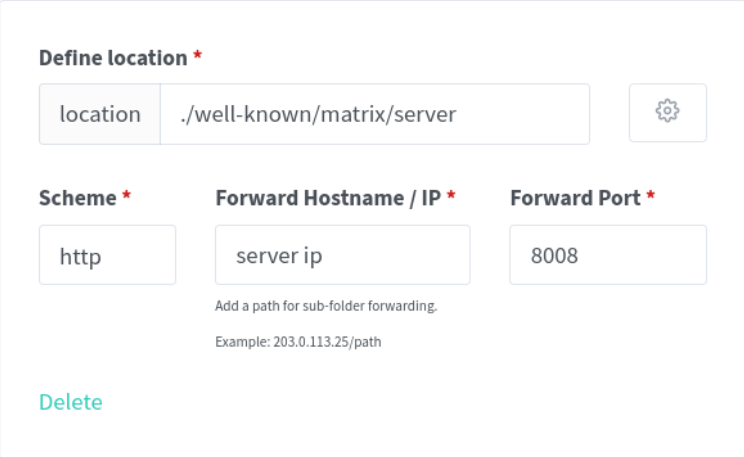
tweaknas-diagnostics-20230216-0822.zipi9 9900k 64gb ddr4 corsair ram gigabyte z390 aorus elite gtx 960 i think this sata card is making it crash https://www.amazon.com/dp/B083WF95Q1?psc=1&ref=ppx_yo2ov_dt_b_product_details was getting this error yesterday "ata10.00: hard resetting link unraid" tho its fine all day but when i go to sleep watching plex and wake up the system won't respond cant even log into gui tweaknas-diagnostics-20230216-0822.ziptweaknas-syslog-20230216-1312.zipMake sure you delete generate from Post Arguments or it won't work.homeserver.yaml Try this forget the coturn for now. Anywhere you see "URL" add your own anywhere you see "KEY" add your key from the default catered homeserver.yaml Test federation After that step than you can try turn. I'll give you my full homeserver.yaml tonightWhat dose your log say ??DNS only??no its not i have matrix running right nowI made a tutorial for NPM...I tired caddy2 once and couldn't make it work rightNot sure I read you could use caddy but didn't trysorry about that forgot lolCloudflare & Nginx proxy manager Step one https://www.cloudflare.com/ Create a A name record pointing at your external IP DNS only. Create an SRV record _matrix targeted at your subdomain Create a C name for coturn turn.yoururl DNS only Nginx proxy manager custom location Tap add 3 Matrix-Synapse Step two Matrix-Synapse docker by matrixdotorg. Delete all ports except Client Port 8008 add Server Name: matrix.yoururl ADVANCED VIEW Post Arguments: add generate install the docker homeserver.yaml edit Step three # Configuration file for Synapse. # # This is a YAML file: see [1] for a quick introduction. Note in particular # that *indentation is important*: all the elements of a list or dictionary # should have the same indentation. # # [1] https://docs.ansible.com/ansible/latest/reference_appendices/YAMLSyntax.html # # For more information on how to configure Synapse, including a complete accounting of # each option, go to docs/usage/configuration/config_documentation.md or # https://matrix-org.github.io/synapse/latest/usage/configuration/config_documentation.html server_name: "matrix.yoururl" pid_file: /data/homeserver.pid public_baseurl: https://matrix.yoururl #web_client_location: https://matrix.yoururl listeners: - port: 8008 tls: false type: http x_forwarded: true bind_addresses: ['0.0.0.0'] resources: - names: [client, federation] compress: false database: name: sqlite3 args: database: /data/homeserver.db log_config: "/data/matrix.yoururl.log.config" media_store_path: /data/media_store registration_shared_secret: "" report_stats: false macaroon_secret_key: "" form_secret: "" signing_key_path: "/data/matrix.yoururl.signing.key" trusted_key_servers: - server_name: "matrix.org" # Enable registration for new users. enable_registration: true enable_registration_without_verification: true registration_shared_secret: trusted_third_party_id_servers: - matrix.org - vector.im - riot.im - matrix.yoururl allow_public_rooms_over_federation: true allow_public_rooms_without_auth: false enable_search: true push: include_content: true group_unread_count_by_room: true ## TURN ## # The public URIs of the TURN server to give to clients turn_uris: ["turn:your turn url:3478?transport=udp"] # The shared secret used to compute passwords for the TURN server turn_username: user turn_password: pass # vim:ft=yaml change all matrix.yoururl to your url registration_shared_secret use key created on install homeserver.yaml macaroon_secret_key use key created on install homeserver.yaml form_secret use key created on install homeserver.yaml coturn Step four change Network Type: too br0 use a open server IP Delete all ports install coturn turnserver.conf listening-port=3478 tls-listening-port=5349 listening-ip=0.0.0.0 external-ip=Br0 server IP min-port=49152 max-port=65535 verbose fingerprint lt-cred-mech user=user:pass total-quota=100 stale-nonce=600 realm=turn.yoururl server-name=turn.yoururl #cert=/ssl/fullchain.pem #pkey=/ssl/privkey.pem #cipher-list="ECDHE-RSA-AES256-GCM-SHA512:DHE-RSA-AES256-GCM-SHA512:ECDHE-RSA-AES256-GCM-SHA384:DHE-RSA-AES256-GCM-SHA384:ECDHE-RSA-AES256-SHA384" syslog pidfile="/var/run/turnserver.pid" #no-tls #no-udp #no-tcp #no-cli #no-tlsv1 #no-tlsv1_1 #no-tlsv1_2 cli-password=passs change turn.yoururl to your coturn url change user=user:pass add the same user:pass created to homeserver.yaml change cli password port forwarding 49152- 65535 UDP !!!!!!!DONT FORGET!!!!!!!! !!!!before starting matrix docker remove generate from Post Arguments!!!! you should now be up and running check https://federationtester.matrix.org/ full homeserver.yaml https://matrix-org.github.io/synapse/v1.37/usage/configuration/homeserver_sample_config.html adding POSTGRES DB, and ELEMENT Web LDAP USERS password_providers: - module: "ldap_auth_provider.LdapAuthProvider" config: enabled: true mode: "search" uri: "ldap://domain:389" start_tls: false base: "OU=home,DC=example,dc=com" attributes: uid: "saMAccountName" mail: "mail" name: "givenName" bind_dn: "cn=ldap,cn=Users,dc=example,dc=com" bind_password: "password" #filter: "(objectClass=posixAccount)" When you get up and running come say hi https://matrix.to/#/#sykocyberofficial:m.sykocyber.com




.PNG.302914b7141b3f1da727f73a46901e95.PNG)



Account
Navigation
Search
Configure browser push notifications
Chrome (Android)
- Tap the lock icon next to the address bar.
- Tap Permissions → Notifications.
- Adjust your preference.
Chrome (Desktop)
- Click the padlock icon in the address bar.
- Select Site settings.
- Find Notifications and adjust your preference.
Safari (iOS 16.4+)
- Ensure the site is installed via Add to Home Screen.
- Open Settings App → Notifications.
- Find your app name and adjust your preference.
Safari (macOS)
- Go to Safari → Preferences.
- Click the Websites tab.
- Select Notifications in the sidebar.
- Find this website and adjust your preference.
Edge (Android)
- Tap the lock icon next to the address bar.
- Tap Permissions.
- Find Notifications and adjust your preference.
Edge (Desktop)
- Click the padlock icon in the address bar.
- Click Permissions for this site.
- Find Notifications and adjust your preference.
Firefox (Android)
- Go to Settings → Site permissions.
- Tap Notifications.
- Find this site in the list and adjust your preference.
Firefox (Desktop)
- Open Firefox Settings.
- Search for Notifications.
- Find this site in the list and adjust your preference.