





chronocide
Members
-
Joined
-
Last visited
-
Wow - very excited to have found this project. I've been working in ComfyUI for the better part of a year and recently become rather uncomfortable with running it in my main Ubuntu Desktop VM given how many community modules are included in my installation. For all the obvious reasons, I want to containerize the ComfyUI instance and was dreading having to put all that together myself. Thanks so much for all the posts here, I'm looking forward to digging in. One quick qualifying question before I go down the wrong path: If I've bound my GPU to my Ubuntu VM (via IOMMU groups) because that's my desktop daily driver, should I pursue running the docker hub version of this container inside my VM? (instead of the Unraid plugin)
-
Ah, perhaps I have simply misunderstood. How does the Audacity Docker container work? As I understand this, Docker containers don't participate in the whole pass-through hardware mechanism - is that wrong?
-
Hi there, I’ve got an ASUS motherboard with onboard audio and I’m not sure where to begin with detecting and configuring the onboard audio. Searching for audio support for unraid beings up a lot of support help relating to virtualization. I’m interested in that too but first I need to get the native audio system working. Any pointers to relevant documentation or suggestions would be appreciated! Thanks for reading. here is my motherboard manual: https://dlcdnets.asus.com/pub/ASUS/mb/LGA1151/MAXIMUS_VIII_GENE/E10484_MAXIMUS_VIII_GENE_UM_WEB.pdf which says the following about audio:
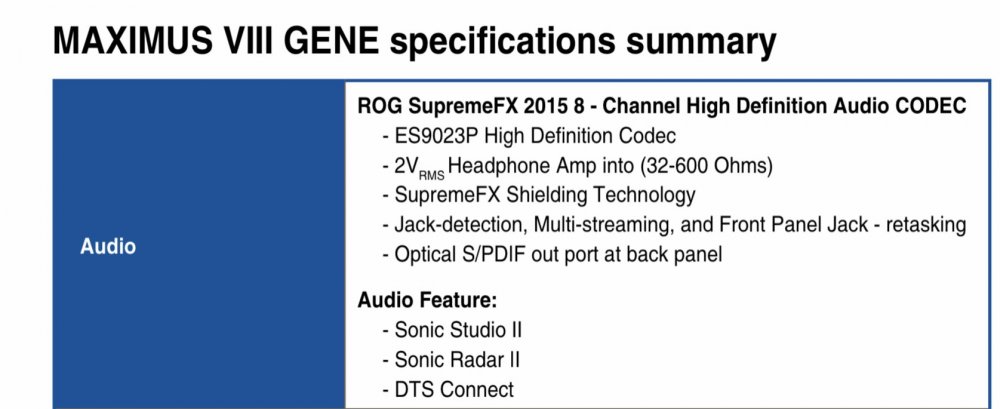
-
I've been on BackBlaze's Personal backup plan for a long long time and I'm hopeful I can stay on it as I migrate from an unvirtualized Windows 10 PC into a Windows 10 VM running on Unraid. Currently all the data I'm interested in protecting is on a USB attached drive array. I'll migrate my BackBlaze license into a Windows 10 VM and just resume backing up that same USB attached disk array on day 1. I've created a new, large ZFS pool and from day 2 forward, I will migrate big chunks of data into the ZFS pool and then serialize (zfs send) backups of the datasets back onto the attached USB. Once it's all backed up and tested, i can delete the original source directory on the USB attached disk array. By doing this one directory at a time (there are about 6-8 or so major directories), i wont need to 2x the data stored on the attached USB device. It's going to take a long time but when I'm done, the attached USB device will just be backups and snapshots. If anyone sees big holes in this, please let me know as I haven't started yet.
-
Thanks @ich777 - please disregard my previous message. It must have been some kind of user error. I had thought that it wasn't allowing me to manually set the path, but I saw your post and decided to simply try again and sure enough, this time it worked. No idea what I had done wrong last time, but I was previously seeing red text highlighting the two paths for VM storage path and ISO storage path, preventing me from saving the config change. Perhaps I simply mistyped the directory names? Irrelevant now.... thanks again
-
Regarding the question of whether or not Unraid can be run without an Array - as others have already pointed out, the answer is no. However, earlier posts in this thread point out that you can run your array off of a single USB thumb drive if you so choose. I am pursuing this strategy now. Having said that, I am dealing with an issue where the Unraid UI will not let me configure the location for my VMs and ISOs to be anywhere outside of the array. As you might imagine, I do not want to run my VMs off a thumb drive. If anyone can provide some insight as to how I might set my configuration to store VMs and ISOs in a ZFS dataset, I would appreciate the help!
-
Yes, I tried typing it in with a trailing slash - when you try to save it highlights them in red and does not save.
-
Thanks @Squid - this wasn't obvious to me at all. (It would seem that greying these out or putting a little lock icon beside them with a mouseover would prevent questions like mine.) However, now that I've found the correct settings, it seems unraid will not let me place the VM ISO or image directories outside my primary array (which again is just a thumbdrive I'm hoping to keep nothing of importance on). Do I need to soft-link from inside /mnt/user into /mnt/zfs1 (the name of my pool)? How can I store VMs and ISOs in my ZFS dataset? EDIT - perhaps i just edit the config files on the boot thumbdrive to circumvent the UI protections that won't let me set this outside the array?
-
I am trying to follow in these footsteps and unfortunately it appears that these configuration elements have been removed? I'm on Unraid 6.9.2 and both my "Settings | Docker" and "Settings | VM Manager" show none of the options outlined above. Am I missing something obvious? What is the recommended way to achieve a stubbed-out thumb drive array while serving VMs and Docker containers out of ZFS datasets?

