





DavidHodges86
Members
-
Joined
-
Last visited
-
Yes, syslog is set to yes weirdly I've seen a couple of people run it manually and get some quite detailed looking output... I just get this: It takes a couple of minutes so it's like it's doing something in the background... David


-
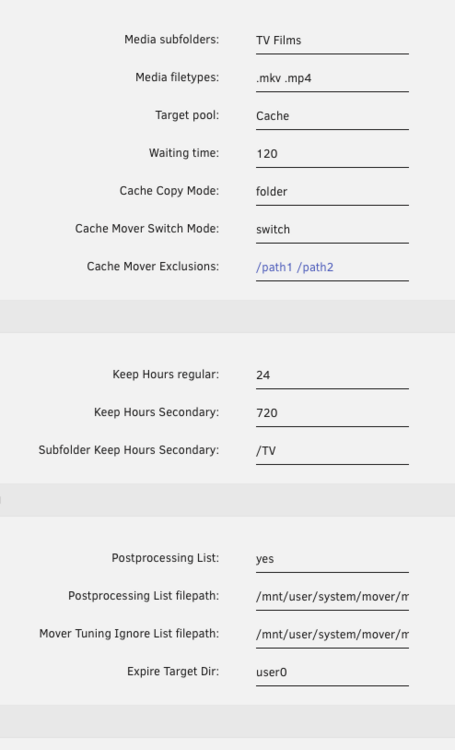
Thought I'd check the processes and found cache_mover running a couple of times and an rsync which looked like it was copying my downloads folder (currently a couple hundred gig) to the cache... Answers some other strange goings on I've had recently. Downloads is not in my TV or Films directory... Maybe one of the downloads has the word TV in it? Would that cause the entire download directory to then rsync to the cache...? Can I set the source folders to /media/Films /media/TV instead of Films TV ? Weird there is no logging though.
-
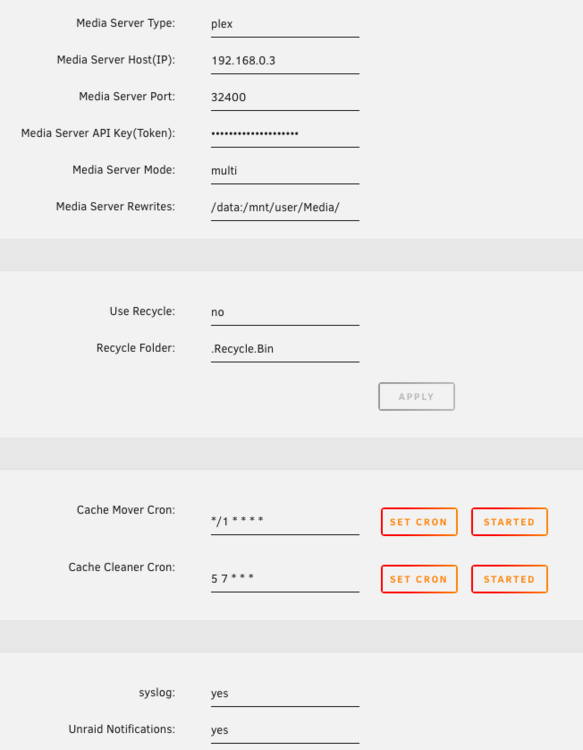
I did get this logged once a couple of hours ago: Feb 6 16:44:02 Tower root: cache-mover: reg: file changed during wait, exiting here But that's the only cache-mover entry I've ever seen. For clarity should it be cache or Cache in the settings? The name is Cache but the mount point is cache That's the only thing I can remember changing oh and the media player settings I re-entered around that time. David
-
Hi thanks for your message! I wondered that, but fairly sure it's capital - I have also tried both though. Unless it wants the name of the /mnt/cache path which is lowercase cache. But I get the same message with both And yes, the directory exists, I think I had to make it. Just get this logged every time it tries to run still: Feb 6 16:44:02 Tower crond[1756]: exit status 1 from user root /usr/local/emhttp/plugins/cache-mover/scripts/cache_mover2 >/dev/null 2>&1 David

-
Hi, I love the idea of the cache-mover but I'm really struggling to get it to do anything. I've been through this thread with a fine tooth comb and tried all kinds of settings but I can never get anything to appear in my system log other than this one liner (currently running it every minute). I have something playing in Plex the entire time and the command to show that file does show me that file (see below)... Any guidance on what I'm doing wrong would be much appreciated! Thanks!


-
ok, thanks Jorge - presumably I can't do that live and need to put the flash drive in to another machine to run it?
-
Hi, Woke up to some strange issues with my Unraid box but have now tracked it down to a power cut which happened overnight and the box booted back up ok but the management ports (http & https) had reset back to the default from my set ports and also the time zone had reset so the clock was wrong. I'm still looking for anything else which might have reset with the power cut but everything else seems ok so far, dockers, VMs, data, plugins, etc. Has this happened to anyone else? Annoyingly I thought the box had locked up so powered it off a couple of times before thinking to test the standard ports (it's a headless unit so is a faff to attach a monitor and it has locked up in the past). Thanks for reading, David


