Bottlecap
Members
-
Joined
-
Last visited
-
My SSD is failing. I switched to a new drive and all my problems have been fixed.
-
Hello, I have been successfully using the minecraftbasicserver container for about a month. However last night I started running into some errors that may or may not have anything to do with this container. First thing I noticed was that the minecraft container unexpectedly stopped some time while I was asleep. I tried starting the container and got this error: e":"open /var/lib/docker/containers/efb1b6d18f271970c49073f0ad8ae0d4d3f2ca9b83dcbd0cfdc709064b9b5659/efb1b6d18f271970c49073f0ad8ae0d4d3f2ca9b83dcbd0cfdc709064b9b5659-json.log: read-only file system"} Afterwards I restarted my entire array and the minecraft container seemed to work. After a few hours it crashed again. > # # A fatal error has been detected by the Java Runtime Environment: # # SIGSEGV (0xb) at pc=0x0000149775ba8b9f, pid=30, tid=65 # # JRE version: OpenJDK Runtime Environment AdoptOpenJDK-17+20-202105062340 (17.0+20) (build 17+20-202105062340) # Java VM: OpenJDK 64-Bit Server VM AdoptOpenJDK-17+20-202105062340 (17+20-202105062340, mixed mode, sharing, tiered, compressed oops, compressed class ptrs, g1 gc, linux-amd64) # Problematic frame: # V [libjvm.so+0x758b9f] G1ParScanThreadState::trim_queue_to_threshold(unsigned int)+0xfdf # # No core dump will be written. Core dumps have been disabled. To enable core dumping, try "ulimit -c unlimited" before starting Java again # # An error report file with more information is saved as: # /serverdata/serverfiles/hs_err_pid30.log # # If you would like to submit a bug report, please visit: # https://github.com/AdoptOpenJDK/openjdk-support/issues # [screen is terminating] The server now crashes randomly, sometimes after 30 seconds of being online, or after 30 minutes of being online. I see that it shows an error report is in /serverdata/ but I don't see that folder in the appdata/minecraft/ folder, and I am not very familiar with the docker/unraid file structure. If someone could point me to where I can find that error log I can attach it here as well. If this sounds like it is a general unraid issue, or some other problem could someone point me to the correct place to figure this out? Thanks for any help. EDIT: I also noticed that next to "Array Started" It shows starting libvirtwol... I don't know if this is related or not but I attached an image.

-
Thanks I ended up getting this resolved on reddit, so I forgot to check back here. Rebooting did fix my issue. I will consider switching my single drive in cache to XFS.
-
My data still shows up if I click the view folder button under "view" in the array devices area. Someone on reddit suggested I reboot. Should I reboot?
-
My cache drive filled up to 100% last night. I woke up today and noticed it and I saw that backups were happening and my cache drive was backing itself up to itself. I changed that setting and I also noticed my main NAS Share was set to prefer cache. I changed that setting to 'No'. When I clicked apply it said "Share deleted". When I check my shares all of them are gone now. I really need help this is all of my data. I ordered a backup drive but it has issues and needed to be returned. I was going to set up glacier asap, but I didn't have time. Is all of my data gone? tower-diagnostics-20211228-1141.zip
-
I am trying to run a linux mint VM with gpu passthrough. When I start unraid I get an output to my screen and then when I start the VM, the screen goes blank and the monitor shows 'no input'. Things I have tried/done: I have IOMMU and CPU Virtualization enabled. I updated my bios to the latest version. I dumped vbios and hexedited the header out. I bound the IOMMU group at startup. Hardware: CPU: Ryzen 2600 Motherboard: Asus ROG Strix B450-F GPU: MSI GeForce GTX 970 4GD5T OC RAM: 32GB G.Skill Ripjaws (2x16GB) I am attaching the diagnostic log, vm log, and my edited vbios (in case I edited it incorrectly?). Thanks for any help! 970-edit2.rom vm-log.txt tower-diagnostics-20211031-1249.zip
-
I appreciate your response and I will keep that in mind for future drives as well. It is really unfortunate that this drive didn't last as long as I had hoped it would, before showing problems.
-
Thank you for a clear and concise opinion. I will run a few more tests and if needed, buy a new drive.
-
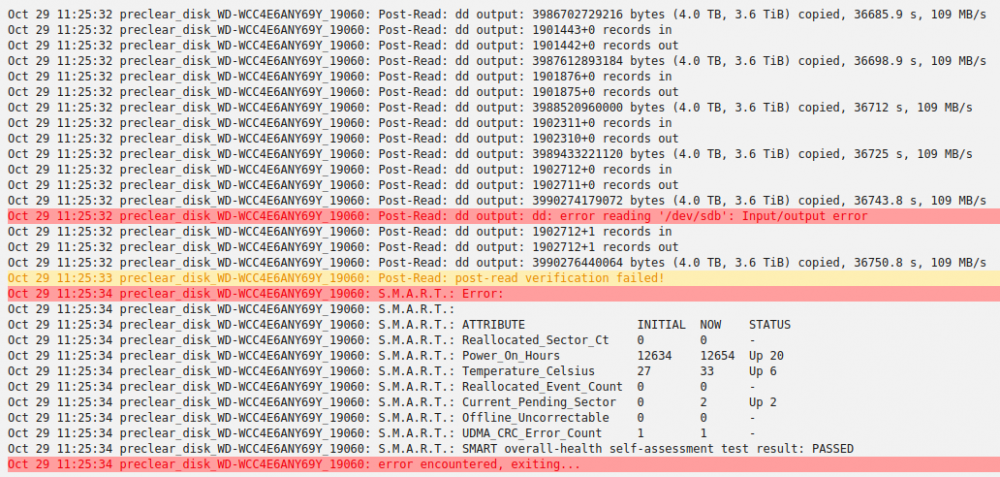
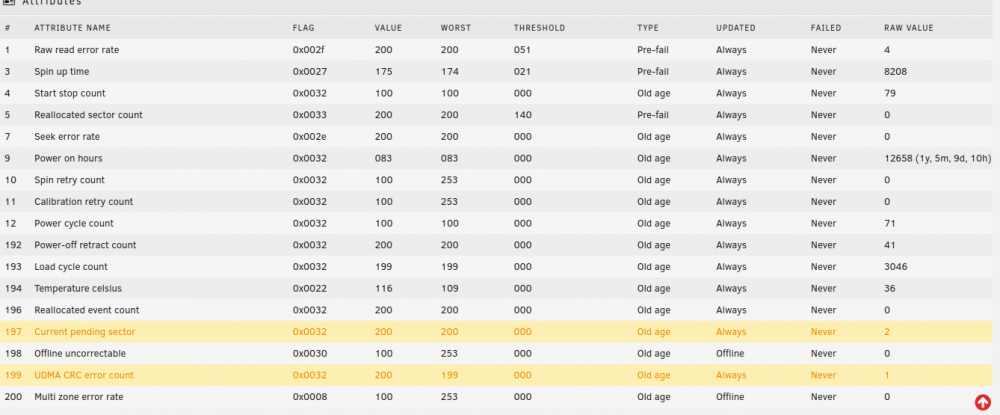
I just started using unraid and I have an old(er) 4TB WD Red drive and a new 4TB WD Red Plus drive. I was planning on just using the old drive for parity when but I ran preclear I got some SMART errors. I am attaching a few images of my results and I am curious on peoples opinion. If I buy another WD Red 4TB would it be a bad idea to use this (failing?) drive along with another for parity? Thanks for any help.