Mammutor
Members
-
Joined
-
Last visited
Everything posted by Mammutor
-
I did it like you siad and know it is working perfectly, thank you very much! I would like to donate for your amazing and fast job. You earned it!
-
https://www.java.com/de/download/manual.jsp i downloaded there the "Linux x64". it wars a .tar.gz and after i opened it there was a .tar and after i opened it there was the folder, just like the one downloaded by the docker.
-
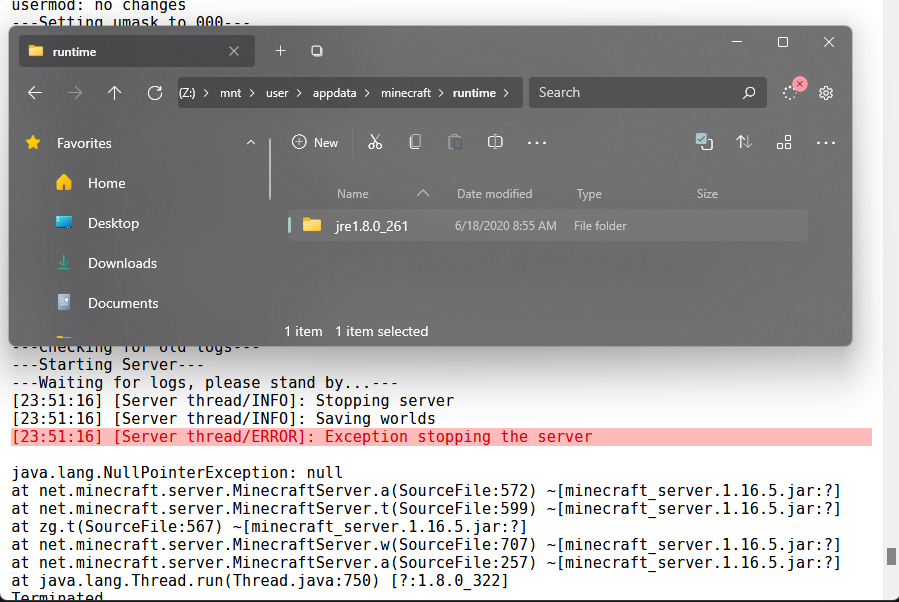
No, I have tried it. Right now I had an big brain idea. I downloaded the newest Version of linux and opened it with 7zip. So I put the folder in the runtime folder, this time "jre1.8.0_333" and I thought, I won. But after I start the docker, it removes the folder I put in and it downloads the older version. Now I have depression.
-
Hello, I have a problem with the MineraftBasicServer Docker. The Version of the BasicJRE is not recent enough. In the following picture you see the folder with the version number "1.8.0_261" but as you see in the logs, i need at least version "1.8.0_322". So can you help me update it manually, or is it a problem that I cannot do someting about? For context: I want to host a Valhelsia 3-3.5.1 Modpack Server