





bs.king
Members
-
Joined
-
Last visited
-
@bmartino1 Thank you so much for all the details. I was afraid I would have to pool them all, but did not think about rsync. Appreciate it.
-
I have 36 4TB SSDs in my array at this moment. I will be transferring about 80Tb of data from these onto 5x 20 TB HDDs that I've borrowed from a friend in order to empty the drives and create a Zpool of 4x 9-drive vDEVs and then transfer the data back to the Zpool. (I know the risk of this operation and know the pros/cons of running zfs in unraid). 1. What is the best way to move these files onto the drives to begin with? I used dynamix file manager and unassigned devices to mount the 20TB drive and was getting something like 250-300 mbps on a test run. Is there a better way to move? Krusader? CLI? 2. How should I format the attached 20 Tb drive - zfs to match? XFS? Doesn't matter? 3. I have a large amount of hard-linked files (unsure if on same drive). How will copying files affect these hard links? What is the best way to preserve the linking across multiple file copies? Do I need to pool all 5 drives in order to ensure one filesystem to preserve the links? Thank you in advance!
-
So it turns out, unraid does not work well with a lot of plugins. To fix the issue I removed both the vm_manager app and the plugins and it booted up fine. I re-installed a majority of the plugins again to try and find the cluprit without any luck. It will boot with the plugins installed but I have to reboot it once before the GUI will work. Marking this as solved as the original issue is now fixed.
-
Thanks for the reply. I have removed all files from the boot/extra directory and still have the same issue. Should I start removing files from the config/plugins folder also? .safe mode and new flash drive both work.
-
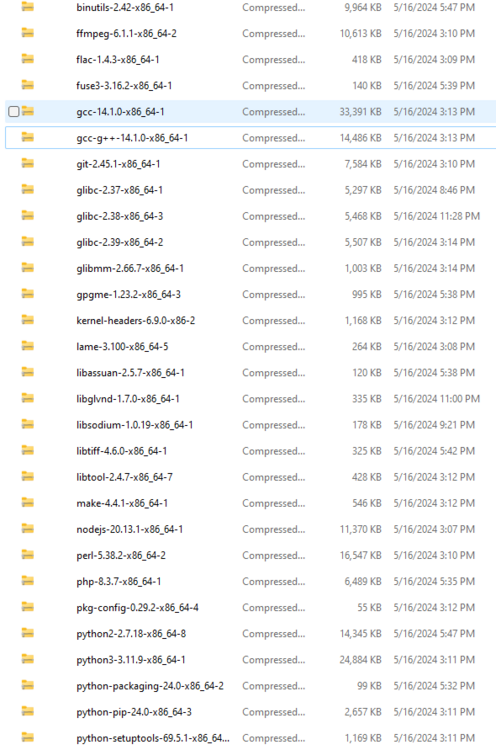
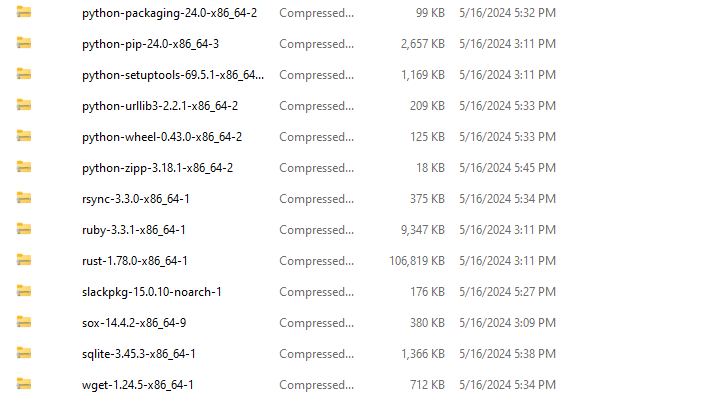
Hello, I installed a bunch of slackware packages this afternoon by placing them into the /boot/extra directory. I've attached the images below. After installation my unraid instance would only boot into safe mode. I assumed one of these were the problem so I deleted almost all of them. This did nothing to fix the issue. I made a new usb and it boots fine, the only issue is that my last backup was very outdated so I would love to save my usb if possible. I am getting random errors as seen in the syslog attached. Any advice on how to salvage this? I am reliant on my server for daily use and really need to get this sorted. Both diagnostic folders below were from when I was trying to boot after installing the packages.
-
You're a god-send. Thank you for the power cycle tip, had reset multiple times without any results. I had two nvme drives out of a three-drive zfs pool that were down. What causes this error? Would I need an apostrophe between the boot option items... such as " append initrd=/bzroot, nvme_core.default,_ps_max_latency_us=0 pcie_aspm=off". I would really like to try and prevent this in the future, any help would be appreciated. Sorry to revive an old thread.
-
Had an unclean shutdown yesterday and noticed 4 drives throwing errors afterwards. The four drives are all connected to my MB onboard LSI3108 controller (which is in JBOD mode). There are four other drives on this controller that is working fine. This did not happen until this latest shutdown but only presents itself during a parity check so may have been an issue for longer. The server otherwise seems to run without issues. Dec 3 03:25:06 Mordor kernel: sd 1:2:3:0: [sde] tag#2097 BRCM Debug mfi stat 0x2d, data len requested/completed 0x80000/0x0 and eventually into these and then write errors Dec 3 03:34:18 Mordor kernel: sd 1:2:2:0: [sdd] tag#2876 Abort request is for SMID: 2877 Dec 3 03:34:18 Mordor kernel: sd 1:2:2:0: attempting task abort! scmd(0x00000000e7b2f6ea) tm_dev_handle 0x2 Dec 3 03:34:18 Mordor kernel: megaraid_sas 0000:01:00.0: megasas_disable_intr_fusion is called outbound_intr_mask:0x40000009 Dec 3 03:34:18 Mordor kernel: megaraid_sas 0000:01:00.0: megasas_enable_intr_fusion is called outbound_intr_mask:0x40000000 Dec 3 03:34:18 Mordor kernel: sd 1:2:2:0: [sdd] tag#2876 task abort FAILED!! scmd(0x00000000e7b2f6ea) The fact that it is only these 4 makes me think it may be a cable problem... but I have used the same setup for many months now through many different parity checks without issue. Wondering if anyone has input into other causes for these errors before I buy new cabling as they are fairly spendy. Thanks! mordor-diagnostics-20231203-1306.zip
-
I have one VM running w/ 2gb on RAM assigned and at any point plex and deluge are using 2-3gb ram each, max. Every other application is using almost no ram and I have 4x 16GB sticks in the system right now. Could it really be fragmented ? Should I just get a few more sticks of ram? I don't think swapfile is an option for me as I have use a BTRFS cache pool in RAID 1.
-
Hello, I keep getting errors that my memory is full on my server and eventually it kills nginx to remedy the issue. I have not noticed any major performance issues. I'm unsure how to start troubleshooting this and my case seems different than every other forum post I have read so far. Any pointers are appreciated. Thanks. mordor-diagnostics-20231108-2137.zip
-
Hello! I was on vacation and my cache drive filled up. I obviously started throwing errors and now it's sat for a few days. Moved some stuff around to clean up the drive but still having these BRTFS errors. I've seen those with similar problems needing to re-build the docker.img but wanted to get some input before blindly doing things. Any help appreciated, thanks. "Nov 6 21:46:00 Mordor kernel: BTRFS error (device loop2: state EA): parent transid verify failed on logical 13574176768 mirror 2 wanted 3645218 found 3644395 Nov 6 21:46:02 Mordor kernel: BTRFS error (device loop2: state EA): parent transid verify failed on logical 13574176768 mirror 1 wanted 3645218 found 3644395" mordor-diagnostics-20231106-2129.zip
-
Okay here they are. ST2000NM0033-9ZM175_Z1X30WY1 (sdf) is a new drive I just pre-cleared, ST2000LM003_HN-M201RAD_S34RJ9CG306662 (sdo) is the failed disc 1 from previously. I have the wrongly-rebuilt drive 7 and another drive with the original contents of drive not connected at the moment. Only really goal right now is to save whatever I can from the failed drive 1. I really appreciate the help. mordor-diagnostics-20220826-0050.zip
-
Hey so I believe I got the drives up and working, problem is that drive 7 was disabled for a long while and contents "emulated", when I rebuilt it, it was rebuilt with 1300GB instead of the 1750 GB that was on there before. Luckily I was able to pull the information off the old drive by sticking it in USB3 reader. While trying the rebuild, drive 1 failed and I haven't been able to get to the information at all - just read errors every time I try... Is there any way to restore it by forcing the array to use either the rebuilt drive 7 with less data than expected, or by putting all the old data back onto drive 7? I am assuming no, since the drive was emulated for a while and probably had a small amount written to it. If not, is there any way to go about recovering data from the drive? I can see all the files, just not copy anything. Smart report is below with an older report ST2000LM003_HN-M201RAD_S34RJ9CG306662-20220824-0128.txt ST2000LM003_HN-M201RAD_S34RJ9CG306662-20220823-1731.txt
-
Is there any way to know whether it is a power vs connection issue? It would make sense as these issues keep happening during rebuilds. I am running 8 drives through one PCI card, which seems like a lot....
-
Hello, So I recently had my drives start failing out of nowhere. Initially drive 7 failed due to read errors, it had many pending sectors so I replaced it. When rebuilding the replacement, drive 1 stated it had errors. I paused the rebuild bit continued it at a later time without issues. Now the replaced drive 7 is disabled again and the SMART report seems fairly benign. Drive 1 is also giving errors again. Could this be a hardware issue? Could my drives be too hot (weather has been brutal the last 2 weeks)? Or is this just very bad luck with the drives? Below are the diagnostics after the initial fail and after the subsequent one. Let me know if any more info is needed. Thanks in advance! mordor-diagnostics-20220822-1413.zip mordor-diagnostics-20220818-2337.zip

