





tyme
Members
-
Joined
-
Last visited
Everything posted by tyme
-
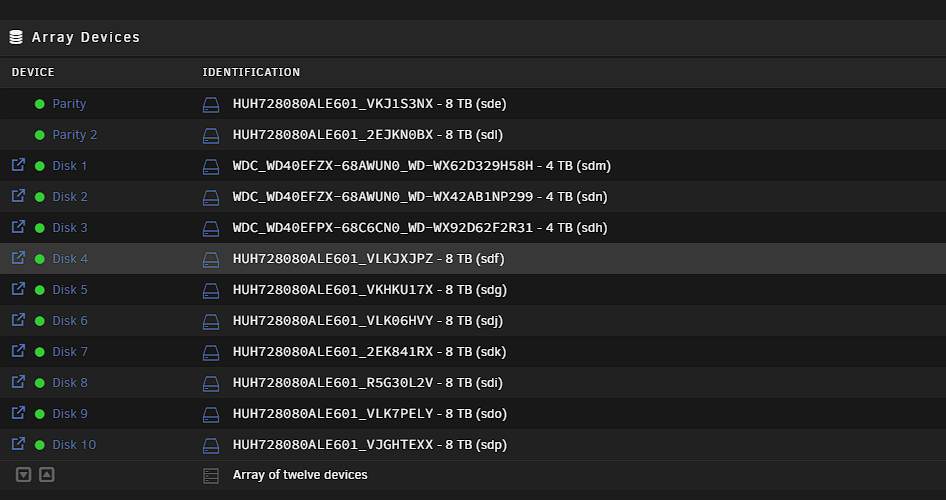
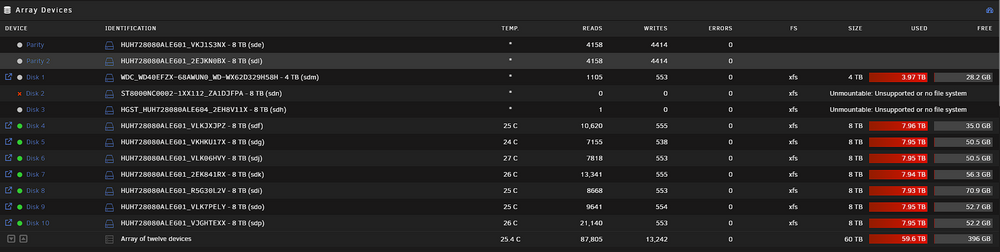
Hello everyone, Unraid noob here. I really need help with this one. Please! I also attached a syslog to this post. I had 2 x 4tb drives that were giving me a lot of CRC errors (Disk 3 and Disk 2). I decided to replace them with brand new 8tb drives. I had two parity drives, figured I was safe to upgrade them. First thing I did was Swap out Disk 3. - I stopped the array and unassigned disk 3. - Added the new 8tb drive which showed in the unassigned devices. I had to format it in order for it to show as an available drive to add to the array. I formatted the drive as XFS. I didn't do a preclear on the drives (which is probably the cause of my problems). - After formatting the drive, I assigned it to disk 3 and started the array. - Drive 3 then rebuilt itself and took about 23 hours. I didn't see any errors. Second, I started to do the same for Disk 2. I did the same steps above, stopped the array, unassigned disk 2, added the new drive, format the new drive, assigned to disk 2, started the array and the disk rebuilt itself. I didn't see any errors. After about a week, I noticed that that Disk 2 was disabled, then a couple of days later Disk 3 was also disabled. (See below) I thought I just got crappy drives. So I ordered some new ones. After receiving the drives. I started the process over about swapping the drives. - I stopped the array and unassigned disk 3. Added the new 8tb drive to the system. It showed up in unassigned devices. Again, I formatted the drive as XFS and assigned the disk to disk 3 in the array. This time, when I started the array. It started rebuilding Disk 3 and then a couple of seconds later. I get the error "Unmountable: Unsupported or no file system." However, I just formatted the new drive to XFS. I'm now also seeing the same "Unmountable: Unsupported...." to disk 2. It originally was just a disabled drive without the "Unmountable...." error. When I look at the bottom of the page, I see the unmountable disks present and the system is needing to format. I thought about adding the new 8tb drive as unassigned then preclear that disk. Then add it to the array. However, I currently do not have any available drive slots open to add to the array. I'm not sure what to do? - Do I format the drives? Will it erase everything on the drive? Won't formatting the drive change the parity, meaning I will lose the data on those drives? Will parity protect and rebuild the drives? Systems specs below: Dell PowerEdge R710 with 8 x 2.5 drives with LSI card in IT mode - Intel® Xeon® CPU L5520 @ 2.27GHz 8c/16t - Memory: 64 GiB DDR3 Multi-bit ECC Attached by SFF 8088 cables is a Dell PowerVault MD1200 I know I'm suppose to have a backup on a different system at a different location but I haven't gotten around to doing that due to cost. I built the system to house my photography images, (production server). I'm working to get a backup built just taking time. Any help will be greatly appreciated. sophia-syslog-20250311-1949.zip

-
Hello, I have this plugin installed on my unraid server running version 6.11.1. It is being used as a NAS/File Server. I usually don't check to see if there is problems on my server as long as I can access the files from my system from a windows computer. I recently checked and noticed I'm getting a "possible hack attempt on Jul 14". I don't have this server on a DMZ. It is on the same network I have all my other servers. As far as I know, I have not set this up to be accessible from outside of my network. I have attached my syslog. I just recently took some of the steps located on https://unraid.net/blog/unraid-server-security-best-practices. Is there anything else I should do? Any advice will be greatly appreciated. Thanks. syslog.txt

