





R__
Members
-
Joined
-
Last visited
-
Thanks for chiming in. The time that would take seems very significant, I'd rather just have both machines running at the same time and transfer the data over (also sounds like a good time for some data pruning). Also, wouldn't my parity disk have to be 12TB if I wanted to swap one by one? Would my approach of setting the new one up with a trial, copying stuff over, and then transferring the license be problematic? My old disks would still have my data that way no?
-
Hi, I'm upgrading my NAS setup, including disks (and cache drive), and I was wondering if there's a recommended way of going about things? I found a bunch of information on how to move the disks to another hardware setup, which seems straightforward enough, but I also want to change disks completely. I'm going from 4x4TB to 4x12TB. I don't believe there's a way for multiple arrays (yet), otherwise I would've moved the 4x4TB as well as a separate array. I have the array, a dozen Docker images, and a VM I want to move. I was thinking I'd setup the new machine with an Unraid trial license, copy everything over manually, and then migrate my license to the new flash drive, but I'm not sure that's the most efficient way of going about it? Thanks in advance for any advice on how to optimize the process!
-
That makes sense, however, like I mentioned the other two disks (who also share the same serial) can be independently mounted/unmounted successfully. Is there a way to reset the mount point name for the one that now both have "movies-archive" assigned to their defaults, so I can use them independently?
-
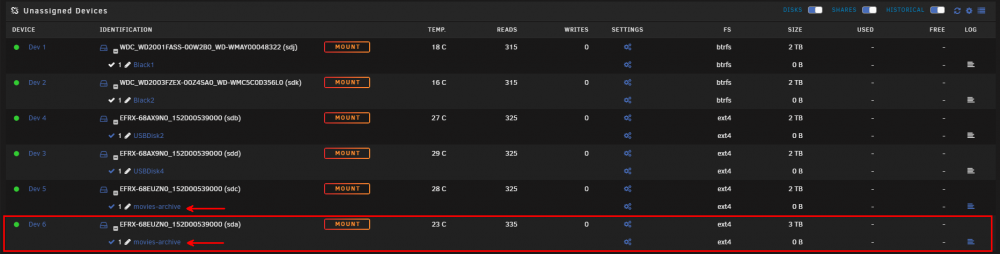
Both are attached, thanks. I can't mount the highlighted disk anymore at the moment, unless I unplug Dev 5 from the enclosure. Dev 3 and Dev 4 are in the same enclosure, and they mount/unmount as expected. rvknas-diagnostics-20211214-1010.zip
-
Hi, I'm not quite sure how I got in this situation, but two of my disks have the same mount point, which leads to obvious issues when mounting/unmounting (they both mount/unmount at the same time, but only one of the disk's contents shows up under /mnt/disks/mountpointname. Is there a way to fix this? These are both disks in an external USB enclosure. The other 2 disks in the same enclosure both have unique mount points. Thanks!
-
Hi all, I'm not quite sure how I got in this situation, but two of my disks have the same mount point, which leads to obvious issues when mounting/unmounting (they both mount/unmount at the same time, but only one of the disk's contents shows up under /mnt/disks/mountpointname. Is there a way to fix this? These are both disks in an external USB enclosure. The other 2 disks in the same enclosure both have unique mount points. Thanks!
-
Wow, renaming the share from 'homes' to something else did the trick. I feel kind of silly for not trying this myself, but similarly I feel this should be documented somewhere! Either way, it's all working now. Thank you very much for the tip!
-
Hi all, I've been using Unraid for a little over half a year now, but I have one issue that has plagued me since the start: I have a specific share (called homes) that I'm unable to connect to over SMB. I get error messages on both Windows and macOS (multiple PCs) when trying to open the share, even though it's configured exactly the same as some other shares (all of which work fine over SMB). I can browse the folder in a terminal session just fine and browsing through Unraid's web interface also works. The error I'm getting on Windows is: Windows cannot access \\***\homes Error code: 0x80070043 The network name cannot be found. I have checked the share settings multiple times: homes Export: Yes Case-sensitive names: Auto Security: Private And the user I'm connecting with has Read/Write access (like my other shares). I have no clue why this one specific share doesn't want to connect. I've already tried SMB 1.0 support in Windows features and enabling insecure guest logins through Group Policy, but nothing had an effect (sort of expected, since the problem is across Windows and macOS clients). Hoping you have some sort of clue to help me figure this out. Thanks!
