dataminz
Members
-
Joined
-
Last visited
Everything posted by dataminz
-
Thanks for the reply! Here syslog before all the service went down. I will take a look at the boot flash when I visit the datacenter, maybe replacing the boot flash. Can you confirm is it a bad boot flash or other issue? Thank you in advance. Dec 12 02:35:27 ResearchSiriraj kernel: usb 4-1: device firmware changed Dec 12 02:35:27 ResearchSiriraj kernel: sda: detected capacity change from 15109516 to 0 Dec 12 02:35:27 ResearchSiriraj kernel: usb 4-1: USB disconnect, device number 2 Dec 12 02:35:27 ResearchSiriraj kernel: blk_update_request: I/O error, dev sda, sector 2574 op 0x0:(READ) flags 0x0 phys_seg 1 prio class 0 Dec 12 02:35:27 ResearchSiriraj kernel: FAT-fs (sda1): FAT read failed (blocknr 526) Dec 12 02:35:27 ResearchSiriraj kernel: blk_update_request: I/O error, dev sda, sector 2574 op 0x0:(READ) flags 0x0 phys_seg 1 prio class 0 Dec 12 02:35:27 ResearchSiriraj kernel: FAT-fs (sda1): FAT read failed (blocknr 526) Dec 12 02:35:27 ResearchSiriraj kernel: blk_update_request: I/O error, dev sda, sector 2574 op 0x0:(READ) flags 0x0 phys_seg 1 prio class 0 Dec 12 02:35:27 ResearchSiriraj kernel: FAT-fs (sda1): FAT read failed (blocknr 526) Dec 12 02:35:28 ResearchSiriraj kernel: usb 4-1: new SuperSpeed USB device number 3 using xhci_hcd Dec 12 02:35:28 ResearchSiriraj kernel: usb-storage 4-1:1.0: USB Mass Storage device detected Dec 12 02:35:28 ResearchSiriraj kernel: scsi host7: usb-storage 4-1:1.0 Dec 12 02:35:28 ResearchSiriraj kernel: blk_update_request: I/O error, dev loop1, sector 27992 op 0x0:(READ) flags 0x800 phys_seg 5 prio class 0 Dec 12 02:35:28 ResearchSiriraj kernel: SQUASHFS error: Failed to read block 0xdab834: -5 Dec 12 02:35:28 ResearchSiriraj kernel: SQUASHFS error: Unable to read data cache entry [dab834] Dec 12 02:35:28 ResearchSiriraj kernel: SQUASHFS error: Unable to read page, block dab834, size 3fe8 Dec 12 02:35:28 ResearchSiriraj kernel: SQUASHFS error: Unable to read data cache entry [dab834] Dec 12 02:35:28 ResearchSiriraj kernel: SQUASHFS error: Unable to read page, block dab834, size 3fe8 Dec 12 02:35:28 ResearchSiriraj kernel: SQUASHFS error: Unable to read data cache entry [dab834] Dec 12 02:35:28 ResearchSiriraj kernel: SQUASHFS error: Unable to read page, block dab834, size 3fe8 Dec 12 02:35:28 ResearchSiriraj kernel: SQUASHFS error: Unable to read data cache entry [dab834] Dec 12 02:35:28 ResearchSiriraj kernel: SQUASHFS error: Unable to read page, block dab834, size 3fe8 Dec 12 02:35:28 ResearchSiriraj kernel: SQUASHFS error: Unable to read data cache entry [dab834] Dec 12 02:35:28 ResearchSiriraj kernel: SQUASHFS error: Unable to read page, block dab834, size 3fe8 Dec 12 02:35:28 ResearchSiriraj kernel: SQUASHFS error: Unable to read data cache entry [dab834] Dec 12 02:35:28 ResearchSiriraj kernel: SQUASHFS error: Unable to read page, block dab834, size 3fe8 Dec 12 02:35:28 ResearchSiriraj kernel: SQUASHFS error: Unable to read data cache entry [dab834] Dec 12 02:35:28 ResearchSiriraj kernel: SQUASHFS error: Unable to read page, block dab834, size 3fe8 Dec 12 02:35:28 ResearchSiriraj kernel: SQUASHFS error: Unable to read data cache entry [dab834] Dec 12 02:35:28 ResearchSiriraj kernel: SQUASHFS error: Unable to read page, block dab834, size 3fe8 Dec 12 02:35:28 ResearchSiriraj kernel: SQUASHFS error: Unable to read data cache entry [dab834] Dec 12 02:35:28 ResearchSiriraj kernel: SQUASHFS error: Unable to read page, block dab834, size 3fe8 Dec 12 02:35:28 ResearchSiriraj kernel: SQUASHFS error: Unable to read data cache entry [dab834] Dec 12 02:35:28 ResearchSiriraj kernel: SQUASHFS error: Unable to read page, block dab834, size 3fe8 Dec 12 02:35:28 ResearchSiriraj kernel: SQUASHFS error: Unable to read data cache entry [dab834] Dec 12 02:35:28 ResearchSiriraj kernel: SQUASHFS error: Unable to read page, block dab834, size 3fe8 Dec 12 02:35:28 ResearchSiriraj kernel: SQUASHFS error: Unable to read data cache entry [dab834] Dec 12 02:35:28 ResearchSiriraj kernel: SQUASHFS error: Unable to read page, block dab834, size 3fe8 Dec 12 02:35:28 ResearchSiriraj kernel: SQUASHFS error: Unable to read data cache entry [dab834] Dec 12 02:35:28 ResearchSiriraj kernel: SQUASHFS error: Unable to read page, block dab834, size 3fe8 Dec 12 02:35:28 ResearchSiriraj kernel: SQUASHFS error: Unable to read data cache entry [dab834] Dec 12 02:35:28 ResearchSiriraj kernel: SQUASHFS error: Unable to read page, block dab834, size 3fe8 Dec 12 02:35:28 ResearchSiriraj kernel: SQUASHFS error: Unable to read data cache entry [dab834] Dec 12 02:35:28 ResearchSiriraj kernel: SQUASHFS error: Unable to read page, block dab834, size 3fe8 Dec 12 02:35:28 ResearchSiriraj kernel: SQUASHFS error: Unable to read data cache entry [dab834] Dec 12 02:35:28 ResearchSiriraj kernel: SQUASHFS error: Unable to read page, block dab834, size 3fe8 Dec 12 02:35:28 ResearchSiriraj kernel: SQUASHFS error: Unable to read data cache entry [dab834] Dec 12 02:35:28 ResearchSiriraj kernel: SQUASHFS error: Unable to read page, block dab834, size 3fe8 Dec 12 02:35:28 ResearchSiriraj kernel: SQUASHFS error: Unable to read data cache entry [dab834] Dec 12 02:35:28 ResearchSiriraj kernel: SQUASHFS error: Unable to read page, block dab834, size 3fe8 Dec 12 02:35:28 ResearchSiriraj kernel: SQUASHFS error: Unable to read data cache entry [dab834] Dec 12 02:35:28 ResearchSiriraj kernel: SQUASHFS error: Unable to read page, block dab834, size 3fe8 Dec 12 02:35:28 ResearchSiriraj kernel: SQUASHFS error: Unable to read data cache entry [dab834] Dec 12 02:35:28 ResearchSiriraj kernel: SQUASHFS error: Unable to read page, block dab834, size 3fe8 Dec 12 02:35:28 ResearchSiriraj kernel: SQUASHFS error: Unable to read data cache entry [dab834] Dec 12 02:35:28 ResearchSiriraj kernel: SQUASHFS error: Unable to read page, block dab834, size 3fe8 Dec 12 02:35:28 ResearchSiriraj kernel: blk_update_request: I/O error, dev loop1, sector 27992 op 0x0:(READ) flags 0x800 phys_seg 5 prio class 0 Dec 12 02:35:28 ResearchSiriraj kernel: SQUASHFS error: Failed to read block 0xdab834: -5 Dec 12 02:35:28 ResearchSiriraj kernel: blk_update_request: I/O error, dev loop1, sector 28024 op 0x0:(READ) flags 0x800 phys_seg 3 prio class 0 Dec 12 02:35:28 ResearchSiriraj kernel: SQUASHFS error: Failed to read block 0xdaf81c: -5 Dec 12 02:35:28 ResearchSiriraj kernel: SQUASHFS error: Unable to read data cache entry [daf81c] Dec 12 02:35:28 ResearchSiriraj kernel: SQUASHFS error: Unable to read page, block daf81c, size 1f7c Dec 12 02:35:28 ResearchSiriraj kernel: blk_update_request: I/O error, dev loop1, sector 27992 op 0x0:(READ) flags 0x800 phys_seg 5 prio class 0 Dec 12 02:35:28 ResearchSiriraj kernel: SQUASHFS error: Failed to read block 0xdab834: -5 Dec 12 02:35:28 ResearchSiriraj kernel: blk_update_request: I/O error, dev loop1, sector 27992 op 0x0:(READ) flags 0x800 phys_seg 5 prio class 0 Dec 12 02:35:28 ResearchSiriraj kernel: SQUASHFS error: Failed to read block 0xdab834: -5 Dec 12 02:35:28 ResearchSiriraj kernel: FAT-fs (sda1): Directory bread(block 29488) failed Dec 12 02:35:28 ResearchSiriraj kernel: FAT-fs (sda1): Directory bread(block 29489) failed Dec 12 02:35:28 ResearchSiriraj kernel: FAT-fs (sda1): Directory bread(block 29490) failed Dec 12 02:35:28 ResearchSiriraj kernel: FAT-fs (sda1): Directory bread(block 29491) failed Dec 12 02:35:28 ResearchSiriraj kernel: FAT-fs (sda1): Directory bread(block 29492) failed Dec 12 02:35:28 ResearchSiriraj kernel: FAT-fs (sda1): Directory bread(block 29493) failed Dec 12 02:35:28 ResearchSiriraj kernel: FAT-fs (sda1): Directory bread(block 29494) failed Dec 12 02:35:28 ResearchSiriraj kernel: FAT-fs (sda1): Directory bread(block 29495) failed Dec 12 02:35:28 ResearchSiriraj emhttpd: Unregistered - flash device error (ENOFLASH3) Dec 12 02:35:28 ResearchSiriraj emhttpd: error: put_config_idx, 607: No such file or directory (2): fopen: /boot/config/shares/Docker_Pool.cfg Dec 12 02:35:28 ResearchSiriraj emhttpd: error: put_config_idx, 607: No such file or directory (2): fopen: /boot/config/shares/Private_Vault_Kee.cfg Dec 12 02:35:28 ResearchSiriraj emhttpd: error: put_config_idx, 607: No such file or directory (2): fopen: /boot/config/shares/Private_Vault_Min.cfg Dec 12 02:35:28 ResearchSiriraj emhttpd: error: put_config_idx, 607: No such file or directory (2): fopen: /boot/config/shares/Share.cfg Dec 12 02:35:28 ResearchSiriraj emhttpd: error: put_config_idx, 607: No such file or directory (2): fopen: /boot/config/shares/appdata.cfg Dec 12 02:35:28 ResearchSiriraj emhttpd: error: put_config_idx, 607: No such file or directory (2): fopen: /boot/config/shares/domains.cfg Dec 12 02:35:28 ResearchSiriraj emhttpd: error: put_config_idx, 607: No such file or directory (2): fopen: /boot/config/shares/isos.cfg Dec 12 02:35:28 ResearchSiriraj emhttpd: error: put_config_idx, 607: No such file or directory (2): fopen: /boot/config/shares/system.cfg This issue occur when I executing python script in docker container
-
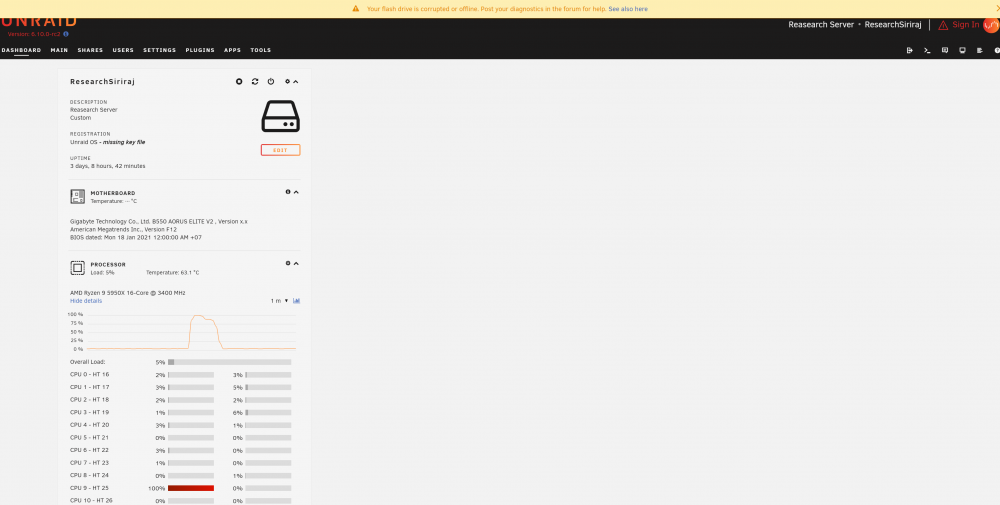
Hi, I have an issue with my docker container causing unraid critical file to be pushing out of the memory. Then most of service starting to error. This issue is only occur in this server, I have tried this deployed this images in other of my unraid server and it behave normally. I suspected that it might be a bad boot flash maybe? Here a diagnostics file and error screen. researchsiriraj-diagnostics-20211212-0319.zip
-
Update I try create new dummy VM that use OVMF Bios(All of my VM use SEABIOS) and the passthrough WORKED! Is there anyway modify my old VM to use OVMF Bios instead?
-
Hi, thank for the answer! I don't know I understand it correctly or not, I have tried isolating the GPU as shown below, now 3080Ti IOMMU is now separated. I am also added a vbios, but it still doesn't worked <hostdev mode='subsystem' type='pci' managed='yes' xvga='yes'> <driver name='vfio'/> <source> <address domain='0x0000' bus='0x49' slot='0x00' function='0x0'/> </source> <rom file='/mnt/user/isos/vbios/RTX3080Ti.rom'/> <address type='pci' domain='0x0000' bus='0x04' slot='0x00' function='0x0' multifunction='on'/> </hostdev> <hostdev mode='subsystem' type='pci' managed='yes'> <driver name='vfio'/> <source> <address domain='0x0000' bus='0x49' slot='0x00' function='0x1'/> </source> <address type='pci' domain='0x0000' bus='0x04' slot='0x00' function='0x1'/> </hostdev> Here is my boot configuration, where 10de:24b0,10de:228b is my A4000 and 10de:2208,10de:1aef is my 3080Ti kernel /bzimage append initrd=/bzroot vfio-pci.ids=10de:24b0,10de:228b,10de:2208,10de:1aef pcie_acs_override=multifunction video=efifb:off

-
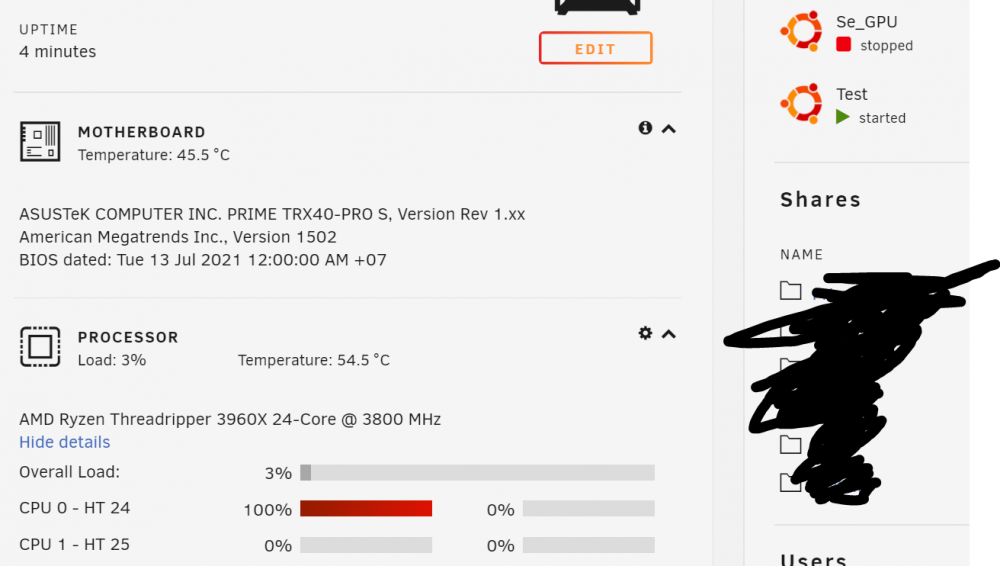
Hi, I having a problem passing second GPU to my second VM My Hardware: GPU1(address 0) GPU2(address 49) My Goal: GPU1 passing to VM1 GPU2 passing to VM2 Current situation: GPU1 passing to VM1 (Work fine) GPU2 passing to VM2 (not boot and 1 core always 100% utilize) Already try: Swap GPU slot, second GPU always not work PCIe ACS override, not work Here is my passing parameter, IOMMU group of second device and 1 core 1 core always 100% utilize my GPU1 use exactly the same passing parameter, except bus <hostdev mode='subsystem' type='pci' managed='yes' xvga='yes'> <driver name='vfio'/> <source> <address domain='0x0000' bus='0x49' slot='0x00' function='0x0'/> </source> <alias name='hostdev0'/> <address type='pci' domain='0x0000' bus='0x04' slot='0x00' function='0x0' multifunction='on'/> </hostdev> <hostdev mode='subsystem' type='pci' managed='yes'> <driver name='vfio'/> <source> <address domain='0x0000' bus='0x49' slot='0x00' function='0x1'/> </source> <alias name='hostdev1'/> <address type='pci' domain='0x0000' bus='0x04' slot='0x00' function='0x1'/> </hostdev>